


More than thirteen years in, and I am still as excited about building this browser as I was on day one. Maybe more.
That excitement comes from a genuine belief that the people who use Vivaldi deserve a browser that takes them seriously. We respect your time, your privacy, your preferences, your intelligence. Every release we ship is another expression of that belief.
Vivaldi 8.0 is the biggest expression of that idea we have shipped in years. A new design direction that makes the browser feel more alive and more unified than any version before it.
In other words: there is more control, more capability, more choice. And a brand new look.
With 8.0, Vivaldi has a new look. We call it “Unified”.
We have approached the Vivaldi interface less as a collection of components, and more as a layered system. Previously, those layers (tabs, toolbars, panels and content) have had subtle separations. This was useful, but also a bit fragmented. With Unified, those boundaries are removed.
All toolbars now live on a single, continuous surface: a Unified frame that wraps the entire browser. Instead of stacked regions, everything is composed within the same visual plane. That shift makes the interface feel more cohesive and easier to read. Alignment becomes more precise, spacing more intentional, and interaction more direct, because elements no longer sit in isolated layers.
When you pick a theme, it flows through everything. A dark theme is dark, all the way through. A warm theme carries that warmth into every corner. All elements of the browser belong together in a way that immediately feels… well … Unified.
It also changes how themes work.
With a single surface, your theme can flow across the entire window. Backgrounds are no longer confined; they can extend from the tab bar through panels and edges without interruption. Wallpapers feel less like decoration and more like part of the environment, especially when combined with translucency and blur. From a system perspective, this reduces complexity. Fewer layers, fewer exceptions and a more consistent foundation to build on.
This isn’t about making the browser look simpler. It’s about making the structure behind it more coherent. This makes everything you see feel like part of the same system.
You can see the new UI’s possibilities with our new default themes, such as Zen, Soria Moria, Sunset Forest and Kawaii Clouds, and our updated light and dark themes. If you can’t find something that hits the right spot for default, there are more than 7000 to choose from at themes.vivaldi.net. And if you have built a custom theme you love, you’re free to decide if you want the new look, or keep your own (Settings →Themes → Editor → Coloring mode). Of course; this is Vivaldi.
One of the things that makes Vivaldi special is also one of the things that can feel like a lot on day one: the sheer range of settings you can configure. If you have been using Vivaldi for years, you have your setup exactly as you want it and you would not trade it for anything. If you are brand new, figuring out where to start can be a real question.
Vivaldi 8.0 answers it with six preset layouts, available right from onboarding (and from Settings → Appearance → Layout whenever you feel like a change). Each one is a thoughtfully curated starting point.
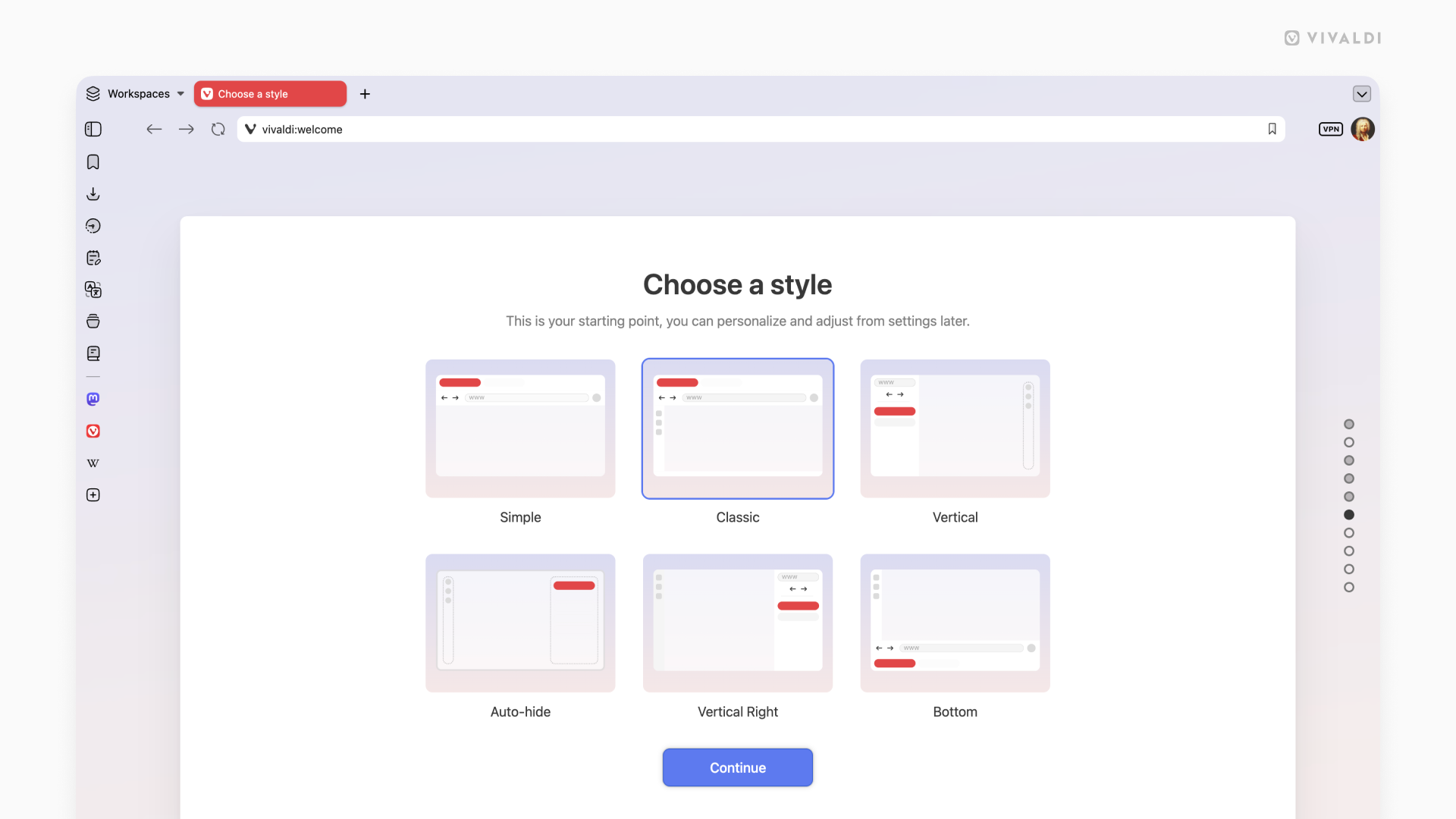
Click on each of the layouts to make them bigger:
Each of these layouts is a launchpad, not a limit. With all the powerful features and tools in Vivaldi, you have everything you need to make the web work exactly the way you want it to.
Vivaldi has a tab management system unlike any other browser. Tile as many pages as you want, just how you want. Use Follower Tab to explore links from an article without ever losing your place in it. Stack your tabs into named, colour-coded groups. Use the Tab Button to search everything at once: open tabs, synced tabs from your other devices, recently closed tabs. Your mail, your calendar, your notes, your reading list: all of it lives inside Vivaldi, organised on your terms, always within reach.
Vivaldi is truly the browser that adapts to you. We’ve proven this with every release. We even go as far as getting completely out of your way. With UI Auto-hide, even the interface itself knows when to let the content take centre stage. Vivald bends to how you work. It always has and always will.
We do not answer to investors telling us which features to build. We do not track your behaviour or treat your data as inventory. Other browsers are adding AI to decide what you see. Vivaldi adds tools that give you more power when deciding for yourself. That has always been the difference. We build Vivaldi because we believe you deserve a better browser.
Download it today. Take your time with it. Come find us in the Forum if there is anything, we read everything.
As always, thank you for being part of the Vivaldi community. Together, we’re fighting for a better web, one release at a time.
***
Check the changelog with the full list of changes from Vivaldi 7.9 to 8.0.
此内容由惯性聚合(RSS阅读器)自动聚合整理,仅供阅读参考。 原文来自 — 版权归原作者所有。