
惯性聚合 高效追踪和阅读你感兴趣的博客、新闻、科技资讯
阅读原文 在惯性聚合中打开

推荐订阅源

S
Schneier on Security
The Register - Security
月光博客
月光博客
freeCodeCamp Programming Tutorials: Python, JavaScript, Git & More
OSCHINA 社区最新新闻
OSCHINA 社区最新新闻
The GitHub Blog
The GitHub Blog
博客园 - 司徒正美
罗磊的独立博客
U
Unit 42
S
SegmentFault 最新的问题
Y
Y Combinator Blog
博客园_首页
Hugging Face - Blog
Hugging Face - Blog
J
Java Code Geeks
Schneier on Security
Know Your Adversary
Know Your Adversary
C
Check Point Blog
Cyber Security Advisories - MS-ISAC
Simon Willison's Weblog
V
Vulnerabilities – Threatpost
让小产品的独立变现更简单 - ezindie.com
阮一峰的网络日志
阮一峰的网络日志
The Hacker News
The Hacker News
博客园 - 叶小钗
C
Cybersecurity and Infrastructure Security Agency CISA
Spread Privacy
Spread Privacy
L
LINUX DO - 热门话题
T
The Exploit Database - CXSecurity.com
P
Palo Alto Networks Blog
cs.CL updates on arXiv.org
Latest news
Latest news
L
Lohrmann on Cybersecurity
A
About on SuperTechFans
L
LangChain Blog
Stack Overflow Blog
Stack Overflow Blog
S
Securelist
A
Arctic Wolf
D
Darknet – Hacking Tools, Hacker News & Cyber Security
T
Threatpost
Scott Helme
Scott Helme
博客园 - 聂微东
博客园 - 【当耐特】
T
Tenable Blog
I
Intezer
D
DataBreaches.Net
B
Blog RSS Feed
Security Latest
Security Latest
C
Cisco Blogs
T
Tor Project blog
N
Netflix TechBlog - Medium

Hacker News

Introducing Claude Opus 4.7 Qwen Studio The Future of Everything is Lies, I Guess: Where Do We Go From Here? GitHub - SeanFDZ/macmind: Single-layer transformer in HyperTalk for the classic Macintosh Show HN: Agent-cache – Multi-tier LLM/tool/session caching for Valkey and Redis Moving a large-scale metrics pipeline from StatsD to OpenTelemetry / Prometheus GitHub - Nightmare-Eclipse/RedSun: The Red Sun vulnerability repository GitHub - SethPyle376/hiraeth: Local AWS emulator focused on fast integration testing, with SQS support, SQLite-backed state, and a debug-friendly web UI. GitHub - macOS26/Agent: Any AI, replaces Claude Code, Cursor, OpenClaw. Over 18 LLM providers (Claude, OpenAI, Gemini, Ollama, Zai, HF, Qwen) wired into a native Mac app that writes code, builds Xcode projects, bumps versions, manages git, automates Safari, use AppleScript, JS or Accessibility, extend Agent! w/ MCP Servers, run tasks from your iPhone via Messages. YouTube now lets you turn off Shorts I Made a Terminal Pager Burgers | マクドナルド公式 Commands — HackerNews CLI documentation ChatGPT for Excel PiCore - Raspberry Pi Port of Tiny Core Linux Live Nation illegally monopolized ticketing market, jury finds Google Broke Its Promise to Me. Now ICE Has My Data. Founding Engineer at Adaptional | Y Combinator CRISPR takes important step toward silencing Down syndrome’s extra chromosome GitHub - saffron-health/libretto: The AI toolkit for building reliable browser automations US v. Heppner (S.D.N.Y. 2026) no attorney-client privilege for AI chats [pdf] Unexpected €54k billing spike in 13 hours: Firebase browser key without API restrictions used for Gemini requests Retrofitting JIT Compilers into C Interpreters IPv6 – Google The Accursèd Alphabetical Clock Cybersecurity Looks Like Proof of Work Now Fragments: April 14 Cal.com Goes Closed Source: Why AI Security Is Forcing Our Decision | Cal.com - Scheduling Software for Online Bookings Laravel raised money and now injects ads directly into your agent When moving fast, talking is the first thing to break Too much Discussion of the XOR swap trick – Heather Cafe Introduction to Spherical Harmonics for Graphics Programmers The Grand Line Building a Z-Machine in the worst possible language High-Level Rust: Getting 80% of the Benefits with 20% of the Pain GitHub - duguyue100/midnight-captain: Inspired by Midnight Commander, tailored to my taste. How to build a `git diff` driver · Jamie Tanna | Software Engineer Center for Responsible, Decentralized Intelligence at Berkeley The Local Universe’s Expansion Rate Is Clearer Than Ever, but Still Doesn’t Add Up - A new synthesis of astronomical measurements confirms a persistent mismatch that could point to physics beyond current models The air throughout our homes is infused with microplastics. But there are things you can do to breathe less of them The disturbing white paper Red Hat is trying to erase from the internet – OSnews The Future of Everything is Lies, I Guess: Annoyances ‘Abhorrent’: the inside story of the Polymarket gamblers betting millions on war Productive procrastination — Max van IJsselmuiden maps, territory and LMs 447 Terabytes per Square Centimetre at Zero Retention Energy: Non-Volatile Memory at the Atomic Scale on Fluorographane Show HN: Pardonned.com – A searchable database of US Pardons 20 Years on AWS and Never Not My Job The Seasons are Wrong Artemis II crew splashes down near San Diego after historic moon mission We gave an AI a 3 year retail lease in SF and asked it to make a profit | Andon Labs How a dancer with ALS used brainwaves to perform live On filing the corners off my MacBooks Installing every* Firefox extension OpenClaw’s memory is unreliable, and you don’t know when it will break Steve Blank Nowhere Is Safe Chimpanzees in Uganda locked in vicious 'civil war', say researchers watgo - a WebAssembly Toolkit for Go linux/Documentation/process/coding-assistants.rst at master · torvalds/linux GitHub - callumlocke/json-formatter: Makes JSON easy to read. Founding Product Engineer at Bild AI | Y Combinator A compelling title that is cryptic enough to get you to take action on it GitHub - Keychron/Keychron-Keyboards-Hardware-Design: Industrial design files for Keychron keyboards and mice. 100+ models with CAD assets in STEP, DXF, DWG, and PDF. Source-available, with commercial use allowed for original compatible accessories within the license terms. [ANNOUNCE] WireGuardNT v0.11 and WireGuard for Windows v0.6 Released 1D-Chess Helium Is Hard to Replace Cooperative Vectors Introduction | Evolve Keeping a Postgres queue healthy — PlanetScale Our response to the Axios developer tool compromise Do Americans read print books, e-books or audiobooks more? The Zettelkasten Method in Obsidian: A Practical Setup Guide Artemis II Is Competency Porn and We Are Starving For It WeakC4 Flight Viz — Cockpit View A Mexican surveillance giant you’ve never heard of is now watching the U.S. border Surelock: Deadlock-Free Mutexes for Rust RISC-V 101 – what is it and what does it mean for Canonical? | Ubuntu The Problem That Built an Industry How Much Linear Memory Access Is Enough? | Solidean Investigating Split Locks on x86-64 Simplest hash functions Sybilproof reputation mechanisms (2005) [pdf] What is a property? How Complex is my Code? Static code analysis in Kotlin — tools overview Toffoli gates are all you need PGLite evangelism dcmake: a new CMake debugger UI Clojure on Fennel part one: Persistent Data Structures Fragments: April 2 Python Release Python install manager 26.1 The Life and Death of the Book Review - Liberties Introducing Database Traffic Control — PlanetScale Bitcoin miners are losing $19,000 on every BTC produced as difficulty drops 7.8% God sleeps in the minerals Building slogbox Apple Silicon and Virtual Machines: Beating the 2 VM Limit Who was “Not Even Wrong” first? Pokemon Evolution Vs Darwinian Evolution The APL Programming Language Source Code
Akse — Draw. Build. Print.
2026-06-15 · via Hacker News

A 3D tool for the maker space

Akse is a 3D modelling tool made for kids and teens. Combine primitive shapes, draw your own 2D blueprints — and export the model as an STL file, ready for the 3D printer.
  • Right in your browser
  • Free to use
  • STL export for 3D printing

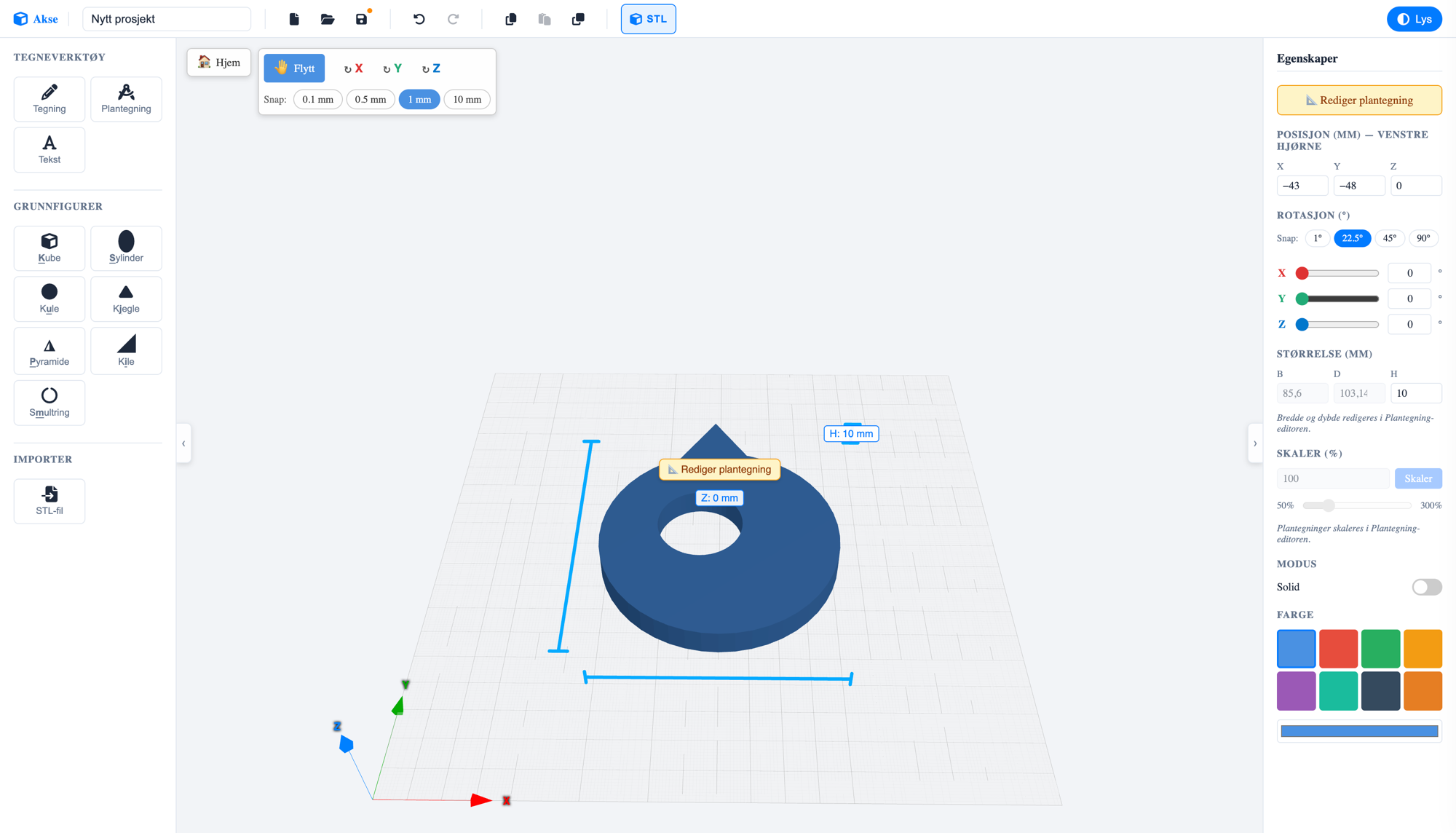
The Akse editor: a blue torus-shaped 3D model with a hole, surrounded by the shape library on the left and the properties panel on the right

01 / What is Akse?

3D modelling anyone can master

Akse means axis — as in X, Y and Z. That's the whole idea: a tool where kids and teens learn to think in three dimensions, without drowning in advanced menus. You build models by placing and shaping primitive shapes — or by drawing your own outline — and everything is measured in real millimetres, so what you see on screen is what you hold in your hand after printing.

Akse is made by Skaperiet, a maker space for kids and teens, and is used in courses and workshops where the path from idea to finished 3D print should be as short as possible. Everything runs right in the browser — nothing to install.

For kids and teens

Simple tools, clear words and big buttons. Designed for curious hands — on both computer and tablet.

Real millimetres

All measurements are in mm. What the kids draw matches what comes out of the 3D printer.

Ready to print

One click exports the whole project as an STL file — the format every 3D printer understands.

02 / How it works

From idea to 3D print in three steps

  1. Build with shapes

    Choose from box, cylinder, sphere, cone, pyramid, wedge and torus — or draw your own outline with freehand drawing, 3D text and blueprints. Shapes land right on the work plane.

  2. Shape and combine

    Move, rotate and scale with millimetre precision and smart snapping. Set a shape to hole mode and it cuts through the others — perfect for screw holes, windows and secret compartments.

  3. Export and print

    Press the STL button and the whole model downloads as a single print-ready file. You can also import STL files others have made and build on them.

03 / The blueprint tool

Blueprint: draw in 2D, get 3D

The most powerful tool in Akse is Blueprint — a dedicated drawing board where you draw the shape from above on millimetre paper, and lift it into a 3D model with one click.
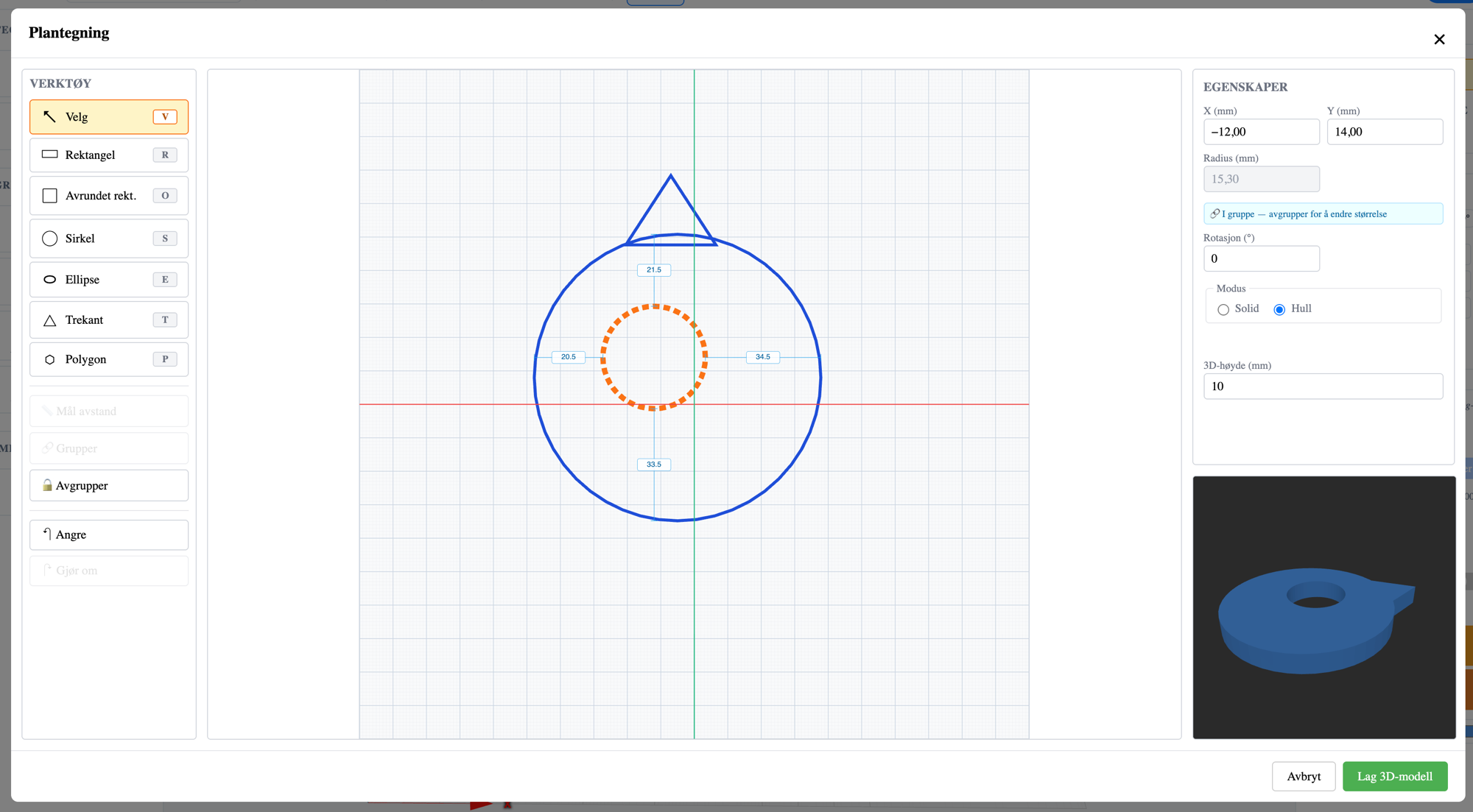
The Blueprint editor: a toolbar with rectangle, circle, ellipse, triangle and polygon on the left, a blueprint of a circle with a hole in the middle, and a live 3D preview at the bottom right
The drawing board with tools, properties and a live 3D preview.
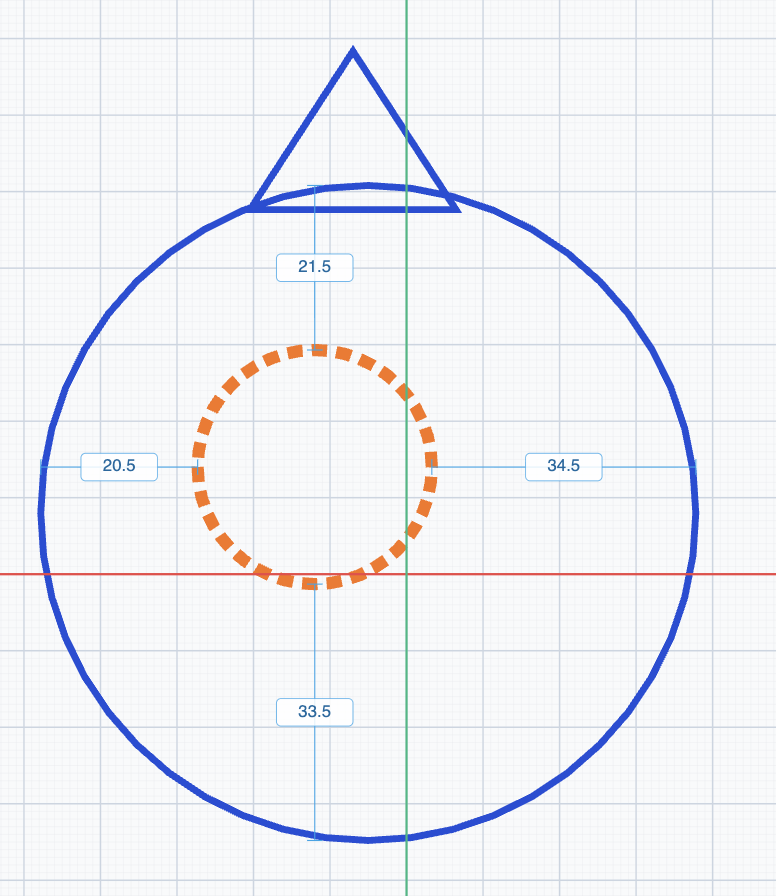
Close-up of a blueprint: a blue circle and triangle, an orange dashed hole, and blue dimension lines showing distances in millimetres
Distances between grouped shapes are shown and edited directly in the blueprint.
  • Seven drawing tools

    Rectangle, rounded rectangle, circle, ellipse, triangle and polygon — each with its own keyboard shortcut, so your hands learn the tool.

  • Solid or hole

    Each shape can be solid (blue) or a hole (orange, dashed). Holes are cut out of the model — that's how you make a key fob in under a minute, for example.

  • Group with distance guides

    Group shapes and the distance between them shows as editable measurements — type in exact numbers, and the shapes stay together when you move and scale them.

  • Make a 3D model

    Choose a 3D height in millimetres and press "Make 3D model". The preview shows the result before you commit — and you can always go back and edit the blueprint.

04 / The building blocks

Seven primitive shapes. Endless possibilities.

Everything in Akse starts with simple shapes. Combine them as solid blocks or holes, and they grow into spaceships, jewellery, name tags and spare parts. Each shape has its own key on the keyboard.

  • Box

    K
  • Cylinder

    S
  • Sphere

    U
  • Cone

    J
  • Pyramid

    P
  • Wedge

    I
  • Torus

    M
  • …and 3D text, freehand drawing and STL import

05 / Features

Small tool. Big possibilities.

  • 📐 Millimetre precision

    Move with snapping at 0.1 / 0.5 / 1 / 10 mm, and rotate with snapping at 1° / 22.5° / 45° / 90°. Measurements show directly on the model and can be edited with the keyboard.

  • 🕳️ Boolean holes

    Any shape can be set to "hole" mode and cut out of the model. Screw holes, letter slots and peepholes — without advanced CAD.

  • 💾 Save where you like

    Save projects in the cloud with a Skaperiet account, or as a file on your own machine. Projects are small JSON files that are easy to share.

  • ↩️ Safe to experiment

    Full undo and redo history (Ctrl+Z / Ctrl+Shift+Z), copy and paste, and duplicate with Ctrl+D to create patterns.

  • 🎨 Colours and themes

    Eight fresh colours for your shapes, and both light and dark themes in the editor — for late nights at the maker space.

  • 👆 Mouse or touch

    Full mouse support with handles and shortcuts — and a simplified touch layout that works well on tablets.

06 / Self-host

Open source — run Akse anywhere

Akse is free software under the AGPL-3.0 licence, and the entire source code is openly available on GitHub. Schools, maker spaces and the curious can run their own Akse — completely free. Here's how to get started:

  1. Get the source code

    You'll need Node.js (version 22 or newer) and git on your machine.

    git clone https://github.com/joachimhs/akse3d.git
    cd akse3d
  2. Install and run

    npm install
    npm run dev

    Open http://localhost:5173 in your browser — your own Akse runs there. Projects are saved locally in the browser.

  3. Embed in your own website

    Akse is also a Svelte package (@skaperiet/akse) that can be embedded in your own websites with your own storage backend through simple ports. See the README on GitHub for details.

AGPL-3.0 means Akse is free to use, modify and host — as long as your version also shares its source code. Want to use Akse in a closed, commercial solution? Skaperiet offers a commercial licence.

Ready to build something?

Akse is free and runs right in your browser. Start with a box — see where it goes.

Open the Akse editor

Works in all modern browsers · No installation