








How We Security-Adopted a Terminated Software Product
Intro
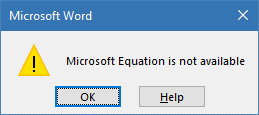
A few days ago Microsoft's update removed Equation Editor from Microsoft Office, the official reason being "security issues with its implementation." Most Office users couldn't care less about this removal, but if you've been happily using Equation Editor to edit Word documents with mathematical formulas just days ago, you suddenly can't do that anymore. You will still see your formulas in the document but you won't be able to edit them. Instead you'll get this:
We have no idea how many users are affected, but Twitter user
@glyph raises an interesting point that those who work with Equation Editor may be tempted to forego this Office update - and by extension all future Office updates -, which will leave them vulnerable to exploits published in the future.
Worse even, affected users may decide to migrate back to unsupported versions of Office that don't receive security updates at all. This user, for instance, reports going back to Office 2000 on his Windows 10 computer. Office 2000 stopped receiving security updates in 2009.
Microsoft suggested affected users can "edit Equation Editor 3.0 equations without security issues" with Wiris Suite's MathType, a commercial application that costs $97 ($57 academic). They did not specify the basis upon which the phrase "without security issues" was provided, but MathType seems to have a clean public security record so far. Which doesn't say much as that was also true for Equation Editor until someone opened its hood.
We haven't tested MathType and can't tell how easy it is to start using it instead of Equation Editor with existing Word documents, but we don't particularly like the idea of suddenly deleting from users' computers a tool they might be using, and sending them to a store to buy a replacement.
Microsoft's unwillingness to continue supporting Equation Editor is understandable. Their manual patching of its recently discovered vulnerability reveals that, for whatever reason, their standard patching process cannot be applied to Equation Editor, and a deviation like that can be expensive. Furthermore, while they aren't new to manually patching executables, such patching can sometimes be fairly difficult to do. When you patch executable files directly, you may have to come up with a different clever space-saving hack for each patch, which can sometimes be very difficult and time-consuming. For instance, Microsoft's manual patches of Equation Editor required the patch author to invent a way to get some free space in the code for additional patch logic by de-optimizing a memory-copying routine.
So when Microsoft was faced with 8 (eight!)* new vulnerabilities in Equation Editor reported after their manual patch (one also reported by us), they gave up on the idea of continuing manual support for it.
We, on the other hand, haven't.
You see, it's much easier for us to create and support binary patches for a given executable module than it is for Microsoft. Why? Because we have a micropatch delivery agent (0patch Agent) that not only instantly downloads micropatches, but also injects them into running processes on the computer while automatically making room for the added code. So we don't have to invent a new way of making room for every micropatch we make, and can therefore focus on the patch itself. We also deliver our micropatches to agents every hour, and they are as trivial to revoke and un-apply as they are to apply. As much as we hate to repeat ourselves, this is how we believe security patching should look like in this century.
That said, we've already issued our micropatch for CVE-2018-0802, and it's been applied to all computers running 0patch Agent where the latest version of Equation Editor is still present. We're also teaming up with other security researchers who have found vulnerabilities in Equation Editor to micropatch those issues too. We urge everyone who finds additional security issues in Equation Editor to share their findings with us and help up create micropatches for them.
[Update 2/20/2018: We've just issued a micropatch for another Equation Editor vulnerability, CVE-2018-0798. Big thanks to the 360 Vulcan Team for their help with that!]
Bringing Equation Editor Back To Life
So you've installed Office Updates from January 9th 2018 and Equation Editor got removed from your computer. Specifically, the update deleted five files (including EQNEDT32.EXE) from the EQUATION folder, leaving the 1033 subfolder and EEINT.DLL inside it intact. It also unregistered Equation Editor as a local COM server by deleting CLSID {0002CE02-0000-0000-C000-000000000046} from registry. Note that Office 2016 still has several files in the EQUATION folder after the update, and in some cases, a 0-byte EQNEDT32.EXE file is left on the system.
The location of the EQUATION folder depends on both the Office version and whether it's 32-bit or 64-bit Office. These are the default locations:
32-bit Office 2007, 2010 and 2013 on 32-bit Windows: C:\Program Files\Common Files\microsoft shared\EQUATION
32-bit Office 2007, 2010 and 2013 on 64-bit Windows: C:\Program Files (x86)\Common Files\microsoft shared\EQUATION
64-bit Office 2007, 2010 and 2013: C:\Program Files\Common Files\Microsoft Shared\EQUATION
32-bit Office 2016 and 365 on 32-bit Windows: C:\Program Files\Microsoft Office\root\VFS\ProgramFilesCommonX86\Microsoft Shared\EQUATION
32-bit Office 2016 and 365 on 64-bit Windows: C:\Program Files (x86)\Microsoft Office\root\VFS\ProgramFilesCommonX86\Microsoft Shared\EQUATION
64-bit Office 2016 and 365: C:\Program Files\Microsoft Office\root\VFS\ProgramFilesCommonX64\Microsoft Shared\EQUATION
The following images depict the before-and-after of the EQUATION folder when applying the January 2018 Office update.
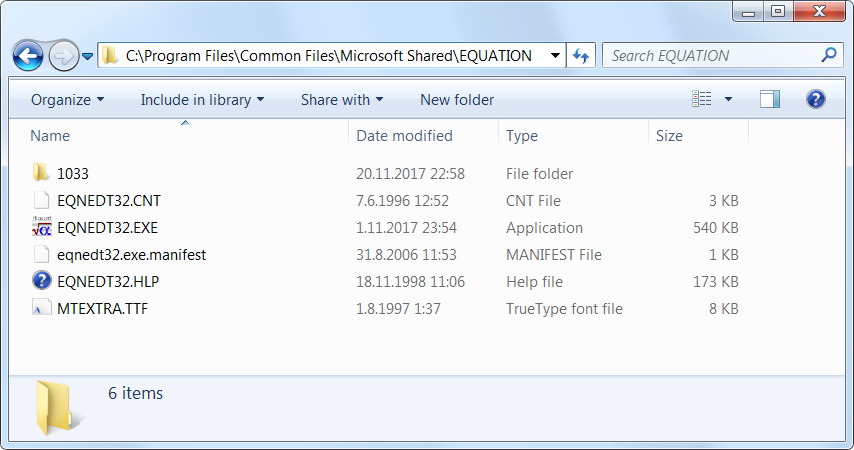
Office 2010: Content of the EQUATION folder before the update
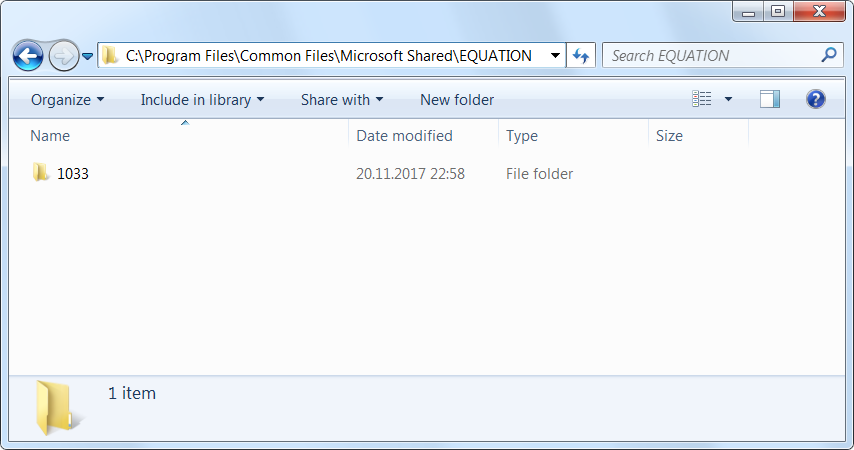
Office 2010: Content of the EQUATION folder after the update
In order to get Equation Editor back while continuing to receive future Office security updates you need to do two things:
Restore deleted Equation Editor files.
Re-register Equation Editor as a local COM server.
Install free 0patch Agent to keep Equation Editor patched against known vulnerabilities.
Obviously, you don't technically need the last step to get Equation Editor working again, but you don't want to be vulnerable to trivial inexpensive attacks that can be delivered in any Word document you ever receive. So just to be clear, we don't recommend performing steps A and B if you don't also perform step C.
A. Restore deleted Equation Editor files
(Disclaimer: The following is not an official Microsoft-supported procedure and is not guaranteed to work or to not have unwanted side effects. In addition, future Office updates may bring additional blocking of Equation Editor and disable its use. You're doing this at your own risk.)
Unfortunately uninstalling the Office security update that removed Equation Editor doesn't bring the deleted files back. This leaves you with two options: (a) find a copy of Office you haven't updated yet, or (b) reinstall Office from your original media and apply all updates up to and including November 2017 updates. Once you do any of these, you will find these files in the EQUATION folder (possibly along some other files in Office 2016):
EQNEDT32.CNT - help file index
EQNEDT32.EXE - Equation Editor executable
eqnedt32.exe.manifest - Equation Editor manifest file
EQNEDT32.HLP - help file
MTEXTRA.TTF - MathType font file
Make sure you have EQNEDT32.EXE version 2017.8.14.0, which is the latest version provided by Microsoft.
What you don't want to do is download the missing files from the Internet, as that is not only a potential violation of your license, but also a great way to get malware on your computer. So don't do that.
Once you have the above Equation Editor files at hand, copy them to the EQUATION folder from which they have been removed on a computer with all updates (including the January 2018 Office update) installed. You will need to have administrative permissions for this, and you may be prompted to overwrite an existing 0-byte EQNEDT32.EXE, which seems to be left on some systems.
B. Re-register Equation Editor as a local COM server
Registering a local COM server requires creating a valid CLSID registry key with required subkeys and values. To make it easier for you, we prepared a template .REG file that you can edit and import in your registry. To do so, follow these instructions:
Download EquationEditor.reg.
Edit EquationEditor.reg (right-click on it and select "Edit"), find in it the path to EQNEDT32.EXE, and change it to the actual path in the EQUATION folder on your computer where you restored the files in step A. IMPORTANT: The path should use double back slashes instead of single ones (just like in our sample reg file above), so make sure to duplicate all back slashes in your path.
Import the modified EquationEditor.reg to registry by first launching the Registry Editor (regedit.exe) as Administrator, then selecting File-Import... in its menu and browsing to your EquationEditor.reg file.
Voila, if everything went well, you can now edit your equation objects in Equation Editor again, and save them back to Word files. Note that it sometimes takes up to a few minutes for this registry change to come into effect; until it does, opening an equation object will result in the "Microsoft Equation is not available" error.
If Equation Editor complains that it's missing a font, reinstall MTEXTRA.TTF.
Important: you will be able to - and are highly encouraged to - keep applying official Office updates after completing this procedure to keep future vulnerabilities in other parts of Office patched. The whole point of this blog post is to help you keep Equation Editor while keeping your Office Applications updated.
But you're not done yet! Now you have to get your Equation Editor patched. On to step C.
C. Install 0patch Agent
0patch provides free micropatches for Equation Editor (and many other software products). To install it, download and launch the installer, create a free 0patch account and register the agent to that account. You will immediately receive all Equation Editor micropatches - [Updated 2/20/2018] one for CVE-2018-0802 and one for CVE-2018-0798, but as we receive details on the other vulnerabilities, we'll issue additional micropatches.
Expected Questions
These are some of the questions we anticipate and would like to answer in advance.
Q: Why are you doing this? Equation Editor is a 17-year-old pile of insecure code and should die!
In today's "Move fast and break things" world we're accustomed to the idea that software must be perpetually and frequently replaced with new versions. In fact, much of the global software business is built on "incentivizing" users to buy a new version of a product that works just fine for them. Of course the underlying hardware is improving, and new attacks are being invented, so software code effectively does get worse in time even if it doesn't change a bit, but let's hold back for a moment.
"17-year-old code" sounds borderline outrageous to many, but we often forget that there are products we want to keep for 20 years or more. Say, medical devices. If an MRI machine running a reasonably new, well tested operating system costs $500k, and its hardware can be serviced for 20 years, do we really want to throw it out after 10 years because it stops getting security updates from the OS vendor? Heck no. What we actually want is for it to remain immutable as much as possible for 20 years, and not get any software changes that aren't necessary for its function and security. This is hard to grasp if you're used to replacing half of your operating system every month.
Clearly, Equation Editor is not a life-critical piece of equipment and seems relatively cheap to replace. It does, however, allow for a nice demonstration how an abandoned software product can be "security-adopted" by a 3rd party, allowing its continued use without exposing one's environment to cheap public exploits.
Q: Isn't Equation Editor full of vulnerabilities and risky to use even if you patch the publicly known issues?
It's impossible to say whether any software product is "full of vulnerabilities" or not without thoroughly inspecting it. Nine vulnerabilities having been found in it in quick succession is easily explained by the fact that before Embedi decided to look under the hood, Equation Editor was shielded by a veil of obscurity. Once they've pointed out how its attack surface can be reached from a Word document, it became an easy toy to play with and apparently attracted many researchers. The additional eight vulnerabilities were most likely all low-hanging fruit, i.e., easy to find. But once we patch them, will it be easy to find the next one? No one knows, and if anyone claims to know, kindly ask them for evidence.
Q: How long are you planning to provide patches for Equation Editor?
With the details we currently have about the known vulnerabilities in Equation Editor, it seems it should be easy for us to micropatch them. Should anyone find additional vulnerabilities in it (and since it's been removed from Office, very few will bother searching), we'll try to micropatch that too. It could happen, although unlikely, that a design vulnerability is found which would be extremely difficult to micropatch, or would require an unreasonable amount of effort on our part. In such case we too will abandon our security support. We hope this will not happen.
Q: How will we receive subsequent micropatches for Equation Editor?
As long as 0patch Agent on your computer has access to the Internet, all subsequent micropatches for Equation Editor will be automatically delivered to your computer and immediately, automatically applied to Equation Editor when it gets launched. If you happen to be using Equation Editor when a new micropatch arrives, the micropatch will get applied to it without disturbing you (i.e., you won't even have to relaunch Equation Editor).
Q: After having used Equation Editor for some time as described here, it suddenly stopped working. What can I do?
One of our users approached us with this problem but also found a solution by themselves and kindli shared it with us. It turned out that one of Office updates appeared to have deleted the content of EQNEDT32.EXE, replacing it with an empty file (size 0). Overwriting this file with the original EQNEDT32.EXE seemed to have resolved the problem.
In general, should any problems occur after having a working setup, it is best to start by re-doing all the steps in section "Bringing Equation Editor Back To Life."
Outro
There you go. Let us know how this works for you - share your experience, questions and possible concerns in the comments below.
Note that we can only provide support for our micropatches (email to support@0patch.com) and not general technical support for Equation Editor. If you encounter any issues with Equation Editor that you haven't seen before, first disable 0patch Agent and see if the issue is still there. If disabling the Agent resolves the issue, please report it to us, otherwise contact Microsoft.
Cheers!
* The initial public perception after the January Patch Tuesday was that Equation Editor had a single reported vulnerability (CVE-2018-0802) when in fact it was eight of them. However, there have been no public details available on these additional issues as of this writing.
此内容由惯性聚合(RSS阅读器)自动聚合整理,仅供阅读参考。 原文来自 — 版权归原作者所有。