











I’ve been running a mixed Proxmox cluster for years – four nodes of wildly different capability, from an Atom x5-Z8350 with 2 GB of RAM (a z83ii, currently offline after years of faithful service as a baseline torture device) up to an i7-12700 with 128 GB (borg, my main homelab server).
This year, somewhere along the way between writing agentbox and all the hype around agentic sandboxes I got tired of the eternal compromise between LXC containers and full virtual machines, and ended up building pve-microvm – a Debian package that adds QEMU’s microvm machine type as a first-class managed guest in Proxmox VE.
This isn’t a quick hack. Well, the first version was, actually, but it’s gone quite a bit farther than that, and certainly farther than I expected.
It now ships a custom kernel, patches the Perl internals to provide Proxmox web UI integration, and, due to my usual fascination with offbeat operating systems, ended up supporting (as of this writing) 21 guest OS types from Debian to NetBSD to Plan9.
Yes, I completely brought it upon myself to run Plan9 in a microVM, and yes, it works.
Finding the Right Balance
After a few rounds of cluster cleanups and migrations, it’s now my daily driver for running Gitea, Caddy reverse proxies, mini-firewalls, and the AI agent that’s helping me clean up this post.
Proxmox gives you two main options out of the box:
-
LXC containers start instantly, share the host kernel, and are spectacularly efficient. But they’re not isolated – a kernel exploit in one container compromises everything. You can’t run a different OS. You can’t easily nest Docker inside them without ending up (eventually) wrestling with
fuse-overlayfsgymnastics. And certain workloads (anything needing custom kernel modules, orCAP_SYS_ADMINin anger) simply don’t fit. -
Full VMs give you hardware isolation via KVM/VT-x, but they boot SeaBIOS or OVMF, sedately walk through GRUB as they yawn their way out of bed, probe a forest of emulated legacy devices (IDE controllers, VGA, USB hubs, PCI bridges), and typically take 5-10 seconds to reach a login prompt. Each one carries the overhead of that entire emulated chipset sitting in memory.
What I wanted was the security boundary of a VM with the startup characteristics of a container. QEMU’s microvm machine type – originally developed for Firecracker-style workloads – strips all of that away. No BIOS, no GRUB, no legacy devices. Direct kernel boot into a minimal virtio-only environment. The result: sub-300ms boot to a fully networked guest with a QEMU agent, running inside its own KVM hardware isolation boundary.
Now, let me be clear: I’m not spawning hundreds of these things. I have Azure for that – but I do want to run Gitea Actions workers, have a very limited set of hardware resources, and got fed up with the time it took for one particular VM to boot repeatedly…
What It Actually Does
pve-microvm is a single .deb that patches Proxmox’s qemu-server Perl modules at install time. When you set machine: microvm on a VM config, the standard config_to_command function delegates to my MicroVM.pm, which builds an (almost) completely different QEMU command line:
qemu-system-x86_64 -M microvm,x-option-roms=off,pit=off,pic=off,\
  isa-serial=on,rtc=on,acpi=on,pcie=on \
  -kernel /usr/share/pve-microvm/vmlinuz \
  -initrd /usr/share/pve-microvm/initrd \
  -append "console=ttyS0 root=/dev/vda rw quiet" \
  -device virtio-blk-pci-non-transitional,drive=drive-scsi0 \
  -device virtio-net-pci-non-transitional,netdev=net0 \
  ...
No chipset emulation. No PCI bridges. No VGA. The guest gets a single serial console (which PVE’s xterm.js connects to natively), virtio block devices, and a virtio network interface. Everything rides PCIe transport with non-transitional (modern-only) virtio devices rather than the MMIO transport microvm was originally designed around – for reasons I’ll come to in a moment.
The package ships:
- A tiny (12MB) pre-built Linux 6.12.22 kernel compiled from
x86_64_defconfigwith a minimal overlay –virtio,vsock,virtiofs,9p, and the modules Docker needs (overlay,veth,bridge,netfilter,BPF), because, well, I’m pragmatic. - A 1 MB
initrdthat probesvirtiodevices, finds the root filesystem by label or device path, and does aswitch_rootin ~150ms pve-microvm-template– builds root filesystems from any of 12 supported OCI base images, with optional SSH, Docker, and guest agentpve-oci-import– pulls an OCI image directly into a PVE-managed disk- Web UI extensions – a “Create µVM” button, machine type dropdown, conditional panel hiding for irrelevant settings, and an amber bolt icon in the resource tree
- A systemd service (
pve-microvm-early.service) that ensures patches are applied beforepvedaemonstarts on boot – critical foronboot=1VMs
The Boot Sequence
Like in aerodynamics, most speed comes from eliminating everything that isn’t strictly necessary. A standard VM spends most of its boot time in firmware and bootloader, so a microVM skips all of that.
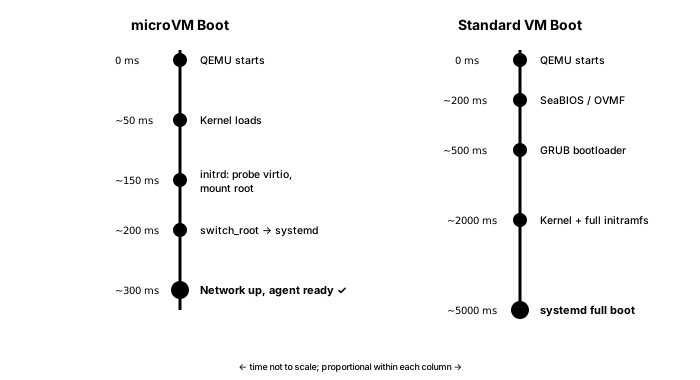
SmolBSD (a NetBSD guest using virtio-mmio transport) boots in 31ms. A full Debian with Docker and the QEMU agent is ready in under 8 seconds – and most of that time is apt package installation during first boot. Subsequent boots hit the 300ms mark consistently, even on my humble hardware.
A fun rabbit hole I went into when someone asked me to add SmolBSD support:
There’s a reason SmolBSD gets to use virtio-mmio and the Linux guests don’t. A QEMU microvm machine type can carry its virtio devices over two transports: the bare-bones MMIO interface it was originally built for, or PCIe. MMIO is the lighter of the two – no PCIe host bridge, no ACPI – which is how a NetBSD guest shaves itself down to 31 ms.
But on QEMU 10.x the MMIO path has (as far as I can tell) a device-probing bug for Linux guests: only virtio-blk binds, and the network, serial and balloon devices are never claimed by their drivers for some reason. NetBSD probes MMIO correctly and is perfectly happy; Linux (at least the kernel I am using) is not.
For every Linux guest I therefore fall back to PCIe with non-transitional (modern-only) virtio devices, which binds all of them reliably. The cost is about 50 ms of extra bring-up – which, against a 300 ms boot, I’ll take without complaint.
I think the above is actually a bug in my kernel configuration, but haven’t really had time (or maybe even the right hardware) to tackle it – this is something I’d love more people to look at and contribute patches.
One Kernel, Many Guests
There’s a deliberate consequence of this direct kernel boot trick that’s easy to miss: the kernel doesn’t live inside the guest. It sits on the Proxmox host at /usr/share/pve-microvm/vmlinuz, and the guest disk holds nothing but a root filesystem – userland, no /boot, no GRUB, no per-guest kernel package, no initramfs of its own.
That also means there’s no “boot the installer ISO and click through it” path, so instead the rootfs gets built straight from an OCI image with pve-microvm-template (Debian, Alpine, Fedora, Rocky, Amazon Linux and friends). In the weird cases, we import a prepared ext4/raw disk with qm importdisk. You don’t install an OS – you assemble a root filesystem.
Decoupling the kernel from the rootfs is what makes this interesting to run at scale. Every Linux microVM on the node boots the same vmlinuz – one kernel, built once from a stock x86_64_defconfig with a microvm overlay, so you can audit and update it in exactly one place: drop a new vmlinuz on the host, restart the guests, done. No guest ever pulls a broken kernel from an apt upgrade, because no guest has a kernel to upgrade, and the rootfs images stay tiny and completely kernel-agnostic.
Container-style kernel consistency, VM-style isolation.
What I’m Running
On my cluster right now, I have a fair smattering of these already. Four off the top of my head are:
gitea(VM 114, on an Intel N5105) – Bare-metal Gitea with SQLite, Caddy HTTPS, local actions runner, Avahi discovery. 2 cores, 2 GB RAM, 32 GB disk. Boots in ~3s, mostly because Gitea does a lot of housekeeping.smith(VM 9022, on my i7) – the mainpiclawagent, the system that manages the cluster, releasespiclawand generally keeps tabs on everything. 2 cores, 6 GB RAM, 48 GB disk. Runs Docker internally, and has 3 smaller, volatile siblings scattered throughout the cluster that don’t run Docker but have different roles (CI/CD, wipe-and-reinstall agent instance for testing upgrades, etc.)exo(VM 9021, on my i7) – Distributed inference coordinator for running LLMs across multiple machines. CPU-only, 2 GB root.virtualdsm(VM 300,tnas) – Synology DSM running inside a microVM with Docker, inside Terramaster NAS hardware. Yeah, I know I’m weird, but it was needed when my Synology went sideways and I haven’t nuked it yet. Uses the stock Debian kernel rather than my custom one, because DSM needs specific module paths.
I also have a dormant 9Front (Plan9) one, as well as a little menagerie of OpenWrt, OPNsense, OSv unikernels, gokrazy Go appliances, and various Alpine/Fedora/Rocky/Amazon Linux configurations filed away as standard Proxmox backups. The 21 guest OS types aren’t theoretical – each one has been booted and validated, and sometimes smith will go and thaw one out to do regression tests.
The z83ii (that ancient Atom x5-Z8350 with 2GB RAM) was invaluable as a baseline test platform, because If a microVM can boot and run usefully on a fanless 2016-era Atom with 2 GB of total system memory, it’ll work anywhere. And it could run six before it started slowing down…
What a Config Looks Like
There’s no magic to a microVM config – it’s an ordinary qm guest with a particular machine type and a kernel command line. Here’s gitea (the VM 114 above) as it sits in /etc/pve/qemu-server/114.conf:
agent: 1
args: -kernel /usr/share/pve-microvm/vmlinuz -append "console=ttyS0 root=/dev/vda rw quiet"
boot: order=scsi0
cores: 2
machine: microvm
memory: 2048
name: gitea
net0: virtio=BC:24:11:00:6E:01,bridge=vmbr0
onboot: 1
scsi0: local-lvm:vm-114-disk-0,size=32G
serial0: socket
tags: microvm
vga: serial0
The only microvm-specific lines are machine: microvm, the args carrying the kernel and its cmdline, and serial0: socket / vga: serial0 wiring the console through to xterm.js. Everything else – cores, memory, the virtio NIC on vmbr0, the scsi0 disk on local-lvm, onboot, the guest agent – is exactly what you’d write for any Proxmox VM.
Note there’s no -initrd in args: MicroVM.pm injects it automatically when it sees the shipped kernel, along with the balloon, vsock and (when configured) virtiofs devices. That’s the whole point – a microVM is a normal guest that happens to boot a host-provided kernel, not a special object you have to learn a new tool to manage.
Networking
A microVM attaches to the network exactly like any other Proxmox guest. The interface spec is a bit of a mouthful (virtio-net-pci-non-transitional device on the PCIe bus), and it lands on whatever Linux bridge and VLAN you point it at:
qm set 900 --net0 virtio,bridge=vmbr0           # single NIC
qm set 900 --net0 virtio,bridge=vmbr0,tag=100   # tagged onto VLAN 100
Because it’s an ordinary KVM guest, the standard PVE firewall applies – per-VM nftables rules work the way they do for any VM, which is the part that actually matters when you’re running untrusted code.
Inside the guest, networking is handled by systemd-networkd rather than cloud-init: DHCP by default (matched on Type=ether, so it survives cloning with no MAC pinning), or a one-line /etc/microvm-static-net for a static address. Earlier versions leaned on cloud-init for this, and I found it too brittle; moving it to systemd-networkd made cloning reliable and I stopped having to debug templates half the time.
Network isolation, another mainstay of the current hype around agent isolation, is a solved problem I have no interest in re-solving inside the package because I think Proxmox’s own SDN already does it properly – a simple VLAN zone with a separate VNet per trust domain keeps untrusted guests on their own segment with no path to the LAN, and if I ever bothered with that on a home LAN (well I have thought about it… but got no time), a VXLAN zone with a designated exit node would let me funnel egress through a single firewalled choke point.
The microVM just lands on whatever VNet I point net0 at, so the policy lives in Proxmox, not in a one-off ruleset I’d have to babysit.
There’s also a non-networked path for host/guest plumbing: each guest gets a vsock CID (VMID + 1000), which I use for SSH-agent forwarding (host keys into the guest without ever exposing them on the wire) and for virtiofs/9p directory sharing, because… I forget. I know I needed it at one point, even if right now most of my microvm instances just do SMB mounts (which were a pain to do under Docker and LXC)
The NIC count is… moderately sane. I currently allow six virtio interfaces per guest (net0-net5) on the spurious grounds that they’re twice the maximum number of physical interfaces across all of my host machines. It’s just defined in MicroVM.pm, and the very few people who need more than that are welcome to tweak it (and if you think you want a dozen you almost certainly want VLANs instead).
Storage and Migration
Storage was… trivial? every PVE backend works, because the disk is just a virtio-blk-pci device and Proxmox hands it the same path it hands any VM. LVM and LVM-thin, ZFS, Ceph/RBD, NFS and CIFS, plain directory storage – all fine, with snapshots, linked and full clones, vzdump backups and qm importdisk behaving exactly as they do elsewhere. A microvm is a normal PVE guest that happens to boot differently.
Migration is the only place things are iffy. a) I can’t do live migration on any of my hardware (none of it is enterprise grade), and b) true live migration isn’t viable with the current QEMU microvm machine type anyway – it simply doesn’t implement it.
Offline migration (i.e., reshuffling instances around) works fine, though, and because microvm boot in well under a second, you can run a quick HA relocate cycle – stop, migrate, start – provided your disks live on shared storage.
I’ve measured it at around two seconds moving a small guest between nodes on shared CIFS. Not seamless VM motion, but perhaps good enough for most uses, and as far as I can figure out, ha-manager drives it the same way it would any guest.
Vs. LXC: When To Choose What
Mind you, I still run LXC containers. They’re the right choice when:
- You trust the workload (or it’s your own code)
- You need zero boot overhead
- You want direct filesystem access from the host
- You want slightly less memory allocation overhead (oh, and there’s shared page cache if you’re really lucky)
MicroVMs win when:
- You need actual kernel isolation – running untrusted code, different kernel versions, nested Docker, anything with aggressive
CAP_requirements - You want a reproducible image you can snapshot, back up (
vzdumpworks), offline-migrate, and clone (linked clones too) - The workload does something unusual to the kernel (BPF programs, custom
netfilterrules, kernel modules) and you don’t want that leaking into your host (which is why most of my tunnels now land in amicrovm) - You’re running non-Linux guests – NetBSD, Plan 9, FreeBSD-based firewalls – which simply can’t run as LXC
- You want a VM that’s up before you’ve finished the command.
The overhead difference between LXC and a microVM on modern hardware is surprisingly small. On borg (that i7-12700), the idle memory footprint of a minimal microvm is ~40 MB, and the CPU overhead of the hypervisor is unmeasurable for most workloads.
The memory figure you set at boot is genuinely just a ceiling: As far as I can tell KVM still only backs the pages a guest actually touches, and the host’s same-page merging dedupes identical pages – kernels, libc, shared base-image layers – across every microvm on the node, so like on grown-up cloud hypervisors the real cost tracks the working set, not the nominal allocation.
Much to my embarrassment, I didn’t even bother with live resizing for a long while, but I added balloon support to the kernel recently, with free-page-reporting and deflate-on-oom. PVE’s balloon target drives proper auto-ballooning, and a virtio-mem device gives genuine fine-grained hot-add and hot-remove, so, again, this works like a normal VM.
The Awkward Parts
Now for the catches…
First one is pretty obvious: I’m patching someone else’s product, and even though I survived the Perl 4 to Perl 5 transition decades ago and I have Codex to help these days,
patching the Perl internals is fragile–every qemu-server upgrade can break my setup.
I mitigate this by a) not blindly running upgrades and b) using dpkg triggers (the package re-patches automatically after upgrades), but it’s still a race condition waiting to happen – I’ve had partial PVE upgrades leave the system in a state where pvedaemon couldn’t even compile the patched module.
And then come the weird failure modes–one upgrade had a nasty little side effect regarding root devices:
- Root is found at
root=/dev/vdabecause the guest boots under themicrovmmachine type withvirtio-blkon PCIe - but if a guest ever comes up under the standard chipset instead (a half-applied patch, or an
onboot=1VM starting before the early-boot service has re-patched after a host reboot), the same disk enumerates as/dev/sda, root isn’t found, and the VM looks like it has lost its filesystem.
The data is always there, just at the wrong path. I’ve patched that particular twist in a way that the dpkg trigger and early-boot service ordering try to mitigate it, so the initrd now falls back to /dev/sda when /dev/vda is missing – but until (if ever) Proxmox supports microVMs natively, expect the occasional papercut.
Package version mismatches can cascade. I learned this the hard way – a partial apt upgrade on one of my nodes left libpve-cluster-perl and libpve-network-perl at incompatible versions, which broke all Perl module loading, which meant pvedaemon couldn’t start, which meant VMs couldn’t be managed.
So… always do full dist-upgrade, never partial upgrades on PVE nodes with this.
Another catch (for some) is that there is no VGA and no graphical console – the serial console is your only interface. If something goes wrong during boot, you’re reading kernel panics on a terminal. This is fine for servers, less fine for desktop-oriented guests, and Plan9 really doesn’t like it.
The next one is that there’s no USB at all – no controllers, no passthrough, nothing on the bus – so I had to get the web UI to hide those options the moment you flip a guest to microvm. This might be a deal-breaker if you want to, say, run a Zigbee controller (and is why my home automation stuff is still in an LXC).
The kernel is opinionated. My custom 6.12.22 kernel includes exactly what I need and nothing else. If your workload needs a module I haven’t included, you’ll need to rebuild it or use the stock Debian kernel (which works fine but is 3x larger and boots slower).
Finally, GPU and PCI passthrough are disabled, not impossible. And this is another thing I would love people with more money hardware to really dive into, since I actually had an RTX 3060 passed through and working in early testing.
In the end, I decided to temporarily disable GPU support for simplicity – the package strips hostpci* today and there’s no vIOMMU plumbing wired up, so it’s off by default.
There’s nothing stopping anyone from adding it back (save some QEMU microvm caveats around the minimal ECAM PCIe bus and IOMMU setup), and I’d genuinely love to be able to do proper PCI and vIOMMU testing – I just don’t have the spare hardware for it, and I chose to focus this on running agents rather than chasing accelerator passthrough.
Under The Hood: The Patch Strategy
The package modifies three files in the PVE Perl stack:
Machine.pm– extends the machine type regex to acceptmicrovmas a valid valueQemuServer.pm– adds ause PVE::QemuServer::MicroVMimport and a delegation check at the top ofconfig_to_command: if the VM hasmachine: microvm, hand off to my module entirelyMicroVM.pm– the complete command builder, installed at/usr/share/perl5/PVE/QemuServer/MicroVM.pm
Since I’m obsessive about recoverability, the patches are reversible (pve-microvm-patch revert), and the original files are backed up. The dpkg trigger system (interest-noawait qemu-server) ensures automatic re-application after PVE updates. The early-boot service ensures patches are live before any VM auto-starts, preventing that sda/vda mixup I mentioned above:
pve-microvm-early.service (Before=pvedaemon.service pve-guests.service)
    └── /usr/share/pve-microvm/pve-microvm-patch apply
Getting Started
If you’ve read this far, you’re either a brave person or missed the GitHub link, so I’ll just drop the potted version here:
# On any PVE 9.x node:
wget https://github.com/rcarmo/pve-microvm/releases/latest/download/pve-microvm_0.3.12-1_all.deb
dpkg -i pve-microvm_0.3.12-1_all.deb

# Create a Debian microVM template:
pve-microvm-template --vmid 9000 --storage local-lvm --profile standard

# Clone it into a real VM:
qm clone 9000 100 --name my-microvm --full
qm set 100 --machine microvm --memory 1024 --cores 2
qm start 100
The template takes about 60 seconds to build (pulls the OCI image, installs packages, writes the root filesystem). After that, cloning is near-instant if you use linked clones.
What’s Next
Besides more testing (that I just don’t have the hardware, time or even focus for, since like most of my projects I just want to use the thing), what’s left is mostly polish: maybe a nicer configuration layer, network-off-by-default with egress allow-lists for untrusted guests for the paranoid, GPU passthrough if I ever wire up vIOMMU properly, and eventually AArch64 support for ARM-based PVE nodes (which I’ve run in the past, and I think might also have microvm support in their QEMU versions).
And, of course, someone should probably upstream this. I reached out informally to a couple of people at Proxmox and was told I should join a mailing-list to discuss this, but a) that is awfully 90s and b) I just don’t have the time to do more than maintain this for myself. And yeah, I get that this would have to go through the entire enterprise QA pipeline (I get that a lot, believe me).
The source is at github.com/rcarmo/pve-microvm, the patches are fairly small, it does not break Proxmox itself since 99% of the features come from QEMU/KVM, so… I’m just literally giving it away.
But if you’re running a homelab, know your way around Linux and want container-speed VMs with actual isolation, this might be what you’ve been looking for since… well, statistically, maybe never–but you can have it now!