


惯性聚合 高效追踪和阅读你感兴趣的博客、新闻、科技资讯
阅读原文 在惯性聚合中打开

推荐订阅源

奇客Solidot–传递最新科技情报
奇客Solidot–传递最新科技情报
Jina AI
Jina AI
博客园 - Franky
Apple Machine Learning Research
酷 壳 – CoolShell
酷 壳 – CoolShell
阮一峰的网络日志
阮一峰的网络日志
量子位
雷峰网
雷峰网
宝玉的分享
宝玉的分享
V
Visual Studio Blog
博客园_首页
小众软件
小众软件
The Cloudflare Blog
让小产品的独立变现更简单 - ezindie.com
大猫的无限游戏
大猫的无限游戏
博客园 - 聂微东
S
SegmentFault 最新的问题
博客园 - 【当耐特】
OSCHINA 社区最新新闻
OSCHINA 社区最新新闻
博客园 - 叶小钗
月光博客
月光博客
博客园 - 三生石上(FineUI控件)
人人都是产品经理
人人都是产品经理
WordPress大学
WordPress大学

Hacker News

GitHub - SeanFDZ/macmind: Single-layer transformer in HyperTalk for the classic Macintosh Show HN: Agent-cache – Multi-tier LLM/tool/session caching for Valkey and Redis Bonsai 1-bit WebGPU - a Hugging Face Space by webml-community Moving a large-scale metrics pipeline from StatsD to OpenTelemetry / Prometheus GitHub - Nightmare-Eclipse/RedSun: The Red Sun vulnerability repository GitHub - SethPyle376/hiraeth: Local AWS emulator focused on fast integration testing, with SQS support, SQLite-backed state, and a debug-friendly web UI. GitHub - macOS26/Agent: Any AI, replaces Claude Code, Cursor, OpenClaw. Over 18 LLM providers (Claude, OpenAI, Gemini, Ollama, Zai, HF, Qwen) wired into a native Mac app that writes code, builds Xcode projects, bumps versions, manages git, automates Safari, use AppleScript, JS or Accessibility, extend Agent! w/ MCP Servers, run tasks from your iPhone via Messages. YouTube now lets you turn off Shorts I Made a Terminal Pager Burgers | マクドナルド公式 Commands — HackerNews CLI documentation ChatGPT for Excel PiCore - Raspberry Pi Port of Tiny Core Linux Live Nation illegally monopolized ticketing market, jury finds Google Broke Its Promise to Me. Now ICE Has My Data. Founding Engineer at Adaptional | Y Combinator CRISPR takes important step toward silencing Down syndrome’s extra chromosome GitHub - saffron-health/libretto: The AI toolkit for building reliable browser automations US v. Heppner (S.D.N.Y. 2026) no attorney-client privilege for AI chats [pdf] Retrofitting JIT Compilers into C Interpreters IPv6 – Google The Accursèd Alphabetical Clock Cybersecurity Looks Like Proof of Work Now Fragments: April 14 Cal.com Goes Closed Source: Why AI Security Is Forcing Our Decision | Cal.com - Scheduling Software for Online Bookings Laravel raised money and now injects ads directly into your agent When moving fast, talking is the first thing to break Too much Discussion of the XOR swap trick – Heather Cafe Introduction to Spherical Harmonics for Graphics Programmers The Grand Line
ACAV: Overview
leomicv · 2026-05-22 · via Hacker News

ACAV (Aurora Clang AST Viewer) is an interactive Abstract Syntax Tree (AST) visualization tool for C, C++, and Objective-C, built with Clang and Qt. Given a JSON compilation database such as compile_commands.json, ACAV lets you open a real project, inspect the AST for a translation unit, and move directly between source code and AST nodes.
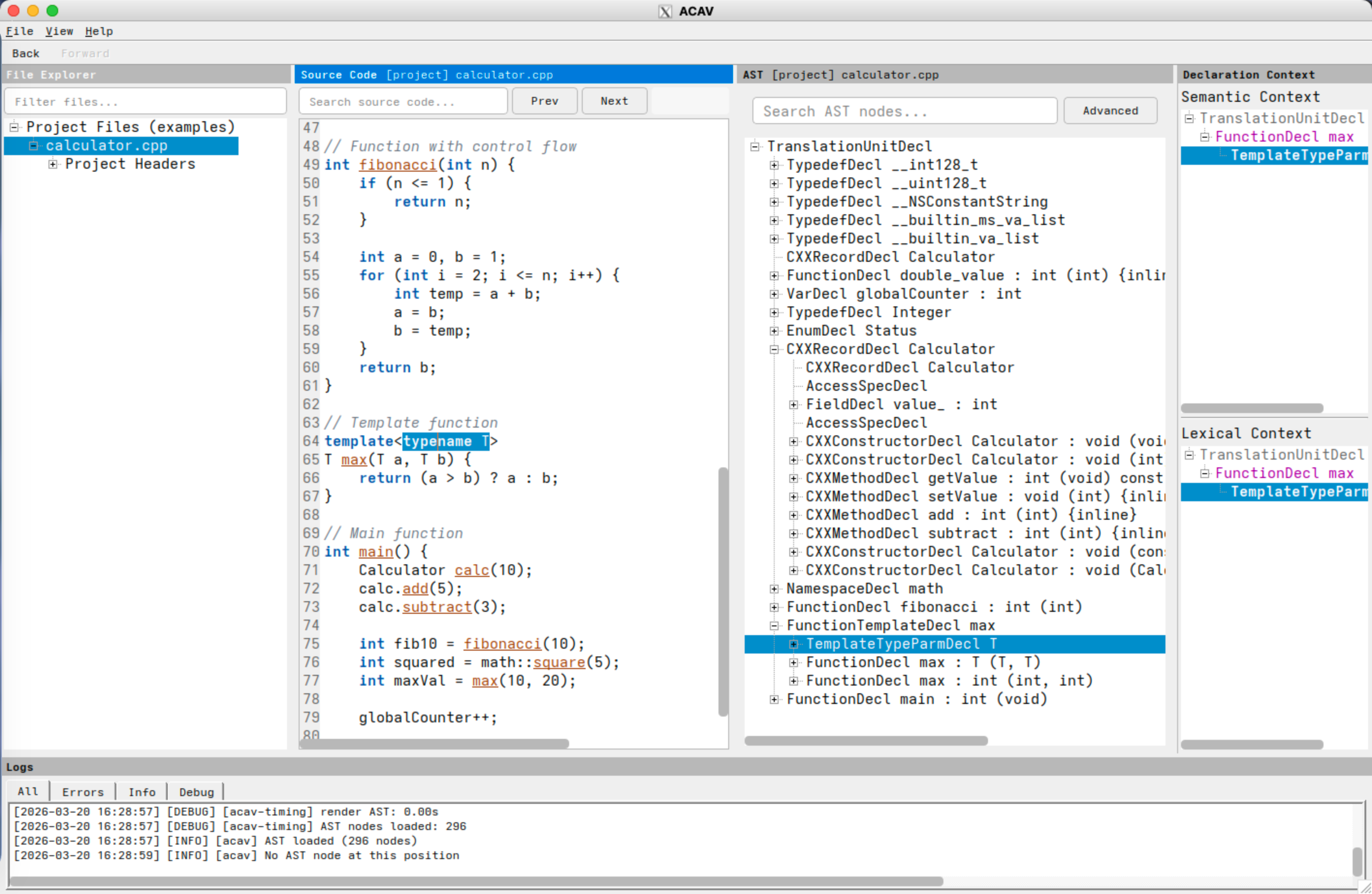
Screenshot of the ACAV interface showing the file explorer, source code view, AST tree view, declaration-context panels, and log panel.

Screenshot: ACAV displaying the file explorer, source-code panel, AST tree view, declaration-context panels, and log panel.

Project Links

At a Glance

With a valid compilation database, ACAV lets you:

  • inspect the AST for a translation unit in a navigable tree,
  • move in both directions between source locations and AST nodes,
  • view declaration context while exploring program structure,
  • search both source text and AST nodes, and
  • reuse dependency and AST-cache artifacts across sessions.

ACAV follows a three-program architecture:

  • acav is the interactive GUI application.
  • query-dependencies extracts dependency information from a compilation database.
  • make-ast builds and caches serialized AST files for individual source files.

Purpose and Scope

ACAV addresses the gap between Clang's powerful front-end infrastructure and the practical difficulty of exploring Clang ASTs interactively. It is designed for real codebases rather than toy examples: it reads a JSON compilation database, applies the recorded build settings for each source file, and keeps the interface responsive through background processing and AST caching.

ACAV is useful for students learning compiler internals, researchers studying program structure, and developers building or debugging Clang-based tools. Its current scope is intentionally limited to read-only AST exploration. ACAV does not modify source code, perform refactoring, or act as a general-purpose editor, and it displays the AST of one translation unit at a time.

Quick Start

The typical workflow is:

  1. Generate or locate a compilation database for the target project.
  2. Build or install ACAV by following Installation.
  3. Launch ACAV:

    acav -c /path/to/compile_commands.json

  4. Browse files in the file explorer, then double-click a file or press F5 to generate or load its AST.
  5. Use the source view, AST view, and declaration context view to navigate the program structure.

Documentation Organization

  • License points to the authoritative license file.
  • Installation covers prerequisites, native builds, and the containerized workflow.
  • Docker/Podman Demo Image provides detailed OCI demo image instructions.
  • User Manual describes the GUI, common workflows, the command-line programs, keyboard shortcuts, and configuration.
  • References lists related technologies and resources.
  • Classes provides the generated class reference.
  • Files provides the generated file reference.
  • Changelog provides public release notes for ACAV.
  • Notice provides project attribution, authorship, and licensing context.

How to Use This Manual

If you are new to ACAV, start with this overview, then Installation, and then User Manual. If you want to inspect the API surface, use Classes and Files. If you want to review public release notes, see the Changelog.