
惯性聚合 高效追踪和阅读你感兴趣的博客、新闻、科技资讯
阅读原文 在惯性聚合中打开

推荐订阅源

J
Java Code Geeks
量子位
MongoDB | Blog
MongoDB | Blog
N
Netflix TechBlog - Medium
奇客Solidot–传递最新科技情报
奇客Solidot–传递最新科技情报
B
Blog
A
About on SuperTechFans
腾讯CDC
The GitHub Blog
The GitHub Blog
云风的 BLOG
云风的 BLOG
雷峰网
雷峰网
Last Week in AI
Last Week in AI
H
Help Net Security
WordPress大学
WordPress大学
博客园 - 司徒正美
钛媒体:引领未来商业与生活新知
钛媒体:引领未来商业与生活新知
H
Hackread – Cybersecurity News, Data Breaches, AI and More
T
Tailwind CSS Blog
博客园 - 【当耐特】
S
SegmentFault 最新的问题
美团技术团队
M
MIT News - Artificial intelligence
L
LangChain Blog
博客园 - 聂微东

Hacker News

GitHub - SeanFDZ/macmind: Single-layer transformer in HyperTalk for the classic Macintosh Show HN: Agent-cache – Multi-tier LLM/tool/session caching for Valkey and Redis Bonsai 1-bit WebGPU - a Hugging Face Space by webml-community Moving a large-scale metrics pipeline from StatsD to OpenTelemetry / Prometheus GitHub - Nightmare-Eclipse/RedSun: The Red Sun vulnerability repository GitHub - SethPyle376/hiraeth: Local AWS emulator focused on fast integration testing, with SQS support, SQLite-backed state, and a debug-friendly web UI. GitHub - macOS26/Agent: Any AI, replaces Claude Code, Cursor, OpenClaw. Over 18 LLM providers (Claude, OpenAI, Gemini, Ollama, Zai, HF, Qwen) wired into a native Mac app that writes code, builds Xcode projects, bumps versions, manages git, automates Safari, use AppleScript, JS or Accessibility, extend Agent! w/ MCP Servers, run tasks from your iPhone via Messages. YouTube now lets you turn off Shorts I Made a Terminal Pager Burgers | マクドナルド公式 Commands — HackerNews CLI documentation ChatGPT for Excel PiCore - Raspberry Pi Port of Tiny Core Linux Live Nation illegally monopolized ticketing market, jury finds Google Broke Its Promise to Me. Now ICE Has My Data. Founding Engineer at Adaptional | Y Combinator CRISPR takes important step toward silencing Down syndrome’s extra chromosome GitHub - saffron-health/libretto: The AI toolkit for building reliable browser automations US v. Heppner (S.D.N.Y. 2026) no attorney-client privilege for AI chats [pdf] Retrofitting JIT Compilers into C Interpreters IPv6 – Google The Accursèd Alphabetical Clock Cybersecurity Looks Like Proof of Work Now Fragments: April 14 Cal.com Goes Closed Source: Why AI Security Is Forcing Our Decision | Cal.com - Scheduling Software for Online Bookings Laravel raised money and now injects ads directly into your agent When moving fast, talking is the first thing to break Too much Discussion of the XOR swap trick – Heather Cafe Introduction to Spherical Harmonics for Graphics Programmers The Grand Line
Reminder: You Can Stitch Together Lots of Little HTML Pag...
Jim Nielsen · 2026-05-04 · via Hacker News

I wrote about building websites with LLMs — (L)ots of (L)ittle ht(M)l page(s) — and I think it’s time for a post-mortem on that approach:

I like it.

I’ve tweaked a few things from that original post but the underlying idea is still the same, which I would describe as:

Avoid in-page interactions that require JavaScript in favor of multi-page navigations that rely on HTML and are enhanced with CSS view transitions (and a dash of JS if/where prudent).

As an example, on my blog I have a “Menu”. It doesn’t “expand” or “slide out” or “pop in” or whatever else you can do with JS. Instead, it navigates to an entirely-new page that is focused on just the menu options of my site.

I say “navigates” because it’s just a link — <a href="/menu/"> — and it functions like a link, but the navigation interaction is enhanced by CSS view transitions.

Have a newer device with a modern browser? Great, you get a nicer effect.

Have an older device, or an older browser, or JS disabled, Et al.? It’ll still work.

If you can follow a link — which is the most fundamental thing a browser can do — it will work.

So how’s it all work under the hood? In essence, all the pages have a link to the menu (except the menu page). When you navigate to the menu, that link is changed to an “X” which “closes” the menu. The closing is still just a link (back to /) but it’s enhanced with JS to actually do a “back” in the browser history. This makes it so “opening/closing” the menu doesn’t add an entry to your browser history.
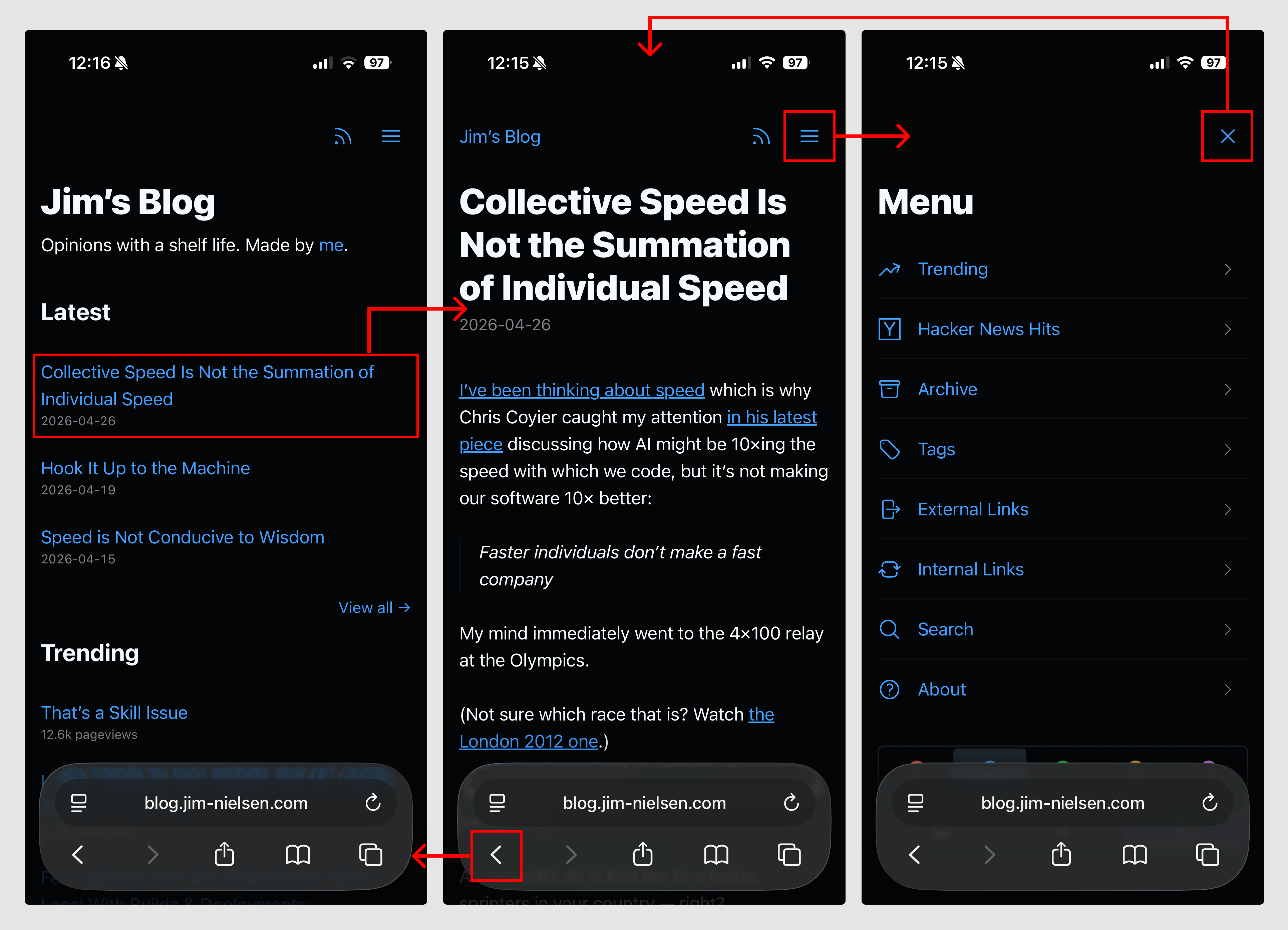
Screenshot of three mobile screenshots of blog.jim-nielsen.com with highlighted sections indicating where navigational clicks can happen and how they link between eachother.

As a simplified example, the code looks like this:

<!-- Normal page -->
<nav>
  <a href="/menu/">
    <svg>...</svg>
  </a>
</nav>

<!-- Menu page -->
<nav>
  <a href="/" onclick="document.referrer ? history.back() : window.location.href = '/'; return false;">
    <svg>...</svg>
  </a>
</nav>

The document.referrer checks whether we came to this page as a navigation (mostly likely from within the blog itself) or via a direct visit (i.e. somebody typed it into the URL bar, unlikely but possible) which is how I suss out whether there’s a meaningful history.back() run or not.

Here’s a video of how it all works, if that’s your thing:

While this solution seems simplistic, it was not a simple thing to arrive at. It required me to spend time thinking about what was essential to navigation, how that interaction could work across multiple pages, and how I could ensure page size stayed small so the interaction was both fast and robust while remaining intuitive to use.

In other words, the approach shaped the design.

Turns out, if you have a website and you think of the browser as a way to navigate documents — rather than a runtime to execute arbitrary code and fetch, compile, and present them — things can be a lot simpler than our tools often prime us to make them.