whoami
I’m a ICT engineer and have been working for 4 years at a nice small biopharma company in Switzerland with lots of really smart people, and most importantly, an awesome IT team :). I’m passionate about software engineering and cybersecurity.
The problem
At the end of 2023, our backup system detected that there was an issue with one of our servers. The result of that was that the backup couldn’t be completed. The role of that server was to host a MS SQL Database that retrieves and stores data from desktop clients across our labs that are used to control complicated instruments which run complex analyses that are not relevant for us cool kids. An important thing to note here also is that this server has a short downtime acceptance, because if the desktop client cannot send the results to the database server after a run, all the data is lost (maybe a bad software design, I don’t know…) and because we are talking about cells and biology stuff, each run counts.
After opening the EventViewer in Windows, those were the errors
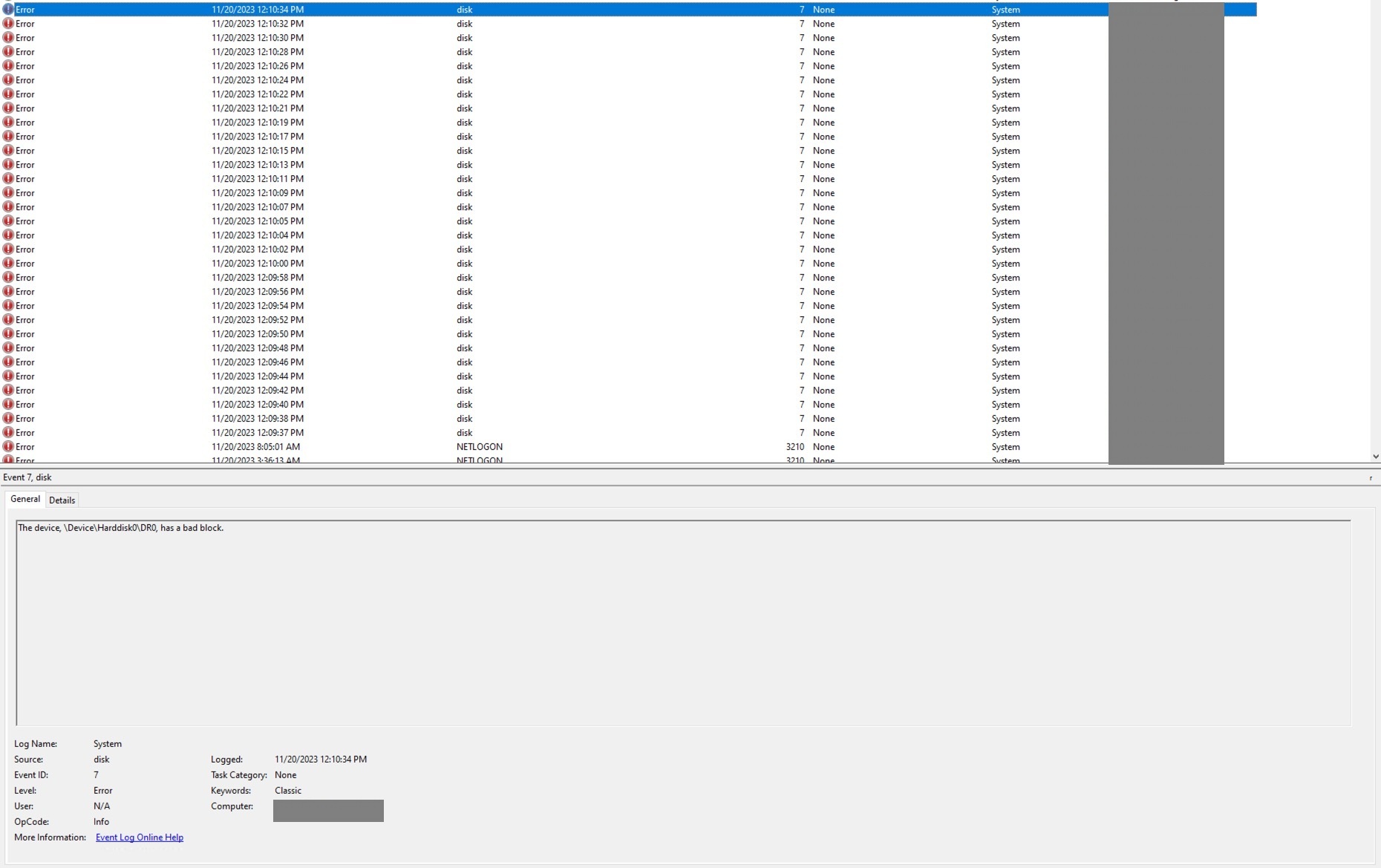
As a quick fix, we started using MS SQL backup system to dump the database (don’t judge, sometimes there’s just too many things to do), it worked for while but after a while, a user told the team that some analyses were not accessible anymore.

So hard drive has a bad block, pretty scary, but to fix things, it is often useful to know what broke it.
Investigation
Lead 1 - EDR (it’s always the AV fault right ?)
Because we had just finished the configuration and the deployment of our new Endpoint Detection and Response (EDR) system a week before. I jumped to the conclusion that the problem was probably due to the EDR agent analyzing / disturbing too much the backup process when the agent tried to make a it. So the pretty straightforward thing to do was to disable the agent and try to do backup, right? guess what, it didn’t work! Then I thought ok, uninstall completely the EDR agent, also didn’t work. At that moment, I realized I was up for a ride.
Lead 2 - VSS
After deep diving into a ton of error codes and logs, I identified that the problem was coming from a Volume Shadow Copy Service (VSS) provider not being able to read a snapshot. and oh boy! Every red flag should have started waving as soon as I read “not being able to read”.
So for those who aren’t familiar with VSS, it’s basically Windows offering you to manage exactly how a snapshot of disk volume that you want to backup is done. Here is Microsoft’s diagram that shows the architecture.
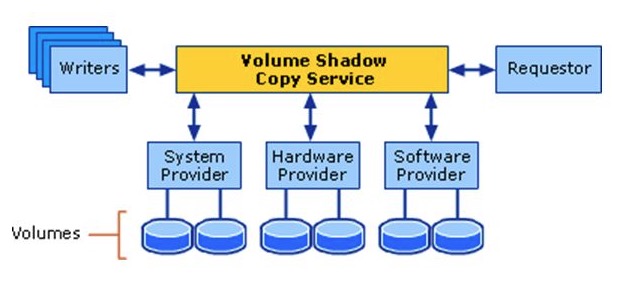
My conclusion then was that one of the “backup” volumes couldn’t be read by our backup software which is Active Business backup from synology.
So I thought, maybe it is just the backup that is corrupted. I should stop the backup service, delete the VSS volume copy and try again to backup, but this didn’t work either.
Lead 3 - Please Windows save me for once
By this point, the backup software was innocent, the VSS configuration was clean, and yet snapshots still wouldn’t work. VSS relies on a bunch of Windows components under the hood, so my next thought was: what if Windows itself is the problem? Maybe one of the system files VSS depends on was corrupted, and that’s why nothing I did at the application layer made a difference.
From my past experiences, when you suspect something is wrong with Windows you run this command and it will try to repair it
dism /Online /Cleanup-Image /RestoreHealth
You can also run the command below to scan for corrupted files
sfc /scannow
Ok so we tried, it detected indeed that something was wrong but couldn’t repair it.
Lead 4 - The shady SQL Patch
I then took a step back to enumerate what changed in this server the last months. That’s when I remembered that a technician came for a maintenance and ran a SQL script to “Patch” the database for a new version of their client application.
Cross-referencing dates, the patch lined up suspiciously well with when the issues started. My theory at the time was that calls colliding with the DROP/CREATE had somehow triggered the corruption. In hindsight, that’s not really how SQL Server corrupts pages, T-SQL can’t write bad sectors directly. But the timing was real. The patch was probably heavy I/O on audit pages that hadn’t been touched in a long time, and that’s what exposed sectors whose magnetic signal had already weakened. The disk was dying. The patch just made it impossible to ignore.
Resolution
Now that we established what caused the issue we knew that we would need to run an offline tool to try to repair the corrupted page in the disk.
We also thought that it would be a good idea to replace this disk. So we contacted the hardware vendor for this server, which is Dell, explain the situation and they said : “ok cool, we can send you a new hard drive but we cannot help more :)”, even though the server was still under warranty. I wasn’t expecting that, but oh well.
The idea was then to try to repair the bad sectors that the database broke while writing the page and then move everything to the new disk.
That was also the time where I lost all hope in recovering any data from this disk.
We tried anyway a few software and even paid for those below.
EaseUS
The famous EaseUS, Even the paid version couldn’t repair them. We bought it so you don’t have to :).
HDD Regenerator (Dmitriy Primochenko)
After searching for a while, we came across HDD Regenerator, which claims it can recover data from bad sectors on magnetic disks using a special algorithm. We gave it a try, even though the website looks like a huge scam, because we had nothing left to lose. And it worked.
I couldn’t understand how. Bad sectors are either physically damaged or contain data that no longer reads back correctly. How can software repair a hardware issue? It felt like “downloading more RAM.” After some more research, I found that others had the same question, and the consensus was this: the software doesn’t physically repair the platter. What it actually does is repeatedly read and rewrite the sector with specific magnetic patterns. Many “bad” sectors aren’t physically destroyed, they’re weakly magnetized, meaning the signal has decayed to the point where the drive’s error correction can no longer recover the data reliably. Rewriting the sector with a strong, clean signal can restore it to a readable state. If the sector is truly physically damaged, the drive’s firmware will eventually remap it to a spare sector from its reserve pool, and the OS sees a healthy sector again.
So how were we able to recover the database and the data inside it? Most of the data was probably still intact, only a few sectors were unreadable. Once those were either restored (rewritten with a strong signal) or remapped by the drive’s firmware, the filesystem and the database engine could read the file end-to-end again. SQL Server pages also have checksums, so if any page came back wrong rather than unreadable, we’d have known. We got lucky: the corruption was at the magnetic-signal level, not at the “platter is scratched” level.
Conclusion
This disk was probably dying. I did some research, and a RAID wouldn’t have saved it either, RAID protects against drive failure, not against silent page corruption that gets faithfully replicated to every mirror. The SQL patch was likely heavy in I/O operations on audit pages that hadn’t been touched in a long time, and that’s what surfaced sectors whose magnetic signal had quietly decayed. What did I learn? A few things:
- Backups are not enough. You need to know your backups actually restore, and you need to verify the data they restore is good. We were lucky.
- When a vendor technician runs a “small patch” on a production database, treat it as a real change: backup before, monitor during, verify after.
- Dell’s enterprise support will happily ship you a new drive and wish you good luck. Data recovery is on you.
- And finally: stay curious. Half of fixing this was being willing to keep digging when every lead turned into a dead end, and being open to a sketchy-looking $90 tool that turned out to actually work.
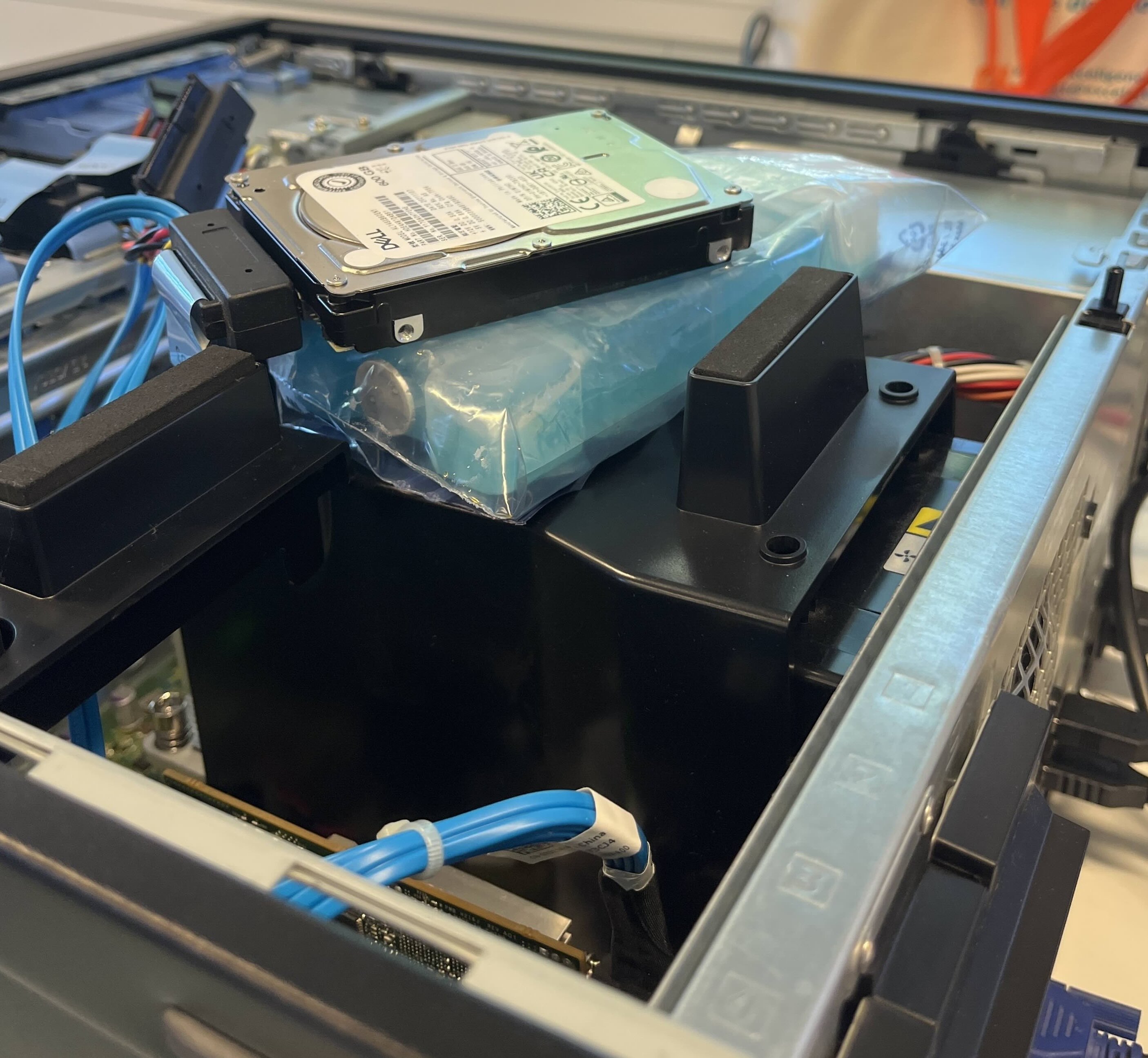
Side note: we had to take out the disk from the server and connect it to another computer with another OS running, because it had special SATA interface below is a picture of the cooling setup while it was recovering the bad sectors.