









Written by Mohamed Habib ·
We started OpenComputer with a single virtual machine in one Azure region. The company grew quickly, but Azure couldn't raise our compute quota in that region any further, and we found ourselves growing against a fixed pool of CPUs.
So we had to find another way to scale.
This post covers what we did to reach a point where we can keep adding capacity more or less indefinitely. We'll go through how we split the system into cells, how a global registry at the edge decides where every sandbox lives, and how four cloud providers add up to a million CPUs.
Our entire capacity lived inside one Azure region's quota
Sandboxes are full VMs, VMs need physical hardware, and cloud providers ration that hardware per region. Our problem started with the rationing, so it helps to spell out how it works first.
Behind cloud quotas
Every cloud provider bounds you by regional capacity, which is basically where the physical data center exists with finite hardware and a long queue of customers who want it.
So providers hand out capacity as a quota, measured in total CPU count. Quotas start small and grow only after you build usage history. The working protocol is to run your existing allocation at around 50% utilization for a week or two, request an increase, and let the usage data justify it. Request 10,000 CPUs on day one and the answer is no.
We hit the 300-CPU ceiling early
Our first region was Azure US East 2, with a starting quota of about 300 CPUs. The plan was to consume it and request more, the way the ladder normally works.
But unfortunately we had picked one of the busiest data centers in the world, and 300 CPUs was the ceiling there regardless of our usage history. Meanwhile new users were signing up against a fixed pool of compute.
Why migrating to another region wouldn't have fixed the scale issue
The obvious move was relocating to a quieter region or a different cloud and collecting a bigger quota there. We also held Azure credits we wanted to use. But the deeper problem is that migrating regions or cloud providers only resets the clock.
Every region has an upper limit, providers raise it gradually, but a single-region architecture scaling fast enough will hit the ceiling at some point.
On top of that, sandbox demand at 10K, 100K, or 1M concurrent VMs can't physically be served from one data center. We needed to rethink the architecture so that adding a region of any cloud is a deployment step rather than a migration project. And we had to take our existing architecture apart to make that happen.
Starting with a single control plane
Our first version of OpenComputer was a single VM handling everything with a control plane.
The second version is where we scaled to multiple VMs in one region, coordinated by one control plane that did everything: the web UI, the dashboard, billing logic, and the actual orchestration of VMs, all in one place.
That design served roughly a thousand sandboxes comfortably. It assumed all compute lived in one region, and the component that orchestrates VMs can also be the component that runs the product around them. We had to split those two jobs apart.
Cells made capacity a deployable unit
We started with cutting the control plane down to a single job (orchestrating VMs), and we packaged it with the workers it manages into a unit that deploys into any cloud region. That unit is a "cell."
The control plane shrinks to one job
The redesign stripped the control plane down to the lifecycle of VMs in its own region:
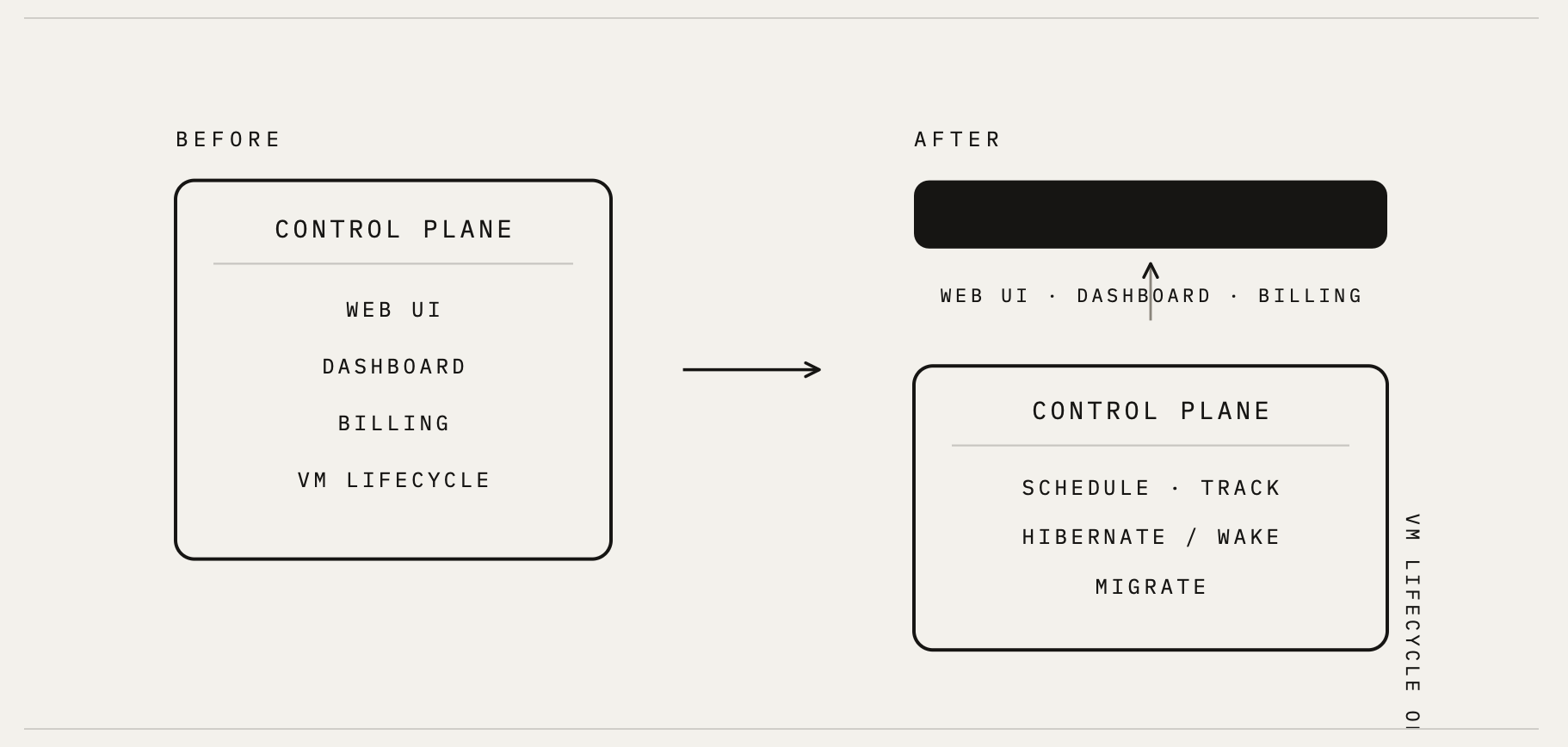
- Schedule a requested sandbox onto a specific worker.
- Track where every VM lives and what state it's in.
- Hibernate idle VMs to S3-backed storage and wake them on demand.
- Migrate a VM from one worker to another when a rebalance calls for it.
Components inside a cell know about each other and about nothing outside the cell. The dashboard, billing logic, and everything user-facing moved out of the cell entirely.
A cell is the smallest unit of failure isolation, and its identifier encodes everything about what server region it lives in. Each cell owns 5 to 10 workers running QEMU VMs.
VM placement is more than picking the least-loaded worker
When a create request is sent with memory, CPU, disk, and a template, the control plane could pick a specific worker based on certain criteria. A simplistic control plane would look for the least-loaded worker and spawn a VM there.
A good control plane should weigh:
- Resource fit so fragmentation doesn't kill capacity
- Template warmth (a worker already holding a warm golden snapshot creates in about 200ms where a cold one takes seconds)
- Hardware differences like ARM against amd64
- Soft affinity that keeps an org's sandboxes near their caches
- Anti-affinity that keeps paid workloads away from noisy free-tier neighbors
The same cell deploys into any cloud
A cell makes no assumptions about which provider it runs on. The worker shape we use has an equivalent instance type in AWS, Azure, GCP, and OCI, so the same cell deploys into any of them unchanged.
With this, capacity stopped being "our Azure quota" and became "the sum of every cell we've deployed."
A global registry at the edge routes every sandbox
With multiple independent cells, something has to answer which cell gets the sandbox. That job sits outside every cell, at the edge.
How a create request finds its cell
The edge layer is a set of Cloudflare Workers, with a D1 database holding the global registry and Durable Objects receiving the event stream coming back from the cells.
That registry knows every cell that exists, where it runs, and how much free capacity it holds. We think of it as a control plane of control planes.
A create request lands at the nearest edge location, the Worker picks the emptiest cell, and that cell's control plane owns the sandbox from there.
Only creates cost time at the edge
A create is rare and expensive anyway, so spending an extra 50 to 100ms at the edge on auth, credit checks, and cell selection is a fine trade.
Everything frequent (exec, file reads and writes, PTY traffic, destroy) goes straight to the cell's control plane over a connection authenticated by a signed JWT, with zero synchronous Cloudflare lookups in the path.
The edge decides where a sandbox is born, and after that the cell serves it directly.
Why Cloudflare Workers and D1 database carry this layer
The registry's workload is small and read-heavy: a row per cell, capacity counters, lifecycle state.
The D1 database is enough for that, and running the lookup at the edge means the routing decision happens close to the user with no round-trip to a home region.
The rest of the global state lives in the same stack. KV holds sessions and event dedup keys, R2 archives the raw event stream, and Durable Objects hold the per-org credit accounting and the per-sandbox routing state.
Heartbeats keep the registry and the billing current
Routing is the downstream half of the edge. The upstream half is the event stream flowing from every running VM back through Durable Objects and into the registry.
Per-second billing from 10-second heartbeats
The most important event in that stream is the heartbeat.
Every running VM reports "still alive" every 10 seconds, and we aggregate those ticks into billing, which is how we charge for each second a sandbox actually runs.
State changes are pushed to the registry instead of waiting for a poll
The same stream also carries lifecycle events. For instance, a VM hibernates, gets stopped, or migrates, and the registry is updated with a push so the next routing decision works from current capacity.
Inside a cell, workers publish events onto Redis Streams, and a forwarder batches them over HTTPS to a Cloudflare ingest Worker, which authenticates each batch with an HMAC, deduplicates on event IDs in KV, and fans out to the registry and the billing objects. Events are idempotent by design, and when Cloudflare is unreachable they buffer in Redis until the link comes back, so a cell never loses billing ticks to a network blip.
The registry is only as good as the events feeding it, and a stale registry keeps routing new sandboxes into a cell that's already full. That's the reason state changes push the moment they happen rather than waiting on a poll.
Boot, hibernate, and wake latencies in production
The cell design only matters if the VMs inside it are fast. And much of our engineering and tuning effort has gone into lifecycle latency. Our hypervisor is QEMU. While a stock QEMU cold boot takes around 30 seconds, we've brought sandbox boot under 1 second at p95.
Hibernation creates a VM checkpoint in S3-backed storage and the process completes in about 6 seconds in the typical successful case. Waking the hibernated sandbox averages 1 to 2 seconds, and the speed depends on whether the checkpoint is still warm on the worker or has to be pulled back from S3.
Where we are today in terms of scaling
We were initially stuck at 300 CPUs because our whole system depended on a single region of a single cloud provider. Now the unit of deployment is a cell that owns its own VM lifecycle, and a region holds as many cells as we choose to put there.
The edge registry routes every sandbox creation to whichever cell has room, and the heartbeat stream keeps billing honest at one-second granularity.
The product promise stays unchanged through all of it. You get a full Linux VM, scheduled close to you, billed for the seconds it actually runs.