







Dr. James Ries sees patients in 37 states. He never touches a stethoscope, never walks a hospital floor, and almost never types a full sentence into a chart.
His main clinical instrument is a Razer Naga V2 Pro. It’s the same mouse World of Warcraft raiders use to fire off 12 abilities without lifting their fingers from the buttons.
That sounds like a joke. It isn’t.
Dr. Ries is the founder of Twenty Mile Medical, a telehealth practice handling urgent care, mental health, and weight management visits across most of the country. He runs his entire clinical workflow through a setup that pairs an MMO gaming mouse with TextExpander Snippets, and he says it’s the single most important tool in his practice.
We had Dr. Ries on a recent webinar to explain the setup. What we expected to be a conversation about clinical documentation turned into something stranger and more useful: One of the most interesting productivity workflows we’ve seen anyone build on top of TextExpander, and a set of principles that work just as well for a customer support team or a law firm as they do for a telehealth practice.
Telehealth has a quality-control problem that nobody talks about much. You hire good clinicians. You give them logins and patient queues. You assume the training they brought from prior practices is enough to deliver consistent care.
It isn’t.
“Every provider had their own version,” Dr.Ries told us. “Some are really meticulous, some are really fast, but they missed out on things. The patients themselves experience completely different interactions depending on who they saw.”
The drift wasn’t about clinical judgment, but about everything that surrounds the judgment: Documentation, patient communication, follow-up instructions, the empathetic phrasing that turns a transactional encounter into something resembling care. Discharge instructions going out at 8 am from a fresh provider look nothing like the ones going out at 4 pm from the same provider after eight hours of visits.
That’s a workflow problem, not a training problem.
Most TextExpander users build dozens of small Snippets, each tied to a specific phrase. You type ;sig and your signature appears. Type ;addr and your address fills in. Predictable, useful, and learnable in an afternoon.
Dr. Ries went the other direction.
He built what he calls monster Snippets. Each one is a single Snippet containing an entire clinical scenario with branching options inside it. One Snippet for sinus infections that covers the introduction, the assessment, prescription options, patient instructions, and follow-up plan. Another for psych refills. Another for general patient communication. Each is essentially a small interactive form that the provider walks through in seconds.
When he expands one, he gets a fill-in dialog with checkboxes, dropdown menus, and optional sections. He picks what applies, removes what doesn’t, and the Snippet generates a complete, clinically appropriate response. The whole thing takes about as long as a normal conversation, except every required element is there, every time.
One scenario. One Snippet. Everything inside it.
Watch Dr. Ries run a psych refill, l and you see why this matters. A returning patient, minimal improvement, looking to increase the dose. Some sexual side effects. Depression is controlled, but anxiety is still running high. He clicks through the built-in options, bumps the medication to 100 mg, and the entire note is ready: The assessment, the medication change, the check-in plan, the internal follow-up, the handouts, and the suicide resources.
Every required element is there because the Snippet carries them. “You’re not worn out,” he says, “because it remembers to send them everything.”
Not every Snippet is a monster. Dr. Ries keeps single-purpose buttons alongside the big ones: One for his signature, one for his intro. The branching Snippets handle whole clinical scenarios. The small ones handle the things he types constantly. Both live on the same mouse, a thumb-press away.
You can run monster Snippets from any keyboard. Dr. Ries could type abbreviations like everyone else. He doesn’t, and his reasoning is worth understanding even if you never buy a gaming mouse.
The Razer Naga V2 Pro has 12 programmable buttons on the side panel. Dr. Ries maps each button to a single character, typically one of the symbols above the number keys he doesn’t use in normal typing. Each symbol is the abbreviation for one of his monster Snippets.
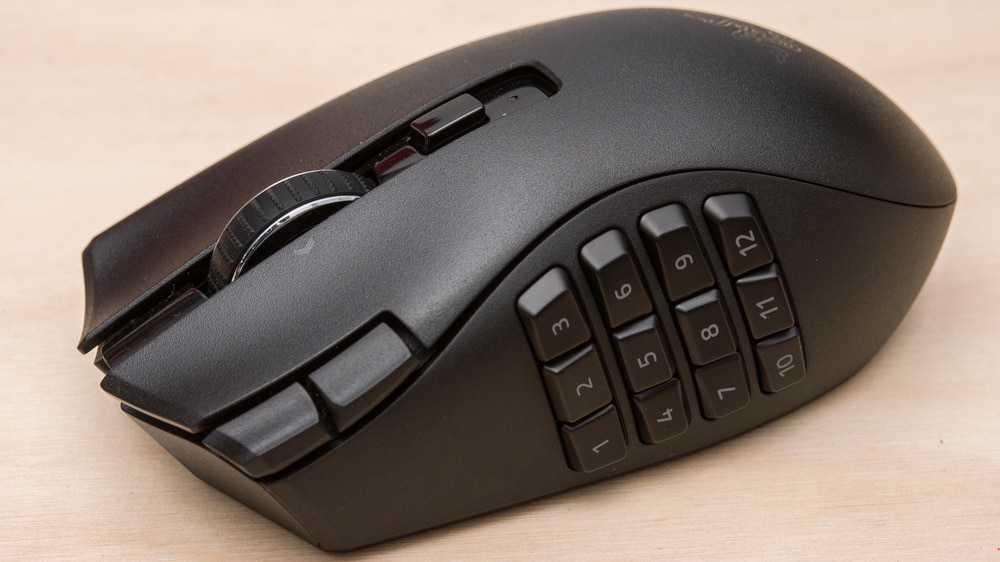
A press of his thumb fires the Snippet. That’s it.
“If you design a system where you’re not searching and you’re not typing,” Dr. Ries said, “you eliminate the cognitive load pretty significantly.”
The science backs him up. Research published in BMJ Open found that physicians make an average of 13.4 clinically relevant decisions per patient encounter, most of them tied to defining the problem, evaluating test results, and weighing drug therapies. Decision fatigue is well documented in clinical settings: Providers make worse calls later in the day, not because they’re bad clinicians but because every micro-decision burns a small amount of mental energy and the deficit accumulates over a shift.
Dr. Ries isn’t saving keystrokes so much as removing the small interruptions that come with picking the right Snippet, remembering the abbreviation, and typing it correctly. His thumb knows where the button is, so his mind stays on the patient.
His PAs don’t all use the gaming mouse. Some prefer a small shortcut remote, a wireless keypad with programmable keys, held in the off hand while the dominant hand stays on the regular mouse. Same principle, different hardware.
| Hardware | Best for | Tradeoff |
|---|---|---|
| MMO gaming mouse (12+ side buttons) | Solo operators, heavy daily use | Steep learning curve to memorize the button map |
| Wireless shortcut remote | Providers who want separation from the pointer | Adds a device, but with easier adoption |
| Stream Deck or similar | People who want visible labels | More desk space, less seamless than handheld |
A webinar attendee asked Dr. Ries specifically about the Stream Deck. He’d tested one, but found it too clunky. “You’re taking your hands off the mouse to do it. The mouse is very seamless, and I forget I’m even using it.”
Configuration is simpler than you’d think.
One thing worth knowing if you go this route: Avoid setting up macros that send long keystroke sequences from the mouse software. Map a single character and let TextExpander handle the rest. This keeps your Snippets editable from inside TextExpander where they belong, and the whole system stays portable if you ever switch mice.
Here’s where the conversation got interesting.
This is Dr. Ries on what actually drives mistakes in telehealth: “Most of the time it’s not the wrong diagnosis, it’s an omission error. The provider didn’t document a key piece of information, forgot to send the patient education, or didn’t include some critical follow-up instructions or discharge instructions.”
The errors don’t come from bad clinical reasoning. They come from a tired provider finishing their fortieth visit and forgetting one of the dozen small things that need to happen at the end of every encounter.
Monster Snippets fix this structurally. The follow-up instructions are in the Snippet. The interaction warning is in the Snippet. The screening question is in the Snippet. The provider can’t forget them because the system doesn’t let them.
Dr. Ries frames this as a clinical leadership responsibility, not an IT one. He builds and maintains the Snippet library himself. He reviews the language. He pushes updates when guidelines change. When a PA finds new empathetic phrasing that works well with patients, Dr. Ries tests it, validates it, and adds it to the shared library so every provider on the team benefits from that single discovery.
The lesson travels outside healthcare almost too easily. Any team with customer-facing communication has the same drift problem. Your morning support reply doesn’t look like your afternoon one. Your best closers’ emails don’t look like your newest hire’s. That variance isn’t a training issue; it’s a tooling issue. Standardize the floor, and the whole team improves without anyone losing their voice.
We didn’t expect this part.
Dr. Ries kept coming back to empathy. Telehealth, by its nature, strips out a lot of what makes in-person care feel like care. You can’t read body language as well. You can’t lean in. You can’t put a hand on a shoulder. The visit is shorter, more transactional, and more easily reduced to a checklist.
Ries’s argument is that monster Snippets give him time and energy back, which is what he spends on the part of the visit that actually matters. “I actually have done a lot of Snippets that are just based on one keystroke or one press,” he said. “The patient is more like having a conversation, but you’re able to get more information out quickly and empathetically.”
The Snippets also bank good empathetic language over time. When a particular phrasing of a difficult message lands well with a patient, Dr. Ries adds it to the library. Other providers benefit from the phrasing he found. New hires inherit eight years of accumulated bedside manner from day one.
That’s a remarkable thing for a tool to do.
Dr. Ries published his complete clinical Snippet group as a public group on TextExpander. It’s called the Telehealth Starter Pack, and it includes the monster Snippets he showed in the webinar: Patient communication templates, urgent care medication references, psych note structures, the works.
Add the Telehealth Starter Pack to your TextExpander account and start using it today. If you don’t have TextExpander yet, start a free trial, and the Snippet group will be waiting.
A reasonable starting workflow if you’re new to this approach:
You don’t need to convert your entire workflow on day one. Dr. Ries built his over eight years, one addition at a time. His rule is simple: When you find yourself typing the same thing repeatedly, add it to the monster Snippet and never type it again. The right first Snippet is the one you’ll use 10 times this week.
The full webinar with Dr. Ries is available on demand. He walks through specific monster Snippets and takes audience questions about hiring, training, and updating Snippet libraries as clinical guidelines change.
What we keep thinking about, days after the conversation: The gaming mouse is the hook, but it’s the last small optimization on top of a workflow that was already excellent. The real work lives in the Snippets themselves:
Anyone who builds processes for other people to follow should be paying attention.
此内容由惯性聚合(RSS阅读器)自动聚合整理,仅供阅读参考。 原文来自 — 版权归原作者所有。