


Every spring, my council publish a new bin collection calendar. These calendars are typically published as a single PDF to cover the entire region, with the information packed into a compact design. I imagine this design is for economy of printing – you can print one calendar in bulk, and post the same thing to everybody.
Here’s an example of this sort of compact diagram from South Cambridge, where breaks the county into four different regions:
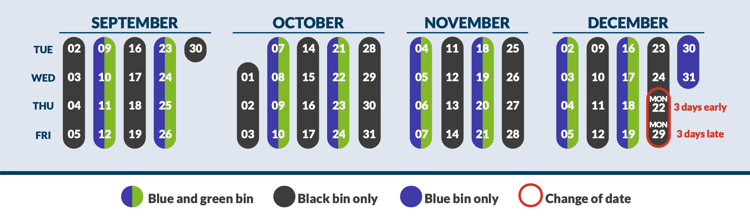
For example, if your usual bin day is Thursday, your final collection of the year would be on Monday 22nd December.
This compact representation is a marvel of design, but it’s not that useful for me, a person who only lives in a single house. I only care about bin day on my street, not across the county.
For several years now, I’ve created a personalised calendar which shows when my bins will be collected, which gets printed and stuck it on my fridge. It’s a manual process, but a small amount of effort now pays off across the year.
I start by generating an HTML calendar using Python. There’s a built-in calendar module, which lets you output calendars in different formats. It doesn’t embed individual date information in the <td> cells, so I customise the HTMLCalendar class to write the date as an id attribute.
Here’s my script, which generates a calendar from April 2026 to March 2027:
from calendar import HTMLCalendar
from datetime import date
class PerDateCalendar(HTMLCalendar):
"""
A customised HTML calendar that adds an `id` attribute to every day
(for example, `d-2026-03-27`) and uses single-letter abbrevations for
days of the week (M, Tu, W, …).
"""
def formatday(self, day: int, weekday: int) -> str:
"""
Returns a table cell representing a single day, or an empty cell
if this is a blank space in the calendar.
"""
if day == 0:
return f'<td class="{self.cssclass_noday}"> </td>'
else:
current_date = date(self.current_year, self.current_month, day)
date_string = current_date.strftime("%Y-%m-%d")
return f'<td id="d-{date_string}">{day}</td>'
def formatmonth(self, year: int, month: int, withyear=True) -> str:
"""
Returns a table representing a month's calendar.
"""
# Store the current month/year so they're visible to formatday()
self.current_year = year
self.current_month = month
return super().formatmonth(year, month, withyear)
def formatweekday(self, day: int) -> str:
"""
Returns a table header cell representing the name of a single weekday.
"""
custom_names = ["M", "Tu", "W", "Th", "F", "Sa", "Su"]
return f"<th>{custom_names[day]}</th>"
if __name__ == "__main__":
cal = PerDateCalendar()
start_year, start_month = 2026, 4
end_year, end_month = 2027, 3
full_calendar_html = (
"<html>"
'<head><link href="style.css" rel="stylesheet"></head>'
'<body><div id="grid">'
)
current_year, current_month = start_year, start_month
while (current_year < end_year) or (
current_year == end_year and current_month <= end_month
):
month_html = cal.formatmonth(current_year, current_month)
full_calendar_html += month_html
if current_month == 12:
current_month = 1
current_year += 1
else:
current_month += 1
full_calendar_html += "</div></body></html>"
with open("bin_calendar.html", "w") as f:
f.write(full_calendar_html)This writes a calendar to an HTML file, where each month is a table, and each day is an individually identifiable cell. Here’s a sample of the output:
<table border="0" cellpadding="0" cellspacing="0" class="month">
<tr>
<th colspan="7" class="month">April 2026</th>
</tr>
<tr>
<th>M</th>
<th>Tu</th>
<th>W</th>
<th>Th</th>
<th>F</th>
<th>Sa</th>
<th>Su</th>
</tr>
<tr>
<td class="noday"> </td>
<td class="noday"> </td>
<td id="d-2026-04-01">1</td>
<td id="d-2026-04-02">2</td>
<td id="d-2026-04-03">3</td>
<td id="d-2026-04-04">4</td>
<td id="d-2026-04-05">5</td>
</tr>The HTML references an external stylesheet style.css, which contains some basic styles that turn the calendar into a three-column view:
#grid {
  display: grid;
  grid-template-columns: repeat(3, 1fr);
  gap: 3em;
  width: 600px;
  margin: 0 auto;
  font-family: Helvetica;
}

th {
  padding-bottom: 5px;
}

td {
  font-size:   0.9em;
  line-height: 1.4em;
  text-align: center;
}
Then I can highlight the individual days for my bin collections, by targeting the <td> cells for each day using the id I created:
#d-2026-04-03,
#d-2026-04-24 {
  font-size: 1.1em;
  font-weight: bold;
  background: black;
  color: white;

  border-bottom: 1px solid white;
  border-top:    1px solid white;
}

#d-2026-04-10,
#d-2026-04-24 {
  font-size: 1.1em;
  font-weight: bold;
  background: green;
  color: white;

  border-bottom: 1px solid white;
  border-top:    1px solid white;
}
It takes less than five minutes for me to transcribe all my bin dates to the calendar by hand, and this is what the result looks like:
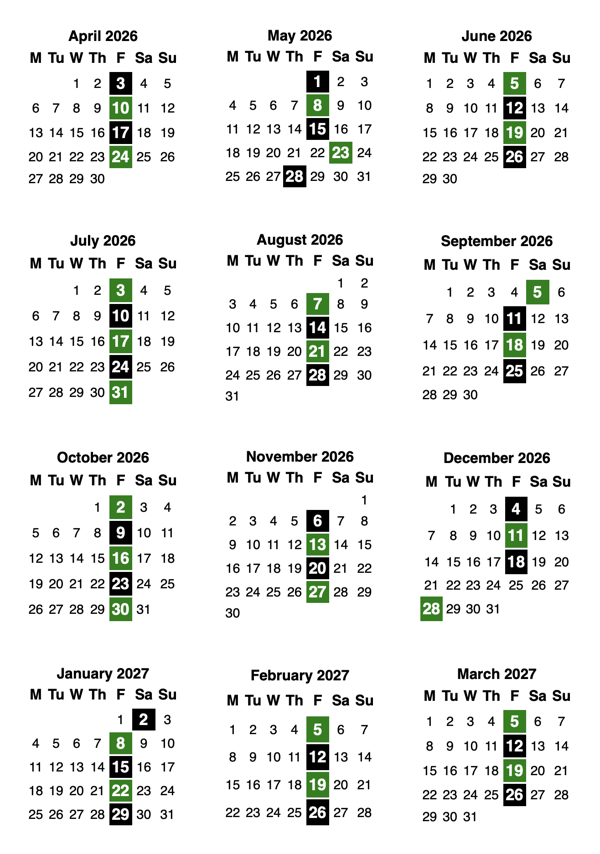
That fits nicely on a single sheet of paper, so I print it and stick it on my fridge. It’s easy to see when I have an off-cycle bin day, or when my next collection is going to be.
I often use this to know if I can skip a collection. I live on my own and I only generate a small amount of waste, so my bins are rarely more than half-full. I don’t think it’s worth putting out a half-empty bin, but I’ll do it anyway if I can see I’ll be away for the next few collections.