

惯性聚合 高效追踪和阅读你感兴趣的博客、新闻、科技资讯
阅读原文 在惯性聚合中打开

推荐订阅源

酷 壳 – CoolShell
酷 壳 – CoolShell
T
Threatpost
Latest news
Latest news
N
News | PayPal Newsroom
Threat Intelligence Blog | Flashpoint
Help Net Security
Help Net Security
D
Darknet – Hacking Tools, Hacker News & Cyber Security
AI
AI
Simon Willison's Weblog
TaoSecurity Blog
TaoSecurity Blog
The Last Watchdog
The Last Watchdog
L
LINUX DO - 热门话题
Google DeepMind News
T
Threat Research - Cisco Blogs
O
OpenAI News
钛媒体:引领未来商业与生活新知
钛媒体:引领未来商业与生活新知
T
The Exploit Database - CXSecurity.com
NISL@THU
NISL@THU
Application and Cybersecurity Blog
S
Securelist
小众软件
小众软件
cs.CL updates on arXiv.org
Martin Fowler
Martin Fowler
S
SegmentFault 最新的问题
Cisco Talos Blog
Cisco Talos Blog
云风的 BLOG
云风的 BLOG
AWS News Blog
AWS News Blog
GbyAI
GbyAI
N
News and Events Feed by Topic
cs.CV updates on arXiv.org
美团技术团队
Engineering at Meta
Engineering at Meta
A
About on SuperTechFans
博客园 - 三生石上(FineUI控件)
S
Schneier on Security
博客园 - 聂微东
V2EX - 技术
V2EX - 技术
T
Troy Hunt's Blog
SecWiki News
SecWiki News
S
Secure Thoughts
B
Blog RSS Feed
Hugging Face - Blog
Hugging Face - Blog
WordPress大学
WordPress大学
腾讯CDC
H
Heimdal Security Blog
Exploit-DB.com RSS Feed
Apple Machine Learning Research
月光博客
月光博客
www.infosecurity-magazine.com
P
Privacy International News Feed

喵喵主题社区

CarrotAdmin 使用手册&相关截图 OrangeAdmin 使用手册&相关截图 Mgame插件使用说明 Mbili插件使用说明 💥MyLife2_见问题说明(Q/A) 💥Sunny3!常见问题说明(Q/A) Sunny3.12!微信发送说说内容时选择分类和添加标签 Sunny3.11!微信/浏览器插件发送说说内容时添加标题 Sunny3.8!AI摘要使用
💥Tulip_常见问题说明(Q/A)
喵喵 · 2026-05-03 · via 喵喵主题社区

主题无法激活,或者激活失败,或者显示激活成功,但是无法进入设置:

  1. 确保网站根目录有755权限。
  2. 确保主页可以正常访问。
  3. 问喵喵。

主题设置中,新增加的复选框无法保存;或当更新主题之后,或从其他主题切换到本主题时,如遇到in_array(): Argument #2 ($haystack) must be of type array, null given报错,或者in_array() expects parameter 2 to be array, null given in报错

错误示例:
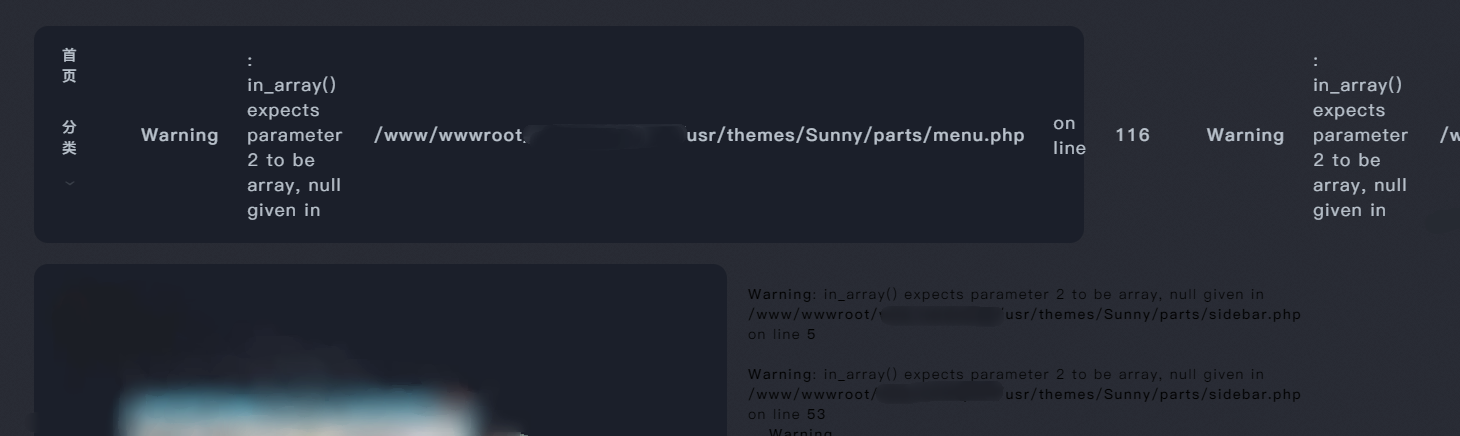
image.png

此原因为typecho1.2.1的bug,喵喵发现已经在typecho1.3.0中解决,可以使用1.3.0正式版。

typecho1.2.1手动修复方法:

  1. https://github.com/typecho/typecho/pull/1591/files/98e2011927f0c7253412abce0248c9ea2f9a7db0
  2. 看不懂的,就是删掉红的,新增绿的,然后左侧行号一致就行了,文件位置图片里也有。
  3. 记得修改完成之后进主题设置(https://博客域名/admin/options-theme.php)保存一下。
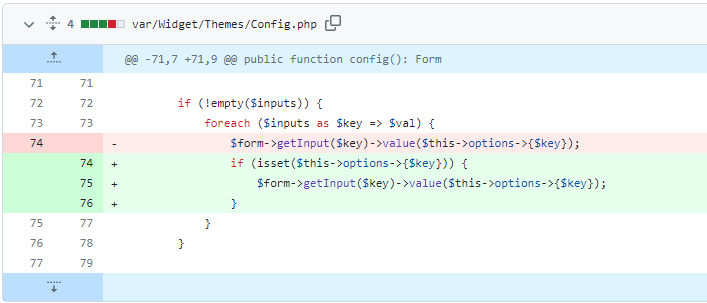
image.png♾️ PHP 代码:
if (isset($this->options->{$key})) {
  $form->getInput($key)->value($this->options->{$key});
}

头像不显示?或者加载很慢?

在网站根目录中的config.inc.php文件中添加一行

♾️ PHP 代码:
define('__TYPECHO_GRAVATAR_PREFIX__', 'https://cn.cravatar.com/avatar/');

当然这里可以自定义为其他的头像源