惯性聚合 高效追踪和阅读你感兴趣的博客、新闻、科技资讯
阅读原文 在惯性聚合中打开

推荐订阅源

Cloudbric
Cloudbric
E
Exploit-DB.com RSS Feed
SecWiki News
SecWiki News
Forbes - Security
Forbes - Security
N
News | PayPal Newsroom
S
Security @ Cisco Blogs
Schneier on Security
V
V2EX - 技术
S
Secure Thoughts
W
WeLiveSecurity
Google DeepMind News
C
CERT Recently Published Vulnerability Notes
NISL@THU
NISL@THU
S
Securelist
S
Security Archives - TechRepublic
Know Your Adversary
Know Your Adversary
V
Vulnerabilities – Threatpost
Security Latest
Security Latest
Recent Commits to openclaw:main
G
GRAHAM CLULEY
H
Hacker News: Front Page
Microsoft Azure Blog
I
Intezer
Google Online Security Blog
美团技术团队
阮一峰的网络日志
阮一峰的网络日志
T
The Exploit Database - CXSecurity.com
钛媒体:引领未来商业与生活新知
钛媒体:引领未来商业与生活新知
Webroot Blog
Webroot Blog
Jina AI
Jina AI
Engineering at Meta
Engineering at Meta
P
Proofpoint News Feed
The Cloudflare Blog
I
InfoQ
L
LangChain Blog
U
Unit 42
P
Proofpoint News Feed
S
Schneier on Security
S
Security Affairs
Y
Y Combinator Blog
T
Tenable Blog
N
News and Events Feed by Topic
MyScale Blog
MyScale Blog
量子位
Google DeepMind News
Cyberwarzone
Cyberwarzone
博客园 - 聂微东
D
Darknet – Hacking Tools, Hacker News & Cyber Security
GbyAI
GbyAI
AWS News Blog
AWS News Blog

喵喵主题社区

CarrotAdmin 使用手册&相关截图 OrangeAdmin 使用手册&相关截图 Mbili插件使用说明 💥Tulip_常见问题说明(Q/A) 💥MyLife2_见问题说明(Q/A) 💥Sunny3!常见问题说明(Q/A) Sunny3.12!微信发送说说内容时选择分类和添加标签 Sunny3.11!微信/浏览器插件发送说说内容时添加标题 Sunny3.8!AI摘要使用
Mgame插件使用说明
喵喵 · 2026-05-03 · via 喵喵主题社区

注意事项及版权声明

  1. 本插件基于小黑盒API以及STEAM API的信息生成,若其更改了信息策略,则可能无法获取任何信息内容,影响插件的正常使用。
  2. 本插件仅供购买者个人使用,严禁分享传播给他人。
  3. 因steam被墙的原因,部分情况下可能会无法显示、获取图片封面在内的信息。
  4. 首次访问steam个人游戏库页面会比较慢(缓存过期之后重新缓存也是),会在网站根目录下生成Mgame_steam.html文件。删除后重新访问可手动重新缓存。默认缓存有效期为三天。

本插件有两种功能(截图使用joe主题参考效果):

  1. 文章内添加指定游戏ID的游戏封面卡片,生成包含标题、封面、开发商以及简介在内的信息。
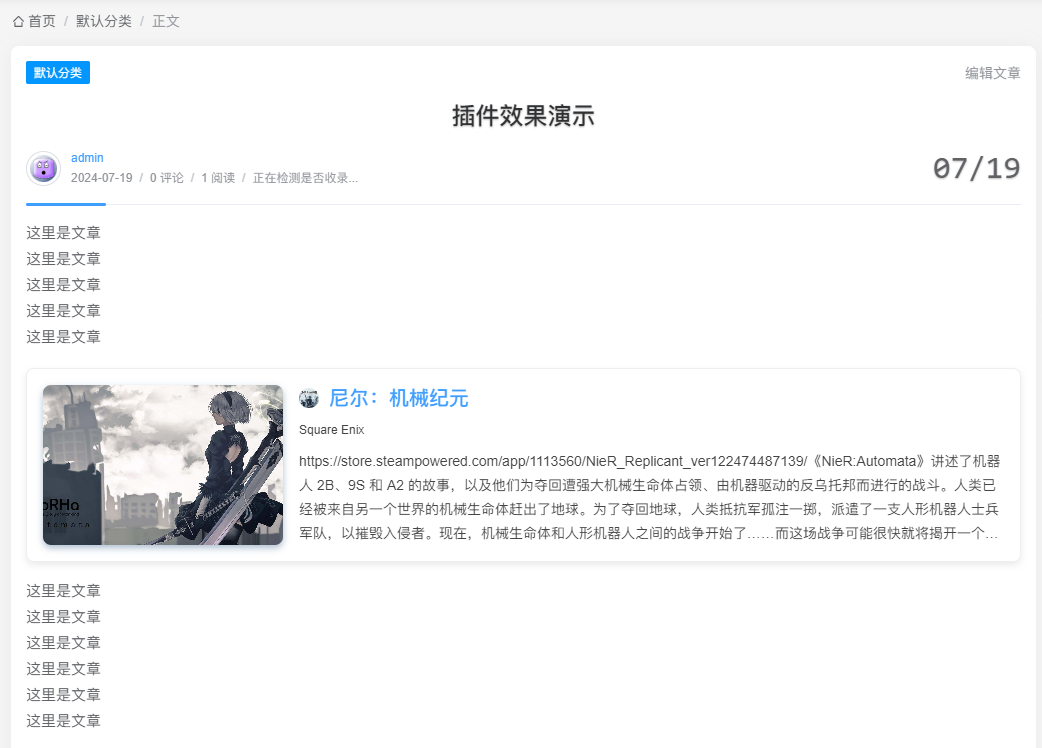
image.png♾️ text 代码:
后台编辑器内短代码演示:
image.png
  1. 输入自己的SteamID以及授权域名的steam apikey,生成自己的steam游戏展示模板,包含个人信息卡片(姓名、头像、等级、库存、常玩的游戏库以及相应的游玩时长),按照时长排列,可选封面图和海报图。可以放在文章、页面的任意位置。
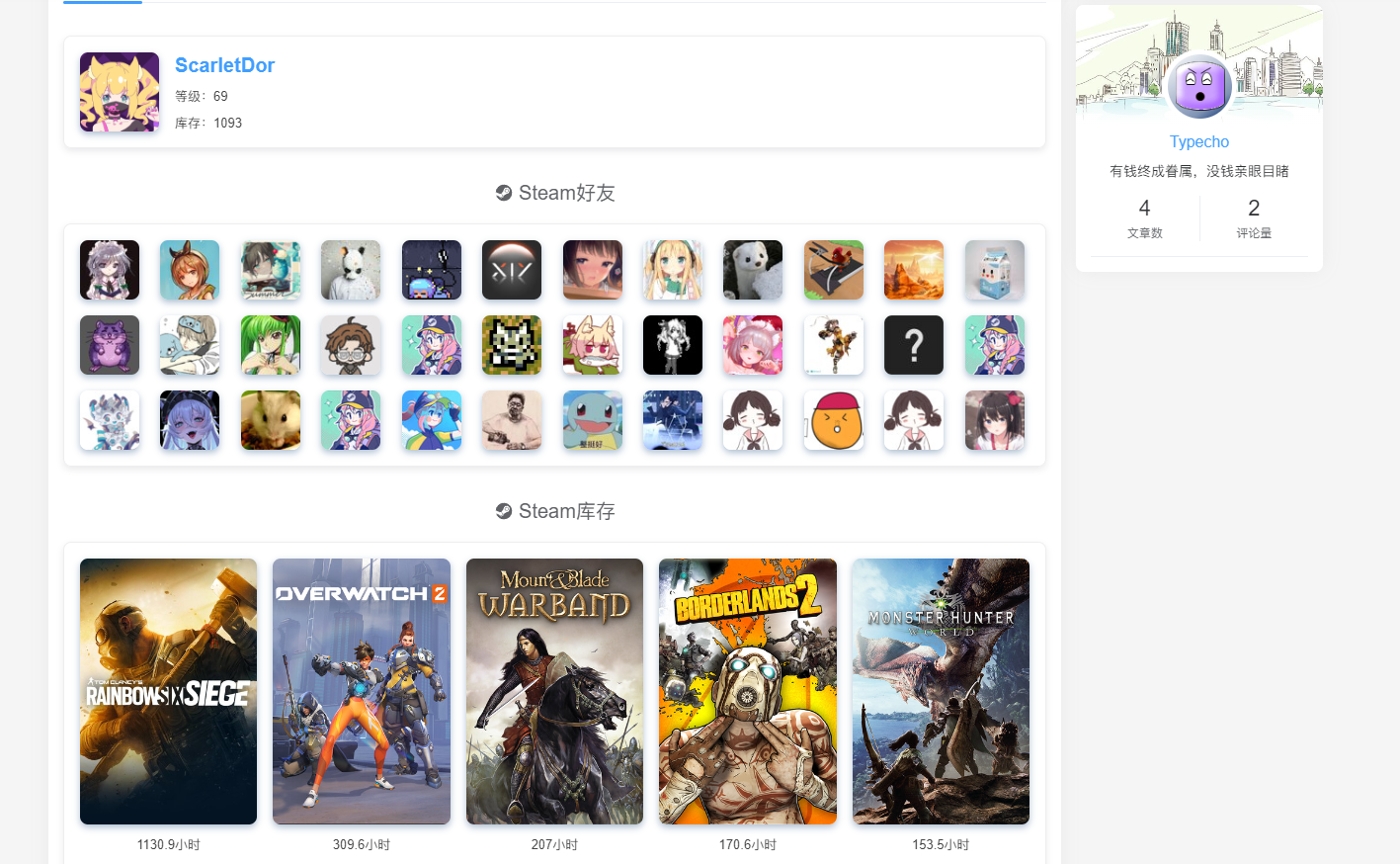
image.png

#### 获取SteamID以及Steam API key

请在【此处】查询SteamID,在【此处】申请steam密钥,因steam被墙,使用此功能可能会使页面访问迟缓

短代码说明

  1. 游戏封面卡片,格式为{Mgame APPID}

    示例:{Mgame 730}

  2. steam游戏展示模板,固定格式为{{Mgame}}

附:游戏Appid获取

本插件使用了小黑盒API,支持steam游戏的appid以及小黑盒的游戏id

如果为steam游戏,此处请填写steam游戏的Appid。可在SteamDB查询游戏的Appid。若为其他平台游戏,可以输入小黑盒游戏的Appid。

小黑盒游戏的Appid获取方法:请搭配使用小黑盒APP,在游戏详情页面分享,在浏览器中打开可获取到分享链接,其中链接红框处即为游戏的Appid。
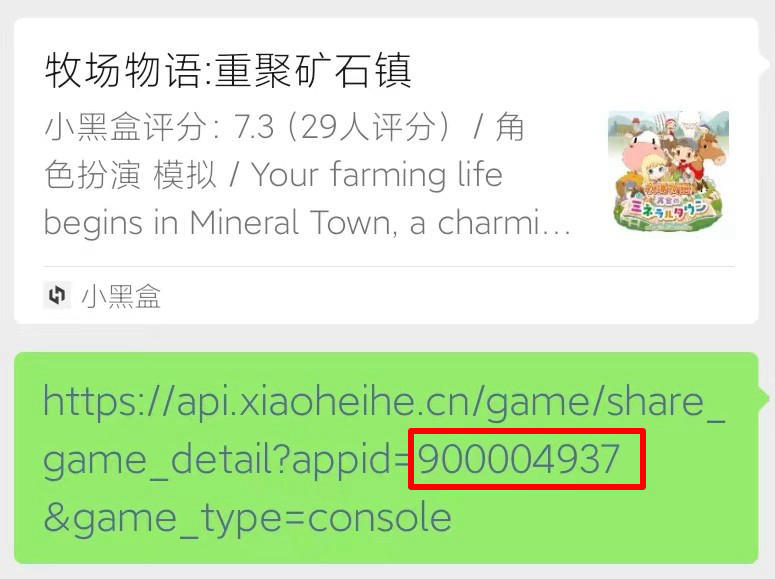
image.png