









There are several tactics that threat actors can use to access cloud environments, services, and data. A common example is lateral movement, which involves techniques that enable a threat actor to pivot from one host to the next within an environment. This type of activity often uses other tactics, such as initial access and privilege escalation, as part of a larger attack flow.
As an example, a threat actor will first gather information about which entry points—hosts, services, or accounts—are available and what they have access to. Entry points can include sources that provide a threat actor with an initial foothold (i.e., initial access) in an environment, such as a compromised account, or access to new areas within an environment, such as a different availability zone. Threat actors will also look for ways to upgrade their permissions (i.e., privilege escalation) in order to access more resources. This cycle of researching, accessing, and manipulating various environment sources continues until a threat actor reaches their end goal, such as gaining access to sensitive data.
Threat actors can move to other hosts, services, and accounts within an environment quickly after they’ve gained a foothold, which means that you often have limited time to determine how a lateral movement attack was initiated and how to prevent it from advancing. Being familiar with your systems’ typical behavior is key in detecting and stopping lateral movement before it progresses to a critical stage, like data exfiltration.
Though a threat actor’s methods for moving laterally may vary depending on your cloud platform, we’ll look at the ways they can take advantage of Microsoft Entra ID (formerly known as Azure Active Directory) and its managed identities to move within hybrid Azure environments, including:
Understanding the common techniques for executing lateral movement via Entra ID
Spotting initial signs of unusual activity and tracking them to determine a threat actor’s next steps
Following lateral movement from end to end
Microsoft Entra ID is a cloud-based directory, identity, and access management service that enables users to connect to other organizational resources, such as the Azure portal and intranets. It is the central identity provider for an organization’s digital identities, which are entities that require authentication and authorization mechanisms—account credentials, secret keys, or certificates—to access Azure resources. For hybrid environments, supporting authentication and authorization through Entra ID requires managing identities for both on-prem and cloud-based hosts, accounts, and services.
Entra ID provides the following human and non-human base identities for organizations:
Human: employees, contractors, and vendors
Workload: containers, virtual machines, applications, and services
Device: mobile devices, IoT sensors and managed devices, and computers
To authenticate these identities, Entra ID uses primary refresh tokens (PRT), access tokens, and refresh tokens, depending on your environment’s configuration. These artifacts provide the foundational mechanisms for connecting users, workloads, and devices to other resources within their environment, both on-prem and cloud-based.
Though there are multiple ways a threat actor can take advantage of any available Entra-managed identity, some of the most common entry points for lateral movement include misconfigurations in devices; overly permissive service accounts; and exposed secrets, keys, and user credentials. Threat actors tend to be more successful in environments with simple misconfigurations, such as highly privileged domain, user, or service accounts and local administrative accounts that also have respective cloud accounts. For example, an on-prem account with over-privileged access could enable a threat actor to create a backdoor into the Azure cloud.
Less straightforward—but more difficult to detect—paths involve taking advantage of Entra ID’s authentication artifacts, including PRTs, access tokens, and refresh tokens. A threat actor can move laterally between on-premises hosts by using a pass-the-hash (PtH) technique, which uses the session of a compromised account to access a resource to which that account has authenticated access or elevated privileges. Another example is a pass-the-PRT attack, which obtains a compromised account’s PRT and session key. In this type of attack, the attacker can move laterally from an on-premises host to cloud resources by importing a PRT cookie into a session for long-term access to resources, bypassing login and MFA prompts. This kind of activity is especially difficult to detect in identities like Azure workloads, which are often created with the intention of running repetitive tasks on on-premises hosts and are therefore not monitored as closely as other types of accounts; these identities can also use multiple credentials to access a variety of resources, which creates a larger attack surface. Long-lived credentials in particular, such as access keys for Entra ID applications, are the most common causes of data breaches.
Because of the combination of on-prem and cloud-based sources that make up a hybrid environment, a threat actor has multiple entry points and techniques for lateral movement. That’s why knowing how to spot initial signs of this activity is critical to prevent it from advancing.
Techniques like PtH and pass-the-PRT are difficult to detect on their own because they take advantage of an account’s valid, authorized sessions—even bypassing MFA in some cases. That’s why it’s important to be familiar with the typical behavior of your users, services, and systems to detect other steps in a threat actor’s lateral movement path. The following questions can serve as a foundation for understanding the different ways a threat actor can move laterally, once they have initial access to your environment:
Does the non-human identity show atypical sign-in activity, such as from a different geographic location or an unusual time?
Have the credentials for a non-human identity changed, including via the addition of new credentials?
Has a non-human identity acquired new permissions or roles?
Who are the administrators and who has admin-level permissions for the host that was accessed?
How would a threat actor get access to admin-level permissions from a potentially compromised host?
To help you answer these questions, Azure generates several types of logs that can provide visibility into unusual activity on both on-prem and cloud hosts. The following logs are a few examples that offer a sufficient starting place for monitoring:
To show how these logs provide valuable insight into activity, let’s look at an example of lateral movement from a host to a cloud resource, such as Azure Key Vault. As a starting point, a threat actor uses the Pass-the-PRT attack to access a user account logged into an on-premises host. The threat actor discovers that the host’s ~/.azure directory has cached secrets (e.g., a client secret or certificate) for a service principal, which is a security identity used by applications or automated tools to access Azure resources. Using one of the available secrets, the threat actor successfully authenticates as the service principal and moves laterally to access Azure Key Vault. Because the attack used a service principal secret that was already authenticated with Entra ID, the threat actor could access the vault. Service principals within an Entra ID tenant have also been used to access business email and additional cloud resources, once a threat actor gained control of the service principal credentials or associated session tokens.
What would this activity look like in Azure logs? For the initial account that the threat actor compromised, you may see activity like what’s captured in the following example log about sign-ins from atypical, geographic locations or IPs, which Azure’s Identity Protection considers a “risky sign-in.”
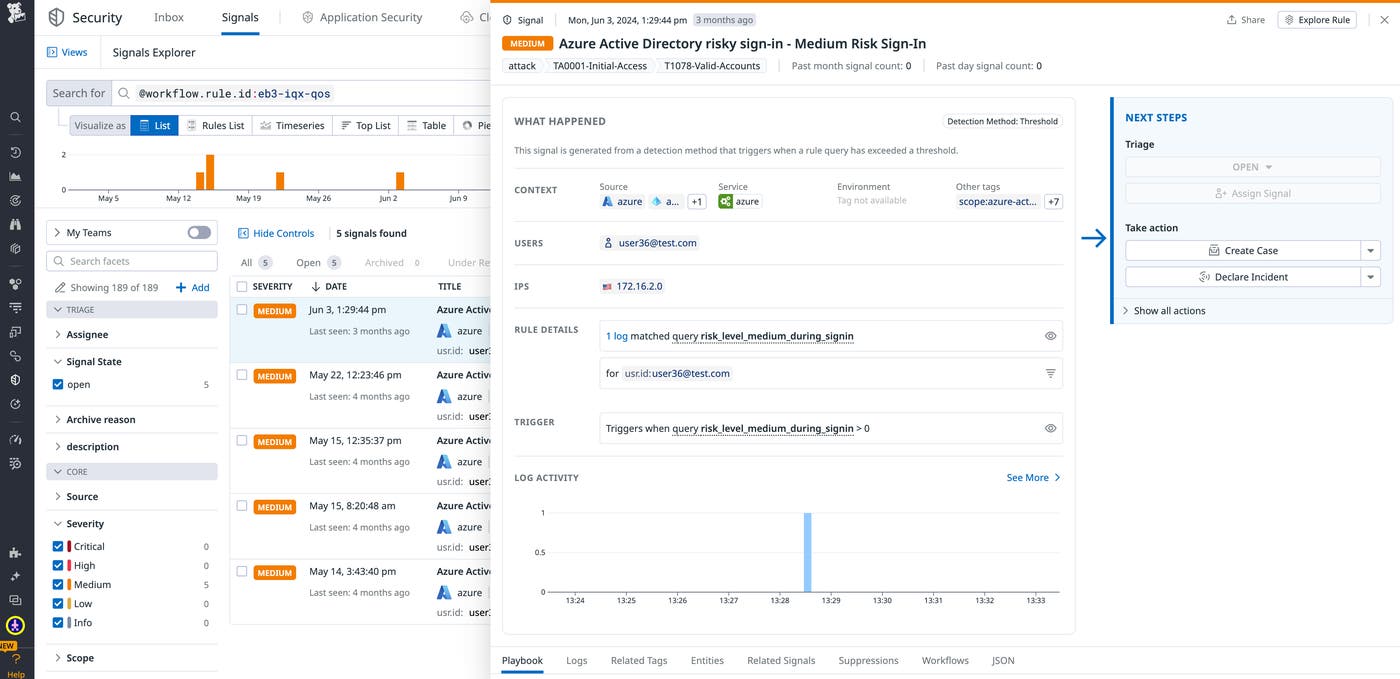
Since the lateral movement path included authenticating as a service principle, you can also look for events related to risky sign-in events for service principles, which Azure’s Identity Protection logs will also capture.
Knowing which accounts and hosts a threat actor accesses provides high-level visibility into lateral movement activity. But it’s important to also be aware of their next steps once they take advantage of authorized sessions, such as activity associated with system files, administrative utilities, or credential dumping tools.
Consider another example of a threat actor with initial access to an account logged in to a domain controller. Through credential dumping or similar techniques, they discover service account credentials or vulnerable secrets tied to a workload identity, which provides access to sensitive cloud resources, such as an SMB file share. File shares are particularly vulnerable because they are cloud-based but connected to on-premises hosts, which makes them easy targets for lateral movement to the cloud.
In this scenario, host activity that’s worth monitoring includes command line and network operations. For example, a threat actor may use built-in commands like ping or nmap to scan for open ports and services on connected hosts.
On top of these common operations, it’s also critical to monitor for commands or tools used to query or manipulate sensitive Active Directory files. For instance, a threat actor with elevated privileges on a domain controller may attempt to extract credentials from an NTDS.dit file—Active Directory’s database containing password hashes—using commands like ntdsutil) or tools like Mimikatz or Volume Shadow Copy Service (vssadmin).
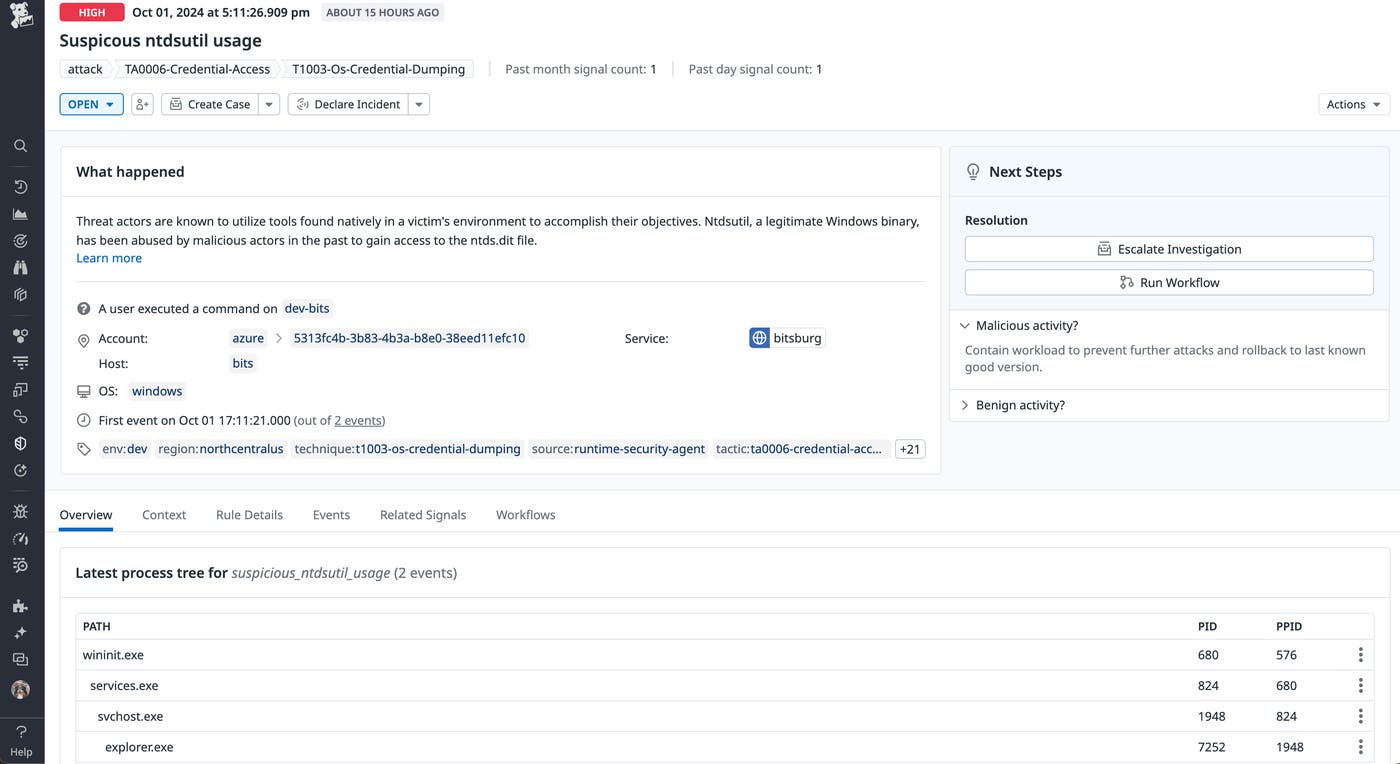
If you find and confirm signs of lateral movement, following its path back to a threat actor’s point of entry can help you discover which parts of your environment were vulnerable. Next, we’ll look at a few ways you can follow the lateral movement path in its entirety.
After you’ve confirmed the initial signs of lateral movement, you can start from the point of detection and follow its path back to the threat actor’s starting point. As previously mentioned, being familiar with your environment’s typical behavior and infrastructure can help you understand how a threat actor would move from one account or resource to the next. Questions such as “Which resources and services would a compromised account have access to?” or “What would a threat actor want to access?” can provide a starting point for your investigation.
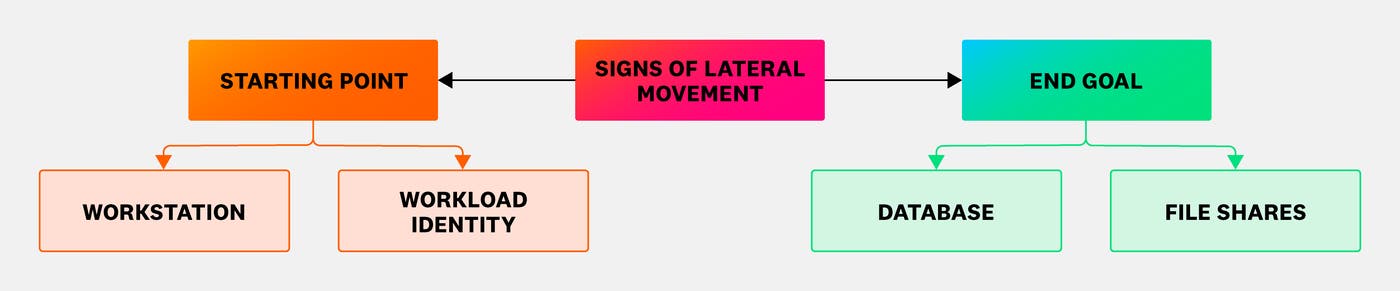
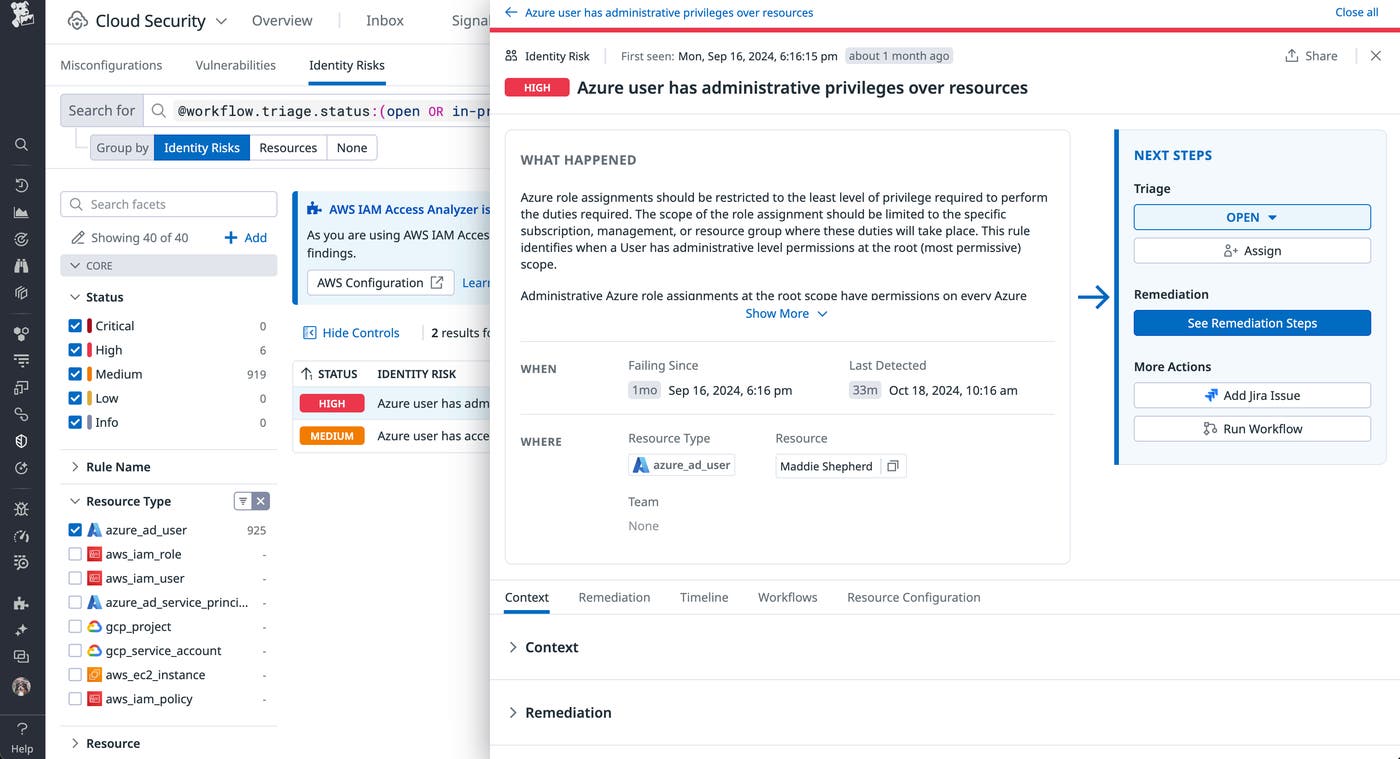
As illustrated in the diagram, if you discover signs of lateral movement from sources like workstations or workload identities, you should review their permissions and which resources they routinely access. Compromised accounts are the leading cause of cloud incidents, so keeping track of permissions and associated resources helps you identify which targets could become a part of a threat actor’s lateral movement path. For example, if a threat actor compromised the user account seen below via methods like phishing, they would have administrative access over multiple Azure resources, such as storage and virtual machines.
You can also track a potentially compromised identity’s recent activity to separate the threat actor’s movement from the identity’s typical behavior. In the following screenshot, you can see that a service principal performs scheduled updates to multiple virtual machines. However, the identity consistently failed to perform one task. It’s worth reviewing signals like these to determine if their activity is expected, the result of a transient error, or suspicious activity.
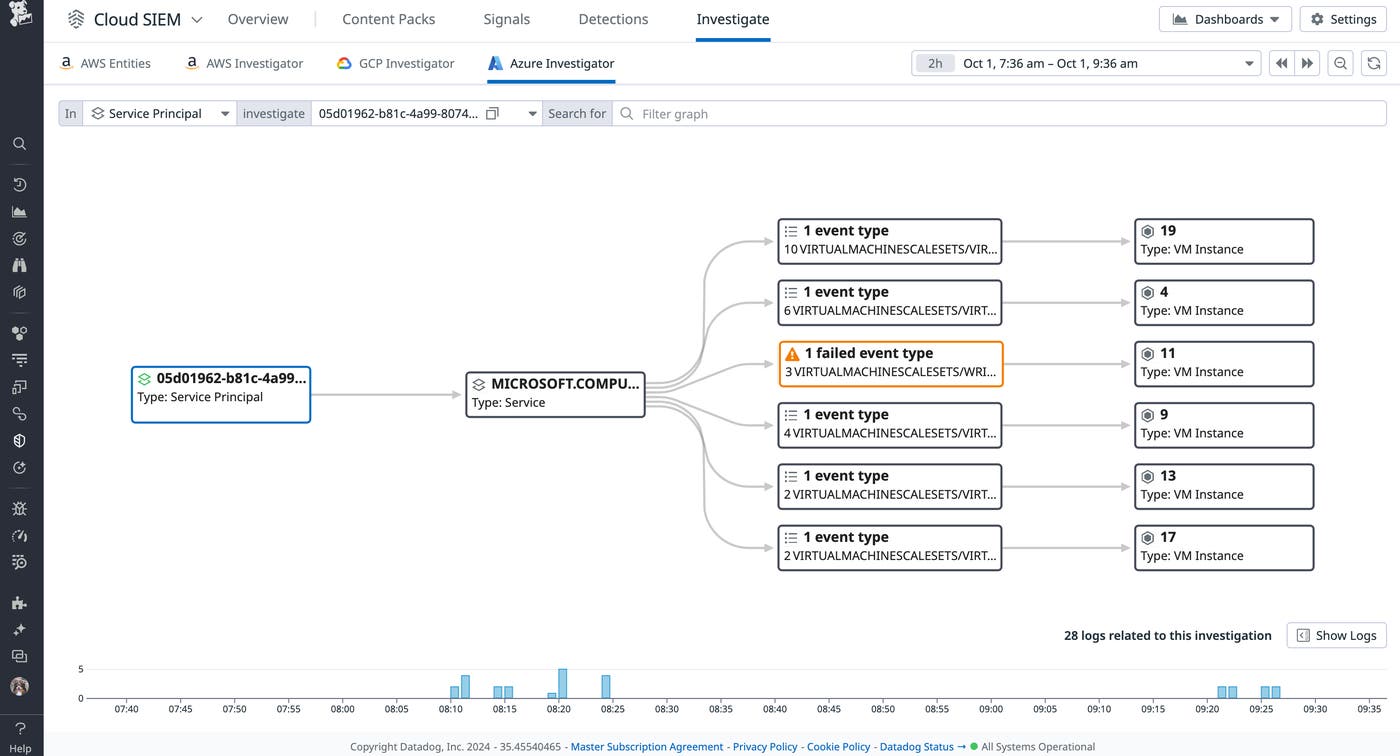
In addition to tracking lateral movement back to a threat actor’s initial point of entry, you should also look at the resources that a threat actor may try to access. Since the service principal has access to Azure resources, such as network components, storage, and virtual machines, you can review their configurations for vulnerabilities. In the following screenshot, you can see that logging may not be enabled for some blob storage resources, which would minimize your visibility into a threat actor’s interactions with them.
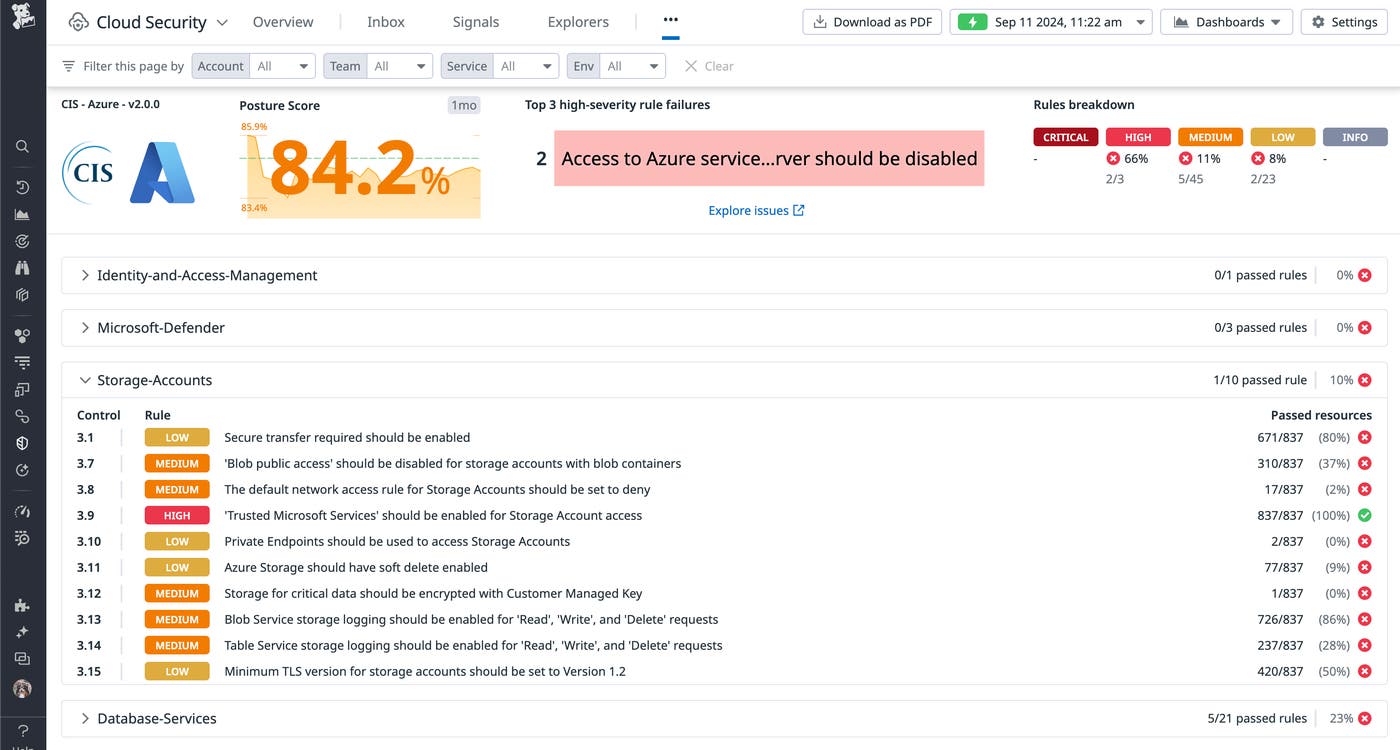
You can review these resources to determine if they are accessible by a compromised identity. In addition, you can track any recent changes to these configurations, which could indicate that the threat actor is attempting to exfiltrate data.
In this post, we looked at the common ways threat actors can take advantage of hybrid Azure environments. Datadog Cloud SIEM can automatically surface malicious activity captured in your Entra ID and other logs. To track activity back to the source, Datadog Cloud Security Identity Risks links actions directly to specific identities, such as users or service principals. And with Datadog Cloud Security Misconfigurations, you can determine which resources a threat actor may move to once they have access to your environment.
For more information about how Datadog helps users detect, monitor, and respond to a threat actor’s lateral movement paths, check out our documentation. You can also learn more about Datadog’s Azure integration, which enables you to collect metrics, traces, and logs from all your Azure resources and monitor their activity. If you don’t already have an account, you can sign up for a free 14-day trial.
We’d like to thank Greg Foss and Katie Knowles of the Datadog Security Research team for their invaluable assistance with research and feedback on this article.
此内容由惯性聚合(RSS阅读器)自动聚合整理,仅供阅读参考。 原文来自 — 版权归原作者所有。