


Making a self-installing agent that works everywhere with all its dependencies for over 20 different OS versions is hard, and we solved that problem with Omnibus packaging.
The Datadog Agent is written in Python and has so far relied on the host OS Python. One problem is that OS Distributions can ship very different versions of Python - from Python 2.4 on CentOS/RHEL 5 to Python 3 on the latest releases of Fedora. Another challenge is that the Datadog Agent often relies on third parties libraries to collect metrics and events from the apps it monitors out of the box, such as your favorite database driver library.
Before Agent 5.0, every time you wanted to install a new integration that required a dependency, e.g. the Postgres integration, you had to go through the following steps.
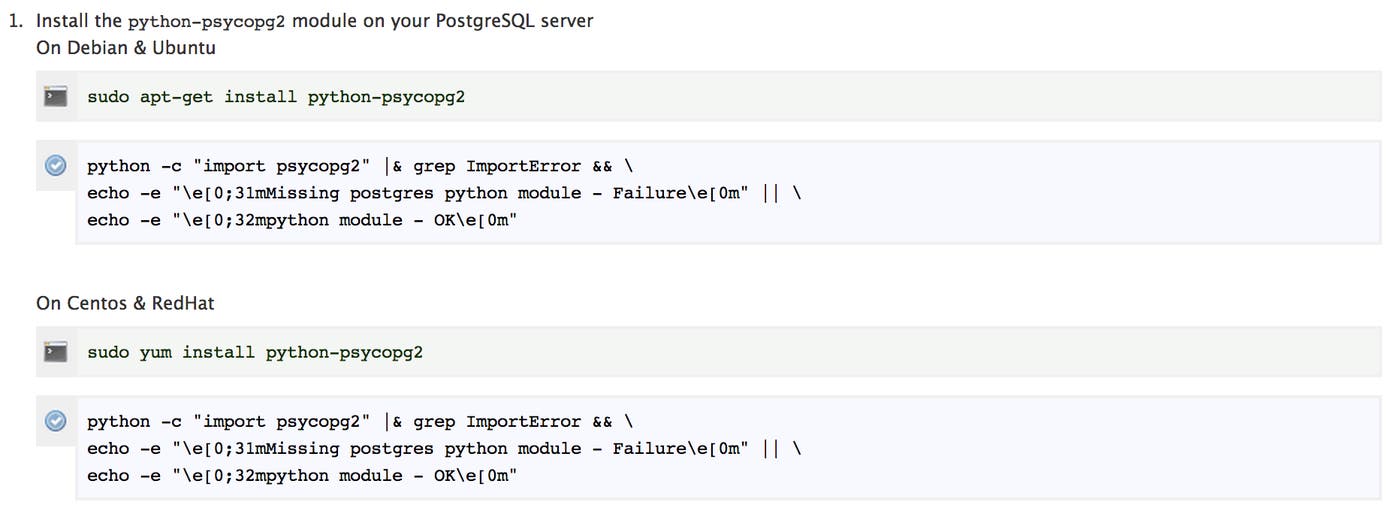
That process could have failed for a number of reasons:
The dependency in the official repositories is outdated and not compatible with the Agent.
The dependency the Agent needs conflicts with one that is already installed and used by other applications.
There is no precompiled version of the dependency and it needs to be installed from source.
These issues forced us to make sure the Agent code worked with as many different versions of the dependency as possible. So we had to write tests to check what version was currently installed on your host OS:
Over time, some of you have hit these frustrating issues and we wanted to make the installation process seamless in 100% of cases.
How did we solve this problem? With Chef Omnibus.

Omnibus is a tool developed by the Chef (formerly Opscode) team in order to “easily create full-stack installers for your project across a variety of platforms.” They use it to create installers for the Chef client and server that installs everything the client and server need to run.
We did the same and designed a new continuous Agent build process that combines the power of Github, Jenkins, Vagrant and S3 to create self-contained installer packages.
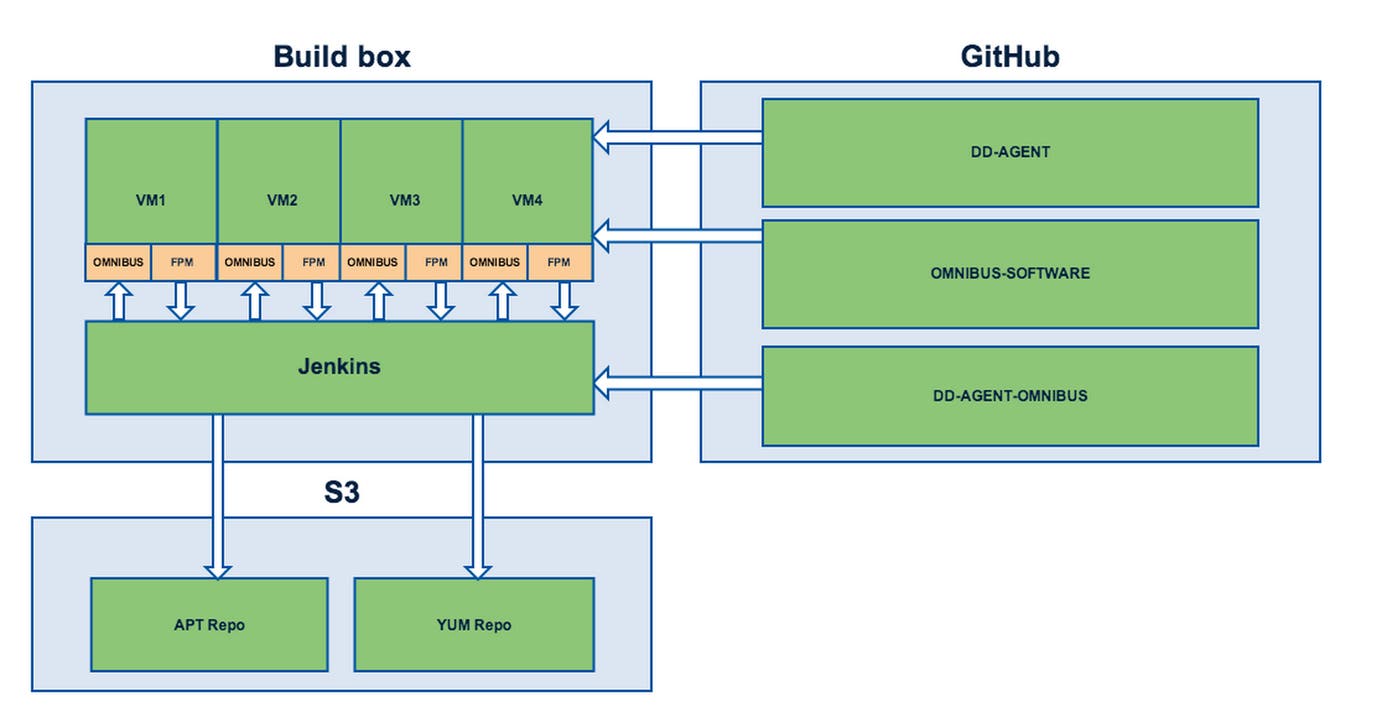
First, we wrote an Omnibus project definition that lives on our Jenkins server. Jenkins uses it to provision a set of VMs that mimics our customers’ platforms. Jenkins triggers all the Omnibus builds. A build compiles the dependencies needed by the Agent as defined in the project definition from the Datadog dd-agent-omnibus repository and in the software definitions in the omnibus-software repository. Finally, Omnibus calls upon FPM to produce native packages for the target systems. We deploy those Agent installer packages to our apt and yum repositories on S3 for everyone to download.
The download is a simple file and contains all the dependencies the Agent needs. Upon installation, the dependencies will be copied to the system and installed in an isolated directory: /opt/datadog-agent. This ensures there’s no conflict with existing dependencies.
Et voilà! It is now possible to enable Datadog’s Agent-based integrations without having to worry about installing dependencies. The Agent will run regardless of your OS’ version of Python and won’t interfere with applications that require the same dependencies but at a different version.
With the new Agent 5.0, you can add integrations and access new features more easily so you have the visibility you need over your entire infrastructure. To take advantage of all that Agent 5.0 has to offer, sign-up for a 14-day free trial and visit this blog post on how to install or upgrade to Agent 5.0.
此内容由惯性聚合(RSS阅读器)自动聚合整理,仅供阅读参考。 原文来自 — 版权归原作者所有。