


Organizations whose IT infrastructure relies heavily on Microsoft will often adopt Azure Functions as part of their cloud modernization strategy. Azure Functions is an on-demand serverless solution that enables you to build and deploy event-driven code without worrying about provisioning and managing infrastructure. Azure Functions offers simplified development and deployment, automatic scaling, and seamless integration with other Azure services all within a cost-efficient pay-for-what-you-use model.
Although Azure Functions are fully managed, there are certain security and performance optimization challenges to keep in mind when working with them. For instance, the ability of Azure Functions to scale out in response to increased traffic makes it particularly susceptible to DDoS attacks. Attackers can overwhelm the system with a flood of requests, causing excessive scaling and resource exhaustion. It can also be difficult to ensure that functions are performing optimally with minimal latency spikes and cold starts, and scaling efficiently while keeping costs at sustainable levels.
In this post, we’ll go over a few quick tips and tricks you can use to ensure your functions on Azure are secure, efficient, and cost effective.
More than just writing clean code, optimizing Azure Functions is also about how you configure the function apps that Azure Functions runs on. Because function apps are the environment in which individual functions are executed (providing all the necessary infrastructure, runtimes, and services you need to run your functions with minimal management), the way you configure them can have a great impact on how your functions perform.
In this section, we’ll look at a few configuration and design principles to keep in mind to get the most out of Azure Functions
If you do decide to modernize your workloads with Azure Functions, one of the first key decisions you’ll need to make is which plan you want to use for hosting your functions. The plan you choose impacts the performance, scaling behavior, and resource allocation of your function apps. It also determines whether support for certain advanced features is enabled. The four major function app hosting plans Azure offers are:
Consumption plan
Premium plan
Dedicated (App Service) plan
Container Apps plan
You should use a consumption plan if your application is built around event-driven workflows and you want a fully serverless solution with a pay-for-what-you-use billing plan. And, because consumption plans only charge for the resources you actually use, enabling you to avoid high costs during idle periods, they are ideal if you expect your application to receive irregular or spiky traffic.
The tradeoffs of choosing a consumption plan include an increased likelihood that functions will experience cold start latencies. Additionally, consumption plans enforce a max duration of 10 minutes, which means if you expect to execute long-running processes you will run into timeout errors that degrade performance.
Microsoft has also recently announced the release of a new consumption plan (in preview), called the consumption flex plan that offers more flexibility and customizability by introducing private networking, instance memory size selection, and faster scale-out features.
If your application has consistent, high levels of traffic and requires guaranteed low latency function executions, then you should consider hosting your function apps on a premium plan. Premium plans provide dedicated “pre-warmed” resources and are designed to handle high traffic and ensure low latencies, making them suitable for applications with demanding loads.
Keep in mind that premium plans are more expensive than consumption plans and you would need to weigh the performance benefits against the premium plan’s impact on costs.
Hosting function apps on a dedicated plan is likely your best option if you already host applications on Azure App Service. Doing so enables you to make use of reserved instances you are already paying for by using them to host function apps. Dedicated plans have no execution time limits, which means they are ideal in use cases that involve long-running workflows such as data analysis and batch processing.
With that said, the dedicated plan can be more costly and require more decision-making around resource management and scaling behavior when compared with the consumption plan.
Lastly, Azure lets you host your functions on Azure Container Apps, a service for building and deploying serverless containers. Hosting Azure Functions within Container Apps enables you to customize your functions’ runtime environment and include specific dependencies, libraries, or frameworks that are not supported by default. Additionally, running functions on Container Apps is particularly useful if you are already running other containerized microservices because you can easily integrate functions with your other services and simplify your architecture.
Managing containers introduces additional complexity compared to traditional serverless environments as it requires you to handle container image creation, updates, and orchestration. There are also cost ramifications to consider; because billing is based on allocated resources instead of usage, containers can incur costs even when idle.
Cost is one of the major considerations to keep in mind when choosing a hosting plan for the workloads you plan to modernize. However, cloud service pricing complexity is often amplified with serverless functions, as costs can vary based on factors such as execution count and duration, memory consumption, and additional charges for outbound data transfers and integrated services. As such, it can be difficult for stakeholders to gain visibility into exactly how certain hosting and configuration decisions can impact their cloud spend. You can use Azure Monitor to view function app metrics that have cost implications such as function execution count. For a more holistic solution, you can use a tool like Datadog Cloud Cost Management to get a full view of your total cloud spend to help understand how Azure Functions and any other Azure cloud services you may be using—such as Azure SQL Database and Azure CDN—are impacting costs.

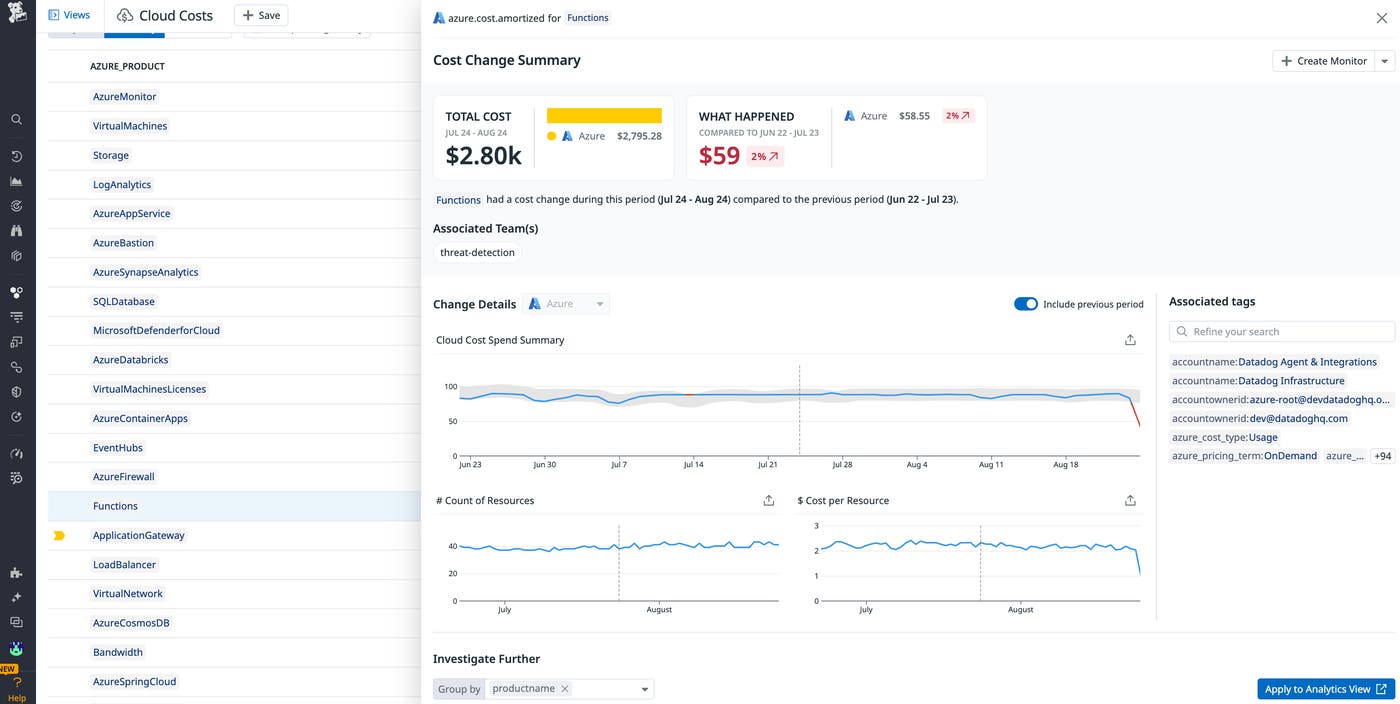
For example, let’s say that when you migrated to Azure Functions you adopted a consumption plan because it initially seemed cheaper because of its pay-as-you-go model but Cloud Cost Management reveals that your spend is higher than you expected. This could be due to things like cold starts and low-latency executions. You also might see that you are paying for unused resources which are hosted on Azure App Service. Armed with this insight, you may decide to move your functions that were on a consumption plan to the dedicated app service plan so you can make use of the unused compute resources you were already paying for.
Fast and reliable functions ensure better end user experiences and can improve the overall satisfaction of your customers. Additionally, optimized functions consume fewer resources, leading to lower operational costs. Azure recommends following a few key design principles to help optimize your functions. These design principles can be applied to individual function code blocks and configurations.
First, Azure recommends avoiding long-running functions. Unlike short-running functions, which execute quickly and free up resources, long-running functions can consume more resources, driving up costs. Particularly large long-running functions can also cause unexpected timeout issues and may require additional handling to ensure reliability.
Long-running functions are particularly problematic if you are using a consumption plan, which has stricter execution time limitations. If you’ve instrumented your Azure function app and are notified of unexpected timeouts, you can mitigate the issues by breaking down larger functions into smaller functions that have fewer dependencies and return faster responses. For example, let’s say you are modernizing e-commerce application workloads with Azure Functions and have a single function that handles the entire order processing workflow, including tasks like payment processing, inventory checking, order confirmation, shipping arrangement, and notification sending. Instead of relying on one function to handle these separate tasks, consider breaking them down into smaller short-lived functions such as PaymentProcessing and CheckInventory.
Azure also recommends writing functions that are stateless and idempotent. Stateless functions facilitate easy load distribution and horizontal scaling, as they do not depend on server-side session data. Idempotent functions enable safe retries without adverse effects, enhancing fault tolerance and consistency. By writing functions to be stateless and idempotent, you can ensure that they are scalable, reliable, and easy to maintain.
In the context of an e-commerce application, you may write a single stateless, idempotent function to handle updating the status of an order being processed. This function would remain stateless because it would only need the data passed to it via an HTTP request (e.g., orderId and status), making it independent of any previous function calls. To make the function idempotent you would ensure that it checks the current status in the database before creating a new status. If the current status is already the desired new status, it could return a message indicating that the status is already set. This ensures that if the function is called multiple times with the same orderId and status, the database is not adversely affected by repeated updates. By following these principles, the function can handle high loads and scale horizontally, while also providing fault tolerance through safe retries.
Additionally, you should aim to minimize the likelihood of errors and crashes by writing resilient functions with robust error handling and input validation. For instance, you should make sure your functions include logic to handle unexpected edge cases—such as empty input values—without crashing. That might look like the following:
def process_data(data):
if not data:
return "Warning: No data provided."
try:
return complex_operation(data)
except (ValueError, TypeError) as e:
return f"Error: {e}"
except Exception as e:
return f"Unexpected error: {e}"
Ensuring that Azure Functions is secure helps prevent data breaches, maintain compliance with regulatory requirements, and protect the availability of your cloud services. With that said, securing Azure Functions is challenging because they’re ephemeral and scale dynamically (creating and deleting instances as needed), making it hard to maintain a consistent security posture. What’s more, functions can be triggered by various events such as HTTP requests, scheduled events, and messages, each widening the possible attack vector.
To help secure your serverless functions, Azure has a number of security features, including identity access management tools such as Entra ID and Managed Service Identity (MSI) as well as secret management services like Azure Key Vault. You can get the most out of these features and improve your security posture by following a few Azure recommendations.
For starters, you should enforce that clients can only connect to your function endpoints via HTTPS along with the latest TLS version. These can be configured from the general settings in your Azure portal. You should also be sure to follow the principle of least privilege (PoLP) and use role-based access control (RBAC) to assign minimum access rights to users, services, and functions. This approach minimizes the attack surface and enhances security by ensuring each component has only the permissions it needs. For example, if a function app needs to access a specific database, ensure it has access only to that database and not to others.
Datadog provides out-of-the-box (OOTB) detection rules that will automatically flag suspicious behavior and misconfigurations that lead to vulnerabilities. For instance, one OOTB rule will notify you if an Azure function has administrative privileges over your other resources. If a function has such privileges and is breached, it poses a threat across all of your Azure-hosted resources.

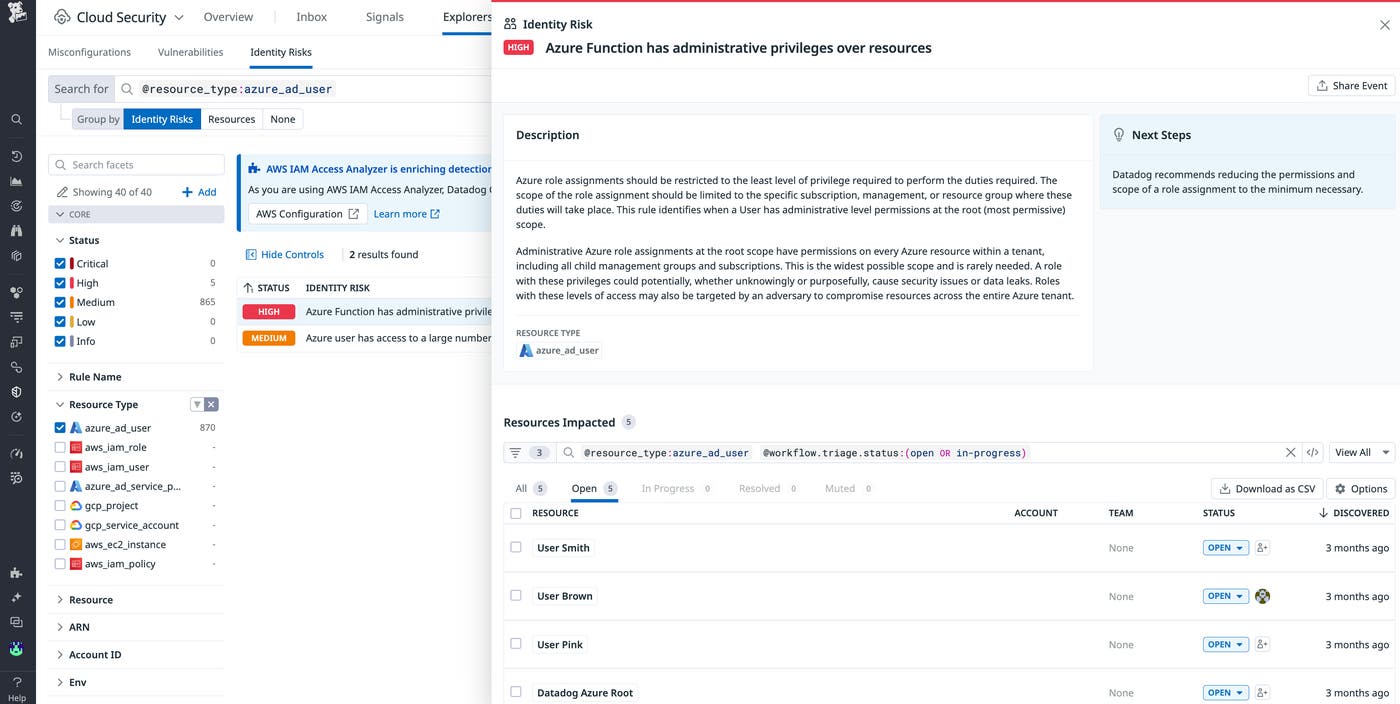
In this post, we looked at a few key strategies and best practices you can implement to optimize and secure Azure Functions. We also discussed different function app hosting options and how each has different performance and cost considerations to keep in mind. And, with Datadog tools like Cloud Security, you can quickly detect and mitigate Azure Function security vulnerabilities.
If you’re not already a Datadog customer, sign up today for a 14-day free trial
此内容由惯性聚合(RSS阅读器)自动聚合整理,仅供阅读参考。 原文来自 — 版权归原作者所有。