


In AWS environments, a data perimeter is a set of preventative controls that help ensure that your trusted cloud identities (principals or AWS services acting on your behalf) are accessing trusted resources from authorized networks. You can apply these controls at various levels of your infrastructure, such as per resource or across all resources in your AWS account.
The ability to apply controls at different levels creates an effective defense-in-depth approach to protecting data, but it also makes it hard to know where gaps exist. Datadog’s 2025 Cloud Security report found that approximately 40% of organizations use data perimeters, with most applying them per resource. Of that group, fewer than 1% use recommended organization-level solutions, such as resource control policies (RCPs) and service control policies (SCPs).
In this post, we’ll walk through examples of data perimeters configured per resource, since that’s where most organizations apply them. Then we’ll look at the security gaps that resource-level controls can create. In each section, we’ll simulate an attack against each gap by using Stratus Red Team, an open source threat emulation tool, and then apply an organization-level policy that closes the gap.
We’ll cover four scenarios:
- Visibility: ensuring that you have visibility into data perimeter activity, an important first step before applying any controls
- Identity perimeters: preventing identities outside your AWS account from accessing your data
- Network perimeters: validating that identities can only access resources from authorized networks
- Resource perimeters: ensuring that identities are not able to transfer data to unauthorized resources
All of the attack techniques described in this post require Stratus Red Team to be installed and configured with a compromised-role profile. We’ll walk through configuring the necessary roles and AWS profiles later.
While not strictly a data perimeter objective, AWS security benchmarks require that CloudTrail is enabled and configured to log read and write management events. CloudTrail trails can capture when a particular policy blocked or allowed access as well as any changes to the controls themselves, such as a bucket policy modification. Because cloud logs provide valuable insights into how your data perimeters respond to requests, tampering with logging is a popular defense evasion technique.
The Stratus Red Team techniques for actions such as deleting AWS CloudTrail trails and stopping logging altogether fulfill two purposes for validating account-level cloud logging scenarios that fall outside of established organization trails. First, they confirm if calls are blocked by available policies, and second, if attempts are visible in your account’s cloud logs. When attempts are visible, your logs will capture those calls the moment they are made, regardless of whether they succeed or are blocked.
The following commands set up the defense evasion scenario for a compromised role:
export AWS_PROFILE=compromised-role
stratus detonate aws.defense-evasion.cloudtrail-delete
stratus detonate aws.defense-evasion.cloudtrail-stop
The Stratus Red Team techniques for deleting or stopping cloud logging include a warmup step that uses the cloudtrail:CreateTrail permission to create new trails within the profile’s associated AWS account before detonating attacks against them. CreateTrail has legitimate uses, such as centralizing logging pipelines and managing audit logs for incident response, so it’s not uncommon to find it granted in real environments.
Most roles, such as those for application services and CI/CD pipelines, have no legitimate reason to modify CloudTrail trails, so those calls are candidates for an SCP policy. You can attach SCPs to an organization, organization unit, or member account, creating the perimeter boundary for control plane actions such as disabling logging. That means that an appropriate SCP will block an identity—in this case, the compromised-role profile—from executing cloudtrail:DeleteTrail and cloudtrail:StopLogging calls.
The following example SCP denies modifications to a member account’s CloudTrail trails:
{
"Version":"2012-10-17",
"Statement":[
{
"Effect":"Deny",
"Action":[
"cloudtrail:DeleteTrail",
"cloudtrail:PutEventSelectors",
"cloudtrail:StopLogging",
"cloudtrail:UpdateTrail"
],
"Resource":"*",
"Condition":{
"ArnNotLike":{
"aws:PrincipalARN":"arn:aws:iam::123456789012:role/AWSCloudTrailAdmin"
}
}
}
]
}
The cloudtrail:PutEventSelectors action is included in the deny policy because that call would enable an attacker to narrow which events get logged without disabling logging entirely, which minimizes the likelihood of detection. The cloudtrail:UpdateTrail action accounts for an attacker redirecting log delivery to an external S3 bucket, which makes the logs inaccessible to your team. The ArnNotLike condition ensures that a specific privileged role still has access to modify trails. For the account with this SCP attached, the Stratus Red Team techniques for cloudtrail:StopLogging and cloudtrail:DeleteTrail actions would be denied.
Note that SCPs do not apply to your cloud management account, where you create and apply organization-level policies. A compromised principal in that account can call cloudtrail:StopLogging regardless of your SCPs, which is why access to a high-privilege management account needs to be treated as a separate security risk.
Even if an attempt to modify cloud logging is blocked, you want to confirm that CloudTrail recorded each event. The attempt itself is suspicious since logging is a required security benchmark. Because the Stratus Red Team techniques act on the trails they create within a member account, your organization-level trail should capture the detonation events, whether the attempt succeeds or is blocked by an SCP.
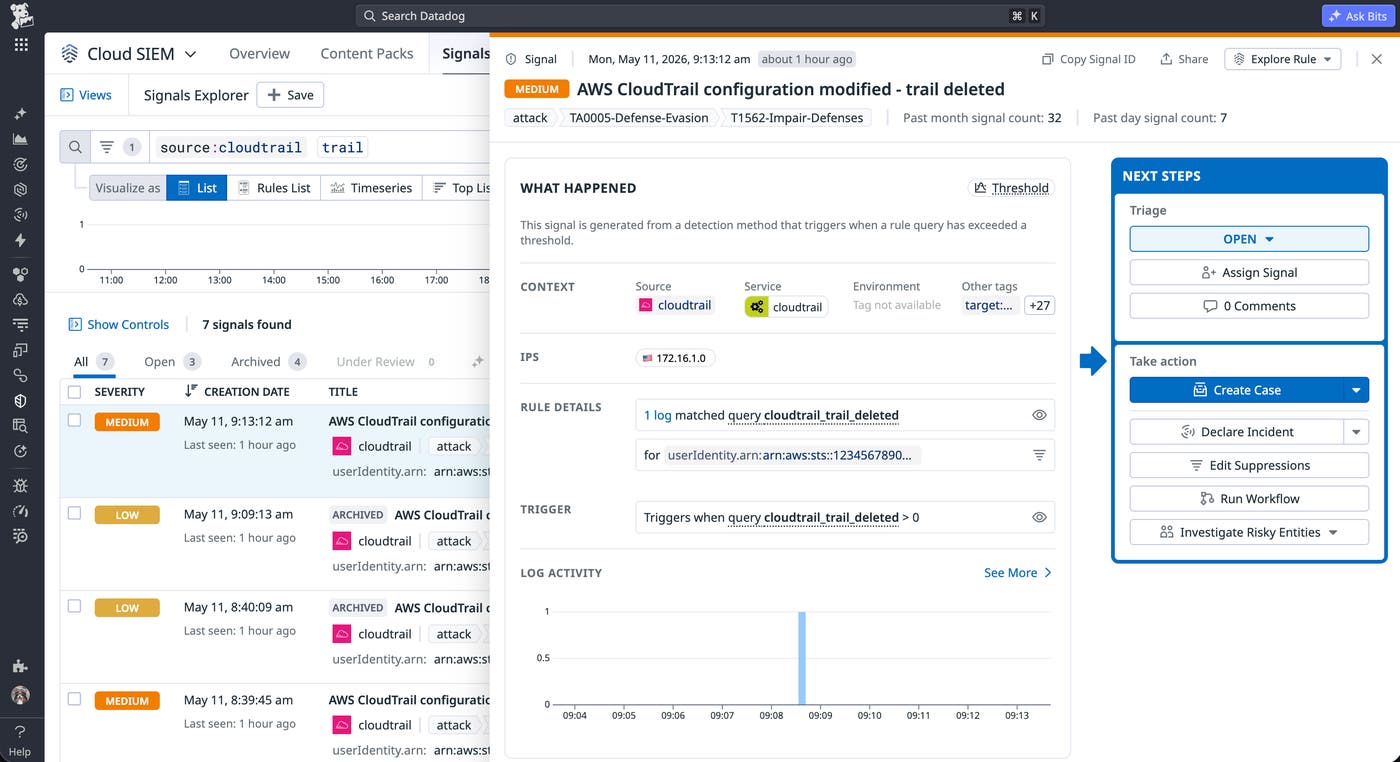
You can read AWS’s guide on managing CloudTrail costs and our guide on configuring AWS CloudTrail logs for more information about how to collect them and which events are important to capture.
One of the control objectives for the identity perimeter is ensuring that only your organization’s principals and the AWS services acting on their behalf can access your resources. According to our report, the majority of organizations with data perimeters enforce this control primarily through policies on individual Amazon S3 buckets. Per-resource policies offer granular control, but they introduce gaps in policy coverage as your environment grows. They also create issues with policy durability when one can be modified by any principal with the right permissions.
The following bucket policy illustrates how organizations typically start building per-resource identity controls for a log bucket:
{
"Version":"2012-10-17",
"Statement":[
{
"Sid":"AllowCloudTrailWrite",
"Effect":"Allow",
"Principal":{
"Service":"cloudtrail.amazonaws.com"
},
"Action":"s3:PutObject",
"Resource":"arn:aws:s3:::example-log-bucket/AWSLogs/*",
"Condition":{
"StringEquals":{
"aws:SourceAccount":"[SOURCE-ACCT]"
}
}
}
]
}
The aws:SourceAccount condition ensures that the CloudTrail service is acting on the behalf of your account specifically. Specifying a source account addresses cross-service confused deputy scenarios, where a privileged AWS service is coerced into taking an action on behalf of a different account than the one that authorized it.
While bucket policies are the most common way that organizations start enforcing perimeters, the success of that approach requires consistent policy coverage across all buckets within an environment. However, the rate and method at which buckets are created—either by specific users, third-party vendors, or automation—can quickly create drift in your identity perimeter if controls are not applied consistently. Even policies that apply appropriate controls can be overwritten, which is a notable gap that per-resource identity perimeters overlook.
The “Backdoor an S3 Bucket via its Bucket Policy” Stratus Red Team technique illustrates how an attacker can override existing policies and introduce unexpected policy drift. The following commands use the technique to simulate a compromised principal within your account calling s3:PutBucketPolicy to grant an external account read access to a bucket:
export AWS_PROFILE=compromised-role
stratus detonate aws.exfiltration.s3-backdoor-bucket-policy
The Stratus Red Team technique creates the bucket and then applies the following backdoor policy:
{
"Version": "2012-10-17",
"Statement": [
{
"Effect": "Allow",
"Principal": {
"AWS": "arn:aws:iam::123456789012:root"
},
"Action": [
"s3:GetObject",
"s3:ListBucket"
],
"Resource": [
"arn:aws:s3:::%s/*",
"arn:aws:s3:::%s"
]
}
]
}
Because the s3:PutBucketPolicy call would replace the entire policy, the original aws:SourceAccount condition would be gone once the backdoor is applied. In a real-world scenario, the attacker would then be able to successfully call s3:GetObject from their external account and extract data.
Simulating the next phase of the attack required a few steps beyond what Stratus Red Team provides. The exfiltration technique sets up the conditions for extraction (such as modifying a bucket policy) but doesn’t move data. To complete the scenario, we grabbed the bucket name from the technique output, uploaded a test file, and ran the following commands from the external account profile to simulate extraction:
export AWS_PROFILE=123456789012_account-admin
aws s3 ls s3://name-of-stratus-red-team-bucket
aws s3api get-object --bucket name-of-stratus-red-team-bucket --key filename.txt output.txt
AWS IAM Access Analyzer can help you identify resources that allow access from outside your AWS account or organization, such as in the backdoor scenario. For example, the following finding shows a bucket that’s accessible to an external AWS principal:
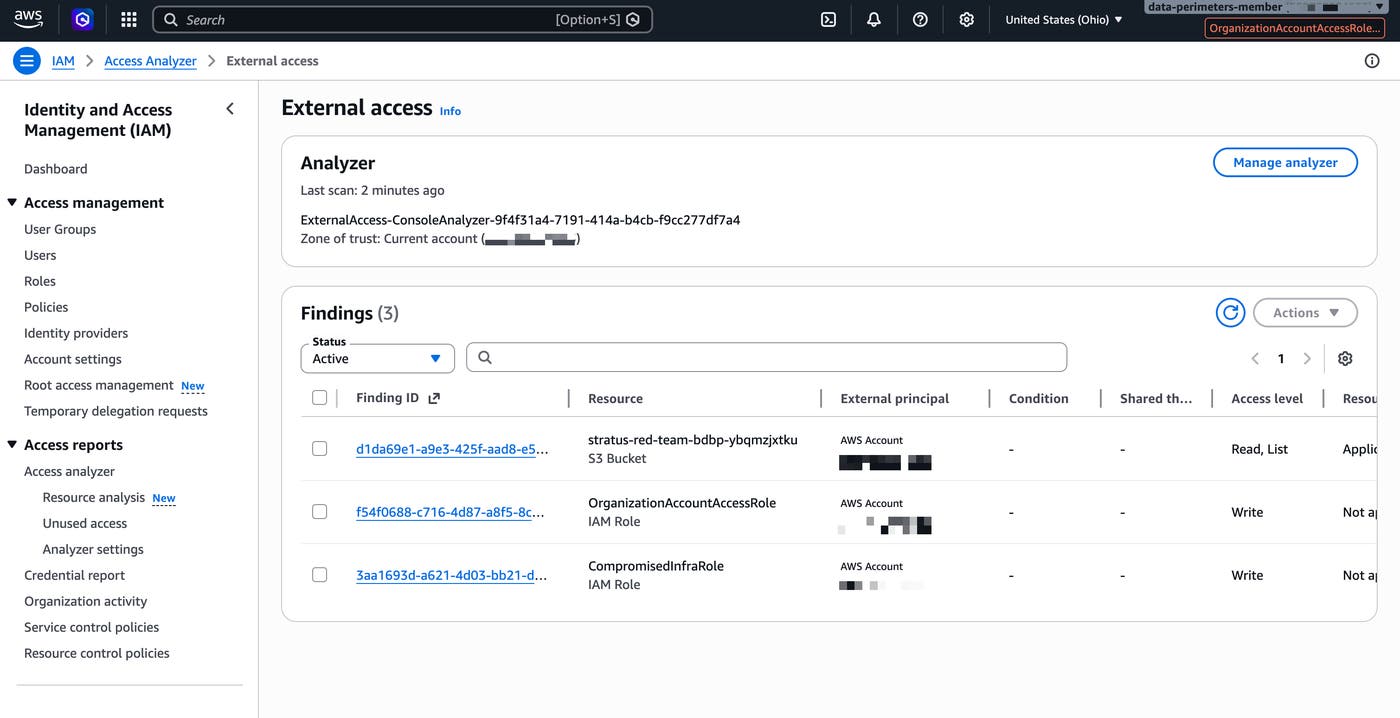
If the external account is able to access the bucket, there is a gap in your data perimeter. While s3:CreateBucket is a common enough permission that restricting it broadly isn’t practical, s3:PutBucketPolicy is a riskier permission, so it’s a good candidate for an RCP.
A single misconfigured or misapplied bucket policy can weaken your entire resource-based identity perimeter. To help ensure that only trusted identities can access resources, you can move the controls out of individual resource policies and apply them at the organization level via an RCP. The following recommended RCP limits S3 bucket access to only your organization’s identities and AWS services acting on your behalf:
{
"Version":"2012-10-17",
"Statement":[
{
"Sid":"EnforceOrgIdentities",
"Effect":"Deny",
"Principal":"*",
"Action":"s3:*",
"Resource":"*",
"Condition":{
"StringNotEqualsIfExists":{
"aws:PrincipalOrgID":"[ORG-ACCT]"
},
"BoolIfExists":{
"aws:PrincipalIsAWSService":"false"
}
}
},
{
"Sid":"EnforceConfusedDeputyProtection",
"Effect":"Deny",
"Principal":"*",
"Action":"s3:*",
"Resource":"*",
"Condition":{
"StringNotEqualsIfExists":{
"aws:SourceOrgID":"[ORG-ACCT]"
},
"Null":{
"aws:SourceAccount":"false"
},
"Bool":{
"aws:PrincipalIsAWSService":"true"
}
}
}
]
}
The EnforceOrgIdentities statement covers the identity perimeter gap because it denies all S3 access to principals outside of your organization while exempting AWS service principals, such as CloudTrail. The EnforceConfusedDeputyProtection statement and its aws:SourceOrgID condition account for cases when an AWS service needs to act on behalf of an account within your organization. Together, the two statements ensure that neither external identities nor AWS services operating outside your organization can access your buckets. This particular RCP is a more comprehensive equivalent of the aws:SourceAccount condition from the per-resource bucket policy.
Network perimeters ensure that your identities only make API calls from expected networks and that your resources are only reachable from expected networks. Controls around your networks protect data from unintentional exposure, such as when accessing corporate resources from a non-corporate network.
Most teams enforce network perimeters with per-resource policies, such as an S3 bucket policy that restricts access to requests from a specific VPC endpoint:
{
"Sid": "EnforceNetworkPerimeter",
"Effect": "Deny",
"Principal": "*",
"Action": "s3:*",
"Resource": [
"arn:aws:s3:::dp-demo-sensitive-[ACCOUNT]-[REGION]",
"arn:aws:s3:::dp-demo-sensitive-[ACCOUNT]-[REGION]/*"
],
"Condition": {
"StringNotEquals": {
"aws:SourceVpce": "[VPCE_ID]"
},
"BoolIfExists": {
"aws:PrincipalIsAWSService": "false",
"aws:ViaAWSService": "false"
}
}
}
This policy denies access from outside the specified VPC endpoint while allowing critical AWS services to continue operating against the bucket. However, the VPC endpoint ID is hardcoded, so the policy doesn’t cover other endpoints without a manual update. And because the policy is attached per resource, you would have to copy and update it on every new bucket.
Like with identity perimeters, implementing per-resource policies requires consistent coverage across all resources within your environment—for example, Amazon Simple Queue Service (SQS) queues and AWS Key Management Service (AWS KMS) keys. Policy drift and gaps in coverage are common when there are no organization-level network controls that apply to each resource and endpoint.
The “S3 Ransomware through individual file deletion” technique illustrates this network perimeter gap. The following command sets up the ransomware scenario for a compromised role within your account:
export AWS_PROFILE=compromised-role
stratus detonate aws.impact.s3-ransomware-individual-deletion
As part of its warmup step, Stratus Red Team creates a new bucket that has no existing VPC endpoint restriction applied to it. Because there’s no network control on that bucket, the technique can execute from any network without being blocked and successfully delete files.
AWS recommends using SCPs and RCPs to cover the control objectives for network perimeters. You can start by implementing an RCP, which covers the risk of principals using valid credentials from non-corporate networks.
The following RCP provides a comprehensive network perimeter for multiple services to cover per-resource policy gaps:
{
"Version": "2012-10-17",
"Statement": [
{
"Sid": "EnforceNetworkPerimeterVpceOrgID",
"Effect": "Deny",
"Principal": "*",
"Action": [
"cognito-identity:*",
"ecr:*",
"kms:*",
"s3:*",
"sqs:*"
],
"Resource": "*",
"Condition": {
"StringNotEqualsIfExists": {
"aws:VpceOrgID": "[MY-ORG-ID]",
"aws:PrincipalTag/dp:exclude:network": "true",
"aws:PrincipalAccount": [
"[LOAD-BALANCING-ACCT-ID]"
],
"aws:VpceAccount": [
"[THIRD-PARTY-ACCT-ID-1]",
"[THIRD-PARTY-ACCT-ID-2]"
],
"aws:ResourceTag/dp:exclude:network": "true"
},
"BoolIfExists": {
"aws:PrincipalIsAWSService": "false",
"aws:ViaAWSService": "false"
},
"ArnNotLikeIfExists": {
"aws:PrincipalArn": [
"arn:aws:iam::*:role/aws:ec2-infrastructure"
]
},
"StringEquals": {
"aws:PrincipalTag/dp:include:network": "true"
}
}
}
]
}
The policy conditions address the operational challenges with implementing organization-wide network perimeters, such as accounting for how your organization and specific AWS services operate:
The aws:VpceOrgID condition checks that a VPC endpoint belongs to your organization, and blocks any calls from external endpoints.
The aws:VpceAccount option grants access to trusted third-party accounts.
The aws:PrincipalAccount condition grants access to a specific load-balancing service that makes API calls to resources using an IAM role outside of the VPC, which the policy would evaluate as a regular IAM principal and block otherwise.
The aws:PrincipalTag/dp:include:network: true condition applies to principals tagged with dp:include:network=true, enabling you to gradually roll out the change instead of applying the perimeter to all principals and disrupting access.
Note that AWS’s version of this policy also includes a NotIpAddressIfExists condition on aws:SourceIp that allows direct internet access from a corporate IP range. The example snippet above omits it for simplicity, but you can add it if your organization has principals that access resources from a corporate network without going through a VPC endpoint.
Resource perimeters ensure that your identities can only access trusted resources and that those resources can only be accessed from your expected networks. The primary goal with resource perimeters is protecting your environment from unintentional data disclosure, such as in cases where a developer moves data outside of your organization into a personal AWS account. For implementing resource controls, AWS recommends using SCPs and virtual private cloud (VPC) endpoint policies with the aws:ResourceOrgID condition to limit which resources are accessible.
In our report, 13% of the organizations that implement data perimeters use VPC endpoint policies, though mostly through the aws:PrincipalAccount condition key. The following VPC endpoint policy is an example of this approach:
{
"Version": "2012-10-17",
"Statement": [
{
"Sid": "AllowOrgBucketsOnly_VPC",
"Effect": "Allow",
"Principal": "*",
"Action": "s3:*",
"Resource": "*",
"Condition": {
"StringEquals": {
"aws:PrincipalAccount": "[ACCT-ID]"
}
}
}]
}
This endpoint policy allows all S3 actions as long as they originate from the specified principal account.
For a VPC endpoint policy, condition keys such as aws:PrincipalAccount and aws:PrincipalOrgID provide some identity controls, but they only cover traffic from trusted identities within the VPC. They do not account for where data can go. For example, an attacker who compromises a workload inside a VPC, such as a vulnerable EC2 instance, can route calls through the endpoint and successfully exfiltrate data. The policy wouldn’t reject those calls because they are coming from a trusted principal inside the VPC.
A notable gap in the current version of the endpoint policy is that it will not account for an attacker operating outside of the VPC. For example, the “Exfiltrate EBS Snapshot by Sharing It” technique demonstrates how an attacker uses stolen credentials outside of the trusted endpoint. The following command sets up the snapshot sharing scenario for a compromised role within your account:
export AWS_PROFILE=compromised-role
stratus detonate aws.exfiltration.ec2-share-ebs-snapshot
The Stratus Red Team technique first creates an Amazon Elastic Block Store (EBS) volume and a snapshot as part of its warmup step before detonating against it. For the warmup step to succeed, the compromised-role profile has ec2:CreateVolume and ec2:CreateSnapshot permissions. The detonation step then calls ec2:ModifySnapshotAttribute to share the snapshot with an external account. Since that request hits the AWS public endpoint instead of the VPC endpoint, the endpoint policy won’t apply.
Upgrading the endpoint policy with the recommended ResourceOrgID condition key seen in the following policy snippet addresses the S3 data exfiltration gap within the VPC:
{
"Version": "2012-10-17",
"Statement": [
{
"Sid": "AllowOrgBucketsOnly_VPC_Updated",
"Effect": "Allow",
"Principal": "*",
"Action": "s3:*",
"Resource": "*",
"Condition": {
"StringEquals": {
"aws:ResourceOrgID": "[ORG_ID]"
}
}
}
]
}
For this policy, we used StringEquals instead of StringEqualsIfExists because aws:ResourceOrgID is only available for resources that belong to an AWS organization. For resources in personal accounts with no organization membership, the key is absent. This means that if a developer tried to copy data to a personal S3 bucket, they could route their request through a bucket where aws:ResourceOrgID doesn’t exist, and the StringEqualsIfExists condition would evaluate to true and allow access.
Any traffic flowing through the VPC endpoint will only be able to reach resources within the specified organization. However, the update still doesn’t address traffic outside of the VPC. An SCP with the aws:ResourceOrgID condition key covers all specified paths—such as the S3 calls seen below—regardless of their origin:
{
"Version": "2012-10-17",
"Statement": [
{
"Sid": "EnforceResourcePerimeter",
"Effect": "Deny",
"Action": [
"s3:GetObject",
"s3:PutObject",
"s3:DeleteObject",
"s3:ListBucket"
],
"Resource": "*",
"Condition": {
"StringNotEqualsIfExists": {
"aws:ResourceOrgID": "[ORG-ID]",
"aws:PrincipalTag/dp:exclude:resource": "true"
},
"BoolIfExists": {
"aws:PrincipalIsAWSService": "false"
}
}
}
]
}
This SCP addresses the S3 attack scenario specifically, and the aws:PrincipalTag condition key exempts specific principals that might legitimately need external S3 bucket access. The policy doesn’t apply to our Amazon EBS snapshot scenario because you cannot use the ResourceOrgID condition on services that allow resource sharing or targeting external resources. For those services, AWS recommends using a governance SCP to block resource sharing by capabilities that are embedded into services, such as ec2:ModifySnapshotAttribute.
To run Stratus Red Team techniques, you can use either static credentials or aws-vault to manage them. The techniques in this post use the following ~/.aws/config and ~/.aws/credentials configurations:
[profile mgmt-account]
region = us-east-2
[profile compromised-role]
role_arn = arn:aws:iam::012345678901:role/CompromisedInfraRole
source_profile = mgmt-account
region = us-east-2
[profile 123456789011_account-admin]
region = us-east-2
[mgmt-account]
aws_access_key_id = [ACCESS_KEY_ID]
aws_secret_access_key = [ACCESS_KEY]
[123456789012_account-admin]
aws_access_key_id = [ACCESS_KEY_ID]
aws_secret_access_key = [ACCESS_KEY]
aws_session_token = [TOKEN]
The first profile, mgmt-account, uses long-term IAM credentials, which is a common but risky practice. The second profile, compromised-role, chains off mgmt-account to assume CompromisedInfraRole in account 012345678901. The goal with these two profiles is to model a specific lateral movement scenario where an attacker obtains account credentials and uses them to assume a role in a workload account. Lateral movement is one of the many ways attackers exploit long-lived credentials, and while a well-configured data perimeter won’t stop the movement itself, it will limit the impact by restricting what a compromised identity can access once it’s inside.
The third profile, 123456789012_account-admin, uses AWS Security Token Service (STS) credentials. Techniques and AWS API calls that are run as this profile test whether your data perimeters correctly deny access to identities that are not authorized to access your resources. The primary goal is to model an external attacker scenario instead of one that focuses on an insider identity or compromised credentials.
Data perimeters are a defense-in-depth approach to protecting your AWS environment from both internal and external threats. Organizations are steadily implementing them, though primarily per resource. Testing your perimeters can help you validate your existing controls and identify potential gaps that organization-level controls, such as RCPs and SCPs, can cover.
If you’re just getting started with data perimeters or are still relying primarily on per-resource policies, the S3 backdoor scenario is a good first test. It surfaces how quickly a single policy update can bypass existing controls. If you already have SCPs and RCPs in place, the sharing techniques are useful because they validate whether your policies cover when an adversary attempts to exfiltrate data via snapshot sharing. The CloudTrail techniques are worth running regardless of where you are in your perimeter maturity because you need visibility into what is happening in your environment. A gap there affects your ability to detect any of the other scenarios.
For more advanced examples of how you can simulate attack techniques against your cloud environments, check out Stratus Red Team’s GitHub repository.
If you don’t already have a Datadog account, you can sign up for a 14-day free trial.
此内容由惯性聚合(RSS阅读器)自动聚合整理,仅供阅读参考。 原文来自 — 版权归原作者所有。