







Detecting and remediating security threats is a constantly evolving concern for modern DevSecOps and security operations center (SOC) teams. Moreover, manually investigating and responding to vulnerabilities and threats is time-consuming, laborious, and knowledge-intensive. Datadog Workflows, which is now available in the Service Management and Integrations menus, can be used in concert with Cloud SIEM to automate repetitive security tasks—such as triaging security signals or detecting emerging vulnerabilities.
Using Datadog Cloud SIEM and Workflows together reduces the burden on security engineers, allowing them to focus on more complex tasks, and helps teams stay ahead of novel threats by automating the classification of emerging vulnerabilities. Cloud SIEM and Workflows also integrate with Datadog Case Management—which allows you to create a centralized, easily accessible workspace for investigating your security signals—so that you can streamline triage and troubleshooting. These integrations help teams reduce tool sprawl and security spend. Rather than maintaining separate automation, case management, and SIEM tools, you can unify these capabilities in a single pane of glass. Additionally, workflow blueprints that can be used in conjunction with Cloud SIEM detection rules are formulated in consultation with Datadog’s dedicated security research team and detection engineers, whose insights can help you prepare for unforeseen threats.
In this post, we’ll show you how to:
Automate security signal triage with Workflows and Case Management
Identify, retro-hunt, and create detection rules for emerging vulnerabilities using a workflow
A Datadog workflow orchestrates an automated series of actions in response to an alert or security signal. You can chain together Datadog-specific actions in a workflow, or actions from integrations such as AWS, CircleCI, Okta, PagerDuty, and more. You can configure your workflows to automate important security tasks, such as rolling back a code deployment that introduces a vulnerability, performing tier 1 triage (i.e., reviewing and adding context to threats detected by Cloud SIEM), or blocking a suspicious IP address.
As an example, the workflow below automates the data collection step of using Datadog Case Management to triage a security signal.

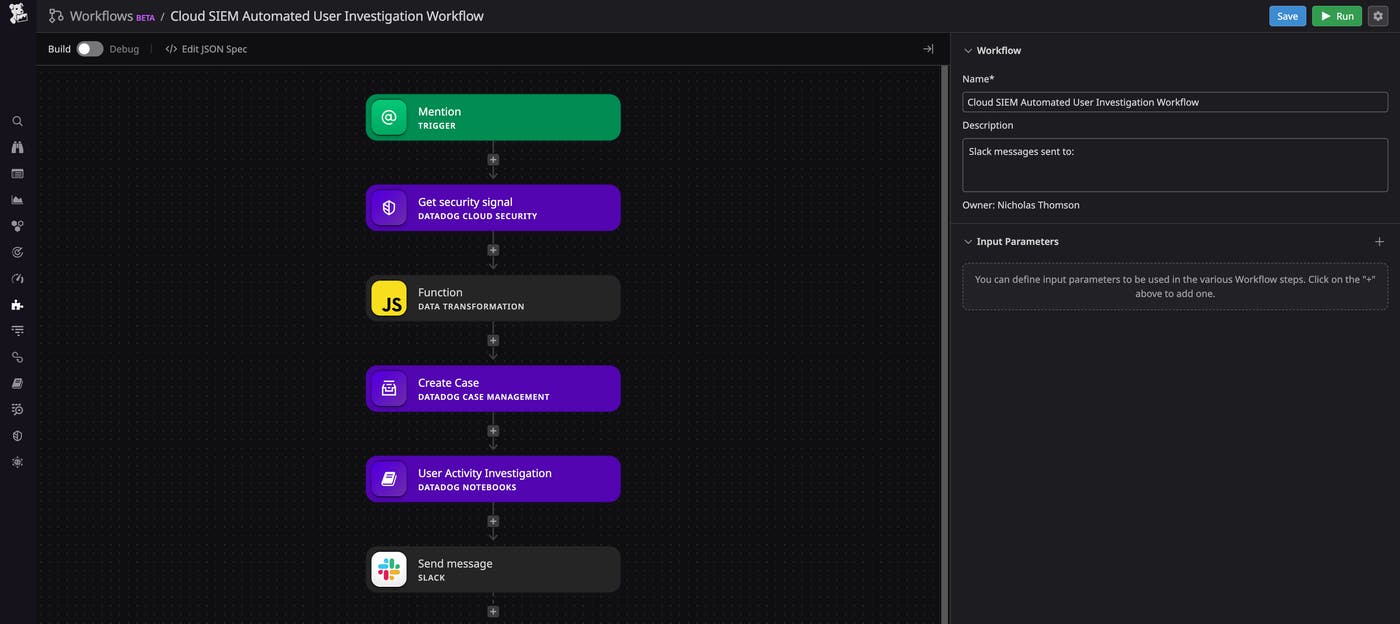
Security signals provide a lot of information, but not necessarily enough to determine whether an alert warrants further investigation or is a false positive. This workflow, when applied to a detection rule of your choosing, will trigger a series of subsequent actions every time the rule is triggered and a new signal is generated. This starts with creating a new case in Case Management, which provides a centralized ticketing system for all issues in your application, enabling your team to track, automate the triage process, and assign issues proactively. By enriching cases with relevant context from your observability data, you can investigate more efficiently, identify and eliminate false positives, and declare an incident if you determine that a security signal is in fact a malicious event.
Next, the workflow will trigger a search in Datadog for activity related to the user identified in the signal. This can provide additional context on why the signal was triggered and surface other areas of your environment that may have been compromised. Then, the workflow will update Datadog Notebooks within the case with the relevant data about this signal—such as logs, key metrics on the volume and on the timing of suspicious requests, and IP addresses of potential attackers. This will help you kick-start your investigation and set your response and remediation process in motion as quickly as possible.
Workflow blueprints are out-of-the-box sequences of actions provided by Datadog. The blueprints are organized by use case, and there are a number covering essential security processes. These include notifying your team on Slack if S3 buckets are not encrypted, disabling or deleting an AWS IAM user, blocking an IP with Cloudflare, and other security actions.
A helpful workflow used internally by our security research team is the Detect Emerging Vulnerabilities workflow, which searches the internet for references to a specific vulnerability and determines whether the vulnerability is emerging.
This workflow begins with the user setting an input parameter, which would be a common vulnerability and exposure (CVE) number or the name of vulnerability (such as “Dirty Pipe”). If the input is a CVE number, the workflow will query the National Vulnerability Database for metadata related to the vulnerability. The workflow then proceeds to search for open source intelligence on Twitter, GitHub, and the Infosec Exchange Mastodon community to gauge the number of instances of or references to the vulnerability in the wild, identify potential proof-of-concept exploits, and check the vulnerability’s zero-day status. Based on the results of these queries, the workflow yields a score to determine the severity of the vulnerability.
If, based on this score, the vulnerability is determined to be a critical threat, the the Detect Emerging Vulnerabilities workflow will automatically send a Slack message to the relevant parties and provide detailed information on the vulnerability, remediation steps, and the option to create an incident with the click of a button.
If the workflow discovers indicators of compromise (IoCs) on Twitter or Infosec Exchange that are associated with an emerging vulnerability, the workflow will initiate a 30-day retro-hunt query on your logs, searching for evidence of these IoCs in your environment. The workflow will then alert the analyst if this search discovers signs of compromise in your logs and update the Notebooks with the relevant data about this retro-hunt—enabling your team to further investigate these events.
Finally, the workflow will trigger the creation of a detection rule in Cloud SIEM that will generate a security signal for this vulnerability based on the specific IoCs that were discovered. Going forward, this enables you to detect if an attacker is attempting to exploit the vulnerability in your environment.
Datadog Cloud SIEM’s new integration with Workflows helps you automate the triage and analysis of security data, expedite issue resolution, and ease coordination across teams by consolidating incident response processes in a single pane of glass. By automating common security tasks, your team can focus on the most critical security issues and leverage Datadog’s wealth of security research experience to detect and defend against unforeseen threats.
Workflows and Case Management can be accessed from the Service Management menu and directly from Cloud SIEM’s Signal side panel. Users who also have Cloud SIEM can start adding workflows to their security and threat detection processes. If you’re new to Datadog, sign up for 14-day free trial.
此内容由惯性聚合(RSS阅读器)自动聚合整理,仅供阅读参考。 原文来自 — 版权归原作者所有。