



惯性聚合 高效追踪和阅读你感兴趣的博客、新闻、科技资讯
阅读原文 在惯性聚合中打开

推荐订阅源

T
The Exploit Database - CXSecurity.com
V
Vulnerabilities – Threatpost
Google DeepMind News
Attack and Defense Labs
Webroot Blog
Webroot Blog
cs.CV updates on arXiv.org
TaoSecurity Blog
TaoSecurity Blog
I
Intezer
Application and Cybersecurity Blog
N
News | PayPal Newsroom
S
Security Affairs
T
Tor Project blog
P
Proofpoint News Feed
Exploit-DB.com RSS Feed
S
Security @ Cisco Blogs
H
Heimdal Security Blog
Hacker News: Ask HN
Hacker News: Ask HN
Help Net Security
Help Net Security
U
Unit 42
云风的 BLOG
云风的 BLOG
The Hacker News
The Hacker News
Cisco Talos Blog
Cisco Talos Blog
量子位
F
Full Disclosure
cs.AI updates on arXiv.org
OSCHINA 社区最新新闻
OSCHINA 社区最新新闻
博客园 - 叶小钗
有赞技术团队
有赞技术团队
T
Troy Hunt's Blog
P
Privacy & Cybersecurity Law Blog
Forbes - Security
Forbes - Security
人人都是产品经理
人人都是产品经理
L
Lohrmann on Cybersecurity
Apple Machine Learning Research
Microsoft Security Blog
博客园 - Franky
腾讯CDC
AI
AI
Last Week in AI
Last Week in AI
Latest news
Latest news
Google Online Security Blog
N
Netflix TechBlog - Medium
Engineering at Meta
Engineering at Meta
GbyAI
GbyAI
让小产品的独立变现更简单 - ezindie.com
IT之家
IT之家
Martin Fowler
Martin Fowler
Blog — PlanetScale
Blog — PlanetScale
V2EX - 技术
V2EX - 技术
酷 壳 – CoolShell
酷 壳 – CoolShell

WordPress.com News

WordPress Studio Just Got Faster, the CLI is Now Dependency-Free, and Sonnet 5 Support What Is Agentic Commerce? What It Means for Your Store How to Choose a Web Host: 7 Factors to Consider WordPress.com Changelog: Shape Your Newsletter Signup and Get Domain Help in Chat Build your first plugin with WordPress Studio and Cursor Feature Clips: Turn Posts Into Social-Ready Video Customize What Newsletter Subscribers See | WordPress.com Your WordPress Expert, Now on Desktop: Studio Code Beta Jetpack Search 7.0: Find Products Faster in WooCommerce WordPress.com Changelog: Sharper Image Editing and a New Way to Multitask Meet Desktop Mode: Turn WordPress Admin Into a Desktop Workspace How to Make Your Website More Discoverable by AI | WordPress.com Develop Locally on Linux with WordPress Studio 10 New WordPress.com Features Just Landed WordPress.com Is Now Available in Stripe Projects WordCamp Europe 2026: Worth the Wait A Better Client Feedback Loop with Studio Code WordPress.com Changelog: WordPress 7.0 and Ways to Repurpose Your Written Content WordPress 7.0 Has Arrived: Here’s Everything You Need to Know WordPress 7.0 Has Arrived: Here’s Everything You Need to Know Now in the Reader: Bluesky, Mastodon, and the Fediverse Introducing Write: A New Way to Post, Built for Writers Meet WordCamp Agent: A Preview of the WordPress Memory Layer Turn Your Blog Posts Into Podcast Episodes WordPress.com Changelog: Launch a Podcast and Update Your Friends Blueprints Gallery Is Now Available in WordPress Studio Inside WordPress.com’s Security Response to the Essential Plugin Attack Achievement Unlocked: Your WordPress.com Milestones Now Have a Home Your Podcast Belongs With Your Blog and Newsletter Easy Site Editor – Coming Soon Easy Site Editor – Now in Beta Introducing Lately, now in beta Introducing WordPress Workspace for Mac WordPress.com Changelog: AI Assistant Opt-in on All Current Paid Plans and A New Way to Build Sites from Your Terminal Go From Idea to Live Ecommerce Store in One Hour A New Theme for Short-Form Blogging on WordPress.com Your WordPress Expert in the Terminal: Try the Studio Code Beta Spry Fox Has Been Making Games for 15 Years. Their Blog Still Matters. How to Build an Endless Stream of Content Ideas with WordPress and Claude How HealthPress.io Used WordPress.com to Power a Growing European Lifestyle Health Movement Murphy Levesque Co-Founded an Animal Rescue at 11. Her WordPress.com Site Helped Save Over 100 Animals. What We Learned (and Loved) at WordCamp Asia 2026 in Mumbai How to Choose Headless WordPress Hosting: A 2026 Checklist How Knockers Design Builds Complex Client Work on WordPress.com WordPress.com Changelog: A New Telegram Bot and Complimentary Newsletter Subscriptions The Top 10 Creative WordPress Themes with Real Personality Give Friends Free Access with Complimentary Subscriptions How WordPress 7.0 Is Building the Foundation for AI-Powered Sites New in WordPress Studio: Studio CLI on npm & phpMyAdmin Access Plugins, Global Styles, and More: Now on Every WordPress.com Paid Plan How Consultings Company Became Brazil’s First Automattic Partner by Betting on Owned Digital Top WordPress Design Trends for 2026: Interactivity, AI, and the Return to Ownership WordPress.com Changelog: Enabling AI Agents to Work on Your Site and More Control Over Newsletter Sending Barbara Kingsley Started TikTok at 77. Now She Has 100,000 Followers and a Website to Match.
WordPress.com Changelog: Try the WordPress 7.0 Beta and a One-Click Solution for Plugin Errors
WordPress.co · 2026-04-24 · via WordPress.com News
The words 'WordPress 7.0 beta & one-click plugin fixes' on a blue background

POSTED BY

Author Image

April 12–23, 2026

Welcome back to the WordPress.com changelog! 

Over the past two weeks, we opened up the WordPress 7.0 beta for Business and Commerce sites, made it easier for you to fix plugin errors, and made our Support Center more easy to navigate.

Releases

Try WordPress 7.0 before it ships

WordPress 7.0 is on its way, and if you’re on a Business or Commerce plan, you can now test the beta on your live and/or staging site.

Visit Sites → Your Site → Settings → Server → WordPress, and pick the beta version from the dropdown.
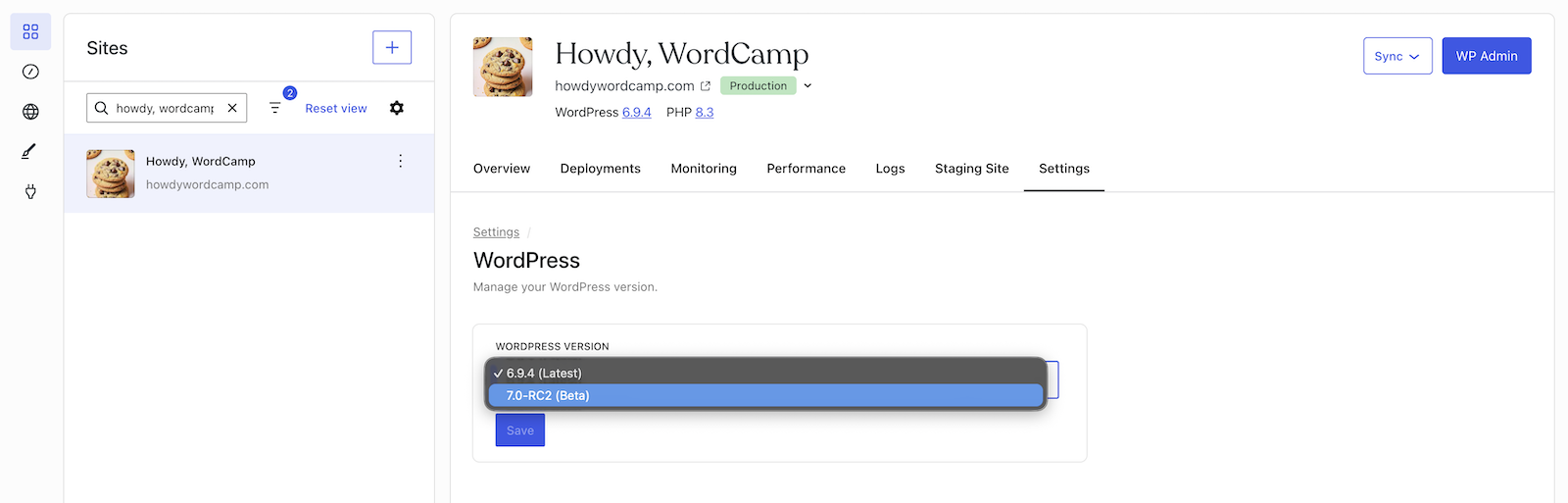
The WordPress 7.0 beta opt-in selected in a drop-down menu on WordPress.com

WordPress.com takes an automatic backup of your site before switching the version, keeps your site on the latest beta as new betas are released, and lets you switch back to a stable version at any time from the same settings area.

Security

When a plugin breaks your site, you can fix it in one click

When a plugin causes a fatal error on your WordPress.com site, you no longer face a blank screen with no way out.

Site owners will now see an error page that identifies which plugin triggered the problem and offers a one-click Deactivate button, which works even if the site won’t load normally, to disable the offending plugin before it has a chance to run again.
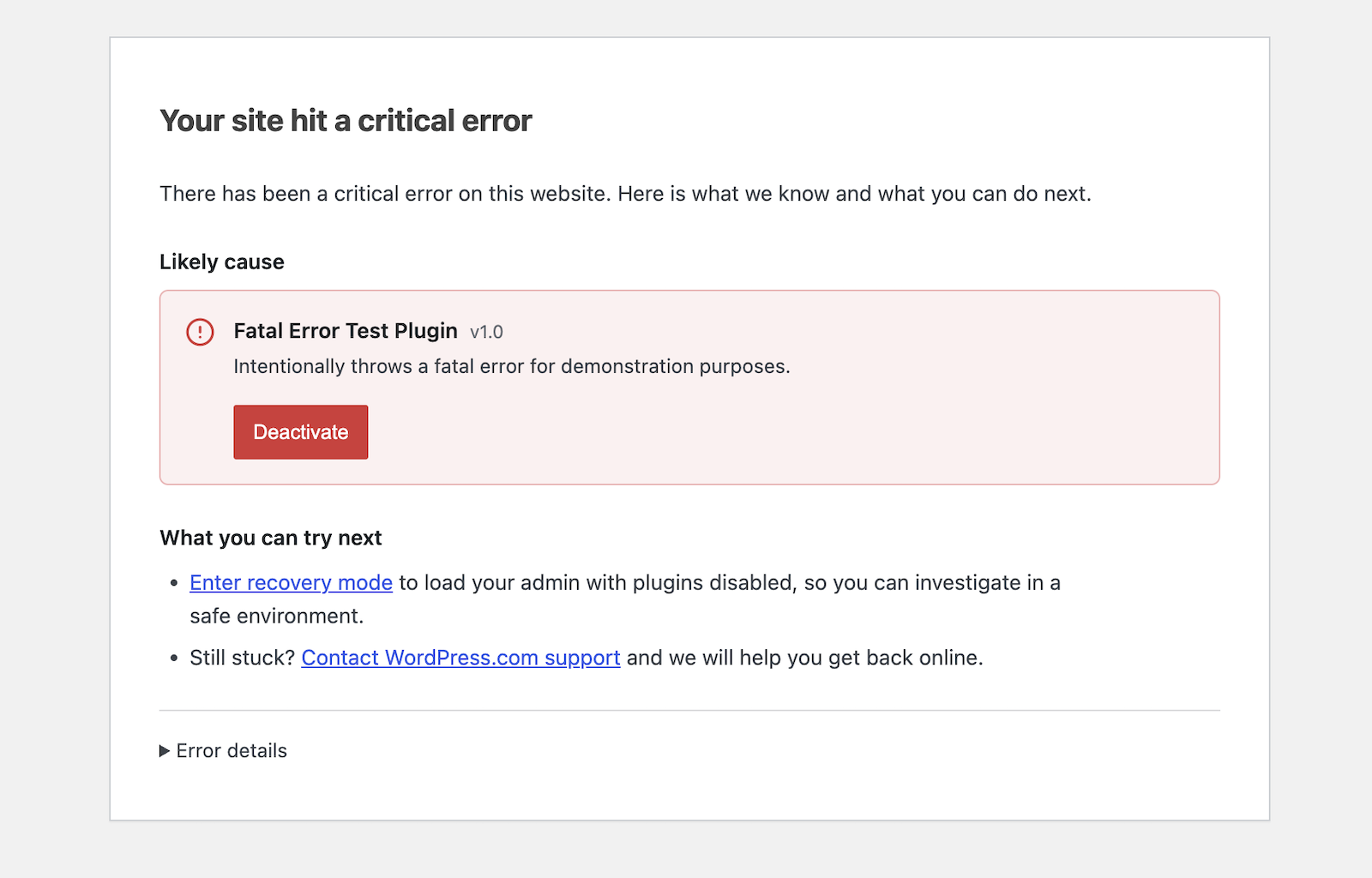
The critical error one-click disable screen on WordPress.com

Meanwhile, your site visitors see a clean apology — no technical details, no alarm.

Site Unavailable message on WordPress.com

For further peace of mind, our Happiness Engineers are constantly working to detect potential issues with plugins that may cause fatal errors on your site and proactively seek solutions before they become an issue for you or your readers/users. 

We also have a dedicated team of Security Specialists who work on detecting and resolving malware and other threats to your sites and will keep you updated with anything they find via email.

Support

Navigate our Support Center with the Support Assistant

Using the search bar in our Support Center now launches the Support Assistant by default for logged in and logged out users. The chat can surface answers to your specific questions, highlight helpful support resources, and connect you with one of our incredible Happiness Engineers if you need more assistance.
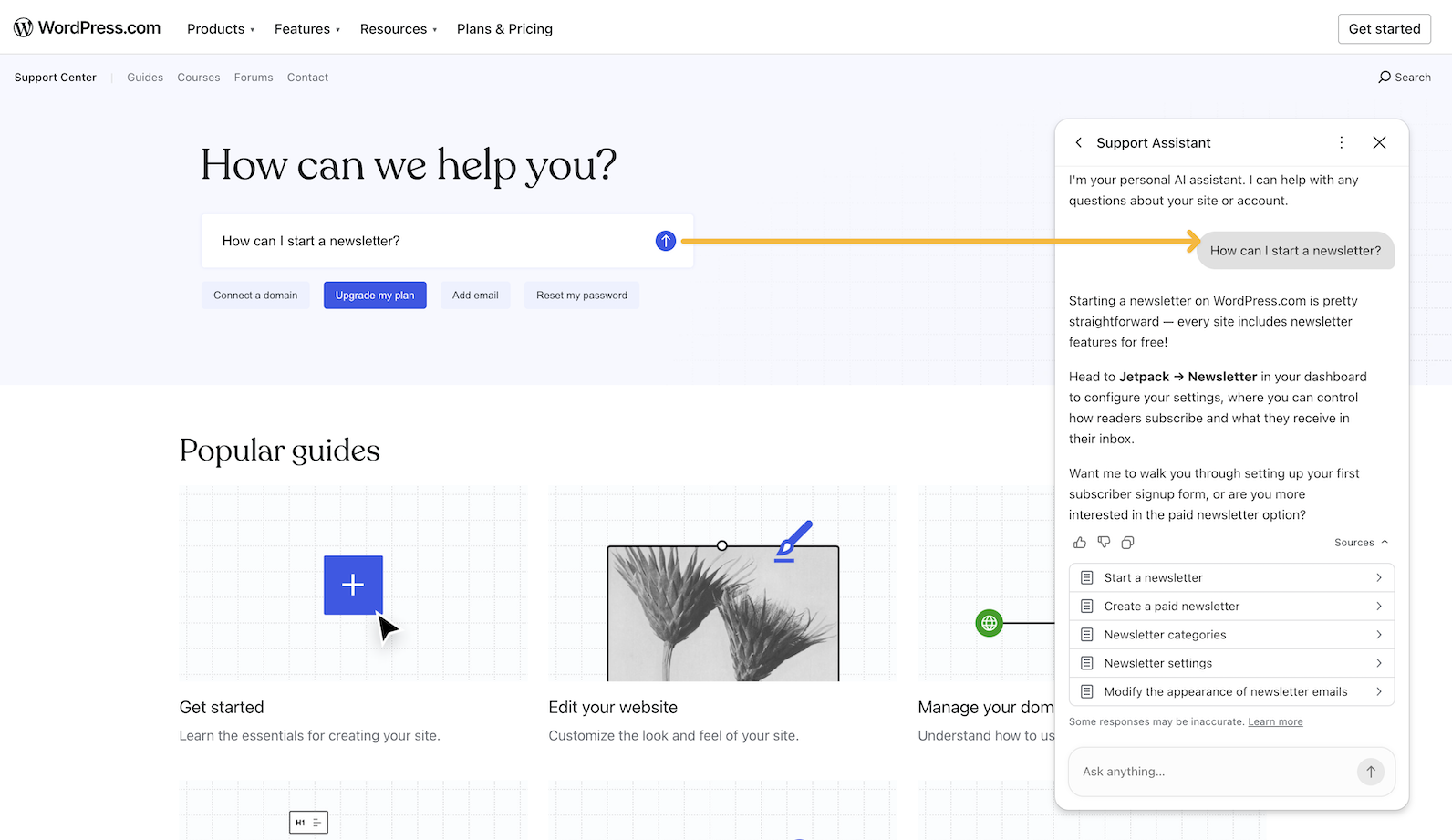
An orange arrow pointing from a text box to an assistant chat on WordPress.com Support Center

Fixes and improvements

We shipped additional reliability and polish updates across WordPress.com too, including:

  • Adding an explicit confirmation screen when connecting your WordPress.com account to Telegram.
  • Preventing survey pop-ups from appearing while the Help Center is open, so the two don’t compete for your attention.
  • Enabling customers to start a free trial using UPI.