





Google has introduced a new version of its Google Consent Mode, a framework that helps advertisers obtain users’ consent to show personalized ads and improve conversions and statistics to optimize ad campaigns.
At iubenda, we collected the most frequently asked questions directly from our users and asked them to Isabella Mazzeo, Google’s Ads Privacy, Data & Measurement Lead for Italy during our webinar.
Questions from our users
- Is Google Consent Mode mandatory?
- What actions does Google take when we do not comply?
- How do I anonymise AdSense data?
- Why does Google Consent Mode add its strings to a URL when I click on “Reject” on a consent banner? Is it possible to remove them?
- If I use Google Analytics 4 and Consent Mode, will the data of those who do not grant their consent be collected and recorded as well?
- Google Ads keeps telling me that I have to enable Consent Mode even though the setting is correct and active. What should I do?
- What is the best way to integrate iubenda with Google Consent Mode?
- Is it necessary to implement Consent Mode even if I only use Google Analytics for traffic measurement, so not for marketing or other reasons?
- What parameters must be in
grantedbefore the user interacts with the cookie banner? - How do you handle the collection and management of consent from users based on their geolocation or other demographic characteristics?
- Should I add new Google services to my privacy policy, or is it enough to have Google Analytics 4 and Google Tag Manager?
- Will the iubenda dashboard (for web agencies with multiple sites) show which sites are to be adapted?
- Is it possible to configure GA4 to not use Consent Mode and the cookie banner (even if I have to give up some data)?
- Is it true that Google Consent Mode has to be managed via Google Tag Manager?
- If I set
analytics_storage = denied, will the number of conversions and associated revenue displayed in GA4 be complete or an estimate? And if the thresholds required for modeling are not met, what data will be displayed in GA4 – just the conversions of those who have given consent? - Although we seem to have implemented everything correctly (i.e. Tag Assistant is not giving us any errors), we are experiencing a drop in GA4-side sessions. We also did a domain migration around this time. Do you think Consent Mode might have something to do with this?
- Are there ways to improve and optimize the consent rate?
- What is the estimated percentage of users who reject cookies that Google Analytics can still track?
- Consent Mode and marketing automation: best practices and tips
- If I already have iubenda installed on my website, is Consent Mode configured by default?
- If there is the warning on Google Ads and it does not tell me whether I have implemented Google Consent Mode correctly, how can I tell whether I have implemented it correctly or not?
- Is the Basic or Advanced plan activated when you enable Consent Mode v2 with iubenda?
- How is it possible to manage Consent Mode with iubenda in Shopify without using Google Tag Manager?
- We are managing some sites from an old CMS that we created. Do we have to generate the scripts on iubenda and then integrate them manually?
Is Google Consent Mode mandatory?
To date, the use of Google Consent Mode is not mandatory. Therefore, if you do not need remarketing or conversion measurement, you can continue to use Google platforms without adopting Consent Mode.
While it is not mandatory, in order to continue using certain features (such as modeling, remarketing, and conversion measurement), Google must receive the consent signals through Consent Mode.
What actions does Google take when we do not comply?
Beginning in March 2024, Google is strengthening the enforcement of its policies, such as the EU User Consent Policy. This will make it mandatory to send the opt-in signal when using Google platforms.
As of 6 March 2024, without the consent information for the ad_personalisation parameter, Google will no longer be able to collect audiences for remarketing. Therefore, if you use first-party cookies to remarket but do not send the consent signal, that collection will be blocked and limited. The audiences you previously collected will continue to work, but over time they will decrease and become empty.
Moreover, if you are still using the old Google Analytics Universal platform and continue to do conversion bidding or audience targeting on the old conversions or audiences, be aware that these stopped working as of 6 March.
Finally, Google’s policy enforcement will also become stricter for measuring conversions, so without consent, you will also lose access to this feature. For this, however, there is no exact date yet.
How do I anonymize AdSense data?
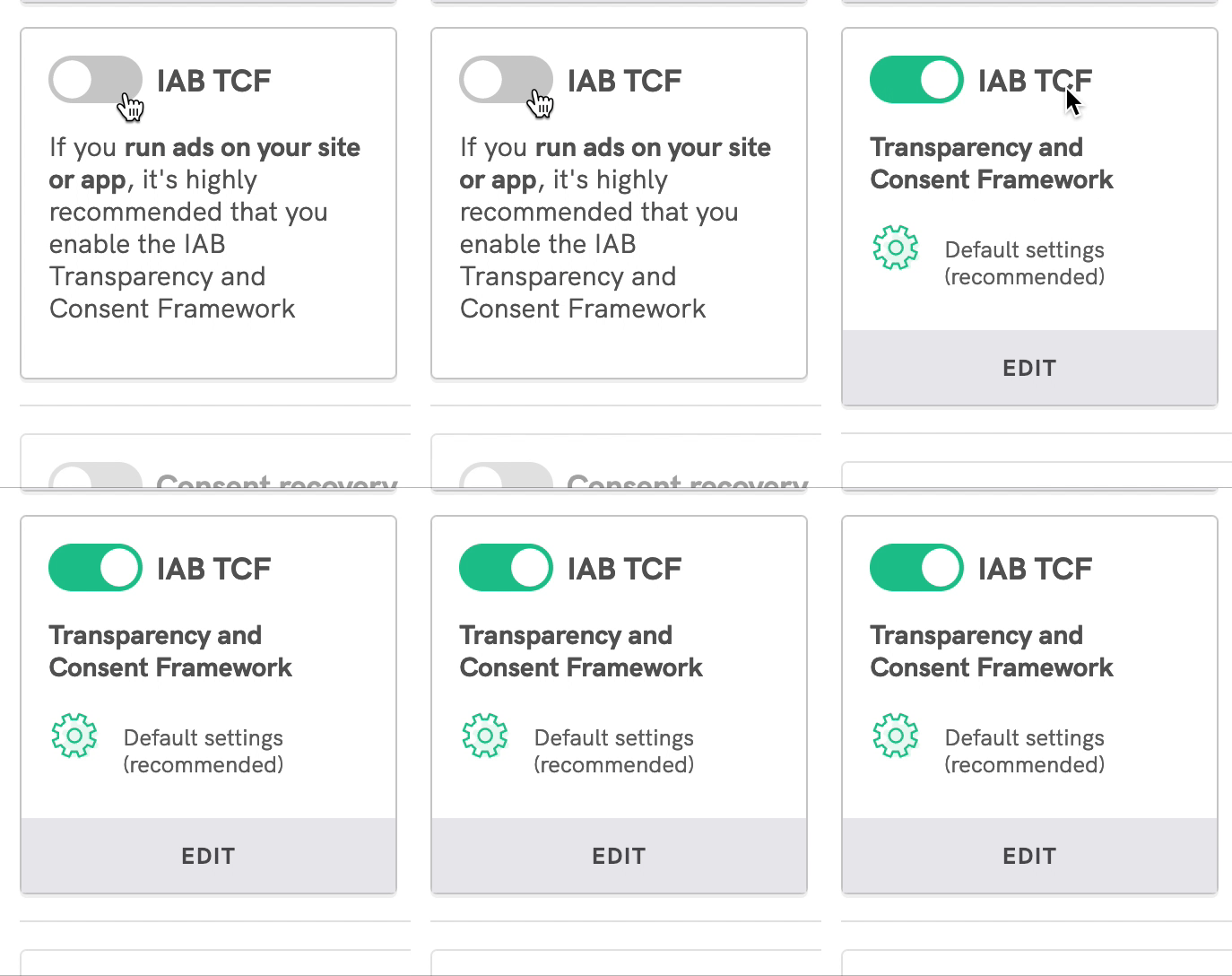
Be careful not to mistake Google AdSense with Google Ads: in fact, Google AdSense is not one of the services that Google Consent Mode supports. However, the AdSense consent signal refers to the TCF, the Transparency and Consent Framework. So, if you show ads on your website or blog via AdSense, what you need to do is implement a Consent Management Platform (CMP) and activate the TCF functionality. With iubenda, you can do this easily from the Privacy Controls and Cookie Solution dashboard.
Why does Google Consent Mode add its strings to a URL when I click on “Reject” on a consent banner? Is it possible to remove them?
This refers to a Google Tag Manager parameter called URL pass-through. What you can do is simply deactivate this parameter in Google Tag Manager and that way no string will be added to the URL of your site. This can be useful for anyone who uses the URL to display particular elements on their site, instead of using CSS.
If I use Google Analytics 4 and Consent Mode, will the data of those who do not grant their consent be collected and recorded as well?
The data of those who do not grant their consent are not recorded. There is, however, a difference between the basic and the advanced version of Google Consent Mode:
- In the Basic version, no data is collected, so all information is only passed on to Google with consent.
- In the Advanced version, anonymized information – such as device type, geo, and browser type – is collected and used anonymously to feed the modeling algorithms.
Google Ads keeps telling me that I have to enable Consent Mode even though the setting is correct and active. What should I do?
This is a warning that is shown to all Google Ads users as a reminder to activate Consent Mode and will be visible throughout March. If you have already activated Consent Mode, you can ignore the message.
What is the best way to integrate iubenda with Google Consent Mode?
All iubenda integrations support Google Consent Mode. Our advice is to rely on the integration mode you are already using. If you use the WordPress plugin, simply update it. If you have integrated iubenda with the direct link, you will need to copy and paste the new script into your site, and the same applies to our Google Tag Manager template and the other available plugins, which should have updated themselves.
Is it necessary to implement Consent Mode even if I only use Google Analytics for traffic measurement, so not for marketing or other reasons?
To date, this is not necessary, because the only functionality blocked without Consent Mode is remarketing. Therefore, if you are not using Google Analytics to collect remarketing audiences, you do not need to activate Consent Mode.
However, in the course of the year, Google may require Consent Mode also for the collection of measurements. Thus, you may need Consent Mode even if you are simply using Google Analytics to measure user behavior on your site.
There is still no date for the implementation of this new requirement, but in order not to miss the latest updates, we recommend that you subscribe to the iubenda newsletter.
What parameters must be in granted before the user interacts with the cookie banner?
By default, no parameters can be set to granted before the user interacts with the cookie banner, so all parameters must be in denied.
So at the moment the user arrives at your site and has not yet completed any choices through the cookie banner, the consent parameters are set to denied. If the user clicks Reject, they remain in denied. If the user clicks Accept, they pass consent and the parameters are updated to granted.
In this regard, you might consider using Google Consent Mode as an alternative to the prior blocking of cookies, but only if you only use Google services on your site (e.g. if you use alternative technologies such as the Meta pixel, prior blocking will still be necessary).
How do you handle the collection and management of consent from users based on their geolocation or other demographic characteristics?
If you use iubenda’s CMP, this is very easy. One of iubenda’s default settings is geolocation-based consent collection, so the CMP will be displayed according to the laws that apply to the user’s country of residence. Currently, Google Consent Mode is required for websites in Europe, but not yet in the US: iubenda will automatically enable Consent Mode tags for European users, but not for US users.
Should I add new Google services to my privacy policy, or is it enough to have Google Analytics 4 and Google Tag Manager?
This depends on which Google services are present on your site. You will definitely need to include Google Analytics and Google Tag Manager if you are integrating via Google Tag Manager. If you use Google Ads, you will also need to include the other Google Ads-related services, such as Google Ads Remarketing.
Will the iubenda dashboard (for web agencies with multiple sites) show which sites are to be adapted?
First of all, iubenda’s Site Scanner periodically scans websites and detects if there are any critical compliance issues. Furthermore, as far as Google Consent Mode is concerned, we have a tool that allows you to automatically check the presence of Google Consent Mode on a website.
Remember that, for agencies, there is also the iubenda Partner Program, which gives you access to discounts and priority support.
Is it possible to configure GA4 to not use Consent Mode and the cookie banner (even if I have to give up some data)?
Some users have implemented Google Analytics 4 with customized settings via server site tagging. In general, if you use GA4 integrated with advertising platforms, it is best to do so with a cookie banner and by activating Google Consent Mode. If you want to use Google Analytics without a banner cookie, it is always best to be sure and to discuss this with your legal team or DPO.
Is it true that Google Consent Mode has to be managed via Google Tag Manager?
No, not necessarily. As we have already explained, iubenda allows several integrations: they all support Google Consent Mode but there is no obligation to use Google Tag Manager. So choose the integration you are most familiar with and proceed with that.
If I set analytics_storage = denied, will the number of conversions and associated revenue displayed in GA4 be complete or an estimate? And if the thresholds required for modeling are not met, what data will be displayed in GA4 – just the conversions of those who have given consent?
If you use behavioral modeling in Google Analytics, the number of user conversions set to denied is modeled. It means that some of this information is retrieved by modeling, but only when thresholds are reached.
As far as thresholds are concerned, the property must have at least 1000 events per day in denied for 7 days, and at least 1000 users per day in granted for 7 days over the last 28 days.
If the thresholds are not reached, no modeling is activated and therefore the information available is only that of the users who have given consent, collected via cookies.
Although we seem to have implemented everything correctly (i.e. Tag Assistant is not giving us any errors), we are experiencing a drop in GA4-side sessions. We also did a domain migration around this time. Do you think Consent Mode might have something to do with this?
There have been cases where there has been a slight decrease in information measured by GA4. This is not so much due to the implementation of Google Consent Mode, but rather the alignment of the cookie banner with the consent requirements. It is likely that prior to Consent Mode, there was no prior blocking on GA4 and therefore the data collected was on all traffic. Now, with Consent Mode, the data collected is on all traffic from users who clicked ‘Accept’ and an estimate of users who clicked ‘Reject’. However, it is expected that this drop will gradually be made up as modeling fills in the missing information.
Are there ways to improve and optimize the consent rate?
Yes, there are some tricks that can help you improve your consent rate. For example, add your logo to the CMP or use a mobile-optimized CMP. You can find more tips to improve your consent rate here.
iubenda is already a CMP with a very high consent rate, and we are constantly optimizing it to help you improve your performance. One of the features we have implemented is consent recovery, which allows you to display a customized message instead of blocked iframes.
What is the estimated percentage of users who reject cookies that Google Analytics can still track?
It depends very much on each case. In general, the information that can be recovered by modeling is about 65% of the lost information.
Consent Mode and marketing automation: best practices and tips
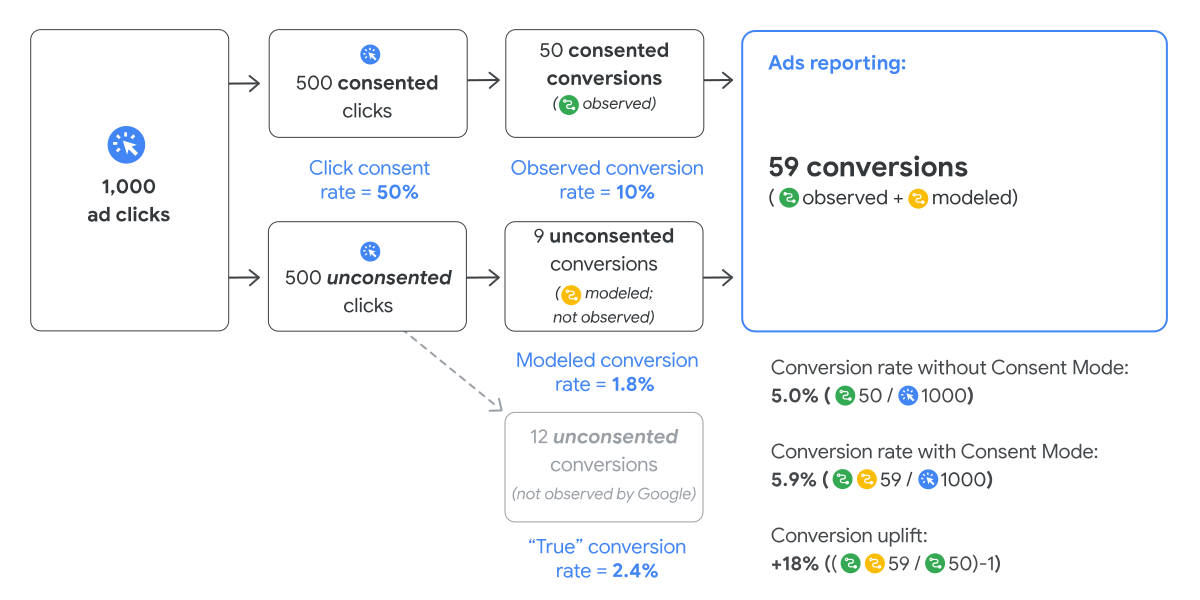
As we have already mentioned, with Consent Mode and with modeling, it is possible to recover a part of the conversions that come from a click on an ad. This recovered information also allows automated bidding algorithms – those that automatically manage advertising investments – to work with more accurate data.
For example, without modeling and with a consent rate of about 70%, 30% of the information is lost and the bidding algorithms work with partial information. With modeling, on the other hand, the algorithms are able to work with more complete information. This, of course, guarantees an improvement in marketing performance.
If I already have iubenda installed on my website, is Consent Mode configured by default?
If you have installed iubenda since November 2023, Consent Mode is enabled by default. If you have installed iubenda before November 2023, you can manually check if the implementation is active or you can integrate the iubenda script back into your website.
If there is the warning on Google Ads and it does not tell me whether I have implemented Google Consent Mode correctly, how can I tell whether I have implemented it correctly or not?
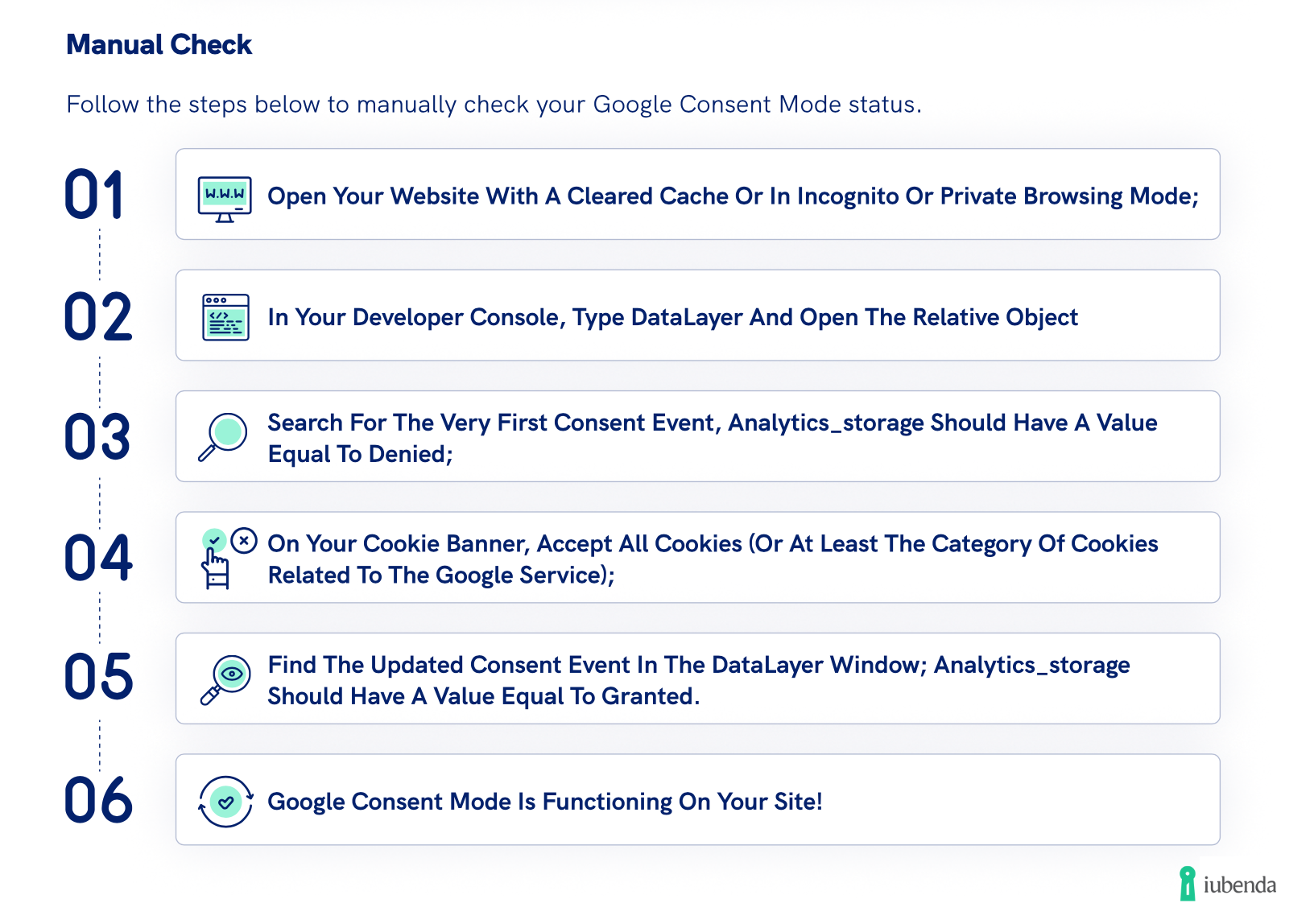
The best way to understand if the Consent Mode has been implemented correctly is to check if the consent information is passed to the data layer via Tag Assistant or via the network traffic monitor.
In particular, Tag Assistant allows you to test the post-consent parameter update and see live whether the consent parameter is correctly recorded after the user gives consent. If this parameter is denied on all four tags even though consent has been given, then the Consent Mode is not implemented correctly.
Here below, we explain how to perform a manual check:
Another way to check the implementation is to monitor the data collection and see if there is a drastic drop in the data collected since you enabled Consent Mode. This drastic drop could be due to a faulty implementation where Consent Mode is not collecting data correctly and all consents are being recorded as declined.
Is the Basic or Advanced plan activated when you enable Consent Mode v2 with iubenda?
The version of Google Consent Mode active on the iubenda CMP is Advanced.
How is it possible to manage Consent Mode with iubenda in Shopify without using Google Tag Manager?
To integrate iubenda with Shopify, you can follow this step-by-step guide.
At this time, due to a limitation of Shopify, it is not possible to integrate the Advanced version of Consent Mode, but you still have access to modeling.
We are managing some sites from an old CMS that we created. Do we have to generate the scripts on iubenda and then integrate them manually?
Yes, the script generated by iubenda is enough to enable Google Consent Mode. There is no need to add the script that forces the default consent to be denied, as it is already included in the iubenda script.
Enable the Google Consent Mode with iubenda
Time is up! March 6th was the deadline for the implementation of the new Consent Mode. If you still haven’t enabled it, then we suggest you hurry, to avoid losing access to key features.
The easiest and fastest way to enable the Google Consent Mode is with a Google-certified CMP, like iubenda. This is also the method that Google recommends, as it makes the implementation a lot easier on your side.
About us

The solution to generate your Privacy Policy. Customizable from 1700+ clauses, available in 9 languages and self-updating