








Stephen Allen Solutions Architect AI Apps and Platforms
Getting a live agent into production is about more than a good demo. It has to take the right actions across a spoken conversation, turn after turn, where timing and recovery matter as much as content. Behavior that sounded perfect yesterday can quietly change on the next prompt tweak or model iteration. Tools stop firing. Context slips between turns. Interjections go ignored. Shipping with confidence takes repeatable evidence that the agent holds up across the conversations real users will actually have.
That’s why we’re bringing native live evaluation to ADK. You can now drive a live, voice-based agent with a simulated user that speaks its turns as audio, score the spoken replies, and do it all inside the same eval loop you already run for text agents. This post takes a live agent from "it works in a demo" to "it's measured and trusted" without leaving ADK.
To see this in action, we’ll build a complete live evaluation loop: creating the agent, authoring an eval case, running the eval, and inspecting the recorded results.
Our example uses a graph-based workflow: three single-purpose live agents sequenced together, with each stage running on gemini-live-2.5-flash-native-audio.
from google.adk.agents.llm_agent import Agent
from google.adk.tools.tool_context import ToolContext
from google.adk.workflow import START, Workflow
from pydantic import BaseModel, Field


LIVE_MODEL = "gemini-live-2.5-flash-native-audio"


def validate_date_of_birth(dob: str, tool_context: ToolContext) -> dict:
  """Validate a confirmed date of birth against records (mocked)."""
  match = dob == "1985-07-12"
  tool_context.state["dob_verified"] = match
  return {"match": match}


greeter_agent = Agent(
    model=LIVE_MODEL,
    name="greeter_agent",
    mode="task",
    instruction="You are Sam, a friendly care-team assistant. Greet the caller "
    "and confirm you're speaking with John Doe before sharing anything else. "
    "Ask one question per turn, then complete your task with the confirmed name.",
)


dob_verifier_agent = Agent(
    model=LIVE_MODEL,
    name="dob_verifier_agent",
    mode="task",
    tools=[validate_date_of_birth],
    instruction="Ask for the caller's date of birth, read it back to confirm, "
    "then call validate_date_of_birth in YYYY-MM-DD format. Complete your task "
    "with 'verified' or 'unverified'.",
)


goals_agent = Agent(
    model=LIVE_MODEL,
    name="goals_agent",
    mode="task",
    instruction="Identity is verified. Proactively share the upcoming "
    "appointment on Tuesday, June 16th at 3 PM with Dr. Example, answer any "
    'questions, then wrap up warmly and end with "Goodbye."',
)


root_agent = Workflow(
    name="live_workflow",
    edges=[
        (START, greeter_agent),
        (greeter_agent, dob_verifier_agent),
        (dob_verifier_agent, goals_agent),
    ],
)
Python
Copied
Each stage is an ordinary live agent, with the workflow simply orchestrating them and carrying output from one stage to the next. This flow walks through three steps with a tool call in the middle, so it generates a rich multi-turn trajectory worth grading. As control moves between agents, the user never notices a handoff. The audio stream stays open across the entire interaction, and ADK carries the accumulated session state and conversation history forward so each agent picks up in context rather than starting cold.
An eval set is a JSON file containing your test cases. Test cases are decoupled from how they run, so you can mix two distinct styles: conversation scenarios and fixed conversations.
The first is a conversation scenario: you describe a goal and a persona, and the user simulator improvises the turns.
{
  "eval_id": "example_scenario_case",
  "conversation_scenario": {
    "starting_prompt": "Hello?",
    "conversation_plan": "You are John Doe. Confirm your name when greeted. When asked for your date of birth, give July 12th, 1985, and confirm it when read back. Listen to the appointment details, ask what you should bring to the visit, then say you have no other questions and let the call wrap up.",
    "user_persona": "NOVICE"
  },
  "session_input": {
    "app_name": "live_workflow",
    "user_id": "test_user_id",
    "state": {}
  }
}
JSON
Copied
The user_persona shapes how the simulated user communicates. ADK ships with a few built-in personas, and NOVICE tells the simulator to share only high-level goals and wait for the agent to ask for specifics, testing how well the agent drives the conversation. Personas are prompt-driven rather than hardcoded, so you can extend the set with your own personas. The simulator ends a scenario on its own once the conversation_plan is satisfied, so you script the goal and let it decide when the call is finished. As a safeguard against run-off conversations, max_allowed_invocations caps the total number of turns, giving every dynamic case a predictable upper bound.
You can also author a fixed conversation and script the user's turns verbatim. A static case is just as valid an input to a live run as a simulated user.
{
  "eval_id": "example_fixed_case",
  "conversation": [
    {
      "user_content": {
        "role": "user",
        "parts": [{ "text": "Hi, yes, this is John Doe." }]
      }
    },
    {
      "user_content": {
        "role": "user",
        "parts": [{ "text": "My date of birth is July 12th, 1985." }]
      }
    }
  ]
}
JSON
Copied
In your test_config.json, add a live_model_config and point ADK at the llm_audio user simulator. Each user turn from the cases above is synthesized to speech with the Gemini TTS voice you pick and streamed to the live agent.
{
  "criteria": {
    "rubric_based_multi_turn_trajectory_quality_v1": {
      "threshold": 0.7,
      "judge_model_options": { "judge_model": "gemini-3.7-flash" },
      "rubrics": [
        {
          "rubric_id": "verifies_identity_first",
          "rubric_content": {
            "text_property": "Across the call, the agent confirms the caller's name and validates their date of birth before disclosing any appointment details."
          }
        }
        // ... further end-to-end rubrics
      ]
    }
  },
  "live_model_config": {
    "timeout_seconds": 300
  },
  "user_simulator_config": {
    "type": "llm_audio",
    "model": "gemini-3.7-flash",
    "max_allowed_invocations": 10,
    "audio_model": "gemini-3.1-flash-tts-preview",
    "audio_model_configuration": {
      "response_modalities": ["AUDIO"],
      "speech_config": {
        "voice_config": {
          "prebuilt_voice_config": { "voice_name": "Kore" }
        },
        "language_code": "en-US"
      }
    }
  }
}
JSON
Copied
A few things worth calling out:
live_model_config enables live mode. Omitting this runs the exact same test cases in standard text mode.model vs. audio_model: model powers the simulated user’s turn-taking logic, while audio_model synthesizes those turns into speech. Adjust voice_name and language_code to test agent performance against different voices and accents.criteria configures metrics and pass/fail thresholds. Rubric-based LLM judges (like trajectory quality) evaluate the conversation end to end—ideal for multi-agent graphs. You can also attach per-turn metrics to score individual responses or tool executions.A spoken reply can be correct in hundreds of different phrasings. Natural-language rubrics judge intent the way a human reviewer would, captured once and applied automatically across every conversation in your suite.
With your agent, eval set, and configuration ready, run the evaluation from the CLI:
uv run adk eval \
  contributing/samples/live/live_workflow \
  contributing/samples/live/live_workflow/live_workflow.evalset.json \
  --config_file_path contributing/samples/live/live_workflow/test_config.json
Shell
Copied
Note: Make sure you have the eval extras installed (uv pip install -e ".[eval]") and API credentials configured for both the Live API and Gemini TTS.
This same pipeline can be called programmatically via AgentEvaluator, making it easy to drop live voice evaluations into your CI/CD pipeline to catch regressions before shipping.
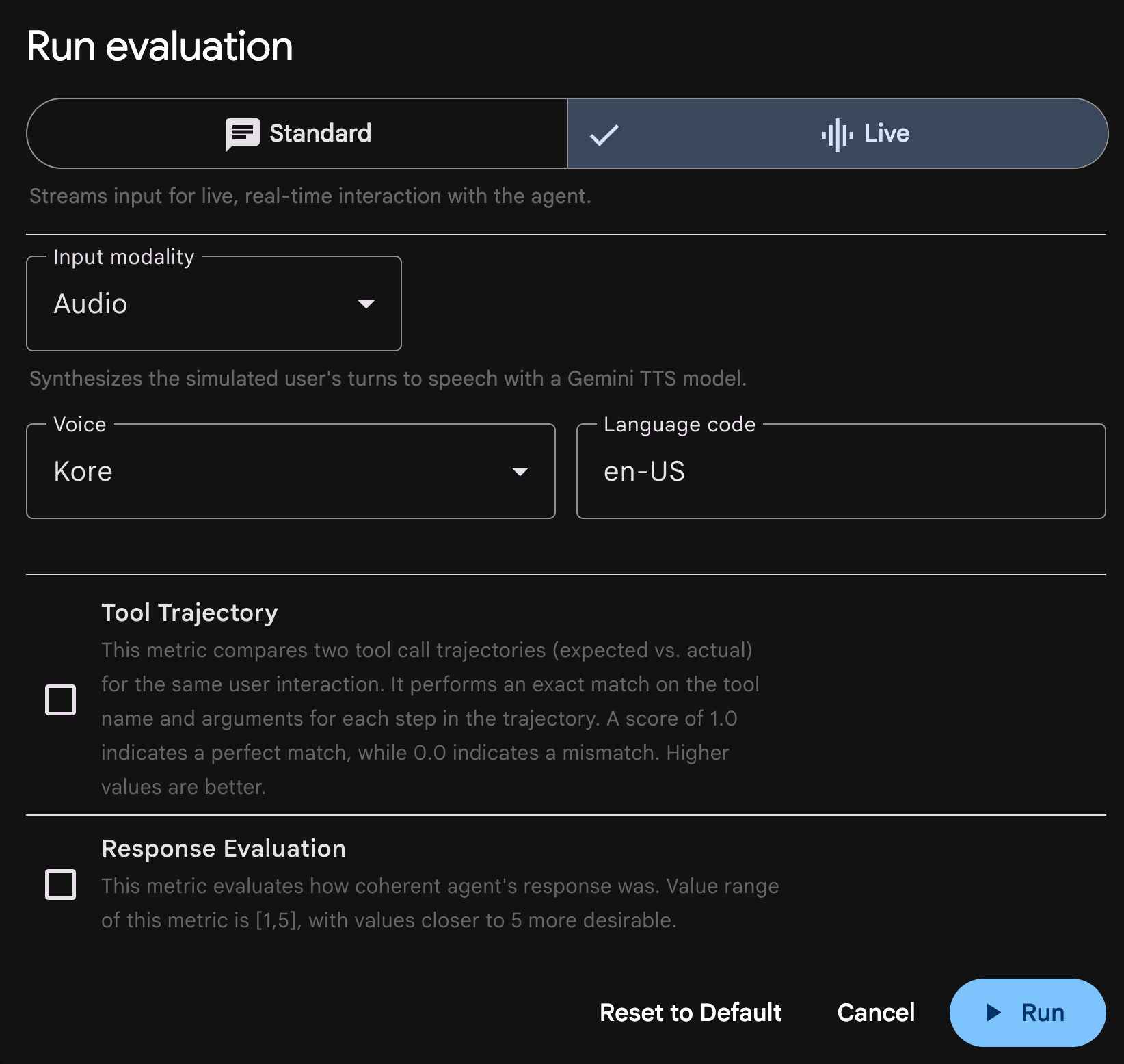
For interactive debugging, ADK Web now natively supports live evaluations. The run setup dialog includes a Standard | Live mode toggle. Selecting Live reveals input modality options (Audio or Text) alongside voice and language settings for the simulated user.
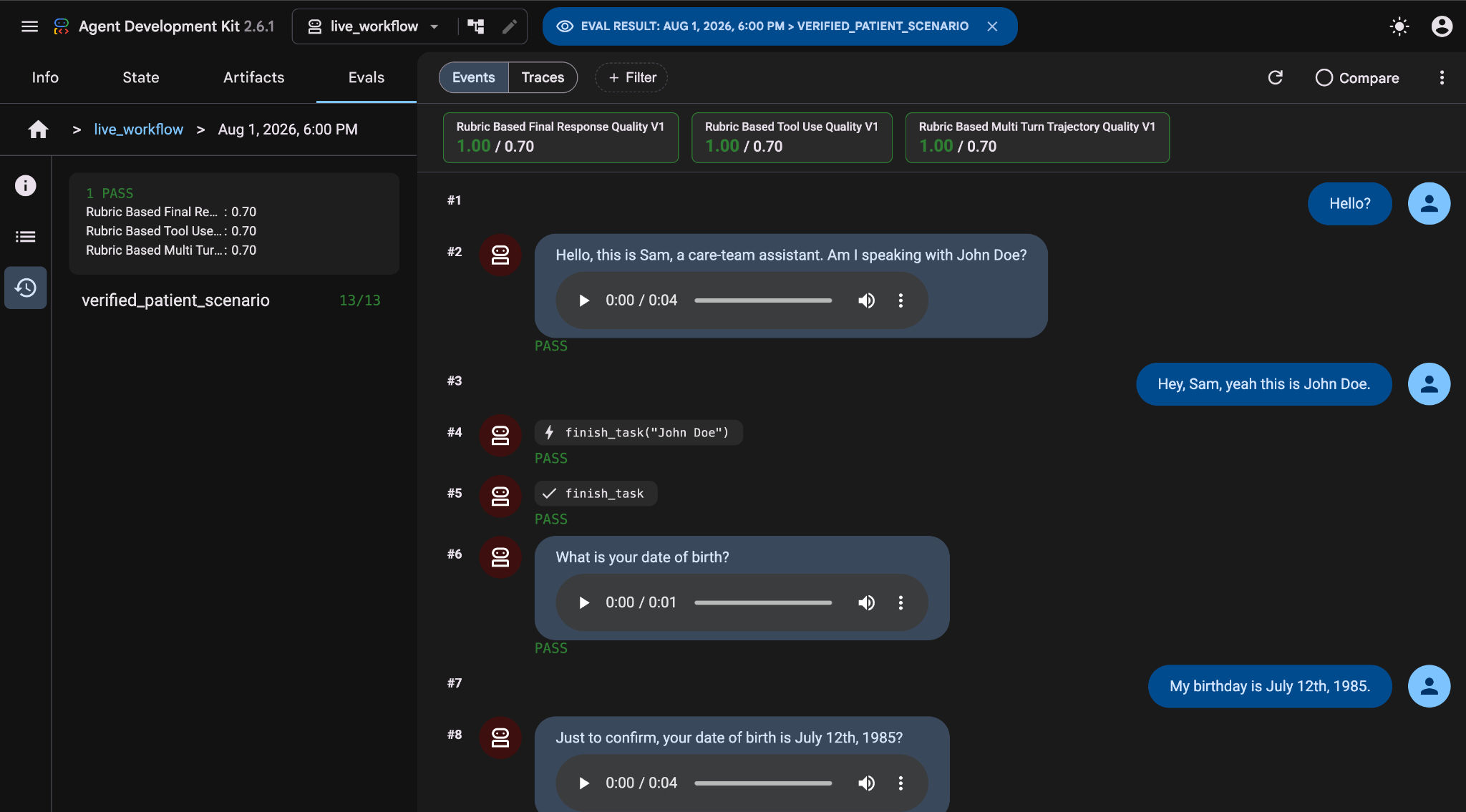
Once the run completes, ADK rebuilds the live audio stream into a clean transcript. Each turn renders in a dedicated message bubble complete with transcript text and an inline playable audio clip, so you can evaluate how your agent sounded, not just what it said.
Ready to test your live agent? Clone the live_workflow sample, run adk eval, and view your results in ADK Web.
Check out the ADK documentation for deeper guides on user simulation, synthetic audio profiles, and custom evaluation metrics. Your voice agent doesn't have to ship on vibes—now it can ship measured.
此内容由惯性聚合(RSS阅读器)自动聚合整理,仅供阅读参考。 原文来自 — 版权归原作者所有。