


惯性聚合 高效追踪和阅读你感兴趣的博客、新闻、科技资讯
阅读原文 在惯性聚合中打开

推荐订阅源

Simon Willison's Weblog
Help Net Security
Help Net Security
P
Privacy International News Feed
T
Threat Research - Cisco Blogs
C
Cisco Blogs
C
CERT Recently Published Vulnerability Notes
NISL@THU
NISL@THU
L
LINUX DO - 热门话题
Security Latest
Security Latest
A
Arctic Wolf
G
GRAHAM CLULEY
月光博客
月光博客
S
Securelist
D
Docker
J
Java Code Geeks
T
Troy Hunt's Blog
T
Tenable Blog
让小产品的独立变现更简单 - ezindie.com
SecWiki News
SecWiki News
S
Security @ Cisco Blogs
量子位
freeCodeCamp Programming Tutorials: Python, JavaScript, Git & More
L
LINUX DO - 最新话题
Recent Commits to openclaw:main
aimingoo的专栏
aimingoo的专栏
博客园 - 【当耐特】
H
Heimdal Security Blog
The Hacker News
The Hacker News
博客园 - 三生石上(FineUI控件)
Application and Cybersecurity Blog
N
Netflix TechBlog - Medium
Vercel News
Vercel News
Forbes - Security
Forbes - Security
B
Blog RSS Feed
H
Hackread – Cybersecurity News, Data Breaches, AI and More
IT之家
IT之家
B
Blog
MongoDB | Blog
MongoDB | Blog
博客园 - 聂微东
Google DeepMind News
S
Secure Thoughts
Threat Intelligence Blog | Flashpoint
C
Check Point Blog
云风的 BLOG
云风的 BLOG
CTFtime.org: upcoming CTF events
T
The Blog of Author Tim Ferriss
L
Lohrmann on Cybersecurity
F
Full Disclosure
D
Darknet – Hacking Tools, Hacker News & Cyber Security
P
Proofpoint News Feed

Crmeb on 老刘博客

用lnmp安装thinkphp类的程序,文件夹没有权限
crmeb商城后台标题修改方法
老刘 · 2021-06-22 · via Crmeb on 老刘博客

crmeb这款商城程序怎么说呢,价格便宜(当年),ui还行,功能基本完备。但是最让人诟病的就是crmeb这个字样到处都是,修改完了,等下次一升级,这些玩意又出来了。特别是网页标题的部分,真是让人烦不胜烦。前台使用的uni-app很多人都比较熟悉,标题在哪修改还好说,后台标题虽然问题不大,但是看着怎么都不舒服。

今天下午没事,又看到了这摊臭狗屎,于是就想把它搞掉。最后终于找出来了方法。

首先,修改两处文件

一处在view/admin/src/config/index.js

另一处在/view/admin/src/router/routes.js

使用notepad++打开,把里面的CRMEB字样替换成你商城的标题,比如老刘的是镜缘轩眼镜商城。

第二步,打包

因为用的是H5,所以需要用Nodejs。

安装Nodejs,官方地址

文件目录:
后台文件目录: view / admin/

打包教程:
1.本地安装 Nodejs(已安装可以跳过)
2.进入 命令行,具体方法如下
windows 系统用户进入 view/admin文件夹后,按住shift + 鼠标右击,点击[在此处打开 Powershell窗口]
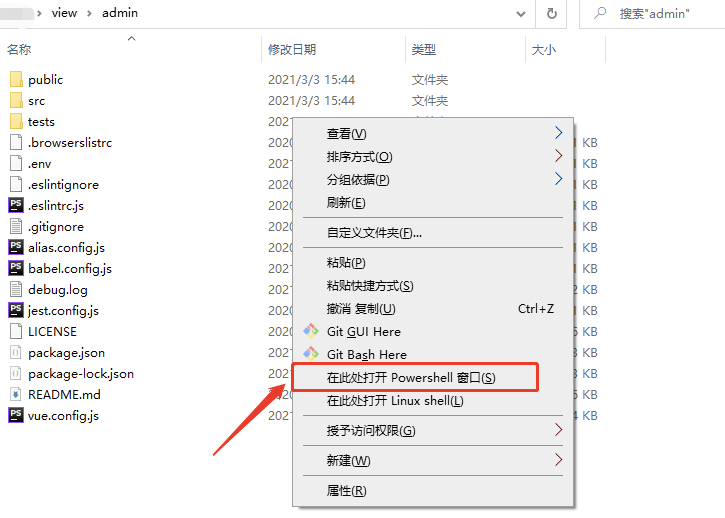
命令行输入npm install或者 npm i
回车。
等待安装完成。

然后

npm run build

打包完成后,把dist 文件夹里的文件覆盖后台里的文件即可。