
惯性聚合 高效追踪和阅读你感兴趣的博客、新闻、科技资讯
阅读原文 在惯性聚合中打开

推荐订阅源

N
News and Events Feed by Topic
D
Docker
云风的 BLOG
云风的 BLOG
F
Fortinet All Blogs
F
Full Disclosure
H
Hackread – Cybersecurity News, Data Breaches, AI and More
P
Proofpoint News Feed
Microsoft Azure Blog
WordPress大学
WordPress大学
The GitHub Blog
The GitHub Blog
L
LangChain Blog
H
Help Net Security
B
Blog
T
Tailwind CSS Blog
V
V2EX
博客园_首页
阮一峰的网络日志
阮一峰的网络日志
人人都是产品经理
人人都是产品经理
The Cloudflare Blog
Recent Announcements
aimingoo的专栏
aimingoo的专栏
美团技术团队
A
About on SuperTechFans
C
Cybersecurity and Infrastructure Security Agency CISA
K
Kaspersky official blog
I
InfoQ
Project Zero
Project Zero
I
Intezer
Google DeepMind News
博客园 - 【当耐特】
Hugging Face - Blog
Hugging Face - Blog
奇客Solidot–传递最新科技情报
奇客Solidot–传递最新科技情报
T
Threat Research - Cisco Blogs
Last Week in AI
Last Week in AI
C
Cyber Attacks, Cyber Crime and Cyber Security
G
GRAHAM CLULEY
Threat Intelligence Blog | Flashpoint
AWS News Blog
AWS News Blog
Spread Privacy
Spread Privacy
S
Securelist
Recorded Future
Recorded Future
D
Darknet – Hacking Tools, Hacker News & Cyber Security
博客园 - 叶小钗
S
Security Affairs
Blog — PlanetScale
Blog — PlanetScale
cs.AI updates on arXiv.org
月光博客
月光博客
freeCodeCamp Programming Tutorials: Python, JavaScript, Git & More
罗磊的独立博客
The Hacker News
The Hacker News

Cloudflare on 老刘博客

博客web端改用apache 利用cloudFlare的边缘计算workers实现外链转内链跳转
利用cloudflare页面规则设置301永久跳转
老刘 · 2023-12-01 · via Cloudflare on 老刘博客

前言

细心的读者可能已经发现,图南博客的域名已经由iliu.org 更换到iliu.org。这个域名是之前在Google注册的,可惜的80端口被墙了,也不知道是怎么实现强域名80端口的。于是在暂时使用一段时间后又使用了原域名。

前两天的时候,感觉还是需要用iliu这个域名,和博客的名字比较搭配,而且用了ssl之后,网站走的443端口,基本上也不会影响什么,所以就切换了过来。

换域名之后另一个需要的解决的事情是要把iliu.org的网址301跳转到新网站,以前用VPS的时候,直接在nginx里设置,现在不用vps了,有没有别的方法呢?答案是肯定的,而且比vps更方便。那就是使用Cloudflare的页面规则进行跳转。

方法

进入到cloudflare的个人中心,点击需要跳转的网站域名,点击DNS。 把域名解析到8.8.8.8,当然你解析到1.1.1.1也是可以的。然后点击规则,再点击页面规则。具体的设置如下图:规则
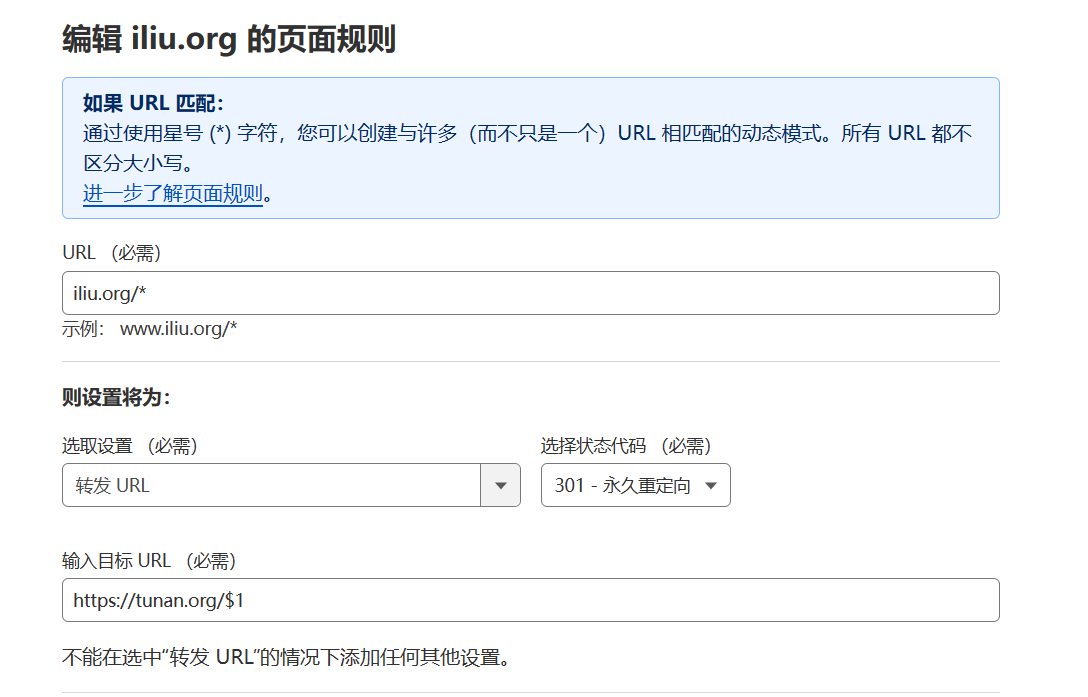
这样,就把iliu.org这个网站的网址,按照同样的规则,跳转到了iliu.org这个网站。

使用免费的cloudflare一个域名只有3个免费的页面规则,因此还有另外一个方法也可以实现,那就是利用cloudflareworkers

进入到cloudflare的后台后,点击Workers 和 Pages

点击创建应用程序,再点击创建workers:把下面的代码修改一下,复制到代码区保存。

 1
 2
 3
 4
 5
 6
 7
 8
 9
10
11
12
13
14
15
16
17
18
19
20
21
22
23
24
25
26
/**
 * Welcome to Cloudflare Workers! This is your first worker.
 *
 * - Run "npm run dev" in your terminal to start a development server
 * - Open a browser tab at http://localhost:8787/ to see your worker in action
 * - Run "npm run deploy" to publish your worker
 *
 * Learn more at https://developers.cloudflare.com/workers/
 */

// Redirect requests from one domain to another

const base = "https://iliu.org"
const statusCode = 301

async function handleRequest(request) {
  const url = new URL(request.url)
  const { pathname, search } = url
  const destinationURL = base + pathname + search

  return Response.redirect(destinationURL, statusCode)
}

addEventListener("fetch", async event => {
  event.respondWith(handleRequest(event.request))
})

上面秩序把域名化成你的域名,然后设置workers的域名是你要转出的域名即可。