




惯性聚合 高效追踪和阅读你感兴趣的博客、新闻、科技资讯
阅读原文 在惯性聚合中打开

推荐订阅源

Simon Willison's Weblog
G
Google Developers Blog
Spread Privacy
Spread Privacy
I
InfoQ
V
V2EX
S
Schneier on Security
小众软件
小众软件
C
CERT Recently Published Vulnerability Notes
博客园 - 聂微东
奇客Solidot–传递最新科技情报
奇客Solidot–传递最新科技情报
Stack Overflow Blog
Stack Overflow Blog
T
Threat Research - Cisco Blogs
L
Lohrmann on Cybersecurity
Recent Announcements
Cyber Security Advisories - MS-ISAC
Attack and Defense Labs
云风的 BLOG
云风的 BLOG
The Hacker News
The Hacker News
S
SegmentFault 最新的问题
C
Cybersecurity and Infrastructure Security Agency CISA
NISL@THU
NISL@THU
OSCHINA 社区最新新闻
OSCHINA 社区最新新闻
GbyAI
GbyAI
Latest news
Latest news
S
Secure Thoughts
Project Zero
Project Zero
MongoDB | Blog
MongoDB | Blog
I
Intezer
Security Latest
Security Latest
Apple Machine Learning Research
Vercel News
Vercel News
N
Netflix TechBlog - Medium
V2EX - 技术
V2EX - 技术
量子位
T
Threatpost
T
The Blog of Author Tim Ferriss
Y
Y Combinator Blog
T
Tor Project blog
A
Arctic Wolf
Microsoft Security Blog
T
The Exploit Database - CXSecurity.com
大猫的无限游戏
大猫的无限游戏
T
Tailwind CSS Blog
freeCodeCamp Programming Tutorials: Python, JavaScript, Git & More
C
Check Point Blog
博客园 - Franky
Google DeepMind News
The Register - Security
The GitHub Blog
The GitHub Blog
L
LINUX DO - 热门话题

输入法 on 老刘博客

Ubuntu25.10编译安装Ibus-libpinyin 使用Fcitx5 for Android,读《万历十五年》
ubuntu20.04开机亮度最大的解决方法及输入法设置
老刘 · 2021-12-20 · via 输入法 on 老刘博客

从很久以前UBUNTU就有一个毛病,有些电脑安装后,开机后屏幕的亮度会是最大。据说从很低的一个版本都有这样bug存在,但是不知道为啥官方一直都没有修复。不过网上也有很多的教程,试用了一下,有些有用,有些没用,直到扒到了一个很老的文章,上面记载的一个很简单的方法,却解决了这样一个问题。

别的不说,直接上代码,照着做就行了:

sudo gedit /etc/default/grub
 
#将GRUB_CMDLINE_LINUX_DEFAULT="quiet",替换为以下
GRUB_CMDLINE_LINUX_DEFAULT="quiet acpi_osi=Linux cpi_backlight=vendor"
 
sudo update-grub 最后一步一定要做。另外GRUB_CMDLINE_LINUX_DEFAULT="quiet"可能是会多出几个单词,不影响不影响,就是这一行。

然后说说ubunut的输入法

以前(十年前吧)的时候,linux下的输入法很难用,现在主流的输入法也都有了,比如搜狗,百度,讯飞等等。最近看了一下,发现已经不需要额外在安装其他的输入法了,用系统自带的中文输入法已经很好用了。

系统自带的输入法是ibuslibpinyin,只需要简单的设置一下,就非常好用了。

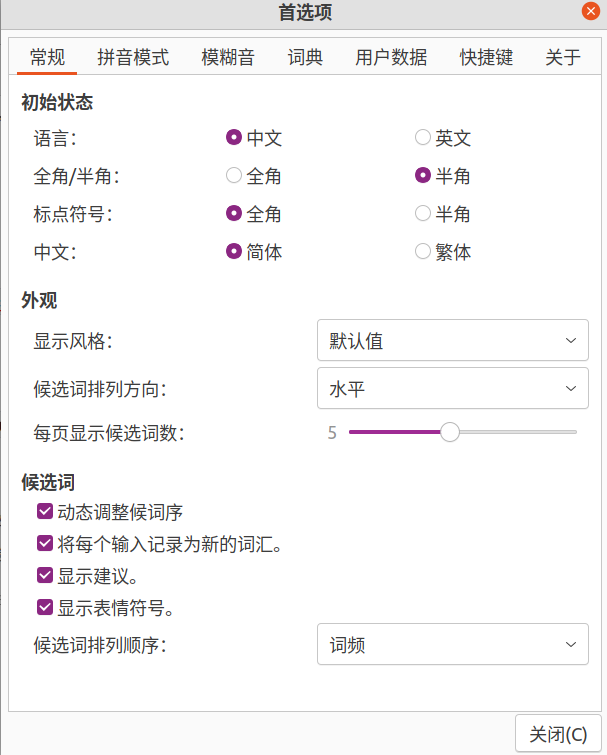
第一步:常规设置,如下图,根据个人的习惯来吧,老刘喜欢候选词以词频方式展示。
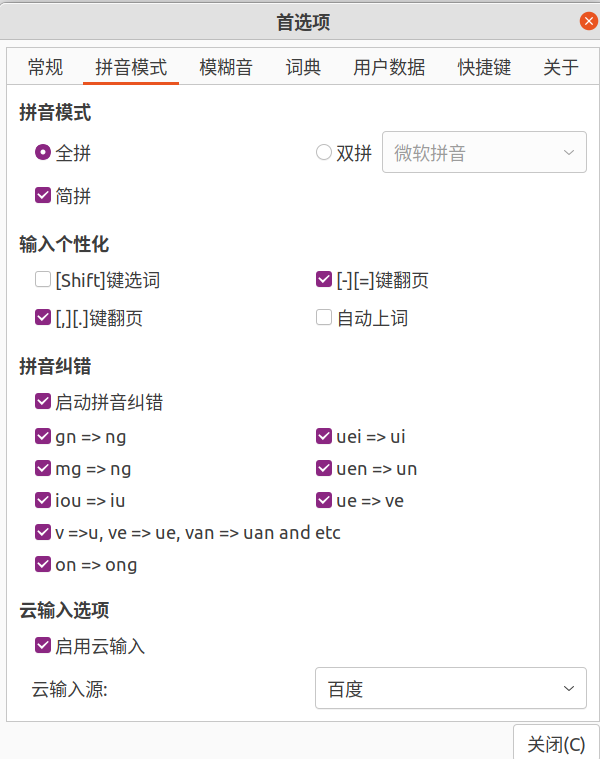
第二步:拼音模式,勾选“启用云输入”
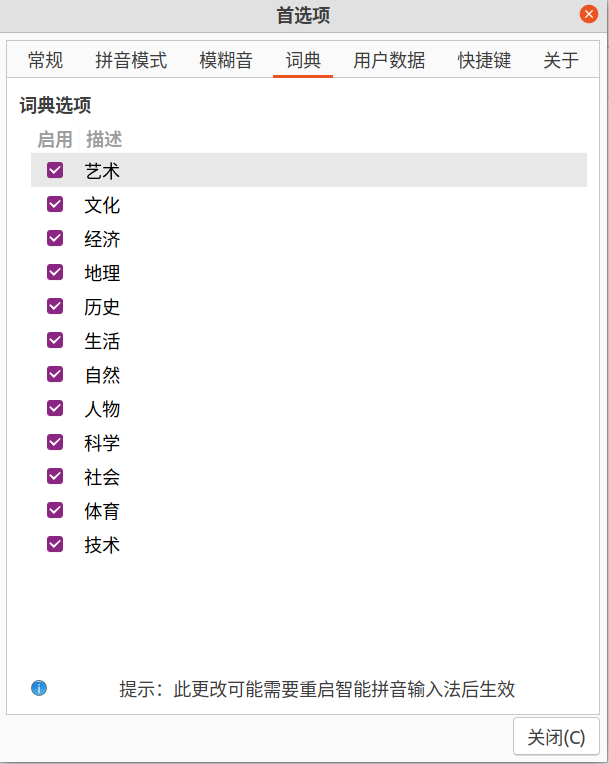
第三步:用户词典,勾选全部
第四步:重启

至此,输入法使用起来基本上和在win10的微软拼音方便程度差不多了。