


Memory shapes how humans think and how AI agents act. Without it, an agent only responds to the current input; with it, it can keep context, recall past actions, and reuse useful knowledge.
AI memory spans short-term, episodic, semantic, and long-term memory, each with different design trade-offs around storage, retention, retrieval, and control. In this article, we’ll explore agent memory patterns, a practical bridge between cognitive science and AI engineering.
Agent memory is the ability of an AI agent to store information, recall it later, and use it to improve future responses or actions. It allows the agent to remember past experiences, maintain context, recognize useful patterns, and adapt across interactions.
This is important because an LLM does not automatically remember everything across sessions. By default, it mainly works with the input available in the current context window. Memory must be added as a separate design layer around the model. This layer decides what should be saved, how it should be organized, and when it should be retrieved.
In a simple chatbot, memory may only mean keeping the last few messages in the conversation. In a more advanced AI agent, memory can include user preferences, past actions, task history, tool outputs, decisions, mistakes, and learned facts. This helps the agent avoid starting from zero every time.
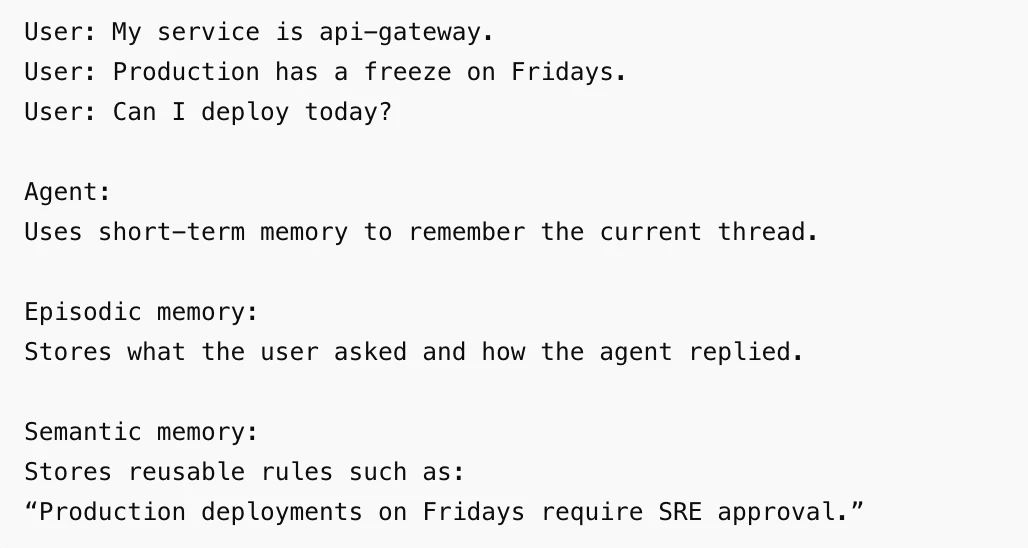
For example, a deployment assistant may remember that a user works on the api-gateway service. It may also remember that production deployments need approval on Fridays. When the user later asks, “Can I deploy today?”, the agent can use that stored information to give a more useful answer.
So, agent memory is not just storage. It is a full process:

Each step matters. A good memory system should store useful information, retrieve only what is relevant, and keep the final response grounded in reliable context. This is why agent memory must be treated as part of system design, not just as a database feature.
AI agent memory is easier to understand when we connect it with human memory. In cognitive science, memory is divided into different systems because each system has a different purpose. The same idea applies to AI agents. A well-designed agent should not store every memory in one place. It should use different memory types for different tasks.
A simple way to compare these memory types is shown below:
| Memory Type | What It Stores | AI Agent Example | Main Use |
| Short-term memory | Current context and recent turns | Last few user messages | Maintain conversation flow |
| Long-term memory | Information saved across sessions | User profile or project history | Personalization and continuity |
| Episodic memory | Specific events and outcomes | “User asked about deployment approval yesterday” | Traceability and learning from history |
| Semantic memory | Facts, rules, and concepts | “Friday production deploys need SRE approval” | Reusable knowledge and reasoning |
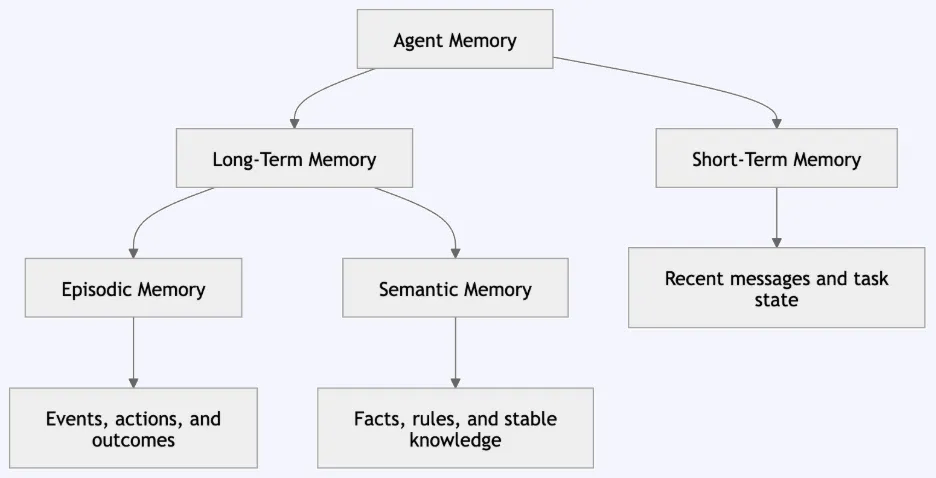
After understanding memory types, the next step is seeing how they work together inside an AI agent. A good memory system does not store everything in one place. It separates memory into layers and moves information carefully between them.
The agent receives user input, uses short-term memory for the current conversation, and retrieves relevant long-term memory when needed. After responding or acting, it can save the interaction as episodic memory. Over time, important or repeated information can become semantic memory.
This flow keeps the agent useful without overloading the context window. Since LLMs do not remember everything across sessions by default, memory must be added around the model. A good system stores only useful information and retrieves only what is relevant.
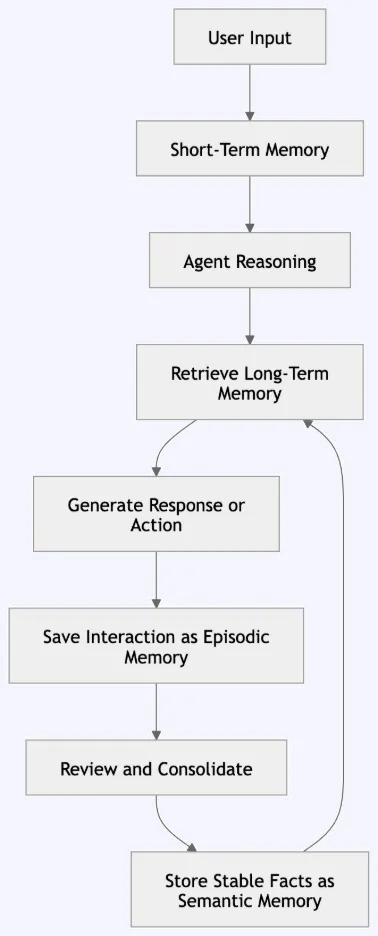
In this architecture, short-term memory supports the current task. Episodic memory records what happened. Semantic memory stores stable facts, rules, and preferences. Long-term memory connects these layers and makes useful information available in future sessions.
A practical agent memory pipeline usually follows these steps:
| Step | What Happens | Example |
| Input | The user sends a query | “Can I deploy today?” |
| Short-term memory | The agent checks recent context | User is working on api-gateway |
| Retrieval | The agent searches stored memory | Friday deployments need approval |
| Reasoning | The agent combines query and memory | Today is Friday, approval is needed |
| Response | The agent gives an answer | “You can deploy only after SRE approval.” |
| Episodic write | The interaction is logged | User asked about Friday deployment |
| Semantic update | Stable facts may be saved | Production Friday deploys require approval |
This design keeps the system clean. Raw events are stored first. Stable knowledge is created later. The agent retrieves only the most relevant memories instead of placing all past data into the prompt. This makes the system faster, easier to evaluate, and safer to manage.
In this hands-on section, we will build one LangGraph agent that uses three memory patterns:
| Memory Type | Purpose |
| Short-term memory | Keeps the current conversation thread active |
| Episodic memory | Stores what happened in past interactions |
| Semantic memory | Stores reusable facts, rules, and preferences |
We want to build an agent that can:
1. Remember the current conversation.
2. Save past interactions as episodic memory.
3. Store reusable facts as semantic memory.
4. Retrieve useful memory before answering.
Example flow:
!pip -q install -U langgraph langchain-openai In Colab, use getpass so the key is hidden.
import os
from getpass import getpass

if "OPENAI_API_KEY" not in os.environ:
os.environ["OPENAI_API_KEY"] = getpass("Enter your OpenAI API key: ") from dataclasses import dataclass
from datetime import datetime, timezone
import uuid
from langchain_openai import ChatOpenAI, OpenAIEmbeddings
from langgraph.graph import StateGraph, MessagesState, START
from langgraph.checkpoint.memory import InMemorySaver
from langgraph.store.memory import InMemoryStore
from langgraph.runtime import Runtime model = ChatOpenAI(
model="gpt-4o-mini",
temperature=0
) We use temperature=0 so the output is more stable during the demo.
This demo uses one checkpointer and one memory store.
embeddings = OpenAIEmbeddings(
    model="text-embedding-3-small"
)

store = InMemoryStore(
    index={
        "embed": embeddings,
        "dims": 1536
    }
)

checkpointer = InMemorySaver()
Here is what each component does:
| Component | Purpose |
| InMemorySaver | Stores short-term thread state |
| InMemoryStore | Stores episodic and semantic memories |
| OpenAIEmbeddings | Helps retrieve semantic memories using similarity search |
We use user_id to keep memory separated by user.
@dataclass
class AgentContext:
    user_id: str
This is important because one user’s memory should not appear in another user’s conversation.
This helper extracts a semantic memory when the user says “remember that”.
def extract_semantic_memory(message: str):
    lower_message = message.lower()

    if lower_message.startswith("remember that"):
        return message.replace("Remember that", "").replace("remember that", "").strip()

    return None
This helper formats stored memories before passing them to the model.
def format_memories(items, key):
    if not items:
        return "No relevant memories found."

    return "\n".join(
        f"- {item.value[key]}"
        for item in items
)This is the main part of the demo. The agent does four things:
1. Reads the latest user message.
2. Retrieves semantic memories.
3. Generates a response.
4. Saves episodic and semantic memory.
def agent_node(state: MessagesState, runtime: Runtime[AgentContext]):
    user_id = runtime.context.user_id
    latest_user_message = state["messages"][-1].content

    episodic_namespace = (
        "episodic_memory",
        user_id
    )

    semantic_namespace = (
        "semantic_memory",
        user_id
    )

    semantic_memories = runtime.store.search(
        semantic_namespace,
        query=latest_user_message,
        limit=5
    )

    semantic_memory_text = format_memories(
        semantic_memories,
        key="fact"
    )

    system_message = {
        "role": "system",
        "content": f"""
You are a helpful deployment assistant.

Use the memory below only when it is relevant.

Semantic memory:
{semantic_memory_text}
"""
    }

    response = model.invoke(
        [system_message] + state["messages"]
    )

    episode = {
        "timestamp": datetime.now(timezone.utc).isoformat(),
        "event": f"User asked: {latest_user_message}. Agent replied: {response.content}",
        "user_message": latest_user_message,
        "agent_response": response.content,
        "memory_type": "episodic"
    }

    runtime.store.put(
        episodic_namespace,
        str(uuid.uuid4()),
        episode
    )

    semantic_fact = extract_semantic_memory(latest_user_message)

    if semantic_fact:
        runtime.store.put(
            semantic_namespace,
            str(uuid.uuid4()),
            {
                "fact": semantic_fact,
                "memory_type": "semantic",
                "created_at": datetime.now(timezone.utc).isoformat()
            }
        )

    return {
        "messages": [response]
}builder = StateGraph(
MessagesState,
context_schema=AgentContext
)
builder.add_node("agent", agent_node)
builder.add_edge(START, "agent")
graph = builder.compile(
checkpointer=checkpointer,
store=store
)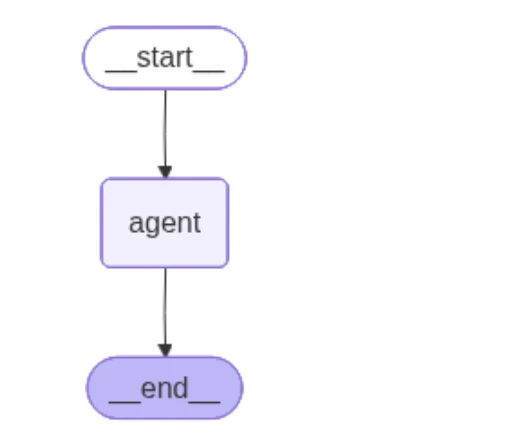
At this point, the agent is ready.
config = {
    "configurable": {
        "thread_id": "deployment-thread-1"
    }
}

context = AgentContext(
    user_id="user-123"
)
The thread_id controls short-term memory. The user_id controls long-term memory separation.
Short-term memory helps the agent remember the current conversation thread.
Run the first turn:
response_1 = graph.invoke(
    {
        "messages": [
            {
                "role": "user",
                "content": "My service is api-gateway."
            }
        ]
    },
    config=config,
    context=context
)

print(response_1["messages"][-1].content)
Run the second turn:
response_2 = graph.invoke(
{
    "messages": [
        {
            "role": "user",
            "content": "Production has a freeze on Fridays."
        }
    ]
    },
    config=config,
    context=context
)

print(response_2["messages"][-1].content) 
Now ask a follow-up question:
response_3 = graph.invoke(
    {
        "messages": [
            {
                "role": "user",
                "content": "Can I deploy today?"
            }
        ]
    },
    config=config,
    context=context
)

print(response_3["messages"][-1].content)
Output:

From the output we can see that the agent remembers that the service is api-gateway and that production has a freeze on Fridays.
This shows short-term memory because the agent uses earlier messages from the same thread.
Episodic memory stores what happened during interactions. In our agent, every user message and agent response is saved as an episode.
Run this cell to inspect saved episodic memories:
episodic_namespace = (
    "episodic_memory",
    "user-123"
)

episodes = store.search(
    episodic_namespace,
    limit=10
)

for episode in episodes:
    print(episode.value["event"])
print()Output:
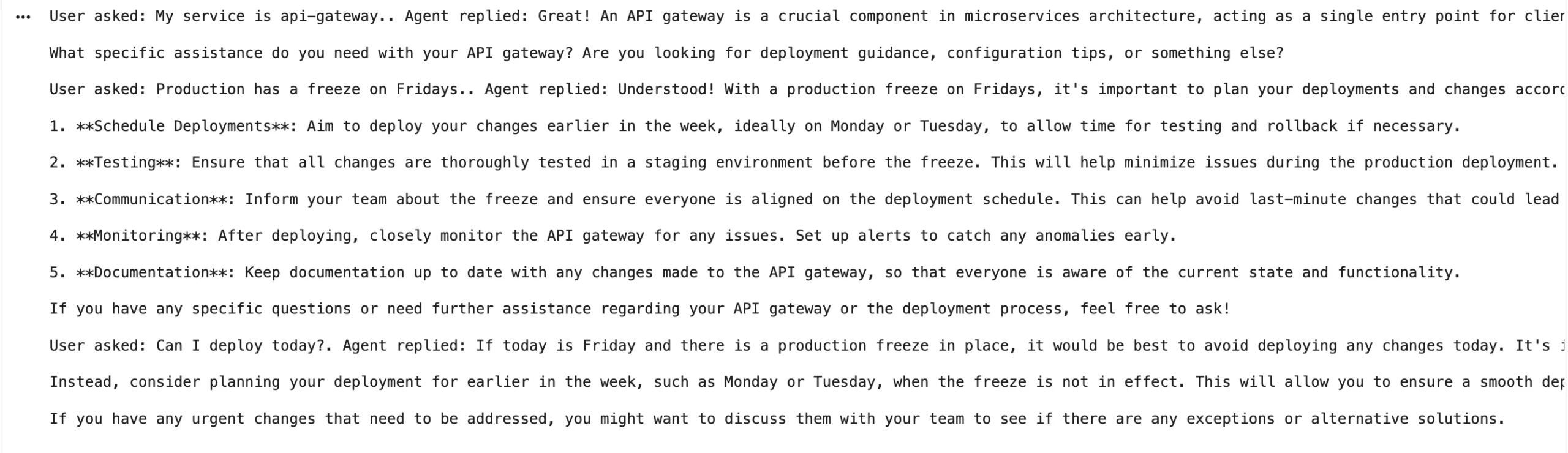
This is episodic memory because it stores specific events. It records what happened, when it happened, and how the agent responded.
Semantic memory stores reusable facts. In this demo, the agent saves a semantic memory when the user starts a message with “Remember that”.
Run this cell:
response_4 = graph.invoke(
    {
        "messages": [
            {
                "role": "user",
                "content": "Remember that production deployments on Fridays require SRE approval."
            }
        ]
    },
    config=config,
    context=context
)

print(response_4["messages"][-1].content)
Now ask a question that should use this stored fact:
response_5 = graph.invoke(
    {
        "messages": [
            {
                "role": "user",
                "content": "Can I deploy api-gateway on Friday?"
            }
        ]
    },
    config=config,
    context=context
)

print(response_5["messages"][-1].content)
Output:

We can see that the agent answered that Friday production deployments require SRE approval.
This shows semantic memory because the stored fact is reusable. It is not just a record of one event. It is knowledge the agent can use again later.
Run this cell to see the saved semantic facts:
semantic_namespace = (
    "semantic_memory",
    "user-123"
)

semantic_memories = store.search(
    semantic_namespace,
    query="Friday deployment approval",
    limit=5
)

for memory in semantic_memories:
print(memory.value["fact"])Output:

| Memory Type | Where It Appears in the Demo | What It Does |
| Short-term memory | Same thread_id | Keeps the conversation connected |
| Episodic memory | episodic_memory namespace | Stores interaction history |
| Semantic memory | semantic_memory namespace | Stores reusable facts |
| User separation | user_id in namespace | Prevents memory mixing across users |
This hands-on demo shows how different memory types can work together in one LangGraph agent. Short-term memory keeps the current conversation active. Episodic memory stores what happened. Semantic memory stores reusable knowledge. In Google Colab, in-memory storage is simple and useful for learning. For production systems, these memory layers should be moved to persistent storage so the agent can preserve memory after restarts.
After building memory into an agent, the next question is where to store it. The best storage backend depends on how the memory will be used.
Short-term memory needs fast access during the current conversation. Episodic memory needs to store events and history. Semantic memory needs search over facts, rules, and preferences. Long-term memory needs to stay available across sessions.
| Memory Type | Good Storage Choice | Why |
| Short-term memory | In-memory store, Redis, PostgreSQL checkpointer | Fast access during the active thread |
| Episodic memory | SQLite, PostgreSQL, MongoDB | Stores events, timestamps, and history |
| Semantic memory | Vector store, Chroma, FAISS, PostgreSQL with vector support | Supports search over meaning |
| Long-term memory | PostgreSQL, MongoDB, durable key-value store | Keeps memory across sessions |
A good memory backend should also support separation by user, thread, and memory type. This prevents memory from mixing across users and makes retrieval easier to control.
Choose the backend based on the memory’s job. Short-term memory needs speed. Episodic memory needs history. Semantic memory needs search. Long-term memory needs durability. A well-designed agent separates these memory layers so the system stays fast, searchable, and easier to manage.
Memory makes an agent more useful, but it also increases risk. When information is stored across sessions, wrong or sensitive memories can affect future responses. A memory system must therefore control what is saved, who can access it, how long it stays, and how it can be deleted.
The main risks include memory poisoning, prompt injection through stored content, sensitive data leakage, cross-user memory leakage, and stale memory. For example, an agent should not save API keys, passwords, tokens, or private user data as memory.
A safe memory system should follow a few clear rules:
| Rule | Why It Matters |
| Store only useful information | Reduces noise and unnecessary risk |
| Avoid secrets and sensitive data | Prevents accidental exposure |
| Separate memory by user and project | Avoids cross-user leakage |
| Validate important memories | Prevents false or harmful memories |
| Support deletion | Allows unsafe or outdated memory to be removed |
| Keep memory below system rules | Prevents stored content from overriding core instructions |
Memory should also include provenance when possible. The system should know where a memory came from, when it was created, and whether it is still valid.
Agent memory should be useful, but it must also be controlled. A good memory system stores only safe and valuable information, separates users clearly, supports deletion, and prevents stored memories from overriding fixed system rules. This makes agent memory safer, more reliable, and easier to manage
Agent memory helps AI agents maintain context, recall past interactions, and reuse useful knowledge. By separating memory into short-term, episodic, semantic, and long-term layers, developers can build agents that are more organized and reliable. Short-term memory supports the current conversation. Episodic memory records events. Semantic memory stores reusable facts. Long-term memory keeps important information across sessions. The LangGraph demo shows how these ideas can be implemented in practice. However, memory must be controlled carefully. A good system should store only useful information, protect sensitive data, support deletion, and prevent memory leakage. Well-designed memory makes agents more consistent, personalized, and trustworthy.
Q1. What is agent memory?
A. Agent memory lets AI agents store, recall, and reuse information to improve future responses.
Q2. Why do AI agents need different memory types?
A. Different memory types handle current context, past events, reusable facts, and long-term continuity.
Q3. What makes agent memory safe?
A. Safe memory stores only useful information, protects sensitive data, separates users, supports deletion, and prevents leakage.

Hi, I am Janvi, a passionate data science enthusiast currently working at Analytics Vidhya. My journey into the world of data began with a deep curiosity about how we can extract meaningful insights from complex datasets.
此内容由惯性聚合(RSS阅读器)自动聚合整理,仅供阅读参考。 原文来自 — 版权归原作者所有。