


Large language models usually generate text one token at a time. While this autoregressive approach delivers strong quality and instruction following, it can be inefficient for local users because GPUs often spend more time moving weights from memory than doing parallel compute.
Google DeepMind’s DiffusionGemma takes a different path, generating and refining blocks of tokens in parallel using diffusion-style text generation. In this article, we’ll explore how DiffusionGemma works, how it performs, and how developers can run it locally.
DiffusionGemma is Google DeepMind’s experimental open-weight model for diffusion-based text generation, built on the Gemma 4 26B A4B MoE foundation. Unlike standard LLMs that write one token at a time, it generates and refines blocks of tokens in parallel.
It behaves more like a drafting system than a typewriter: refining uncertain tokens until the answer converges. This makes it interesting for local inference, where GPUs can benefit from larger parallel workloads.
Most production LLMs today are autoregressive. They generate text one token at a time, which works well for quality but creates a clear latency bottleneck.
For cloud providers, this is manageable. They can batch requests from many users and keep GPUs busy. But for a single local user, batching does not help much. The user still receives output sequentially, token by token.
DiffusionGemma asks a different question:
What if one user could get a block of text generated in parallel?
Instead of spreading GPU work across many users, DiffusionGemma applies parallel compute to a 256-token canvas for one user. The model refines that block repeatedly, making local and low-concurrency inference feel much faster.
This makes it especially useful for:
It is not meant to fully replace standard Gemma 4 models. Instead, DiffusionGemma is best understood as a speed-first experimental model for workflows where responsiveness matters as much as raw benchmark quality.
| Area | Autoregressive LLMs | DiffusionGemma |
| Generation style | One token at a time | Full token canvas refined in parallel |
| Direction | Left to right | Bidirectional within each canvas |
| Main bottleneck for single-user local inference | Memory bandwidth | Compute |
| Best for | High-quality production text, chat, reasoning, general workloads | Fast local generation, editing, infilling, structured blocks |
| Self-correction | Limited because previous tokens are usually fixed | Stronger because uncertain tokens can be re-noised and replaced |
| Long output handling | Sequential token generation | Multiple 256-token canvases stitched block by block |
| Cloud batching | Very efficient at high concurrency | Speed benefit is strongest at low to medium batch sizes |
| Maturity | Highly mature ecosystem | Experimental and still evolving |
The key difference is not just speed. It is the way the model thinks about a generated answer. Autoregressive models commit early. DiffusionGemma can revise the canvas before finalizing it.
DiffusionGemma is based on the Gemma 4 26B A4B Mixture-of-Experts architecture. It has 25.2B total parameters and activates around 3.8B parameters during inference.
At a high level, the architecture has three major parts:
The encoder processes the user prompt and creates a KV cache. This is similar to how transformer models prepare prompt context during prefill.
The prompt is not regenerated at every diffusion step. Instead, the model stores the prompt representation and lets the denoising process use that cached context.
The decoder works on a canvas of tokens. The default canvas length is 256 tokens.
This decoder uses bidirectional attention over the canvas. That means every token position can attend to every other token position in the same block. This is very different from causal attention, where a token can only attend to previous tokens.
This bidirectional setup is useful for:
A 256-token canvas is useful, but many responses are longer than 256 tokens. DiffusionGemma handles this through multi-canvas sampling.
The process looks like this:
This gives DiffusionGemma a hybrid behavior. Inside each block, generation is diffusion-based and parallel. Across multiple blocks, generation is still sequential.
Diffusion is common in image generation, where a model starts with noise and gradually denoises it into a coherent image.
DiffusionGemma brings a similar idea to text, but with a key challenge: text is discrete. Unlike pixels, tokens are fixed vocabulary items. So instead of smoothing noise, DiffusionGemma starts with random placeholder tokens and repeatedly predicts better tokens across the entire canvas.
This is how text diffusion happens in DiffusionGemma:
DiffusionGemma is fast, but it is not generally stronger than Gemma 4 26B A4B in raw model quality. Gemma 4 26B A4B leads most benchmark categories, including math, coding, science reasoning, multimodal reasoning, and long-context retrieval.
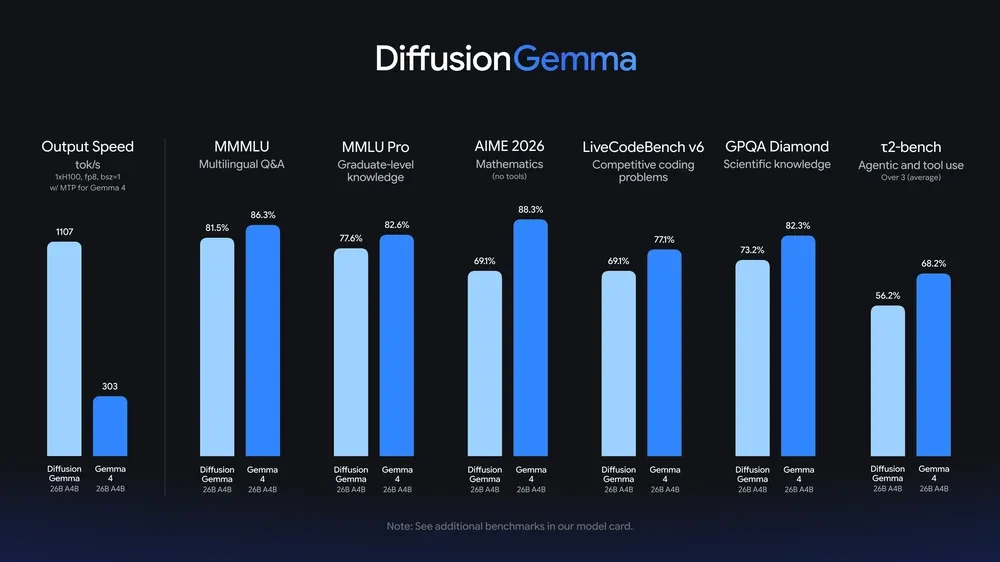
DiffusionGemma’s value is different. It trades some quality for a major change in latency behavior. This makes it more attractive when speed is the product requirement.
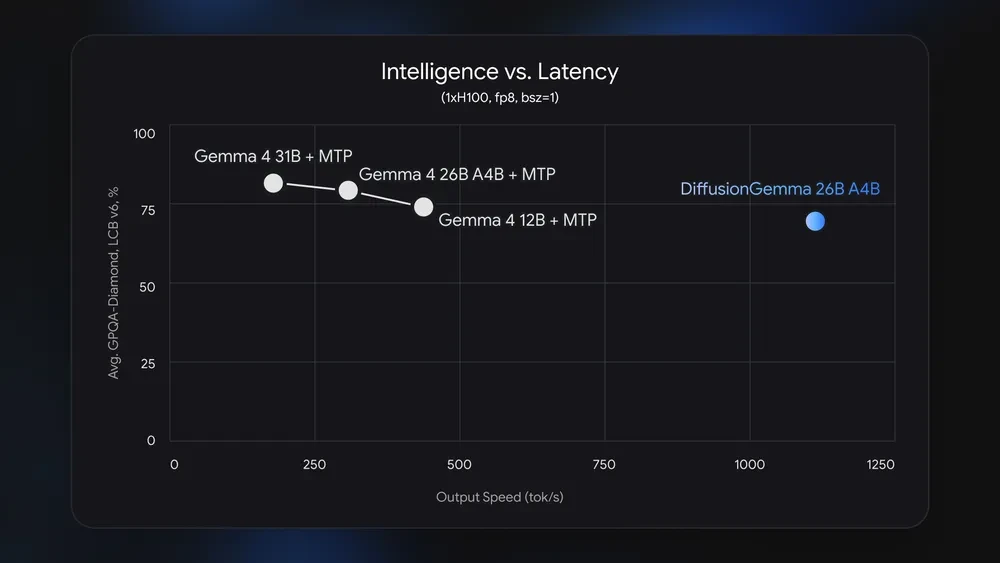
DiffusionGemma is positioned as a speed-first experimental model. It aims to reduce latency for local and interactive workflows, while standard Gemma 4 remains the stronger default for maximum quality.
In this hands-on section, we will run DiffusionGemma locally using llama.cpp. Since DiffusionGemma uses a new block-diffusion generation approach, regular llama.cpp builds may not support it fully yet. For this experiment, we will use the DiffusionGemma pull request branch from llama.cpp and build the dedicated llama-diffusion-cli.
The model used in this walkthrough is the Unsloth GGUF version:
unsloth/diffusiongemma-26B-A4B-it-GGUF We will use the Q4_K_M quantized model because it is smaller and more practical for local testing compared to larger precision variants.
Before building llama.cpp, install the required Python packages using the terminal:
pip install -U "huggingface_hub[cli]"
pip install vllm cmake
You should also make sure that the following tools are available on your system:
git --version
cmake --version
python --version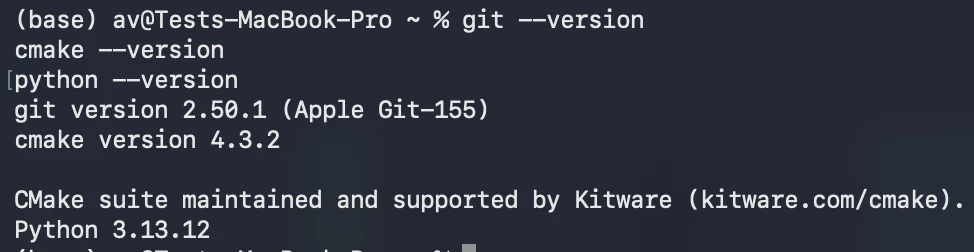
If you are using a CUDA-enabled NVIDIA GPU, make sure CUDA drivers and build tools are installed correctly. GPU acceleration is strongly recommended because DiffusionGemma is a large 26B-class model.
Clone the official llama.cpp repository:
git clone https://github.com/ggml-org/llama.cpp
cd llama.cpp The DiffusionGemma support is available through llama.cpp pull request 24423.
git fetch origin pull/24423/head:diffusiongemma
git checkout diffusiongemma
This switches your local llama.cpp repository to the DiffusionGemma development branch.
Now build the dedicated DiffusionGemma CLI.
For CUDA-enabled systems, use:
cmake -B build -DGGML_CUDA=ON
cmake --build build -j --config Release --target llama-diffusion-cli
If you are building without CUDA, you can use:
cmake -B build
cmake --build build -j --config Release --target llama-diffusion-cli
After the build is complete, the binary should be available at:
./build/bin/llama-diffusion-cli Download the Q4_K_M GGUF model from Unsloth:
hf download unsloth/diffusiongemma-26B-A4B-it-GGUF \
--local-dir unsloth/diffusiongemma-26B-A4B-it-GGUF \
--include "*Q4_K_M*"
This downloads the quantized GGUF file locally. The Q4_K_M version is useful for local experiments because it is significantly smaller than higher precision variants.
Once the model is downloaded, run it using llama-diffusion-cli: Adjust the location of the model .gguf if required
./build/bin/llama-diffusion-cli -m unsloth/diffusiongemma-26B-A4B-it-GGUF/diffusiongemma-26B-A4B-it-Q4_K_M.gguf -ngl 99 -cnv -n 2048 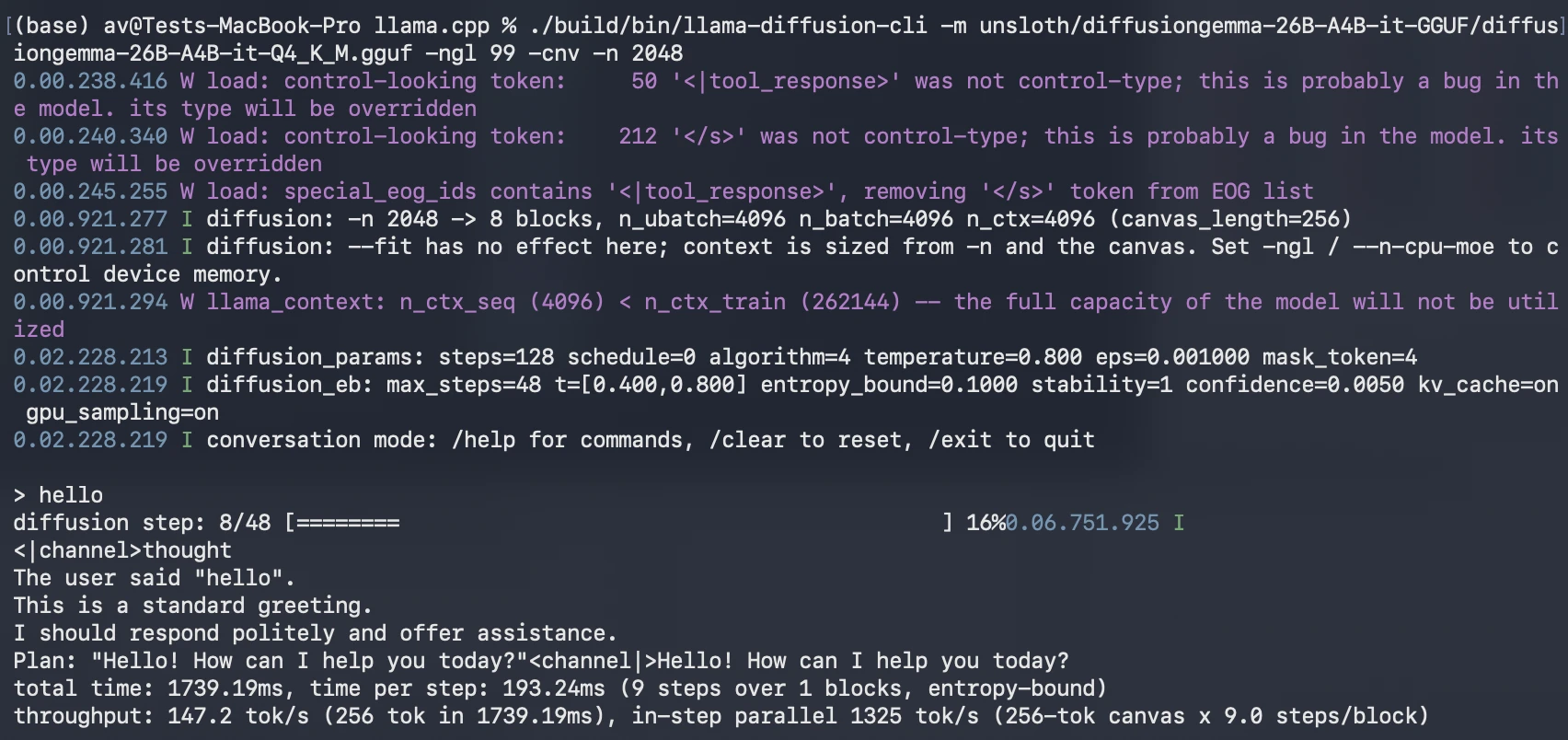
If your machine has limited GPU memory, reduce the number of GPU layers or try a smaller quantized model if available.
Once the model loads, start with a simple prompt:
./build/bin/llama-diffusion-cli -m unsloth/diffusiongemma-26B-A4B-it-GGUF/diffusiongemma-26B-A4B-it-Q4_K_M.gguf -ngl 999 --diffusion-visual -p "Write a Python script that benchmarks local LLM response time. The script should send 5 prompts to a local model endpoint, measure total response time for each prompt, and print the average latency. Use simple error handling." Output:
DiffusionGemma is a language model that generates text differently from traditional LLMs. Instead of writing one token at a time from left to right, it starts with a noisy block of tokens and repeatedly refines the whole block until it becomes meaningful text. This makes generation more parallel and can improve speed on local GPUs. It is especially useful for fast drafting, editing, code completion, and structured text generation where the model can revise multiple parts of the output at once.
The exact answer may differ, but the model should clearly explain the difference between autoregressive generation and diffusion-based generation.
Use the following prompt:
./build/bin/llama-diffusion-cli -m unsloth/diffusiongemma-26B-A4B-it-GGUF/diffusiongemma-26B-A4B-it-Q4_K_M.gguf -ngl 999 --diffusion-visual -p "Write a 500-word technical introduction to diffusion-based text generation. Use clear headings and avoid marketing language."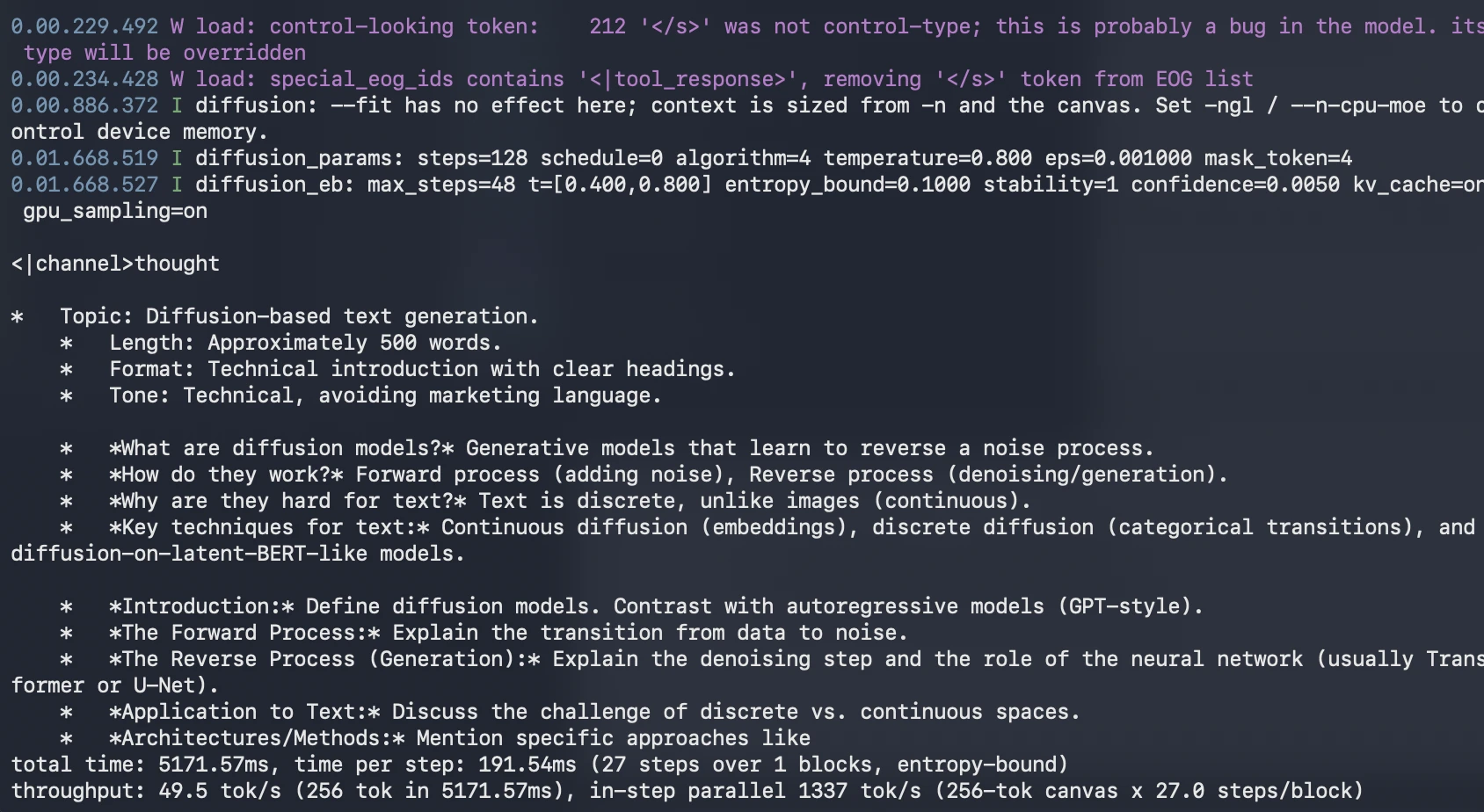
What to observe:
This test helps you understand whether DiffusionGemma is useful for fast long-form drafting.
Use the following prompt:
./build/bin/llama-diffusion-cli -m unsloth/diffusiongemma-26B-A4B-it-GGUF/diffusiongemma-26B-A4B-it-Q4_K_M.gguf -ngl 999 --diffusion-visual -p "Write a Python script that benchmarks local LLM response time. The script should send 5 prompts to a local model endpoint, measure total response time for each prompt, and print the average latency. Use simple error handling." 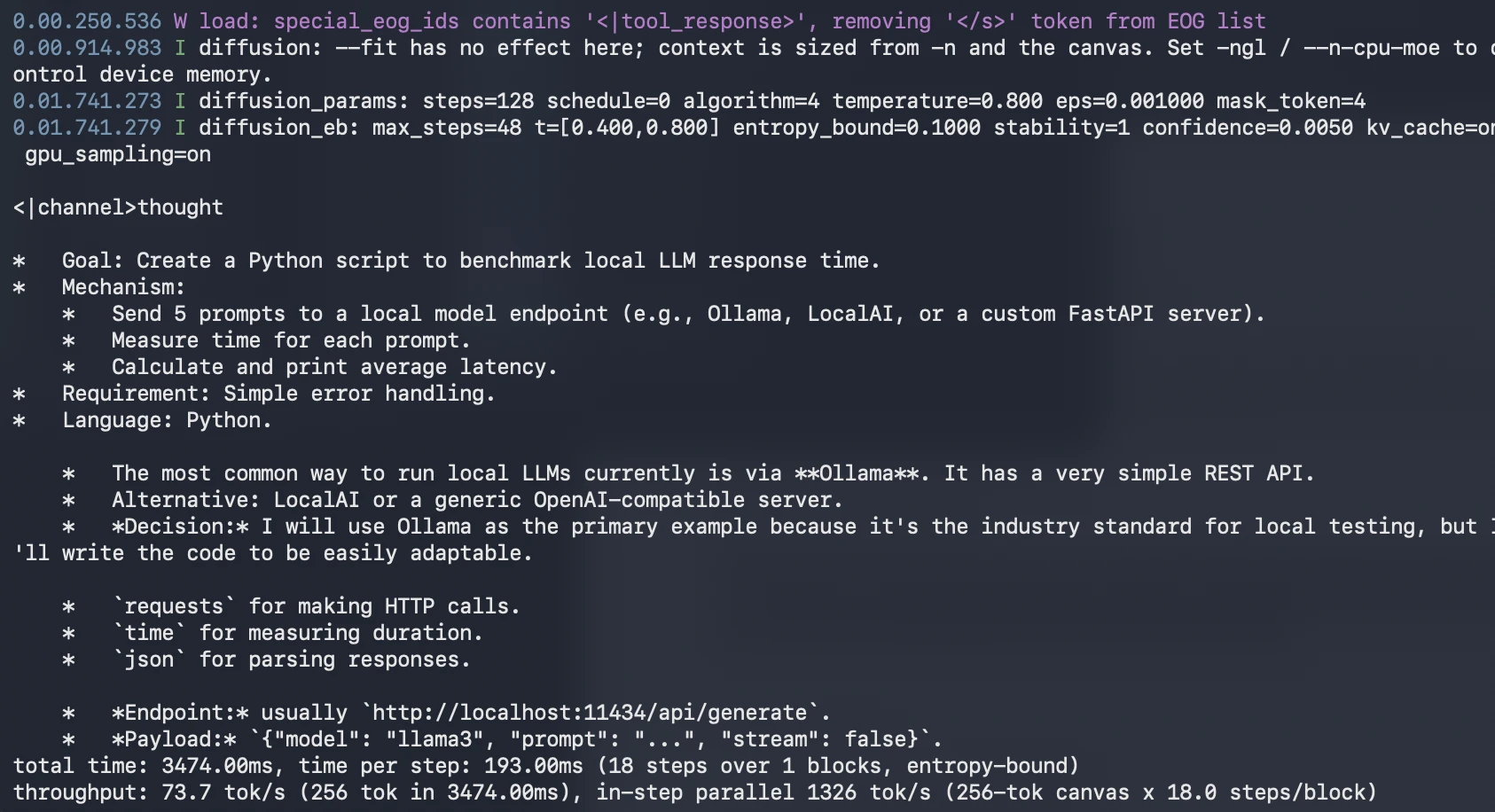
What to observe:
This test helps evaluate DiffusionGemma’s ability to generate practical developer code.
This setup is best treated as an experimental local evaluation path. DiffusionGemma support in llama.cpp is new and may change as the pull request evolves. For a production setup, evaluate more stable serving paths such as vLLM, SGLang, NVIDIA NIM, or a managed deployment option once they match your requirements.
For hands-on testing, this llama.cpp route is useful because it gives direct access to the GGUF model and the dedicated diffusion CLI. It also lets you observe the generation behavior more closely than a standard chat interface.
DiffusionGemma stands out because it changes how text is generated, not just how large the model is. Its main promise is speed: by denoising a 256-token canvas in parallel, it reduces the sequential bottleneck of token-by-token decoding and gives local GPUs a more parallel workload.
It is not a universal replacement for Gemma 4, which remains stronger on most quality-focused benchmarks. But that is not the point. DiffusionGemma is a speed-first experimental model for local assistants, editing, code infilling, and latency-sensitive developer workflows.
For developers, it is worth testing now through Unsloth GGUF and Ollama. For technical leaders, it is worth watching closely. DiffusionGemma may not define the final form of diffusion-based text generation, but it clearly shows where fast local AI could be headed next.
Harsh Mishra is an AI/ML Engineer who spends more time talking to Large Language Models than actual humans. Passionate about GenAI, NLP, and making machines smarter (so they don’t replace him just yet). When not optimizing models, he’s probably optimizing his coffee intake. 🚀☕
此内容由惯性聚合(RSS阅读器)自动聚合整理,仅供阅读参考。 原文来自 — 版权归原作者所有。