
惯性聚合 高效追踪和阅读你感兴趣的博客、新闻、科技资讯
阅读原文 在惯性聚合中打开

推荐订阅源

OSCHINA 社区最新新闻
OSCHINA 社区最新新闻
WordPress大学
WordPress大学
CTFtime.org: upcoming CTF events
小众软件
小众软件
美团技术团队
Attack and Defense Labs
S
Security Archives - TechRepublic
C
Comments on: Blog
腾讯CDC
V
Visual Studio Blog
Help Net Security
Help Net Security
MyScale Blog
MyScale Blog
S
Secure Thoughts
P
Privacy & Cybersecurity Law Blog
I
Intezer
NISL@THU
NISL@THU
T
Tor Project blog
G
Google Developers Blog
罗磊的独立博客
E
Exploit-DB.com RSS Feed
Hugging Face - Blog
Hugging Face - Blog
The Cloudflare Blog
P
Proofpoint News Feed
C
Cisco Blogs
量子位
A
Arctic Wolf
Scott Helme
Scott Helme
Schneier on Security
Blog — PlanetScale
Blog — PlanetScale
I
InfoQ
让小产品的独立变现更简单 - ezindie.com
Stack Overflow Blog
Stack Overflow Blog
T
Troy Hunt's Blog
H
Heimdal Security Blog
云风的 BLOG
云风的 BLOG
N
News and Events Feed by Topic
cs.CL updates on arXiv.org
SecWiki News
SecWiki News
P
Proofpoint News Feed
有赞技术团队
有赞技术团队
B
Blog
C
Check Point Blog
O
OpenAI News
N
News | PayPal Newsroom
www.infosecurity-magazine.com
freeCodeCamp Programming Tutorials: Python, JavaScript, Git & More
L
LINUX DO - 最新话题
L
Lohrmann on Cybersecurity
Hacker News: Ask HN
Hacker News: Ask HN
Security Latest
Security Latest

Runpod Blog.

DeepSeek V4 in the wild, and how to run it on Runpod New Runpod datacenter now live: AP-IN-1 Track GPU spend across your team with Cost Centers The GPU supply supercycle is here. Here’s what AI builders need to know. Community Spotlight: One-click AI image and video generation on Runpod with SwarmUI | Runpod Blog Community Spotlight: LoRA Pilot Data Prep to Inference Introducing the Runpod Assistant: Manage Your Cloud GPU Resources with Natural Language OpenAI's Parameter Golf: Train the Best Language Model That Fits in 16MB on Runpod LLM inference optimization: techniques that actually reduce latency and cost Pruna P-Video and Vidu Q3 public endpoints now available on Runpod Runpod brand spelling guide Build a Basic Runpod Serverless API | Runpod Blog The AI market looks nothing like the narrative Training StyleGAN3 with Vision-Aided GAN on Runpod KoboldAI – The Other Roleplay Front End, And Why You May Want to Use It How to Connect Cursor to LLM Pods on Runpod for Seamless AI Dev Community Spotlight: How AnonAI Scaled Its Private Chatbot Platform with Runpod Prompt Scheduling with Disco Diffusion on Runpod Runpod's Latest Innovation: Dockerless CLI for Streamlined AI Development Run Your Own AI from Your iPhone Using Runpod Introducing Flash: Run GPU workloads on Runpod Serverless: No Docker required Use Claude Code with your own model on Runpod: No Anthropic account required Avoid Errors by Selecting the Proper Resources for Your Pod What hackers built on Runpod at TreeHacks 2026 Easily Back Up and Restore Your Pod with Cloud Sync + Backblaze B2 The Complete Guide to GPU Requirements for LLM Fine-Tuning AI Guides, Tutorials & GPU Infrastructure Insights | Runpod Your first Claude Code project within Runpod: a complete setup guide 10 billion Serverless requests and counting Building for resilience: Runpod’s response to the AWS us-east-1 outage How to Connect Google Colab to Runpod Founder Series #1: The Runpod Origin Story AMD MI300X vs. NVIDIA H100: Mixtral 8x7B Inference Benchmark How to Run the FLUX Image Generator with ComfyUI on Runpod Run Llama 3.1 405B with Ollama on Runpod: Step-by-Step Deployment How to Run FLUX Image Generator with Runpod (No Coding Needed) How to Use 65B+ Language Models on Runpod Deploy Llama 3.1 with vLLM on Runpod Serverless: Fast, Scalable Inference in Minutes Open Source Video & LLM Roundup: The Best of What’s New Run vLLM on Runpod Serverless: Deploy Open Source LLMs in Minutes Introduction to vLLM and PagedAttention New update to Github integration: release rollback! | Runpod Blog A note to the developers who built Runpod with us Deploy ComfyUI as a Serverless API Endpoint Building an OCR System Using Runpod Serverless From No-Code to Pro: Optimizing Mistral-7B on Runpod for Power Users Lessons While Using Generative Language and Audio For Practical Use Cases Runpod RoundUp 3 – AI Music and Stock Sound Effect Creation New Navigational Changes To Runpod UI | Runpod Blog Use alpha_value To Blast Through Context Limits in LLaMa-2 Models Runpod Roundup 5 – Visual/Language Comprehension, Code-Focused LLMs, and Bias Detection Runpod is Proud to Sponsor the StockDory Chess Engine Runpod Roundup 4 – Open Source LLM Evaluators, 3D Scene Reconstruction, Vector Search | Runpod Blog Meta and Microsoft Release Llama 2 as Open Source SuperHot 8k Token Context Models Are Here For Text Generation How to Manage Funding Your Runpod Account Encrypted Volumes on Runpod: Protect Your Data at Rest How to Run a "Hello World" on Runpod Serverless Runpod AI field notes: December 2025 Faster GitHub Builds: Major Performance Improvements to Our Automated Integration Partnering with Defined AI to Bridge the Data Wealth Gap How to Run Serverless AI and ML Workloads on Runpod How to fine-tune a model using Axolotl Transcribe and translate audio files with Faster Whisper Runpod Achieves SOC 2 Type II Certification: Continuing Our Compliance Journey Orchestrating GPU workloads on Runpod with dstack Exploring Runpod Serverless: Create Workers From Templates DeepSeek V3.1: A Technical Analysis of Key Changes from V3-0324 Deep Cogito Releases Suite of LLMs Trained with Iterative Policy Improvement Wan 2.2 Releases With a Plethora Of New Features Iterative Refinement Chains with Small Language Models The New Runpod.io: Clearer, Faster, Built for What’s Next Introducing Clusters: On-Demand Multi-Node AI Compute Run DeepSeek R1 on Just 480GB of VRAM How Do I Transfer Data Into My Runpod? Spot vs. On-Demand Instances: What’s the Difference? Deploy GitHub Repos to Runpod with One Click Run GGUF Quantized Models Easily with KoboldCPP on Runpod How to Work with GGUF Quantizations in KoboldCPP Introducing Better Forge: Spin Up Stable Diffusion Pods Faster Supercharge Your LLMs with SGLang: Boost Performance and Customization Mastering Serverless Scaling on Runpod: Optimize Performance and Reduce Costs RAG vs. Fine-Tuning: Which Is Best for Your LLM? Run Larger LLMs on Runpod Serverless Than Ever Before – Llama-3 70B (and beyond!) How to Run vLLM on Runpod Serverless (Beginner-Friendly Guide) Embracing New Beginnings: Welcoming Banana.dev Community to Runpod Stable Diffusion + ComfyUI on Runpod: Easy Setup Guide Runpod RoundUp 2 – 32k Token Context LLMs and New StabilityAI Offerings Runpod Roundup: High-Context LLMs, SDXL, and Llama 2 16k Context LLM Models Now Available On Runpod Savings Plans Are Here For Secure Cloud Pods – How To Purchase a Monthly Plan And Save Big Pygmalion-7b from PygmalionAI has been released, and it's amazing Ada Architecture Pods Are Here – How Do They Stack Up Against Ampere? Spin up a Text Generation Pod with Vicuna and Experience a GPT-4 Rival Using OpenPose to Annotate Poses Within Stable Diffusion Set Up a Chatbot with Oobabooga on Runpod Connect VSCode to Your Runpod Instance (Quick SSH Guide) Deploy a Stable Diffusion UI on Runpod in Minutes Google Colab Pro vs. Runpod: Best GPU Cloud for AI Workloads How to Run a GPU-Accelerated Virtual Desktop on Runpod
Setting up Slurm on Runpod Clusters: A Technical Guide
Brendan McKeag · 2026-01-20 · via Runpod Blog.

Introduction

Slurm (Simple Linux Utility for Resource Management) is a powerful job scheduler and resource manager designed for high-performance computing (HPC) environments. When combined with Runpod's Clusters, it provides a robust platform for managing distributed AI workloads, scientific computing, and batch processing tasks across multiple GPU nodes.

Runpod Clusters can come with Slurm pre-configured, featuring automatic cluster setup with one node designated as the "Slurm Controller" and additional nodes as "Slurm Agents." This guide will walk you through deploying, configuring, and testing a Slurm cluster on Runpod.

Why Choose Slurm Over Standard Clustering?

While you could theoretically manage a cluster using direct TCP/IP connections and manual job distribution, Slurm offers several critical advantages that make it indispensable for serious distributed computing:

Resource Management and Fair Sharing: Slurm intelligently allocates GPUs, CPUs, and memory across jobs, preventing resource conflicts and ensuring optimal utilization. Unlike manual clustering approaches, Slurm can handle complex scenarios where multiple users submit jobs simultaneously, automatically queuing work and allocating resources based on priority, user limits, and availability.

Job Scheduling and Queue Management: Rather than manually coordinating when and where jobs run, Slurm provides sophisticated scheduling algorithms that can optimize for throughput, fairness, or specific priority schemes. It handles dependencies between jobs, manages job arrays for parameter sweeps, and can automatically retry failed jobs - capabilities that would require significant custom development in a basic TCP/IP cluster setup.

Fault Tolerance and Monitoring: Slurm provides built-in monitoring, logging, and fault tolerance that goes far beyond simple network connectivity checks. It tracks job completion, resource usage, and can automatically handle node failures by rescheduling work to healthy nodes. The system maintains detailed accounting records and can generate usage reports - essential features for production environments that are absent in basic clustering approaches.

Integration with Distributed Frameworks: Modern AI frameworks like PyTorch, TensorFlow, and scientific computing tools are designed to work seamlessly with Slurm's environment variables and resource allocation model. This integration handles the complex coordination required for distributed training - managing process ranks, setting up communication backends like NCCL, and coordinating initialization across nodes - tasks that would require extensive custom coordination logic in a manual TCP/IP setup.

Runpod Clusters come with an option to have Slurm pre-configured, featuring automatic cluster setup with one node designated as the "Slurm Controller" and additional nodes as "Slurm Agents."

Setup

To set up a cluster with Slurm enabled, all you need to do is select Slurm Cluster in the cluster type dropdown when deploying.
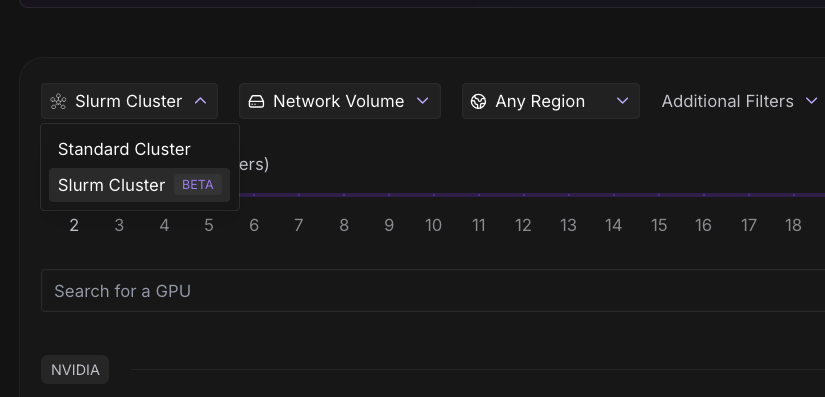
Runpod console cluster type dropdown with the Slurm Cluster beta option selected

Access Your Cluster

Connect to the Controller Node

Once deployed, you'll see your cluster nodes listed. The controller node will be labeled "Slurm Controller." You can connect to the Slurm Controller node via Jupyter Notebook and open up a Terminal for ease of access, though any method of connecting via a terminal will work just fine.
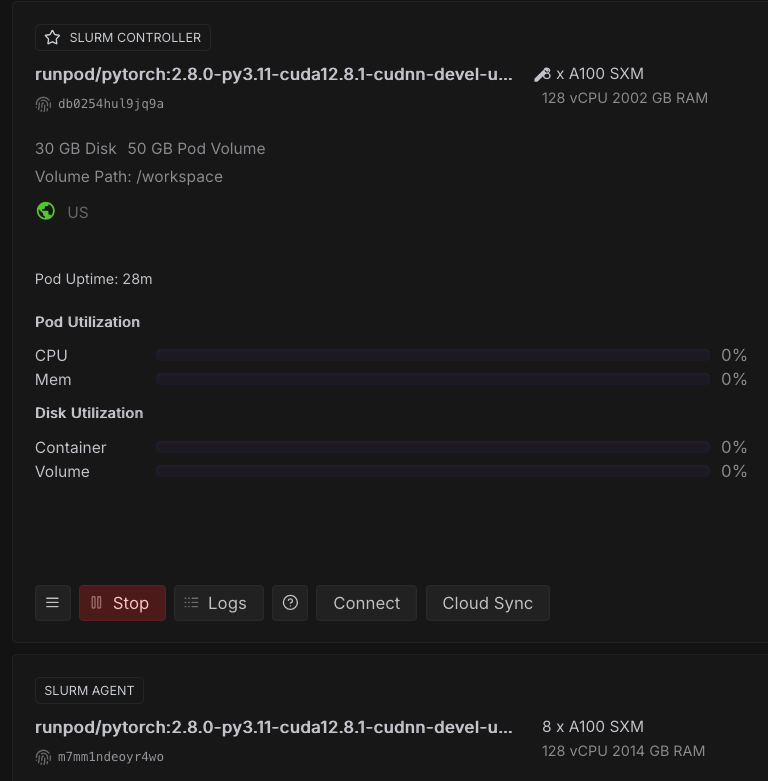
Runpod console showing Slurm controller and Slurm agent pods running on A100 GPUs

Quick Cluster Diagnostic

Run this comprehensive check immediately after connecting:

You should see the following:

Notably, you’ll want to make sure you have the IP addresses of all your nodes in your cluster, as we’ll need this later. In this case, they are:

You can also use sinfo to verify that all nodes are up and running:

Creating, Testing, and Running Multi-Node Scripts

Create a directory for your Slurm jobs:

The easiest way to run and submit jobs on Slurm is to save them as .sh files, and then to submit them with the sbatch command.

For example, here is a script to test communication between nodes. You can just run this in the terminal and it will write everything directly to the .sh or .py files as needed.

Here is a script to test distributed Pytorch training across nodes:

You can run these, or any other scripts you create using the following commands:

The results of any given job run will be written to .out files (or .err files if there is an error). Here’s what you should see in the output when testing the distributed training test:

Process Summary

This guide walked you through a systematic approach to deploying and validating Slurm on Runpod Clusters. We started with basic cluster deployment and connectivity verification, then progressively tested more complex distributed computing scenarios. The connectivity test confirmed that nodes could communicate and execute jobs across the cluster, while the GPU detection test verified that CUDA resources were properly allocated and visible to Slurm jobs.

The single-node PyTorch test established that the AI framework stack was functioning correctly on individual nodes, providing a foundation for distributed testing. The multi-node PyTorch distributed test represented the culmination of our validation process, demonstrating that NCCL could successfully coordinate tensor operations between nodes using the high-speed ens1 network interface. The successful all_reduce operation - where tensors from different ranks were properly aggregated across nodes - confirmed that the cluster is ready for real distributed training workloads.

Author profile: Brendan McKeag