


Everyone wants more bang for their buck when it comes to their business expenditures, and we want to ensure you have as many options as possible. Although you could certainly load full-weight fp16 models, it turns out that you may not actually need that level of precision, and it may be costing you money that you don't actually need to spend. Loading full weight models requires a huge amount of VRAM, which may require you stepping up to a higher GPU spec. Instead of doing that, why not try a quantization like GGUF? As always, you will always want to ensure that the results are satisfactory before putting a solution in production, but it will likely be a great savings for you to explore quantization models in the meantime.
GGUF is an evolution of the GGML (GPT-Generated Machine Learning) format, which was originally developed for efficient inference of transformer-based models. GGUF builds upon GGML's foundations to offer improved flexibility, compatibility, and performance.
GGUF accomplishes this through a number of different manners:
Quantization, in the context of machine learning, refers to the process of reducing the precision of the numbers used to represent the model's parameters. Instead of using high-precision floating-point numbers (typically 32-bit floats), quantization converts these values to lower-precision formats, such as 16-bit, 8-bit, 4-bit or even lower-bit integers.
This has the end result of drastically lowering the VRAM footprint and file size while making inference significantly quicker without a major impact on perplexity. Let's review some stats collected by Benjamin Marie in his Medium article:
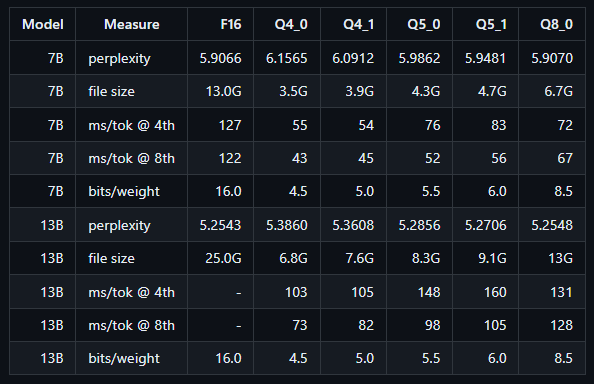
A review of the stats even for low-parameter models shows that using an 8-bit quantization has a negligible effect on perplexity while using approximately half of the VRAM. Climbing down the quantization ladder shows some level of further increasing perplexity along with more tradeoff gains in memory usage. It is notable, however, that settling for an 8-bit quantization is as close to a "free lunch" as you are going to get with such a drastic increase in performance while barely impacting perplexity.
One of the fastest, most lightweight ways to get running is to use the official KoboldCPP template, which comes with API access right out of the box.
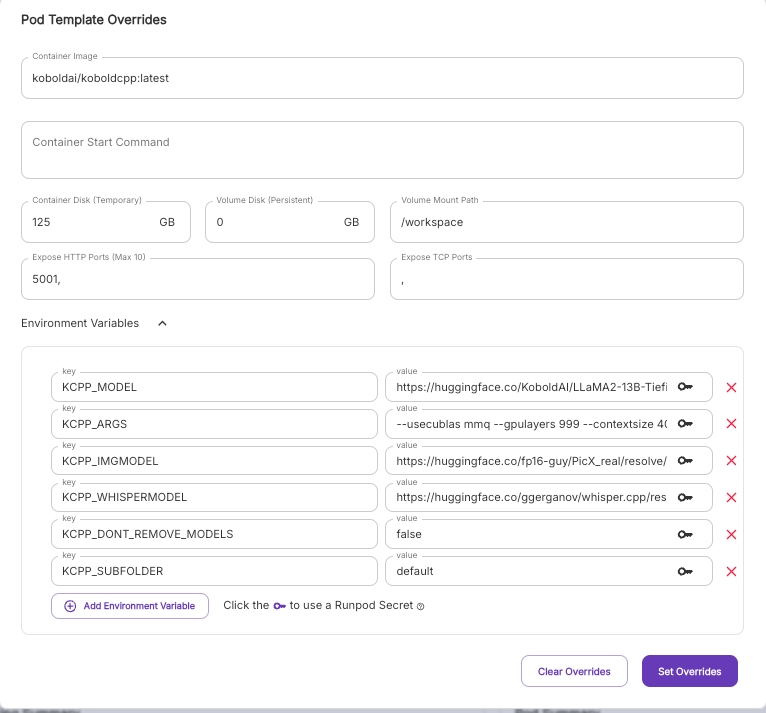
All you need to do to swap the model out is to put the URL of the model files in the KCPP_MODEL environment variable, delimited with commas if there are multiple files. For example, you can get an instance set up with Nous Hermes 405b GGUF quant on KoboldCPP with the following string:
You may also want to update the --contextsize argument off of its default of 4096. (Ensure that there is a space after the value and the next argument, otherwise you'll segfault!)
Here are the default values if you'd like to copy and paste:
KCPP_MODEL : https://huggingface.co/KoboldAI/LLaMA2-13B-Tiefighter-GGUF/resolve/main/LLaMA2-13B-Tiefighter.Q4_K_S.gguf
KCPP_ARGS: --usecublas mmq --gpulayers 999 --contextsize 4096 --multiuser 20 --flashattention --ignoremissing
KCPP_IMGMODEL: https://huggingface.co/fp16-guy/PicX_real/resolve/main/picX_real.safetensors
KCPP_WHISPERMODEL: https://huggingface.co/ggerganov/whisper.cpp/resolve/main/ggml-base.bin?download=true
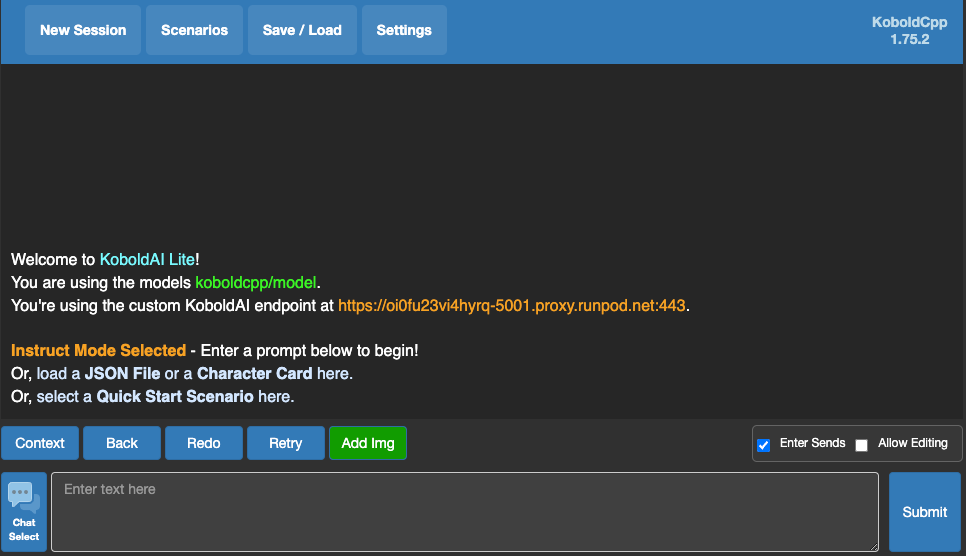
This will start up an endpoint that can be accessed through the proxy, e.g. https://oi0fu23vi4hyrq-5001.proxy.runpod.net/ (just swap out your pod ID.) The complete documentation, along with how to send requests, can be found on the KoboldCPP wiki. You can also connect to the proxy URL directly to get access to the UI panel if you'd rather talk to the model directly there.
You can get a pod deployed in just a few clicks by going to the Deploy Pod page and selecting the template for KoboldCPP.
GGUF quantization is a game-changer for optimizing LLMs on cloud GPUs. It offers a powerful combination of improved performance and cost-effectiveness. Runpod is uniquely positioned to help you leverage this technology through our template system that allows you to use whichever inference engine you like - while KoboldCPP specializes in GGUF specifically and is geared for this specific quant, we also have templates for vLLM, SGlang, and text-generation-webui.
Author profile: Brendan McKeag
此内容由惯性聚合(RSS阅读器)自动聚合整理,仅供阅读参考。 原文来自 — 版权归原作者所有。