
惯性聚合 高效追踪和阅读你感兴趣的博客、新闻、科技资讯
阅读原文 在惯性聚合中打开

推荐订阅源

Cyberwarzone
Cyberwarzone
F
Fortinet All Blogs
Y
Y Combinator Blog
C
Check Point Blog
Latest news
Latest news
A
About on SuperTechFans
Spread Privacy
Spread Privacy
W
WeLiveSecurity
Know Your Adversary
Know Your Adversary
Stack Overflow Blog
Stack Overflow Blog
云风的 BLOG
云风的 BLOG
Recent Announcements
Threat Intelligence Blog | Flashpoint
Microsoft Azure Blog
博客园 - 叶小钗
Last Week in AI
Last Week in AI
S
SegmentFault 最新的问题
T
Troy Hunt's Blog
T
Threatpost
Recent Commits to openclaw:main
博客园 - 司徒正美
Cloudbric
Cloudbric
J
Java Code Geeks
N
News | PayPal Newsroom
雷峰网
雷峰网
N
News and Events Feed by Topic
罗磊的独立博客
博客园 - 三生石上(FineUI控件)
Recorded Future
Recorded Future
爱范儿
爱范儿
C
Cisco Blogs
P
Proofpoint News Feed
Hacker News: Ask HN
Hacker News: Ask HN
钛媒体:引领未来商业与生活新知
钛媒体:引领未来商业与生活新知
Hugging Face - Blog
Hugging Face - Blog
O
OpenAI News
大猫的无限游戏
大猫的无限游戏
Webroot Blog
Webroot Blog
T
The Blog of Author Tim Ferriss
宝玉的分享
宝玉的分享
S
Secure Thoughts
博客园 - 【当耐特】
人人都是产品经理
人人都是产品经理
V
Vulnerabilities – Threatpost
cs.AI updates on arXiv.org
D
Darknet – Hacking Tools, Hacker News & Cyber Security
SecWiki News
SecWiki News
Martin Fowler
Martin Fowler
阮一峰的网络日志
阮一峰的网络日志
P
Privacy & Cybersecurity Law Blog

Runpod Blog.

DeepSeek V4 in the wild, and how to run it on Runpod New Runpod datacenter now live: AP-IN-1 Track GPU spend across your team with Cost Centers The GPU supply supercycle is here. Here’s what AI builders need to know. Community Spotlight: One-click AI image and video generation on Runpod with SwarmUI | Runpod Blog Community Spotlight: LoRA Pilot Data Prep to Inference Introducing the Runpod Assistant: Manage Your Cloud GPU Resources with Natural Language OpenAI's Parameter Golf: Train the Best Language Model That Fits in 16MB on Runpod LLM inference optimization: techniques that actually reduce latency and cost Pruna P-Video and Vidu Q3 public endpoints now available on Runpod Runpod brand spelling guide Quickstart - Runpod Documentation The AI market looks nothing like the narrative Training StyleGAN3 with Vision-Aided GAN on Runpod KoboldAI – The Other Roleplay Front End, And Why You May Want to Use It How to Connect Cursor to LLM Pods on Runpod for Seamless AI Dev Community Spotlight: How AnonAI Scaled Its Private Chatbot Platform with Runpod Prompt Scheduling with Disco Diffusion on Runpod Runpod's Latest Innovation: Dockerless CLI for Streamlined AI Development Run Your Own AI from Your iPhone Using Runpod Introducing Flash: Run GPU workloads on Runpod Serverless: No Docker required Use Claude Code with your own model on Runpod: No Anthropic account required Avoid Errors by Selecting the Proper Resources for Your Pod What hackers built on Runpod at TreeHacks 2026 Easily Back Up and Restore Your Pod with Cloud Sync + Backblaze B2 The Complete Guide to GPU Requirements for LLM Fine-Tuning AI Guides, Tutorials & GPU Infrastructure Insights | Runpod Your first Claude Code project within Runpod: a complete setup guide 10 billion Serverless requests and counting Building for resilience: Runpod’s response to the AWS us-east-1 outage How to Connect Google Colab to Runpod Founder Series #1: The Runpod Origin Story AMD MI300X vs. NVIDIA H100: Mixtral 8x7B Inference Benchmark How to Run the FLUX Image Generator with ComfyUI on Runpod Run Llama 3.1 405B with Ollama on Runpod: Step-by-Step Deployment How to Run FLUX Image Generator with Runpod (No Coding Needed) How to Use 65B+ Language Models on Runpod Deploy Llama 3.1 with vLLM on Runpod Serverless: Fast, Scalable Inference in Minutes Open Source Video & LLM Roundup: The Best of What’s New Run vLLM on Runpod Serverless: Deploy Open Source LLMs in Minutes Introduction to vLLM and PagedAttention New update to Github integration: release rollback! | Runpod Blog A note to the developers who built Runpod with us Deploy ComfyUI as a Serverless API Endpoint Setting up Slurm on Runpod Clusters: A Technical Guide Building an OCR System Using Runpod Serverless From No-Code to Pro: Optimizing Mistral-7B on Runpod for Power Users Lessons While Using Generative Language and Audio For Practical Use Cases Runpod RoundUp 3 – AI Music and Stock Sound Effect Creation New Navigational Changes To Runpod UI Use alpha_value To Blast Through Context Limits in LLaMa-2 Models Runpod Roundup 5 – Visual/Language Comprehension, Code-Focused LLMs, and Bias Detection Runpod is Proud to Sponsor the StockDory Chess Engine Runpod Roundup 4 – Open Source LLM Evaluators, 3D Scene Reconstruction, Vector Search Meta and Microsoft Release Llama 2 as Open Source SuperHot 8k Token Context Models Are Here For Text Generation How to Manage Funding Your Runpod Account Encrypted Volumes on Runpod: Protect Your Data at Rest How to Run a "Hello World" on Runpod Serverless Runpod AI field notes: December 2025 Faster GitHub Builds: Major Performance Improvements to Our Automated Integration Partnering with Defined AI to Bridge the Data Wealth Gap How to Run Serverless AI and ML Workloads on Runpod How to fine-tune a model using Axolotl Transcribe and translate audio files with Faster Whisper Runpod Achieves SOC 2 Type II Certification: Continuing Our Compliance Journey Orchestrating GPU workloads on Runpod with dstack Exploring Runpod Serverless: Create Workers From Templates DeepSeek V3.1: A Technical Analysis of Key Changes from V3-0324 Deep Cogito Releases Suite of LLMs Trained with Iterative Policy Improvement Wan 2.2 Releases With a Plethora Of New Features Iterative Refinement Chains with Small Language Models The New Runpod.io: Clearer, Faster, Built for What’s Next Introducing Clusters: On-Demand Multi-Node AI Compute Run DeepSeek R1 on Just 480GB of VRAM How Do I Transfer Data Into My Runpod? Spot vs. On-Demand Instances: What’s the Difference? Deploy GitHub Repos to Runpod with One Click Run GGUF Quantized Models Easily with KoboldCPP on Runpod How to Work with GGUF Quantizations in KoboldCPP Introducing Better Forge: Spin Up Stable Diffusion Pods Faster Supercharge Your LLMs with SGLang: Boost Performance and Customization Mastering Serverless Scaling on Runpod: Optimize Performance and Reduce Costs RAG vs. Fine-Tuning: Which Is Best for Your LLM? Run Larger LLMs on Runpod Serverless Than Ever Before – Llama-3 70B (and beyond!) How to Run vLLM on Runpod Serverless (Beginner-Friendly Guide) Embracing New Beginnings: Welcoming Banana.dev Community to Runpod Stable Diffusion + ComfyUI on Runpod: Easy Setup Guide Runpod RoundUp 2 – 32k Token Context LLMs and New StabilityAI Offerings Runpod Roundup: High-Context LLMs, SDXL, and Llama 2 16k Context LLM Models Now Available On Runpod Savings Plans Are Here For Secure Cloud Pods – How To Purchase a Monthly Plan And Save Big Pygmalion-7b from PygmalionAI has been released, and it's amazing Ada Architecture Pods Are Here – How Do They Stack Up Against Ampere? Using OpenPose to Annotate Poses Within Stable Diffusion Set Up a Chatbot with Oobabooga on Runpod Connect VSCode to Your Runpod Instance (Quick SSH Guide) Deploy a Stable Diffusion UI on Runpod in Minutes Google Colab Pro vs. Runpod: Best GPU Cloud for AI Workloads How to Run a GPU-Accelerated Virtual Desktop on Runpod
Spin up a Text Generation Pod with Vicuna and Experience a GPT-4 Rival
Brendan McKeag · 2023-04-16 · via Runpod Blog.

Why use Vicuna?

The primary benefit of Vicuna is that it has a level of performance rivaled only by ChatGPT and Google Bard. The model has been tested across a wide variety of scenarios, including Fermi problems, roleplay scenarios, and math tasks, and a framework graded by GPT-4 showed that it handily beat out other models such as LLaMa and Alpaca. (And given how much press GPT-4 has itself gotten recently, the fact that it's effectively given Vicuna its stamp of approval should really mean something.) Trained on 13 billion parameters, Vicuna is best able to work in natural language processing applications and is best suited to chatbots and the like, which makes it a prime model for anything that requires a human touch. You can see the results of GPT-4's evaluations of Vicuna on their website.

In my personal testing, I've also found Vicuna to be at least more resistant to hallucinations than iterations such as ChatGPT, which tends to overshare things that it may not really know much about and is still very open to confidently sharing things that it does not know as fact. Vicuna, on the other hand, is a bit more taciturn, but also can be more thoroughly trusted in its responses.  

Unlike GPT-4  and Bard, the model is open source and can be run locally for free on any platform you choose - including Runpod! In addition, because it is  open to the community, you can easily tweak its parameters to suit your needs.

How to Install Vicuna

First things first - spin up a pod with the "Runpod Text Generation UI" (oobabooga:1.0.0). You'll also want to bump up the container size to at least 25gb, since we'll be downloading and installing the Vicuna model once we get the pod up and running.
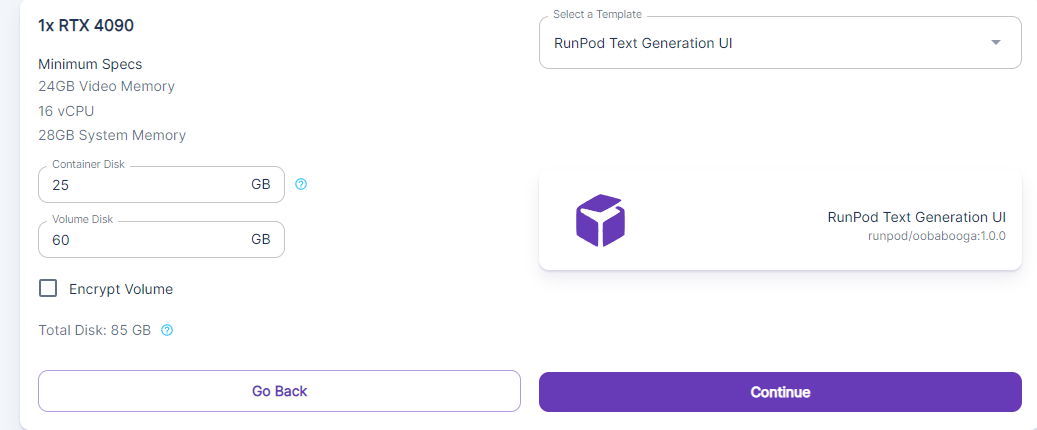
Runpod pod configuration for 1x RTX 4090 with the Runpod Text Generation UI template selected

Once you've got the pod created, open Jupyter Notebook and open up the terminal. Enter the following in the terminal to download the Vicuna model.

cd text-generation-webui
python download-model.py HenryJJ/vincua-13b

This will download the Vincua model from Huggingface, which is the flavor I've chosen to demonstrate the install. (The main Vicuna model does not appear to be on the site, for some reason – only its deltas, so I chose another iteration to demonstrate a fresh install.) There's roughly 15gb of files involved, so it may take a few minutes. Because there are so many individuals  in the community tweaking the model, there are many different potential Vicuna derivations to experiment with. Searching Huggingface for Vicuna should bring up a number of potential options to play with, allowing you to get acquainted before tweaking the model as needed.

Downloading the model to models/vincua-13b
Downloading file 1 of 9...
100%|███████████████████████████████████████████████████████████████████████████████████████████████████| 507/507 [00:00<00:00, 331kiB/s]
Downloading file 2 of 9...
100%|██████████████████████████████████████████████████████████████████████████████████████████████████| 137/137 [00:00<00:00, 81.1kiB/s]
Downloading file 3 of 9...

Once the model is downloaded, switch to the Vicuna model like so. Hit the blue Refresh icon to the right if it doesn't appear.
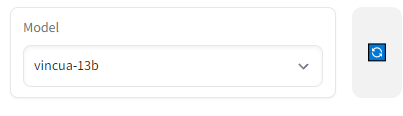
Model dropdown in the text generation web UI with a Vicuna 13B model selected

How to use Vicuna

As stated, Vicuna is great at anything involving natural language, which lends itself well to roleplay, question answering, and anything where you would need the "human touch."

Chat with Vicuna answering a request to write a blog entry on the best time to visit Alaska

Have any questions about how to get Vicuna up and running? Hit us up on our Discord server!

Author profile: Brendan McKeag