
惯性聚合 高效追踪和阅读你感兴趣的博客、新闻、科技资讯
阅读原文 在惯性聚合中打开

推荐订阅源

P
Proofpoint News Feed
云风的 BLOG
云风的 BLOG
Apple Machine Learning Research
Hugging Face - Blog
Hugging Face - Blog
OSCHINA 社区最新新闻
OSCHINA 社区最新新闻
Google DeepMind News
钛媒体:引领未来商业与生活新知
钛媒体:引领未来商业与生活新知
让小产品的独立变现更简单 - ezindie.com
雷峰网
雷峰网
B
Blog
月光博客
月光博客
博客园 - 【当耐特】
WordPress大学
WordPress大学
Microsoft Azure Blog
I
InfoQ
The GitHub Blog
The GitHub Blog
Engineering at Meta
Engineering at Meta
Jina AI
Jina AI
博客园 - Franky
MyScale Blog
MyScale Blog
H
Hackread – Cybersecurity News, Data Breaches, AI and More
Last Week in AI
Last Week in AI
B
Blog RSS Feed
H
Help Net Security

Runpod Blog.

New Runpod datacenter now live: AP-IN-1 Track GPU spend across your team with Cost Centers The GPU supply supercycle is here. Here’s what AI builders need to know. Community Spotlight: One-click AI image and video generation on Runpod with SwarmUI | Runpod Blog Community Spotlight: LoRA Pilot Data Prep to Inference Introducing the Runpod Assistant: Manage Your Cloud GPU Resources with Natural Language OpenAI's Parameter Golf: Train the Best Language Model That Fits in 16MB on Runpod LLM inference optimization: techniques that actually reduce latency and cost Pruna P-Video and Vidu Q3 public endpoints now available on Runpod Runpod brand spelling guide Quickstart - Runpod Documentation The AI market looks nothing like the narrative Training StyleGAN3 with Vision-Aided GAN on Runpod KoboldAI – The Other Roleplay Front End, And Why You May Want to Use It How to Connect Cursor to LLM Pods on Runpod for Seamless AI Dev Community Spotlight: How AnonAI Scaled Its Private Chatbot Platform with Runpod Prompt Scheduling with Disco Diffusion on Runpod Runpod's Latest Innovation: Dockerless CLI for Streamlined AI Development Run Your Own AI from Your iPhone Using Runpod Introducing Flash: Run GPU workloads on Runpod Serverless: No Docker required Use Claude Code with your own model on Runpod: No Anthropic account required Avoid Errors by Selecting the Proper Resources for Your Pod What hackers built on Runpod at TreeHacks 2026 Easily Back Up and Restore Your Pod with Cloud Sync + Backblaze B2 The Complete Guide to GPU Requirements for LLM Fine-Tuning AI Guides, Tutorials & GPU Infrastructure Insights | Runpod Your first Claude Code project within Runpod: a complete setup guide 10 billion Serverless requests and counting Building for resilience: Runpod’s response to the AWS us-east-1 outage How to Connect Google Colab to Runpod
Deploying Multimodal Models on Runpod
James Sandy · 2025-03-18 · via Runpod Blog.

Multimodal AI models integrate various types of data, such as text, images, audio, or video, to allow tasks such as image-text retrieval, video question answering, or speech-to-text. Examples are CLIP, BLIP, and Flamingo, among others, showing what is possible by combining these modes–(but deploying them presents unique challenges including high computational requirements, complex data pipelines, and scalability concerns.

Runpod offers a robust cloud platform specifically optimized for AI workloads, making it ideal for deploying resource-intensive multimodal models. This guide provides detailed, step-by-step instructions for successfully deploying multimodal AI models on Runpod.

Challenges of Multimodal AI Deployment

Resource Requirements

Multimodal models process complex datasets that combine modalities, such as pairing text and images. This inevitably adds a higher bar to clear for VRAM and compute needs. For example, llama-3.2 90b Vision could be described as the 70b parameters of the LLM itself, with another 20b of vision parameters "bolted on." Most multimodal models require at least 16GB VRAM for inference, bare minimum.

Integration

There is always a jam in aligning multiple modalities within the inference pipelines. For example, combining image preprocessing with text embedding generation requires seamless orchestration.

Scalability

Multimodal deployments demand elasticity to handle varying workloads, especially in production scenarios where demand keeps fluctuating.

Preparing for Deployment

Environment Setup

Create a Runpod account at runpod.io, if you haven't already done so. Then, select an appropriate GPU instance based on your model requirements. For CLIP/BLIP: a smaller GPU spec like the A40 (48GB) will get the job done. For larger models still, A100 (80GB), H200 (141GB) or multiple GPUs may be necessary.

Runpod offers a number of pre-set templates that comes with most common libraries pre-installed - you can start with the official PyTorch templates, for example.

If you'd rather create and push your own Docker file, that's certainly an option, too. An example Docker build may look something like this:

With your example requirements.txt set up like this:

Preparing the Model

Here's an example of how you might use CLIP to classify an image, in code:

And here's the code for running queries against an example:

Here's how this would look in action:
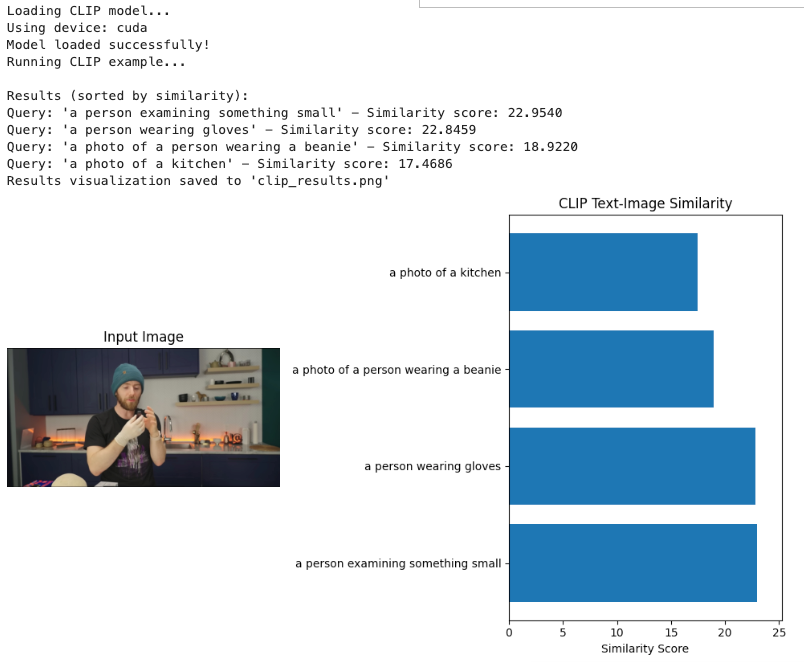
Terminal output of a CLIP example with similarity scores and a bar chart ranking text queries against an input image

Conclusion

Runpod provides an excellent platform for deploying resource-intensive multimodal AI models. By following these detailed steps, you can deploy models like CLIP, BLIP, or Flamingo with optimal performance and scalability. The platform's GPU-focused infrastructure, combined with proper containerization and API design, enables efficient serving of multimodal models for production use cases.

Remember to regularly update your models and monitor performance to ensure your deployment remains efficient and cost-effective over time.

Author profile: James Sandy