








April 17, 2026, 11:39pm 1
I do Rust development on RPi 4, and rustc out looks great.
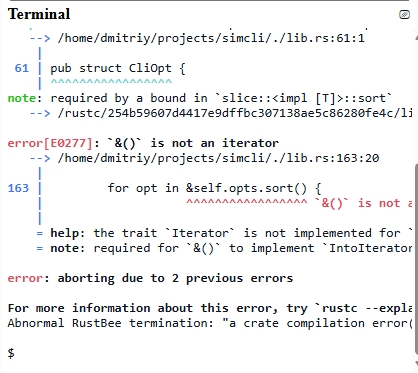
It looks same good when the dark mode selected. However when I occasionally switch to Windows 11 machine, rustc out looks terrible:
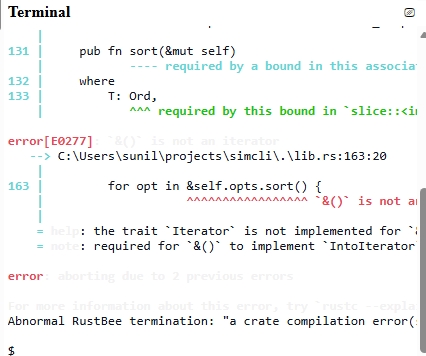
You can see that error messages use almost white hard coded color. Probably it looks good for the dark theme, but not good for the light one. Can somebody advise rustc team to reconsider color scheme for rustc and make it unified for all platforms?
Jesper April 18, 2026, 12:16am 2
I think it is the terminal profile rather than rustc that is the problem - have you tried changing it? (settings -> profiles -> colors).
You can also turn colors off - to see the invisible text:
rustc --color=never
MOCKBA April 18, 2026, 12:37am 3
Switching color off is a work around. As for now, I just select the message to see it in inverse color, but it's annoying. Anyway, not so many people do Rust development on Windows, and the issue isn't a big deal.
steffahn April 18, 2026, 1:00am 4
I believe rustc should be sending the exact same ansi escape sequences to either terminal here, on your Raspberry Pi, or on Windows, so it’s actually just the color scheme differences between these terminals of yours that make the difference, nothing rustc controls directly.
2 Likes
steffahn April 18, 2026, 1:17am 5
I’ve copied an example output line from an error message including the ecape sequences I got, and here’s some Rust code that should print the same kind of colored text, so you can double-check if that matches the behavior, if you like 
fn main() {
    println!("\x1b[1m\x1b[91merror[E0601]\x1b[0m\x1b[1m: `main` function not found in crate `foobar`\x1b[0m");
}
The text consists of:
\x1b[1m\x1b[91merror[E0601]\x1b[0m\x1b[1m: `main` function not found in crate `foobar`\x1b[0mHere, \x1b is the way to represent the ASCII character “ESC” (with hex code 1b) in Rust string.
The sequence ESC [ is called the “control sequence introducer” (short “CSI”) and all escape sequences we see here start with it.
Moreover, all of our sequences are of the form CSI n m for some integer number n, and you can find a listing of the meaning of sequences of this form here; in particular:
CSI 1 m: “Bold or increased intensity”
CSI 91 m: “Set bright foreground color” - specifically for “Bright Red”
CSI 0 m: “Reset“ (All attributes become turned off)
Thus, the whole text can be interpreted as follows:
CSI 1 m: “Bold or increased intensity”CSI 91 m: “Set bright foreground color” - specifically for “Bright Red”error[E0601]CSI 0 m: “Reset“ (All attributes become turned off)CSI 1 m: “Bold or increased intensity”: `main` function not found in crate `foobar`CSI 0 m: “Reset“ (All attributes become turned off)Notice how the rust compiler is thus not hardcoding any color at all. It just says “make this bold”, basically. Assuming you can confirm the same behavior with my simplified println example, then the problem really is only up to your terminal, and how it’s implemented and/or configured 
I do recall that some terminal applications do allow you to configure each color in your color scheme (the 8/16 basic ANSI colors) separately between the choice of color for normal text, vs. the choice of color for bold text.
Double-checking my own terminal (Konsole on linux), it looks like - specifically - they allow you to configure an “intense” color separately (I assume this is also what the “… or increased intensity” part of that escape code description relates to). Maybe you configured or some other way ended up a color scheme somehow without specifying a fitting “intense” variant of the default foreground color that has sufficient contrast for the default (non-intense) background.
3 Likes
MOCKBA April 18, 2026, 2:59am 6
Thank you for the so detailed answer. I captured out on Linux and Windows terminals:
Linux:
e[1me[91merrore[0me[1m: unexpected token:
)e[0m
Windows:
e[1me[91merrore[0me[1me[97m: unexpected token:
)e[0m
You can see that the ANSI codes are almost identical except that Windows uses high intensity - WHITE. It's obviously hardly visible. It looks like rustc uses a separate branch for coloring out on Windows. My desire that rustc merged the branches if it's possible.
As a temporary work around, I consider to reduce intense of white background on my terminal, maybe using something as #dddddd. Any other suggestions?
2 Likes
steffahn April 18, 2026, 3:03am 7
Oh, that’s interesting indeed! I don’t have a Windows PC at hand at the moment to double-check, but if there’s really such a difference, we should be able to find the relevant code and see if there’s any good reason for why it’s done this way.
For completeness: Did you also test if just printlning an output without that added e[97m (e.g. with something like the fn main() I shared in my previous reply) on your Windows machine would indeed result in the desired behavior?
Edit1: So it looks like rustc is generally using the anstream crate for some functionality.
Moreover, it looks like the annotate-snippets crate is also used.
I’m still some ways off finding where the actual color codes come from in the end.
Edit2: Looks like annotate-snippets uses anstyle to define color and boldness choices.
Edit3: I found the case distinction / branching here:
Edit4: That logic came into annotate-snippets in
which references relevant code points in older versions of rustc…
Edit5: Okay, I’ve found the original source of the decision to special-case Windows colors (skiping some in-between refactorings later that seems to have preserved the original logic):
I do assume that this special-casing might potentially only make sense though in older Windows versions before they had ANSI-code support (assuming that bold text in terminals is properly supported there nowadays). So I guess it’s worth opening an issue about this – I’m not quite sure whether it’s more fitting on rust-lang/rust or on rust-lang/annotate-snippets-rs.
11 Likes
epage April 18, 2026, 11:19am 8
Annotate-snippets is where the issue should go though it would likely take some more investigation before it any PR could be posted.
April 19, 2026, 12:31am 9
rustc out with errors on a console with a light background looks like below:
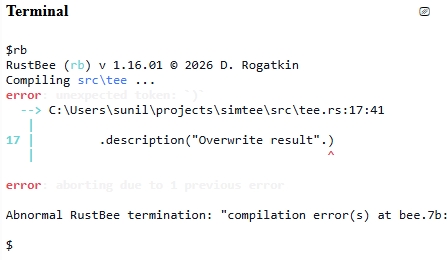
The error message is hardly visible, because the bright white is used for it.
Here are ANSI color codes used by Windows rustc:
e[1me[91merrore[0me[1me[97m: unexpected token: `)`e[0m
As you can see - 97 ANSI code is used.
The view with dark background looks good though:
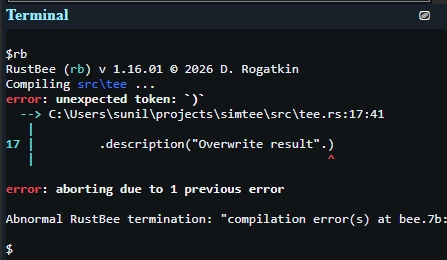
Here are rustc raw arguments:
"rustc" ["--color", "always", "-L", "all=..\crates", "--extern", "simcli", "--edition", "2024", "-o", "simtee", "C:\Users\sunil\projects\simtee\src\tee.rs"]
And rustc version is : rustc 1.94.1 (e408947bf 2026-03-25)
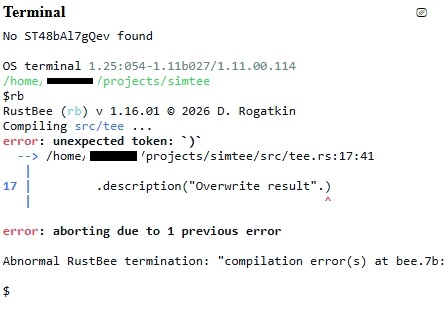
When Linux/MacOS computer is used in the same scenario, the light color background screen looks like:
And the dark color terminal looks like:
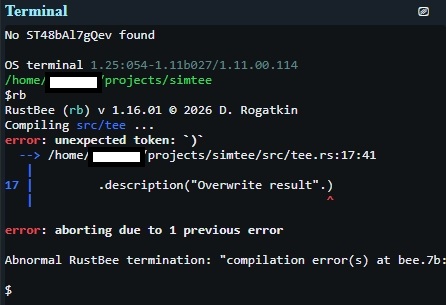
As you can see, ANSI codes look like:
e[1me[91merrore[0me[1m: unexpected token: `)`e[0m
There is no the bright white color code, therefore the image looks good for any background.
The raw command to run rustc is:
"rustc" ["--color", "always", "-L", "all=../crates", "--extern", "simcli", "--edition", "2024", "-o", "simtee", "/home/sunil/projects/simtee/src/tee.rs"]
And rustc version is : rustc 1.93.0 (254b59607 2026-01-19)
Remove extra ANSI code on Windows.
Windows at least documents support for bold:
I'll have to take a stab to see how effective it is in the legacy console and the "new" terminal.
There's some OSC "dynamic colors" codes and $COLORFGBG that supposedly provide the current colors, basically to detect if you're in a light or dark terminal, but it doesn't look like Windows supports either of them (at least it's not documented.)
steffahn April 19, 2026, 12:16pm 11
It looks like the old way of setting terminal colors in Windows
only supported concrete colors and intensity:
(3 bits for the color, 1 bit for intensity; no way to set “generic” color [i.e. just add intensity without also hard-coding the color])
The question this doesn’t answer is whether or not boldness and such features are correctly rendered on standard cmd.exe nowadays, yet reading things such as this GitHub issue on neovim
Bold and italic text works correctly in the powershell or cmd, but not in Neovim.
suggests they do work.
Barring of course some actual testing before such a change is shipped stably, this sounds to me like we should remove the Windows special-casing, except possibly for the cases where the old Winapi approach may still exist as a fallback. Furthermore, it sounds like the ANSI sequence support exists since Windows 10 (and AFAICT we don’t really support older Windows versions for rustc, anyway).[1]
Of course “support” in principle does not necessarily guarantee that text marked just bold but without colors set, through an ANSI sequence, will also actually display differently, hence the need for testing  ↩︎
↩︎
khimru April 19, 2026, 12:26pm 12
It's windows. Nothing is ever simple there. In Windows 11 there are both old and new terminals. And while you may distinguish them… @MOCKBA would probably break the detection by attempts to “secure” things.
steffahn April 19, 2026, 12:45pm 13
Meh… you could also say it’s terminals, nothing is ever simple there. Also most of the replies in the issue you linked there seem to be interested in other terminal capabilities like true color[1] not
My thinking was that a detection should usually only enable a specific special-case handling designed for “cmd.exe on Windows” or something, and not deviate from the normal behavior (across all other OSs) otherwise. In that case, any special setup would result in the more “normal” (and in this case also the more desired) behavior.
Regarding the question if detection for support of ANSI codes at all works as intended, that’s already the casee apparently, given @MOCKBA did report having gotten out text with ANSI codes.
Besides standalone terminals, I can imagine e.g. the current situation can similarly negatively affect users of IDEs on Windows (if they dare to have a light color scheme, the contrast may be off completely — otherwise, it’s still unnecessary that the ANSI codes sent to e.g. vscode isn’t 100% equivalent across platforms, even if the differences are more subtle[2].)
Looking back at the screenshots of @MOCKBA, it looks like an “same IDE on different platforms” situation might actually be the very thing that’s happening here, anyway
此内容由惯性聚合(RSS阅读器)自动聚合整理,仅供阅读参考。 原文来自 — 版权归原作者所有。