惯性聚合 高效追踪和阅读你感兴趣的博客、新闻、科技资讯
阅读原文 在惯性聚合中打开

推荐订阅源

N
Netflix TechBlog - Medium
V
Vulnerabilities – Threatpost
Google Online Security Blog
Hugging Face - Blog
Hugging Face - Blog
L
LINUX DO - 热门话题
云风的 BLOG
云风的 BLOG
P
Proofpoint News Feed
D
Docker
C
Cyber Attacks, Cyber Crime and Cyber Security
MyScale Blog
MyScale Blog
P
Palo Alto Networks Blog
T
Tenable Blog
P
Privacy International News Feed
Google DeepMind News
小众软件
小众软件
Cisco Talos Blog
Cisco Talos Blog
aimingoo的专栏
aimingoo的专栏
Cyber Security Advisories - MS-ISAC
A
Arctic Wolf
C
Cybersecurity and Infrastructure Security Agency CISA
C
Cisco Blogs
T
Threat Research - Cisco Blogs
NISL@THU
NISL@THU
The Hacker News
The Hacker News
Project Zero
Project Zero
AWS News Blog
AWS News Blog
Simon Willison's Weblog
cs.CL updates on arXiv.org
T
Threatpost
V
Visual Studio Blog
The GitHub Blog
The GitHub Blog
The Cloudflare Blog
Last Week in AI
Last Week in AI
Jina AI
Jina AI
Cyberwarzone
Cyberwarzone
The Register - Security
C
CXSECURITY Database RSS Feed - CXSecurity.com
Vercel News
Vercel News
D
Darknet – Hacking Tools, Hacker News & Cyber Security
MongoDB | Blog
MongoDB | Blog
U
Unit 42
Scott Helme
Scott Helme
A
About on SuperTechFans
WordPress大学
WordPress大学
F
Fortinet All Blogs
大猫的无限游戏
大猫的无限游戏
G
GRAHAM CLULEY
Latest news
Latest news
让小产品的独立变现更简单 - ezindie.com
S
Schneier on Security

记录生活,精彩一刻 - VPS

给大家推荐一个自认为还不错的商家 - 非凡云(白嫖) 非常稳定的服务器,马上到期,准备放生 本来要压缩开支的,结果又犯病,好在病情不太严重,哈哈 最近这两天越发的在自问,买这些个 VPS 有啥用处吗? 国内服务商提供免费 VPS 服务器 RooVPS:香港大硬盘VPS 香港CN2+CTG 优化线路 不限流量 美国CN2 GIA 不限流量 5折(已跑路) VPS云服务器线路科普,怎样挑选适合自己线路。 WHMCS V7.8.0原版下载及破解补丁安装教程
VPS服务器常用脚本合集
Huo · 2023-06-18 · via 记录生活,精彩一刻 - VPS

所有脚本均来自互联网,本站仅对这些脚本进行收集,以方便自己及各位基友使用。本站不对其可用性负责,也不对其安全性等任何方面负责。

目录

  • 查看CPU信息
  • 查看当前内核信息
  • 关键字查找进程
  • 内核更改 [开启BBR、更换BBRplus等]
  • Linux修改主机名
  • 一键开启/关闭Swap
  • 缝合怪测评
  • IP质量测试
  • Bench – 系统信息+I/O+测速
  • SuperBench – 系统信息+I/O+测速
  • HyperSpeed 一键测速
  • Besttrace 直接显示回程线路
  • Backtrace 三网回程路由测试
  • BestTrace 回程测试
  • 回程测试 [Nanqinlang大佬作品]
  • UnixBench.sh [秋水逸冰大佬作品]
  • LemonBench.sh
  • Yabs.sh [Masonr大佬作品]
  • 流媒体解锁测试 [Lmc999大佬作品]
  • 流媒体解锁测试 [LovelyHaochi大佬作品]
  • 推荐杜甫使用-本脚本支持查看I/O bench以及system info
  • 测试25端口是否开放

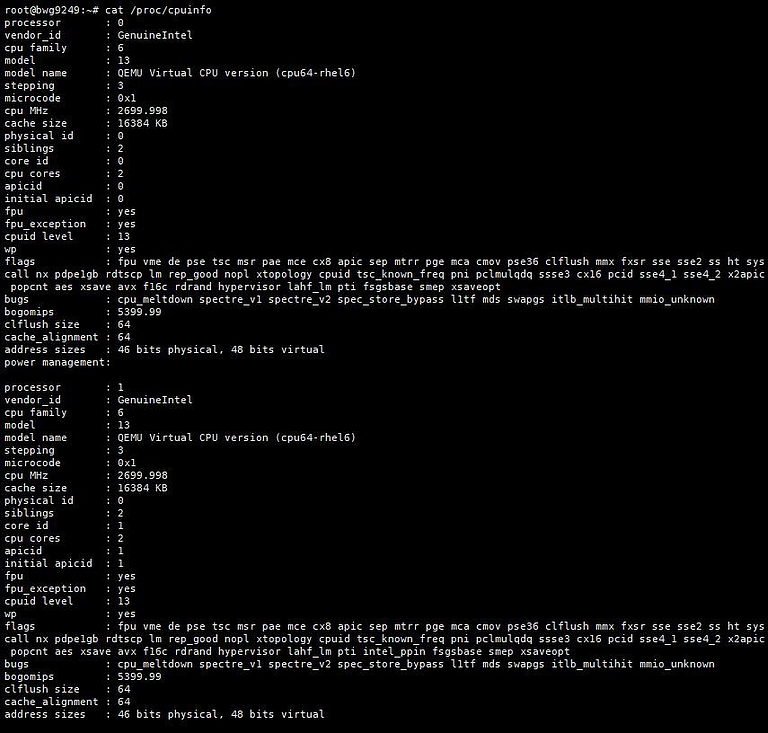
查看CPU信息

cat /proc/cpuinfo

CPU信息

查看当前内核信息

uname -a

内核信息

关键字查找进程

ps -ef | grep <进程关键字>

内核更改 [开启BBR、更换BBRplus等]
Centos:

yum install ca-certificates wget -y && update-ca-trust force-enable

Debian/Ubuntu:

apt-get install ca-certificates wget -y && update-ca-certificates

不卸载内核版本:

wget -O tcpx.sh "https://github.com/ylx2016/Linux-NetSpeed/raw/master/tcpx.sh" && chmod +x tcpx.sh && ./tcpx.sh 

卸载内核版本:

wget -O tcp.sh "https://github.com/ylx2016/Linux-NetSpeed/raw/master/tcp.sh" && chmod +x tcp.sh && ./tcp.sh

Linux修改主机名

首先执行

hostnamectl set-hostname <newhostname>

然后执行下面的命令

vi /etc/hosts

在第二行增加一个

127.0.0.1 <newhostname>

同时将文件中的原主机名修改为刚设置的新主机名
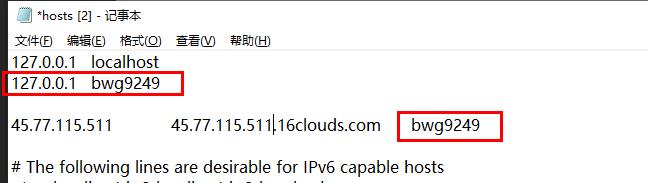
修改主机名

一键开启/关闭Swap

wget https://www.moerats.com/usr/shell/swap.sh && bash swap.sh

缝合怪测评

  • 自由组合测试方向和单项测试以及合集收录第三方脚本–原创
  • 基础系统信息–感谢teddysun和superbench和yabs开源
  • CPU测试–感谢lemonbench开源
  • 内存测试–感谢lemonbench开源
  • 磁盘IO读写测试–感谢lemonbench开源
  • 硬盘IO读写测试–感谢yabs开源
  • 御三家流媒体解锁–感谢sjlleo的二进制文件
  • 常用流媒体解锁–感谢RegionRestrictionCheck开源
  • Tiktok解锁–感谢lmc999的开源
  • 三网回程以及路由延迟–感谢zhanghanyun/backtrace开源
  • 回程路由以及带宽类型检测(商宽/家宽/数据中心)–由fscarmen的PR以及本人的技术思路提供
  • 端口检测(检测是否被墙)–由fscarmen的PR以及作者的技术思路提供 – 待修复
  • IP质量检测(检测IP白不白)(含IPV4和IPV6)–独创,感谢互联网提供的查询资源
  • speedtest测速–由teddysun和superspeed的开源以及整理
  • 全国网络延迟测试–感谢IPASN开源
bash <(wget -qO- --no-check-certificate https://gitlab.com/spiritysdx/za/-/raw/main/ecs.sh)

bash <(wget -qO- --no-check-certificate https://github.com/spiritLHLS/ecs/raw/main/ecs.sh)

IP质量测试

bash <(wget -qO- --no-check-certificate https://gitlab.com/spiritysdx/za/-/raw/main/qzcheck.sh)

bash <(wget -qO- --no-check-certificate https://github.com/spiritLHLS/ecs/raw/main/qzcheck.sh)
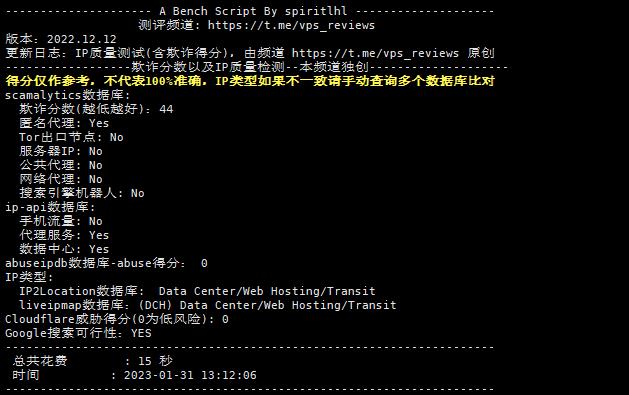
测试

Bench – 系统信息+I/O+测速

wget -qO- bench.sh | bash
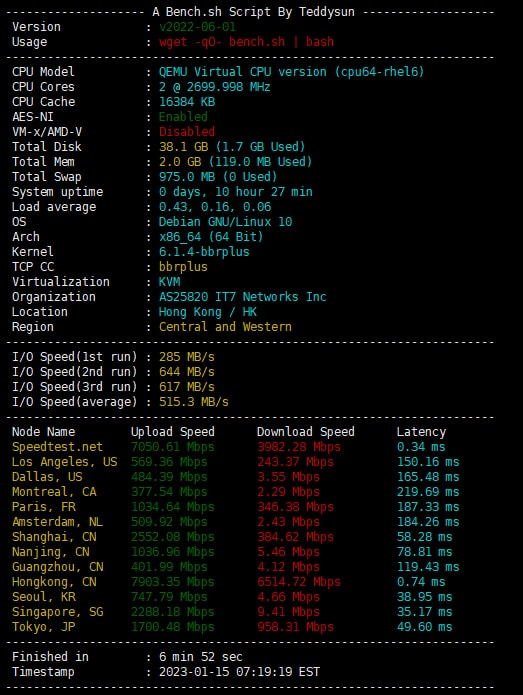
测试

SuperBench – 系统信息+I/O+测速

wget -qO- git.io/superbench.sh | bash

wget -qO- --no-check-certificate https://raw.githubusercontent.com/oooldking/script/master/superbench.sh | bash

测试

HyperSpeed 一键测速

  • 支持单线程、8线程测速,显示延迟与抖动
bash <(curl -Lso- https://bench.im/hyperspeed)

bash <(wget -qO- https://bench.im/hyperspeed)
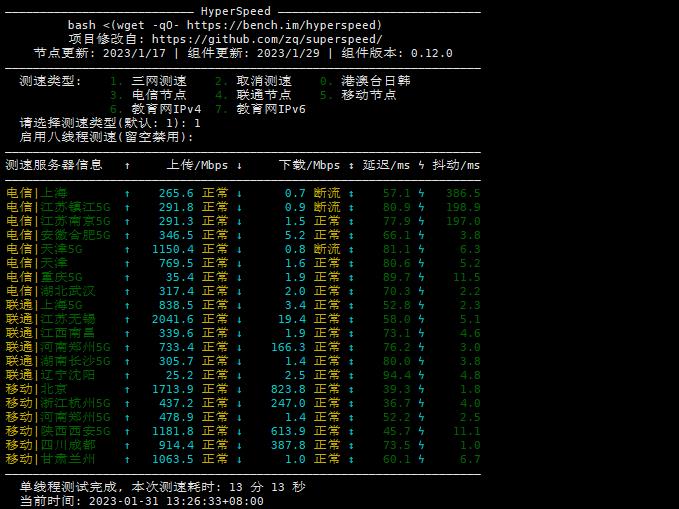
一键测速

Besttrace 直接显示回程线路

wget -qO- git.io/besttrace | bash
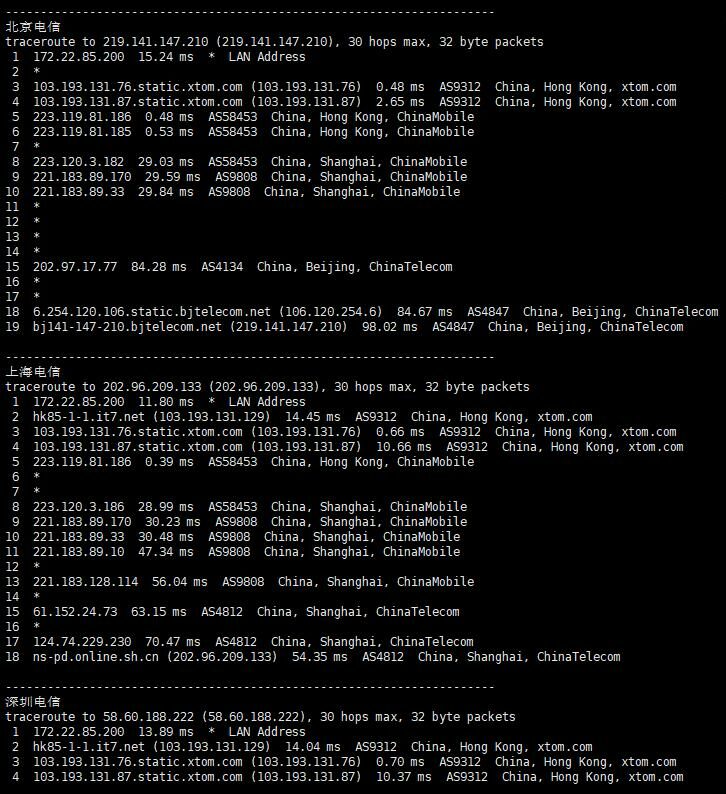
截图

( * 部分截图 )

Backtrace 三网回程路由测试

curl https://raw.githubusercontent.com/zhanghanyun/backtrace/main/install.sh -sSf | sh
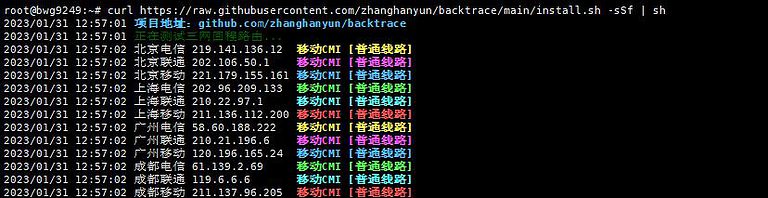
路由测试

BestTrace 回程测试

  • ipip.net 提供的手动输入IP测试回程线路工具
mkdir /root/besttrace
cd /root/besttrace
wget https://cdn.ipip.net/17mon/besttrace4linux.zip
unzip besttrace4linux.zip

解压之后会看到几个二进制文件,根据自己的系统选择对应文件。

常用的:

Linux X64系统:

chmod +x besttrace./besttrace xxx.xxx.xxx.xxx # 此处输入需测试IP

Linux X32位系统:

chmod +x besttrace32./besttrace32 xxx.xxx.xxx.xxx # 此处输入需测试IP

ARM机型:

chmod +x besttracearm./besttracearm xxx.xxx.xxx.xxx # 此处输入需测试IP


回程测试 [Nanqinlang大佬作品]

  • 支持选择节点测试,四网快速测试,手动输入IP测试三种模式
wget https://raw.githubusercontent.com/nanqinlang-script/testrace/master/testrace.sh && bash testrace.sh
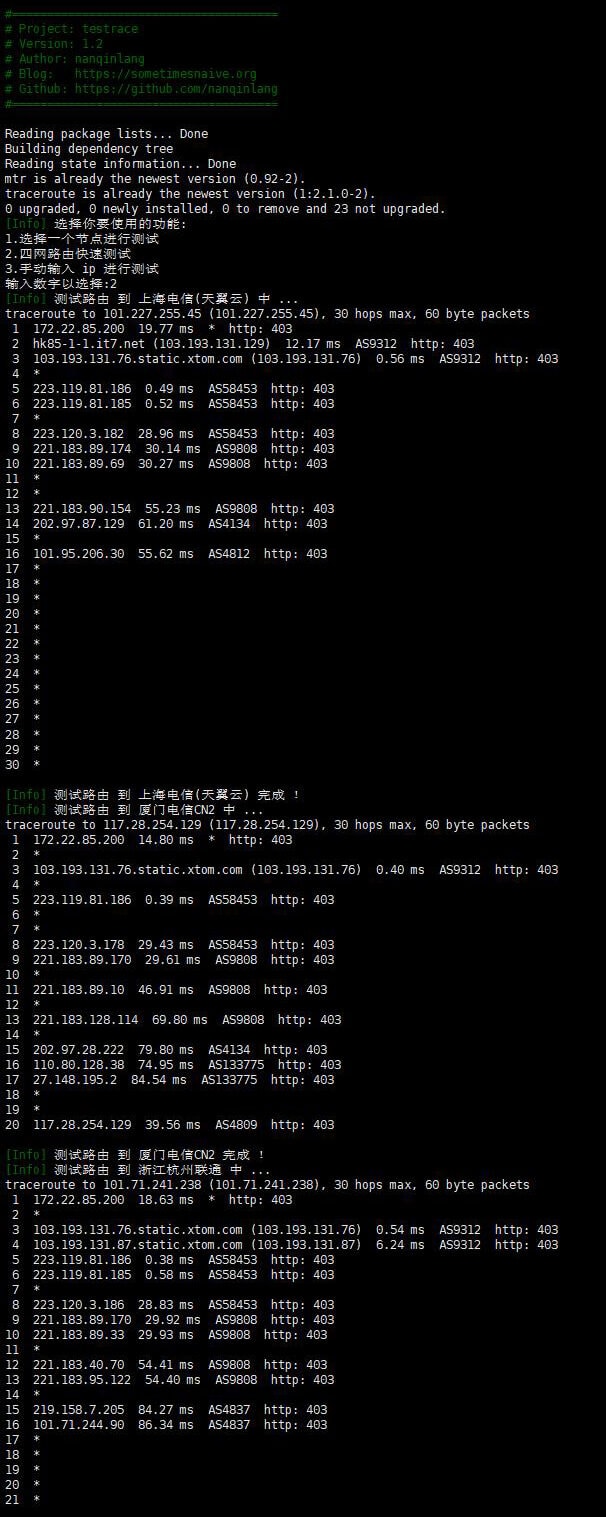
回程测试

( * 部分截图 )

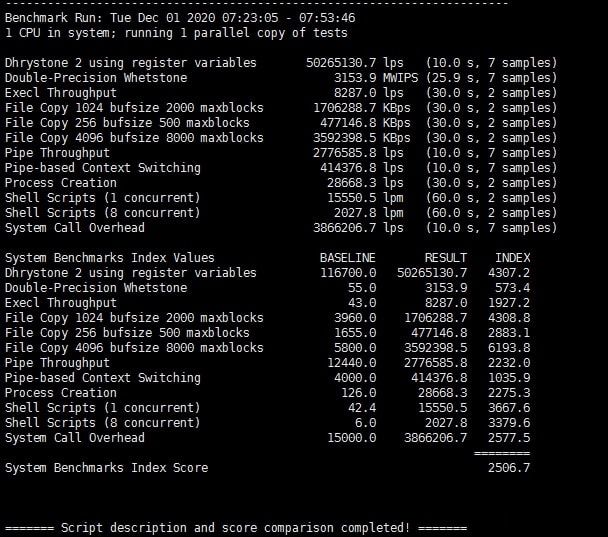
UnixBench.sh [秋水逸冰大佬作品]

  • UnixBench是一个类unix系(Unix,BSD,Linux)统下的性能测试工具,一个开源工具,被广泛用与测试Linux系统主机的性能。Unixbench的主要测试项目有:系统调用、读写、进程、图形化测试、2D、3D、管道、运算、C库等系统基准性能提供测试数据。
wget --no-check-certificate https://github.com/teddysun/across/raw/master/unixbench.sh && chmod +x unixbench.sh && ./unixbench.sh
秋水逸冰

LemonBench.sh

  • LemonBench工具(别名LBench、柠檬Bench),是一款针对Linux服务器设计的服务器性能测试工具。通过综合测试,可以快速评估服务器的综合性能,为使用者提供服务器硬件配置信息。目前涵盖的测试有:服务器基础信息
    (CPU信息/内存信息/Swap信息/磁盘空间信息/网络信息等),流媒体解锁测试 (目前支持HBO
    Now/动画疯/B站港澳台/B站台湾限定),系统性能测试 (CPU/内存/磁盘),Speedtest网速测试
    (本地到最近源及国内各地域不同线路的网速),路由追踪测试 (追踪到国内和海外不同线路的路由信息)。

快速测试:

curl -fsL https://ilemonra.in/LemonBenchIntl | bash -s fast

完整测试:

curl -fsL https://ilemonra.in/LemonBenchIntl | bash -s full


Yabs.sh [Masonr大佬作品]

  • 又一个 Linux VPS 一键测评脚本,可以一键测试 VPS 硬盘的读写速度、网络带宽也就是下载速度、CPU 跑分(包括
    Geekbench 4 和 Geekbench 5),以及各种性能测试等。
wget -qO- yabs.sh | bash

curl -sL yabs.sh | bash


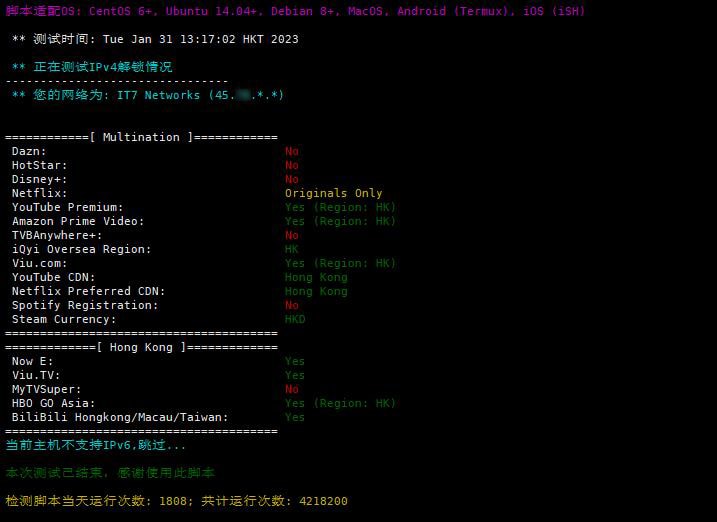
流媒体解锁测试 [Lmc999大佬作品]

bash <(curl -L -s check.unlock.media)

尾部添加参数的释义:
-M 4 只检测IPv4结果
-M 6 只检测IPv6结果
-I eth0 指定检测的网卡名称(例:eth0)
-E 选择脚本语言为英文
流媒体解锁测试

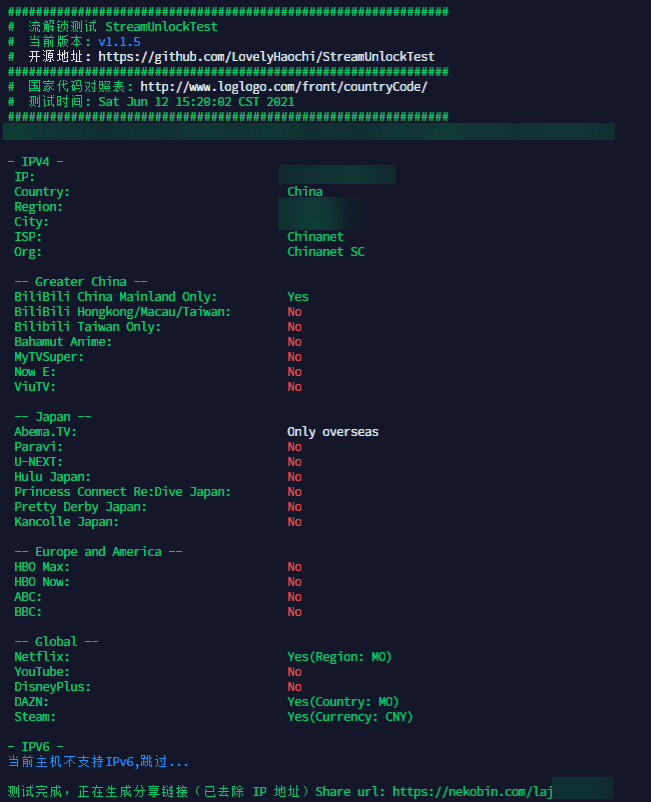
流媒体解锁测试 [LovelyHaochi大佬作品]

  • 支持多个流媒体的ipv4与ipv6解锁情况
bash <(curl -sSL "https://git.io/JswGm")
流媒体解锁测试

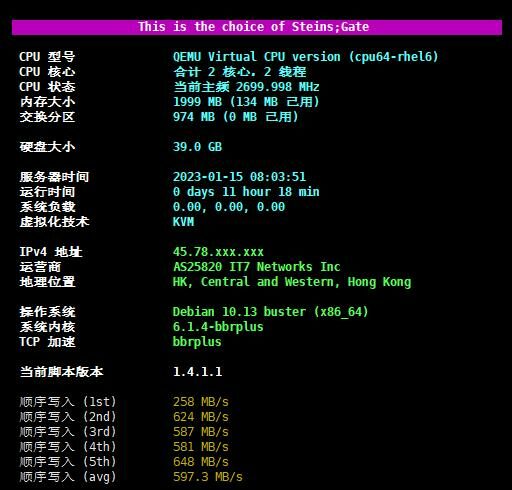
推荐杜甫使用-本脚本支持查看I/O bench以及system info

  • 支持查看硬件信息,硬盘通电时间,io等脚本,适合独立服务器使用,vps也能用。
  • Github项目地址:https://github.com/Aniverse/A
wget -q https://github.com/Aniverse/A/raw/i/a && bash a
杜甫使用查看硬件信息

测试25端口是否开放

telnet smtp.aol.com 25

如果看到类似下面的回显,则说明端口是开放的:

Trying 74.6.141.50…
Connected to smtp.aol.g03.yahoodns.net.
Escape character is ‘^]’.
220 smtp.mail.yahoo.com ESMTP ready

如果显示

Connection timed out

说明25端口不开放。
需要注意的是:部分服务商或是系统,需要在控制后台开放25端口,或需要开放系统防火墙端口。