



In OBS 30.2 I introduced the new "Hybrid MP4" output format which solves a number of complaints our users have had for pretty much all of OBS's existence; It's resilient against data loss like MKV, but widely compatible like regular MP4.
Getting here was quite a journey, and involved fixing several other bugs in OBS that were only apparent once diving this deep into how the audio and video data is stored.
In this post I'll try to explain how MP4 works, what the drawbacks were to regular/fragmented MP4, and how I tried to solve them with a hybrid approach.
The MP4 file format we all know and love today is based on Apple's "QuickTime File Format" (QTFF) - mostly just known as "MOV" - which was originally created in the 90s. It was adapted by the International Organization for Standardization (ISO) to create the MP4 File Format in 2001, then later split up into the more generic "Base Media File Format" (ISO BMFF) and an MP4 extension containing MPEG-specific features.
Since then, MP4 has undergone numerous updates and extensions over the years to support new codecs and more specialised use cases. The extensible nature of the base format also means that various users of MP4, such as Apple, have added extensions to support various other features such as DRM, 3D video and more.
While MP4 is very widespread and supported by almost anything under the sun, there are some issues specific to the use case of recording live video to disk. To explain those, let's first go over the basic structure of an MP4 file, as that will help make sense of what was required to make Hybrid MP4 work.
At its core an MP4 file is made up of objects known as "Boxes" in ISO, or "Atoms" in Apple terminology. Each box consists of a header containing its size and a four-letter name/type, followed by its data. Most boxes contain data structures defined in ISO/Apple specifications, but some are containers for other boxes. This allows for a hierarchical structure of the file and makes it easy to extend the format by introducing new boxes containing additional information without breaking backwards compatibility with existing software. For the purposes of this blog post, however, we'll only be looking at what are known as "top-level boxes", i.e. boxes that are written directly into the file and are not contained within other boxes.
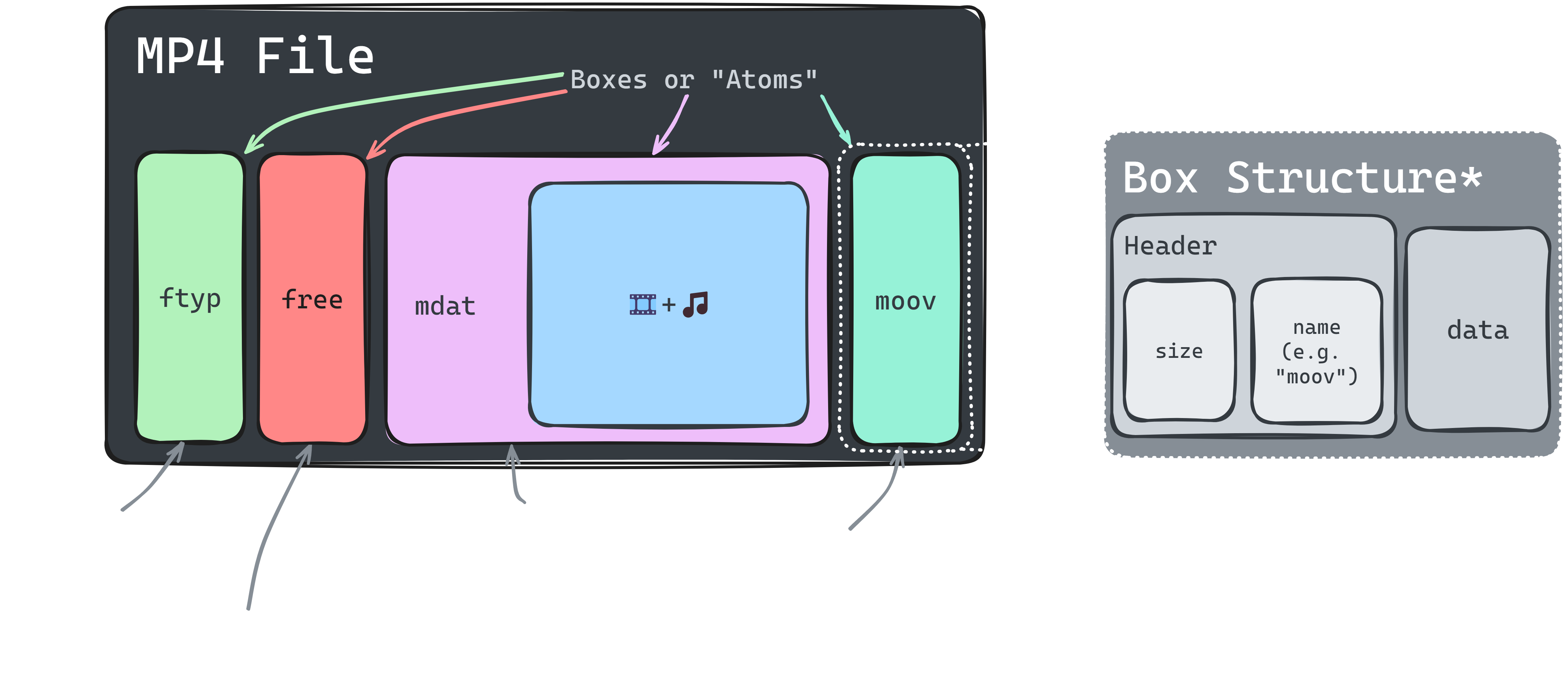
A typical MP4 file produced by OBS or FFmpeg will contain four top-level boxes:
ftyp - File Type Box: Contains information about the the standard version(s) used in the filefree - Free Space Box: Placeholder that should be ignored/skipped overmdat - Media Data Box: Contains data for media tracks (audio, video, etc.)moov - Movie Box: Contains other boxes with metadata for the file and media tracksThere are two things here that create the main problem we have with MP4: The moov sits at the end and is written when finalising the file, and it is required to be able to make sense of the data contained in the mdat box. This means that if the writing of the file gets interrupted for any reason (BSOD, disk full, power loss, etc.) and the moov box is not written, the file is extremely difficult - if not impossible - to recover. This is obviously very bad™ if you just recorded your best ever clutch in Counter-Strike but then your disk space ran out and now you don't have any proof of it ever happening!
Note about the free box since it will become important later: The size field in the box header is limited to 4 GiB. In order to have an mdat box larger than that, an extended size field needs to be used, which increases the size of the header. FFmpeg and OBS will write the placeholder so that it can be overwritten to writer a longer mdat header should it become necessary.
This leads us into the next part, which details the first attempt at solving this problem...
Some time ago the ISO format was extended with support for splitting media data into "Fragments", this is commonly referred to as "Fragmented MP4". These fragments can be split out into separate files as well, which is mainly used when streaming video over the internet, whether live on Twitch1 or films on Netflix. The details of that are beyond the scope of this post, but you can learn more about why this is done and its advantages for streaming use cases by reading more about HLS and DASH.
What's relevant for us is that a fragmented file has an "incomplete" moov that only contains the basic information necessary for decoding each track, with the information about specific samples (video frames, audio segments) contained in a fragment being stored in the moof (Movie Fragment Box) at the start of each fragment.
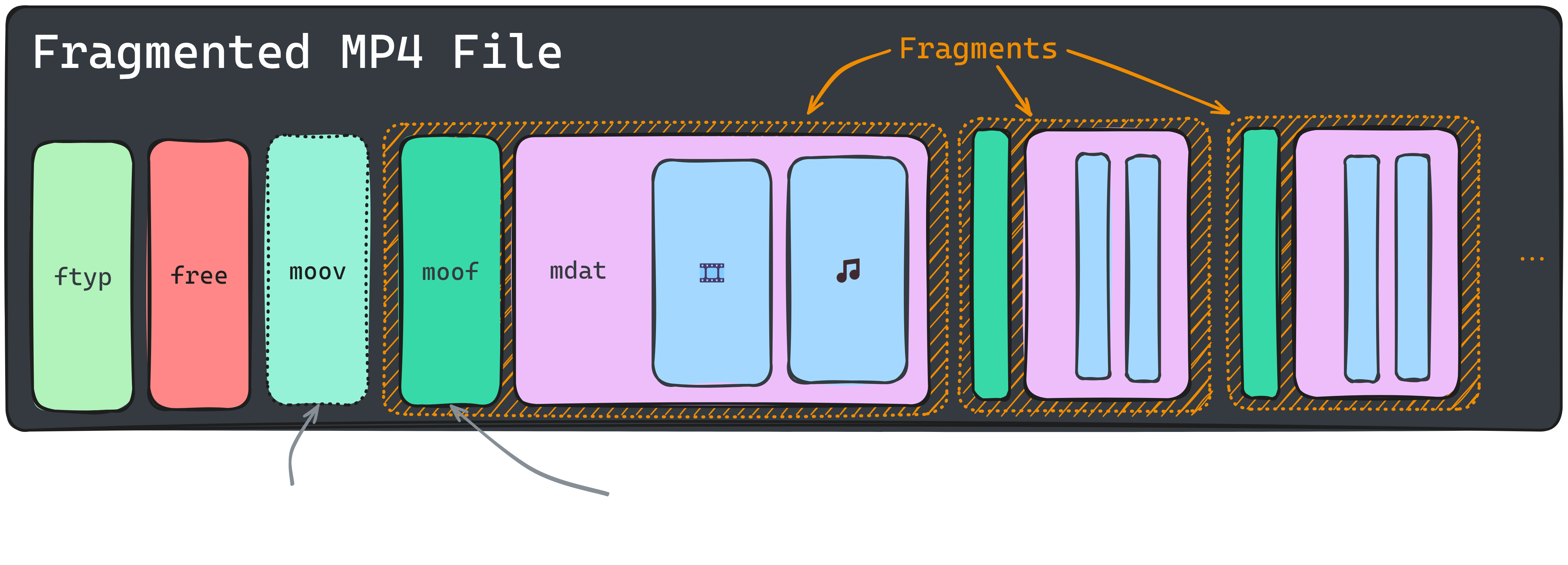
This is useful for the OBS recording use case because it means that a file no longer relies on a single moov containing all the information about the media data in the file. Each fragment only needs it's own moof box + the incomplete moov at the beginning to be played back correctly. This means that if the writing of the file is interrupted (e.g. due to a power failure), everything up to the last fragment will still be readable, solving the data loss problem of regular MP4 files.
Sounds too good to be true, doesn't it? Well, there are some significant downsides that ultimately caused us to stop using fragmented MP4 as the default pretty quickly:
Of course this can be fixed by remuxing the file, but that just brings us right back to where we started with MKV. There has to be a better way...
Quite a while ago I had a simple though: What if we just "finalise" a fragmented file with a full moov so that it behaves like a regular MP4? Then finally a few months ago I started to actually explore this idea which evolved into what we now know as "Hybrid MP4".
While the recording is running, a hybrid file is really just a fragmented MP4, retaining the resilience against data loss, but when the recording stops, it is quickly modified to appear like a normal MP4. I called this process a "soft remux" because it only needs to overwrite a small part of the file to achieve similar results to fully remuxing a file.
To do this, a full moov is written at the very end of the file that indexes the media data exactly like a normal MP4 would, and the placeholder free box at the start is overwritten with an mdat header that turns the entire file up to the newly written moov box into one giant Media Data box, thus effectively hiding the fragments from a reading application. This means we're now left with a file that appears to be a regular MP4, when it's actually fragmented inside!
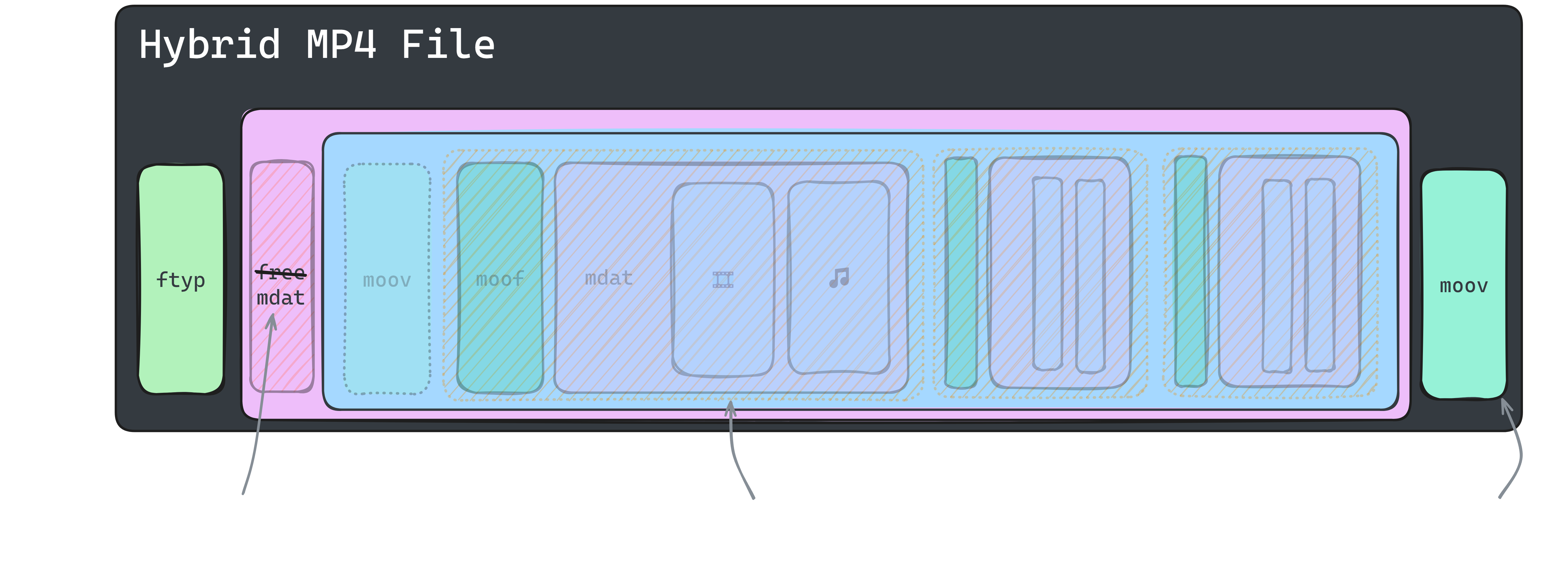
The hybrid approach ultimately addresses all the problems we had by combining the best of both worlds. If a file is not finalised you still have a valid fragmented MP4 that can be remuxed if necessary, and if it is finalised, well, for all intents and purposes it's just a regular old MP4.
And that's pretty much it. This idea went through a few rounds of iteration and improvement, this post only details the final version that has shipped in OBS. It kind of hurts that several days of work and research can be summed up in a couple paragraphs, but that's what the "pain" part in the subtitle is for.
The process of building this implementation took me down quite a few rabbit holes, as it required me to learn a lot of low-level details about how audio and video data is stored in files, and sometimes left me wondering why my results were different from the references I was using. This section contains some fun and some not so fun examples of things I encountered while working on the Hybrid MP4 output.
Markers are one of the headline features that Hybrid MP4 adds over the existing FFmpeg-based output. Don't get me wrong, FFmpeg does support these as well, but we never implemented it. But while I was doing this I figured this might be a good time to get it done, and will give users a nice incentive to actually use and test it.
The MP4 standard itself actually does not define anything for chapter markers, they are entirely based on Apple's QuickTime specification, and even then it seems to be only mostly documented. The implementation in OBS is directly adapted from FFmpeg, and should work in all the same software that it does like video players and some editing suites such as DaVinci Resolve. Sadly this does not include Adobe Premiere or Final Cut Pro, but there may be tools coming to make it a bit easier for those users!
While I was at it I figured I can add some additional metadata to each media track and the file itself, such as the encoder configuration2, so I did! This is particularly useful when you're testing different settings and want to compare them later, but don't want to have to rename the file after every test. Files now also contain a correct creation/encoding date so even if you rename them you can still track when a file was originally recorded.
The new MP4 output now also supports multiple video tracks alongside multiple audio tracks, this is great for debugging features such as Twitch's Enhanced Broadcasting by having a single file with all the video streams that can be easily switched between in players such as MPC-HC.
So it's not super useful for the average user yet, but hopefully we can make use of it in the future for things such as ISO recording (well, if we can also convince video editors to support it...).
AAC and Opus audio both have something called "priming" samples, this is a few milliseconds of silence at the start of an audio stream used to "warm up" the encoder, which should be skipped when playing back the file. Audio packets containing priming samples have a negative timestamp, indicating (part of) the audio they contain should be skipped during playback. There were two separate issues in OBS related to this:
Issue 1. happened to not affect the default audio encoder (FFmpeg AAC), as it uses a delay equivalent to packet duration, meaning the first packet with actual audio already starts at 0. Opus on the other hand would produce a first packet with a timestamp of -312 with the next one being 648, OBS would then "correct" the packets to 0 and 960 respectively and would result in the 312 samples of silence being included and the audio being ~6.5 ms late.
Just a few days after we merged the Hybrid MP4 feature into OBS the FFmpeg maintainer Martin submitted a patch that adds a similar feature to FFmpeg's MOV/MP4 muxer. This was entirely coincidental, and includes a note that Apple apparently did something like this already, which just proves that great minds do indeed think alike 😛.
This has now also been merged into FFmpeg as well, meaning it's already available in git builds and will hopefully soon make it's way into a stable release!
Note: The FFmpeg implementation is slightly different, and the OBS version has a few more safety nets just in case. It's still great to have though!
While MP4 is great for many things, it lacks some of the features and codec support available in it's ancestor QTFF (or MOV). Adding a "Hybrid MOV" mode is the next step to truly making it the new default in OBS. This primarily requires dealing with some of the differences between MOV and MP4 with things like PCM audio, differently implemented metadata structures, and also support for the ProRes codec. I'm hoping this can be done in time for OBS 31.0 if everything goes well!
A few other things that I'd like to work on for future improvements:
tmcd) track (requires the same backend updates as 1.)此内容由惯性聚合(RSS阅读器)自动聚合整理,仅供阅读参考。 原文来自 — 版权归原作者所有。