惯性聚合 高效追踪和阅读你感兴趣的博客、新闻、科技资讯
阅读原文 在惯性聚合中打开

推荐订阅源

Simon Willison's Weblog
Help Net Security
Help Net Security
P
Privacy International News Feed
T
Threat Research - Cisco Blogs
C
Cisco Blogs
C
CERT Recently Published Vulnerability Notes
NISL@THU
NISL@THU
L
LINUX DO - 热门话题
Security Latest
Security Latest
A
Arctic Wolf
G
GRAHAM CLULEY
月光博客
月光博客
S
Securelist
D
Docker
J
Java Code Geeks
T
Troy Hunt's Blog
T
Tenable Blog
让小产品的独立变现更简单 - ezindie.com
SecWiki News
SecWiki News
S
Security @ Cisco Blogs
量子位
freeCodeCamp Programming Tutorials: Python, JavaScript, Git & More
L
LINUX DO - 最新话题
Recent Commits to openclaw:main
aimingoo的专栏
aimingoo的专栏
博客园 - 【当耐特】
H
Heimdal Security Blog
The Hacker News
The Hacker News
博客园 - 三生石上(FineUI控件)
Application and Cybersecurity Blog
N
Netflix TechBlog - Medium
Vercel News
Vercel News
Forbes - Security
Forbes - Security
B
Blog RSS Feed
H
Hackread – Cybersecurity News, Data Breaches, AI and More
IT之家
IT之家
B
Blog
MongoDB | Blog
MongoDB | Blog
博客园 - 聂微东
Google DeepMind News
S
Secure Thoughts
Threat Intelligence Blog | Flashpoint
C
Check Point Blog
云风的 BLOG
云风的 BLOG
CTFtime.org: upcoming CTF events
T
The Blog of Author Tim Ferriss
L
Lohrmann on Cybersecurity
F
Full Disclosure
D
Darknet – Hacking Tools, Hacker News & Cyber Security
P
Proofpoint News Feed

记录生活,精彩一刻 - 域名

内容创作者与粉丝订阅互动平台爱发电无法打开 备案被注销及域名被冻结 Typecho 网站更换域名操作指南 阿里云备案用户不想掉备案 Typecho更换新域名教程 数据库篇 WHMCS V7.8.0原版下载及破解补丁安装教程
Namesilo域名转出教程
Huo · 2023-10-17 · via 记录生活,精彩一刻 - 域名

域名转出有哪些前置条件?

首先要明确,哪些域名可以转移,哪些域名不可以转移。

  1. 如果你的域名注册不满60天,是无法进行转移的。
  2. 如果你要转移的域名,目标域名注册机构不支持,也无法进行转移。例如Cloudflare不支持 .top 域名,你就无法把 .top域名转入到Cloudflare。
  3. 如果你的域名是在国内的域名服务商,例如腾讯云,阿里云购买的,一般转移比较简单。不需要进行其他的操作,直接就可以转移。
  4. 但如果你是在Namesilo购买的域名,它默认是赠送隐私服务的,而且域名会被上锁。所以你无法直接转移到其他的域名服务商。

Namesilo域名如何转出?

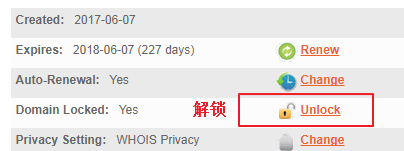
第 1 步:Namesilo域名解锁

  • 首先在namesilo中找到我们想要转出域名。
  • 解锁域名,然后点击域管理界面中的小锁按钮。
  • 点击 “Unlock” 给你的Namesilo域名解锁 ▼

解锁

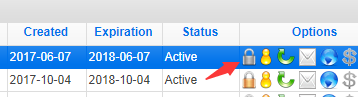
第 2 步:确认解锁

  • Namesilo确认域解锁按钮 ▼

确认解锁

  • 此时,Namesilo域名小锁变成灰色 ▼

确认解锁

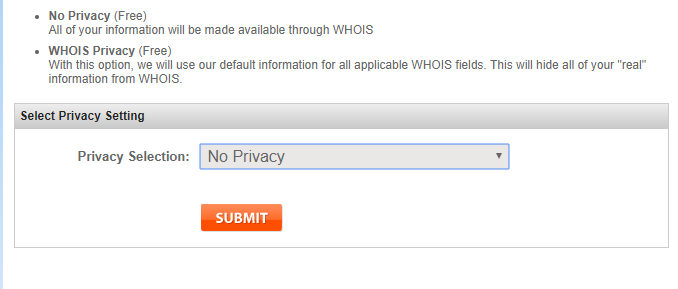
第 3 步:关闭域名隐私保护

由于我启动了域名隐私保护(一项Namesilo免费的域名隐私保护),因此转移需要提前关闭域名隐私保护。
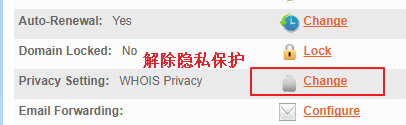
  • 点击 “Change” 更改 ▼

关闭隐私保护

  • 选择 “no privacy” 没有隐私,关闭隐私保护 ▼

关闭隐私保护

  • 此时,头像状态变成灰色了,说明你的域名的隐私保护已被解除 ▼

头像变灰

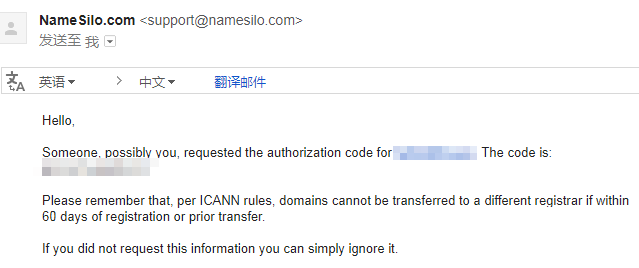
第 4 步:获取Namesilo转移密码

完成上述步骤后,你可以单击 “send email” 发送电子邮件,将转移密码发送到你的邮箱。
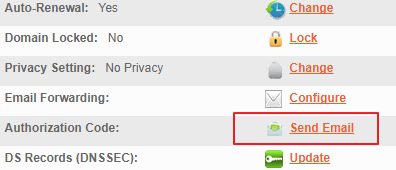
Email

第 5 步:Email收到Namesilo转移密码

邮件

  • 记下域名和转移密码,就能转移到其他运营商 ▲