惯性聚合 高效追踪和阅读你感兴趣的博客、新闻、科技资讯
阅读原文 在惯性聚合中打开

推荐订阅源

P
Privacy & Cybersecurity Law Blog
V
V2EX
月光博客
月光博客
奇客Solidot–传递最新科技情报
奇客Solidot–传递最新科技情报
The Register - Security
MongoDB | Blog
MongoDB | Blog
P
Privacy International News Feed
The Last Watchdog
The Last Watchdog
Security Archives - TechRepublic
美团技术团队
Stack Overflow Blog
Stack Overflow Blog
博客园 - 司徒正美
博客园 - 三生石上(FineUI控件)
V
Visual Studio Blog
cs.CV updates on arXiv.org
K
Kaspersky official blog
S
Secure Thoughts
T
Tenable Blog
Security Latest
Security Latest
The Cloudflare Blog
S
Security @ Cisco Blogs
H
Heimdal Security Blog
aimingoo的专栏
aimingoo的专栏
TaoSecurity Blog
TaoSecurity Blog
Blog — PlanetScale
Blog — PlanetScale
Microsoft Security Blog
Schneier on Security
Webroot Blog
Webroot Blog
G
Google Developers Blog
www.infosecurity-magazine.com
Scott Helme
Scott Helme
IT之家
IT之家
Latest news
Latest news
The Hacker News
The Hacker News
C
Check Point Blog
T
The Exploit Database - CXSecurity.com
H
Hackread – Cybersecurity News, Data Breaches, AI and More
腾讯CDC
C
CERT Recently Published Vulnerability Notes
NISL@THU
NISL@THU
N
News | PayPal Newsroom
Forbes - Security
Forbes - Security
P
Palo Alto Networks Blog
S
Security Affairs
S
Securelist
Google Online Security Blog
WordPress大学
WordPress大学
Last Week in AI
Last Week in AI
C
Cybersecurity and Infrastructure Security Agency CISA
A
About on SuperTechFans

记录生活,精彩一刻 - 教程

GKD - 安卓 去广告 神器 安装及使用教程 西门子差压变送器校准教程(新锦) FarCDN配置教程和常见问题解答 简单的端口映射教程 frp – 开源内网穿透工具教程 宝塔面板日常使用八大技巧总结(建议收藏)
Namesilo域名转出教程
Huo · 2023-10-17 · via 记录生活,精彩一刻 - 教程

域名转出有哪些前置条件?

首先要明确,哪些域名可以转移,哪些域名不可以转移。

  1. 如果你的域名注册不满60天,是无法进行转移的。
  2. 如果你要转移的域名,目标域名注册机构不支持,也无法进行转移。例如Cloudflare不支持 .top 域名,你就无法把 .top域名转入到Cloudflare。
  3. 如果你的域名是在国内的域名服务商,例如腾讯云,阿里云购买的,一般转移比较简单。不需要进行其他的操作,直接就可以转移。
  4. 但如果你是在Namesilo购买的域名,它默认是赠送隐私服务的,而且域名会被上锁。所以你无法直接转移到其他的域名服务商。

Namesilo域名如何转出?

第 1 步:Namesilo域名解锁

  • 首先在namesilo中找到我们想要转出域名。
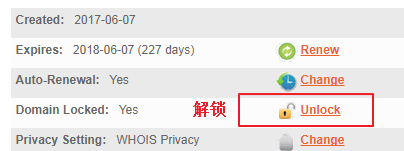
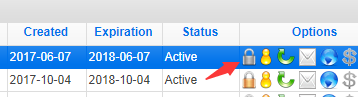
  • 解锁域名,然后点击域管理界面中的小锁按钮。
  • 点击 “Unlock” 给你的Namesilo域名解锁 ▼

解锁

第 2 步:确认解锁

  • Namesilo确认域解锁按钮 ▼

确认解锁

  • 此时,Namesilo域名小锁变成灰色 ▼

确认解锁

第 3 步:关闭域名隐私保护

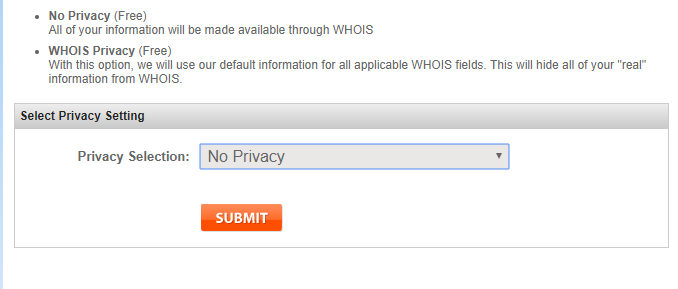
由于我启动了域名隐私保护(一项Namesilo免费的域名隐私保护),因此转移需要提前关闭域名隐私保护。
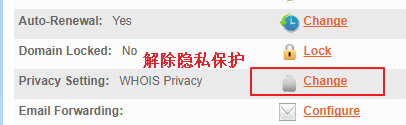
  • 点击 “Change” 更改 ▼

关闭隐私保护

  • 选择 “no privacy” 没有隐私,关闭隐私保护 ▼

关闭隐私保护

  • 此时,头像状态变成灰色了,说明你的域名的隐私保护已被解除 ▼

头像变灰

第 4 步:获取Namesilo转移密码

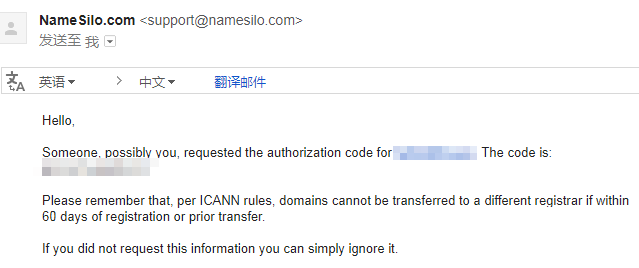
完成上述步骤后,你可以单击 “send email” 发送电子邮件,将转移密码发送到你的邮箱。
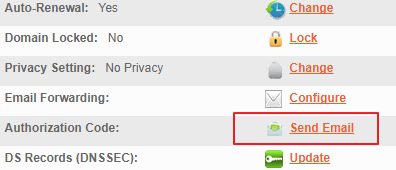
Email

第 5 步:Email收到Namesilo转移密码

邮件

  • 记下域名和转移密码,就能转移到其他运营商 ▲