



惯性聚合 高效追踪和阅读你感兴趣的博客、新闻、科技资讯
阅读原文 在惯性聚合中打开

推荐订阅源

腾讯CDC
Schneier on Security
B
Blog RSS Feed
aimingoo的专栏
aimingoo的专栏
P
Proofpoint News Feed
A
About on SuperTechFans
Recorded Future
Recorded Future
Recent Announcements
Microsoft Security Blog
L
LangChain Blog
Hugging Face - Blog
Hugging Face - Blog
The GitHub Blog
The GitHub Blog
Google DeepMind News
T
Tailwind CSS Blog
Vercel News
Vercel News
H
Hackread – Cybersecurity News, Data Breaches, AI and More
MyScale Blog
MyScale Blog
V2EX - 技术
V2EX - 技术
N
Netflix TechBlog - Medium
F
Fortinet All Blogs
V
Visual Studio Blog
Martin Fowler
Martin Fowler
K
KPMG report finds enterprise disconnect between AI and its ROI | CIO
博客园 - Franky
freeCodeCamp Programming Tutorials: Python, JavaScript, Git & More
T
The Exploit Database - CXSecurity.com
F
Full Disclosure
Scott Helme
Scott Helme
H
Heimdal Security Blog
博客园 - 叶小钗
Google DeepMind News
Cyberwarzone
Cyberwarzone
Application and Cybersecurity Blog
V
Vulnerabilities – Threatpost
Blog — PlanetScale
Blog — PlanetScale
Security Latest
Security Latest
WordPress大学
WordPress大学
Cyber Security Advisories - MS-ISAC
T
Troy Hunt's Blog
S
SegmentFault 最新的问题
Forbes - Security
Forbes - Security
Jina AI
Jina AI
S
Securelist
小众软件
小众软件
Simon Willison's Weblog
J
Java Code Geeks
AWS News Blog
AWS News Blog
N
News and Events Feed by Topic
博客园 - 三生石上(FineUI控件)
量子位

记录生活,精彩一刻 - typecho

Typecho 插件推荐 UploadPlugin Typecho 站内搜索插件 SiteSearch(BUG) Typecho-Riven主题正式发售啦 Typecho 已经更新到1.3.0 ,你更新了吗? 分享一个适用于Typecho博客的Robots协议规则 Typecho插件:ImageAccelerator文章图片加速 Typecho开启Gzip压缩加速网站 Typecho 数据库字符集导致Emoji表情评论报错 Typecho 博客自定义右键 Typecho 网站更换域名操作指南 Typecho发布文章时出现的错误
推荐一款特别漂亮的Typecho主题 - 见字
Huo · 2024-12-24 · via 记录生活,精彩一刻 - typecho

现代、极简
引用 Bootstrap,移除冗余代码,提高代码复用率。部分设计风格参考 Apple Inc.
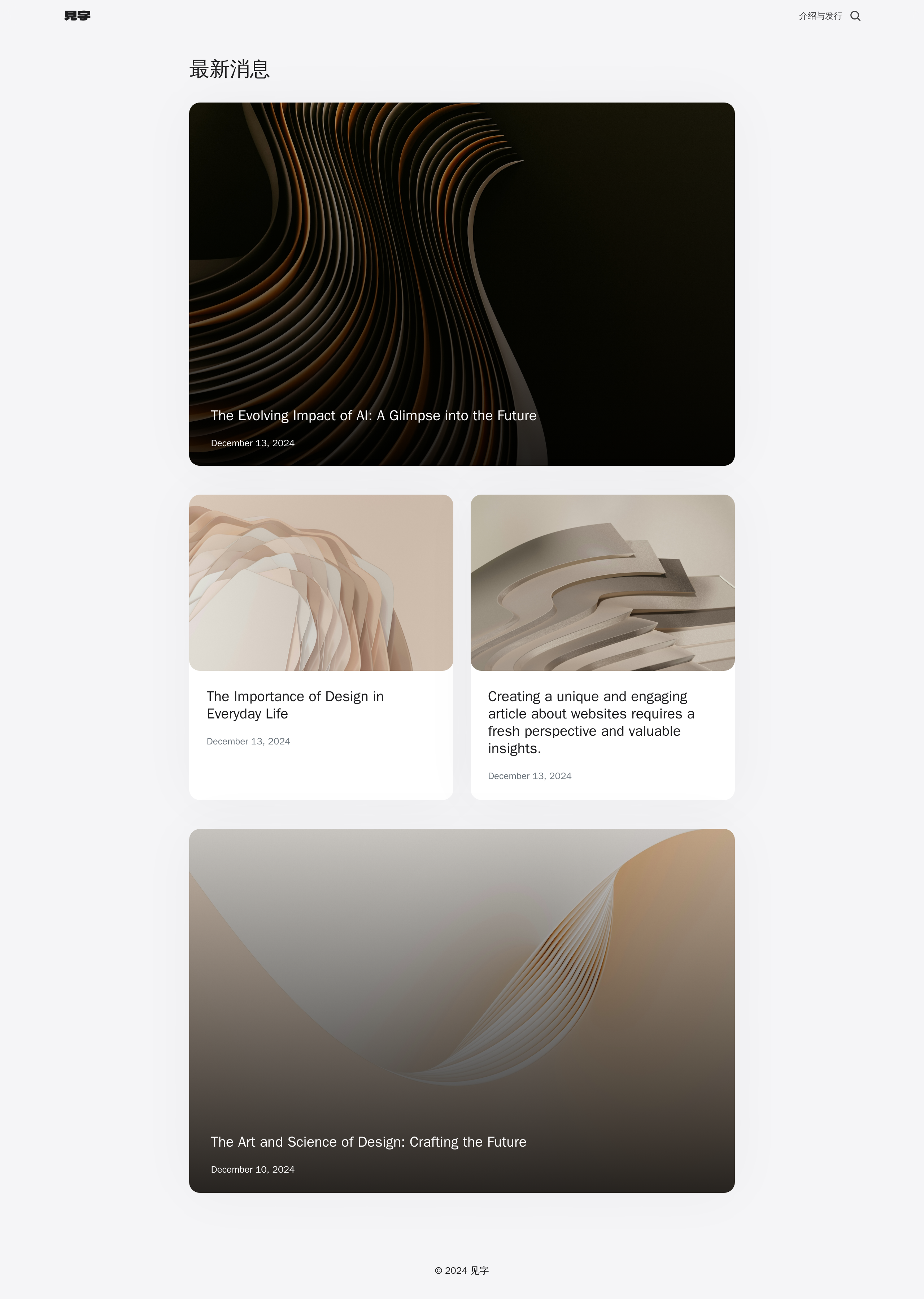
网站演示

演示地址

核心演示站:https://i.ihk.me

常见问题

如何安装主题:

  1. 下载主题文件压缩包。
  2. 解压主题文件压缩包。
  3. 将解压后的文件夹移动至站点根目录下的 usr/themes 文件夹中。
  4. 在 网站管理后台 => 控制台 => 外观 => 启用 "见字" 主题。

如何设置站点 LOGO

在 管理后台 => 控制台 => 外观 => 设置外观 中,填入 站点 LOGO 与 深色模式站点 LOGO 的 URL 地址。

浅色模式下使用,LOGO 颜色应为深色。

深色模式下使用,LOGO 颜色应为浅色。

如何为文章设置不同的列表宽度

文章列表的宽度依照 Bootstrap Grid System, 因此仅支持 1-12 范围内的整数。点击查看官方文档。

建议取值范围:3、4、6、12。

在文章编辑时,设置自定义字段:

字段名称:col

字段类型:整数

字段内容:1-12 范围内的整数

简述:Grid 系统将页面分为 12 个区块,当设置文章宽度为 12,则表示宽度撑满整个屏幕;当宽度设置为 4,则表示宽度占全屏的 1/3。以此类推,用户可自定义设置文章卡片宽度。

如何为文章设置封面图片

在文章编辑时,设置自定义字段:

字段名称:cover_image

字段类型:字符

字段内容:封面图片 URL 地址

如何为文章设置不同的封面样式

主题提供两种文章封面样式,Basics 为基础分离卡片,ImageOverlays 为图片覆盖卡片。

在文章编辑时,设置自定义字段:

字段名称:card_type

字段类型:字符

字段内容:取值范围:ImageOverlays、Basics

如何设置页脚 Footer 内容

在 管理后台 => 控制台 => 外观 => 设置外观 中, 按需填写页脚内容,若留空将不显示对应信息。

支持的编辑内容如下:

  1. 页脚基本信息
  2. ICP 备案号
  3. 网安备案号
  4. "见字" 与 "ESTO" 版权

更新日志

版本信息:V0.1.0

Beta 预览版发布
发布内容
适配 文章
适配 独立页面
适配 搜索
适配 Header
适配 Footer
适配 一级评论

下载地址

本站下载:点击下载

项目地址

https://es4t.oevon.com/?index=a332a15d32da