惯性聚合 高效追踪和阅读你感兴趣的博客、新闻、科技资讯
阅读原文 在惯性聚合中打开

推荐订阅源

Exploit-DB.com RSS Feed
S
Schneier on Security
A
Arctic Wolf
Scott Helme
Scott Helme
S
Securelist
Schneier on Security
W
WeLiveSecurity
Attack and Defense Labs
Security Latest
Security Latest
Project Zero
Project Zero
cs.AI updates on arXiv.org
Know Your Adversary
Know Your Adversary
P
Palo Alto Networks Blog
K
KPMG report finds enterprise disconnect between AI and its ROI | CIO
Google DeepMind News
P
Proofpoint News Feed
C
Check Point Blog
F
Full Disclosure
Stack Overflow Blog
Stack Overflow Blog
H
Hacker News: Front Page
T
The Blog of Author Tim Ferriss
TaoSecurity Blog
TaoSecurity Blog
Vercel News
Vercel News
A
About on SuperTechFans
N
News and Events Feed by Topic
cs.CV updates on arXiv.org
The GitHub Blog
The GitHub Blog
S
Security Affairs
Y
Y Combinator Blog
T
The Exploit Database - CXSecurity.com
奇客Solidot–传递最新科技情报
奇客Solidot–传递最新科技情报
Forbes - Security
Forbes - Security
IT之家
IT之家
WordPress大学
WordPress大学
Last Week in AI
Last Week in AI
Cyber Security Advisories - MS-ISAC
F
Fortinet All Blogs
N
Netflix TechBlog - Medium
The Register - Security
Jina AI
Jina AI
云风的 BLOG
云风的 BLOG
T
Tailwind CSS Blog
K
Kaspersky official blog
Hacker News: Ask HN
Hacker News: Ask HN
C
Cisco Blogs
MyScale Blog
MyScale Blog
博客园 - 【当耐特】
T
Threat Research - Cisco Blogs
D
Docker
G
GRAHAM CLULEY

News on Xubuntu

Xubuntu – Xubuntu 26.04 Community Wallpaper Contest Winners Xubuntu – Xubuntu 26.04 Wallpaper Voting Open Xubuntu – Xubuntu Anniversary Wallpaper Contests Xubuntu – Public postmortem of the Xubuntu.org download compromise Xubuntu – Xubuntu 25.10 released! Xubuntu – Xubuntu 25.04 released! Xubuntu – Xubuntu 24.10 released! Xubuntu – Xubuntu 24.04 released! Xubuntu – Xubuntu 23.10 released! Xubuntu – Xubuntu 23.04 released! Xubuntu – Xubuntu 22.10 released! Xubuntu – Xubuntu 22.04 released! Xubuntu – Xubuntu 22.04 Community Wallpaper Contest Winners Xubuntu – Xubuntu 22.04 Community Wallpaper Contest Xubuntu – Xubuntu 21.04 released! Xubuntu – Xubuntu 21.04 Testing Week Xubuntu – Xubuntu 20.10 released! Xubuntu – Xubuntu is now on GitHub! Xubuntu – Xubuntu 20.04 released! Xubuntu – Xubuntu 20.04 Community Wallpaper Contest Winners Xubuntu – Xubuntu 20.04 Testing Week Xubuntu – Xubuntu 20.04 community wallpaper contest Xubuntu – Xubuntu 19.10 released! Xubuntu – Xubuntu 19.04 released! Xubuntu – Xubuntu 18.10 released! Xubuntu – Xubuntu 18.04.1 released! Xubuntu – Xubuntu 17.10 EOL Xubuntu – New Wiki pages for Testers Xubuntu – Xubuntu 18.04 released! Xubuntu – Xubuntu 18.04 Community Wallpaper Contest Winners! Xubuntu – Testing for Xubuntu Xubuntu – Xubuntu 18.04 community wallpaper contest Xubuntu – Xubuntu 17.10.1 Release Xubuntu – Xubuntu 17.04 End Of Life Xubuntu – Xubuntu 17.10 released! Xubuntu – Xubuntu Quality Assurance team is spreading out Xubuntu – Xubuntu 17.04 released! Xubuntu – Winners of the #lovexubuntu Competition! Xubuntu – Introducing the Xubuntu Council Xubuntu – Integrating releases to the website Xubuntu – Presenting the Xubuntu status tracker Xubuntu – Xubuntu 16.10 Released Intel cursor bug fix released Xubuntu – Xubuntu 16.04.1 Release Xubuntu – Looking for memorable and fun Xubuntu stories! Xubuntu – Xubuntu 16.04 released! Xubuntu – Xubuntu 16.04 Wallpaper Competition Winners! Xubuntu – The small details: Wallpapers Xubuntu – My media manager: Other alternatives Xubuntu – The small details: Panel layouts Xubuntu – My media manager: The cloud Xubuntu – The small details: Personal information integration Text editor and terminal color schemes Xubuntu – The small details: Shortcut keys Xubuntu – The small details: Theme configuration Xubuntu – The Small and the Noisy Xubuntu – Xubuntu 16.04 LTS Beta 2 Xubuntu – Introducing Xubuntu core Xubuntu – Xubuntu 12.04 End of Life Xubuntu – Xubuntu 15.04 released! Xubuntu – Xubuntu 15.04 Beta 2 Xubuntu – Xubuntu 15.04 Beta 1 Xubuntu – Xubuntu at Mexican collection agencies Xubuntu – Xubuntu 14.04.2 released Xubuntu – Help the Community with testing and win Xubuntu stickers Xubuntu – Xubuntu 14.10 released! Xubuntu – Xubuntu 14.10 Beta 2 is released! Xubuntu – Xubuntu 14.10 Beta 1 is released! Xubuntu – Using inxi to detect hardware information Fix available for the black screen on unlock bug Xubuntu – 5 Things to Do After Upgrading from 12.04 to 14.04 Xubuntu – Xubuntu 14.04.1 released Xubuntu – Screen locking in Xubuntu 14.04 Xubuntu – Xubuntu 14.04 QA Recap Xubuntu – Xubuntu 14.04 released! Xubuntu – Xubuntu 14.04 Final Beta Xubuntu – Xubuntu 14.04 Beta 1 Xubuntu – Xubuntu Marketing with StartUbuntu Flyer Xubuntu – Reporting is caring Xubuntu – Xubuntu 12.04.4 released Xubuntu – Xubuntu community wallpaper contest winners Xubuntu – Xubuntu 14.04 Alpha 2 Xubuntu – Xubuntu 14.04 Alpha 1 Xubuntu – Help us test Xubuntu 14.04 LTS Xubuntu – Xubuntu 14.04 Default Wallpapers Xubuntu – Xubuntu Natty Artwork Xubuntu – Xubuntu 11.04 alpha 2 released Xubuntu – Xubuntu 11.04 alpha 1 released Xubuntu – Xubuntu 10.10 released Xubuntu – Xubuntu 10.10 RC released Xubuntu – Xubuntu 10.10 alpha 3 released Xubuntu – Xubuntu 9.10 RC released Xubuntu – Xubuntu 9.10 beta released Xubuntu – Free Xubuntu CDs now available Xubuntu – Xubuntu 9.04 Released Xubuntu – Countdown to Xubuntu 9.04 Xubuntu – Xubuntu 9.04 beta released Xubuntu – Xubuntu 8.10 released Xubuntu – Xubuntu 8.10 Release Candidate now available Xubuntu – Countdown to Xubuntu 8.10
Xubuntu – The small details: Menu editing
2016-04-02 · via News on Xubuntu

In this series the Xubuntu team present some of the smaller details in Xubuntu to help you use your system more efficiently. Several of the features covered in this series are new for those who will be upgrading from 14.04 LTS to 16.04 LTS. We will also cover some features that have been in Xubuntu for longer, for those that are completely new to the operating system.

The application menus offer access to all installed applications on the system, whether it was shipped by default or installed a minute ago. While the applications are organized by category, there are situations where you want to reorganize them to your liking. Alternatively, you might want to hide a launcher completely or create a new one for your own custom script.

MenuLibre is an application created for that purpose by the Xubuntu team. Let’s see how you can get started with menu editing!

Hiding, moving and adding launchers

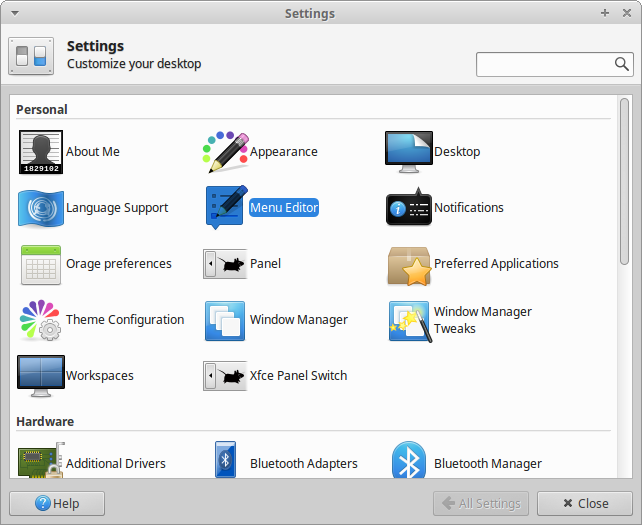
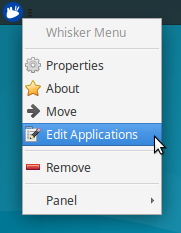
To open MenuLibre, go to Menu → Settings Manager → Menu Editor or right-click the menu and select Edit Applications.

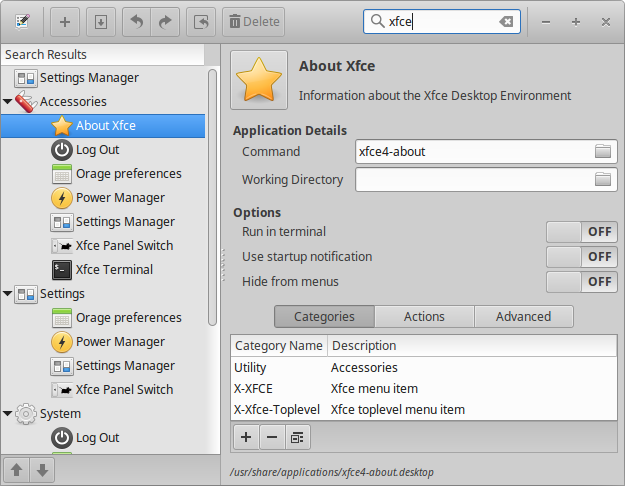
Hiding launchers is one of the simplest ways to change the way your menu looks. To hide a launcher, search for the application you wish to hide from the search box in the top right corner, then click the launcher you want to edit in the left sidebar. After that, click the Hide from menus button under the Options section, then Save Launcher (second button from the left in the toolbar).

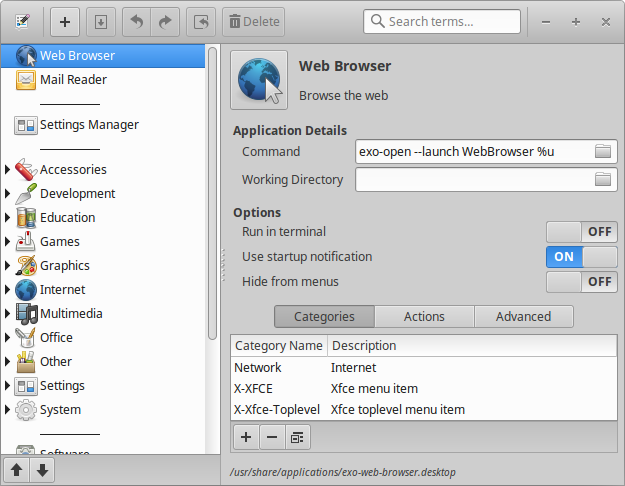
If you want to move a launcher inside a menu, find it in the tree pane, then use the arrow buttons below to move it. You don’t have to save changes – moving menu items happens real time.

Adding launchers is slightly more complicated, but only because there are more steps to take. To add a launcher, first press the Add button (with the plus sign, first from the left on the toolbar) and from the opening menu, select Add Launcher, type the Command you want the launcher to run. You’ll likely also want to change at least the Icon (change by clicking the icon) and Name. Finally, feel free to change other options as you wish and then press Save Launcher.

The MenuLibre documentation is available online at https://smdavis.us/doku/doku.php?id=menulibre_usage.