





惯性聚合 高效追踪和阅读你感兴趣的博客、新闻、科技资讯
阅读原文 在惯性聚合中打开

推荐订阅源

Cyberwarzone
Cyberwarzone
Google DeepMind News
宝玉的分享
宝玉的分享
博客园_首页
量子位
博客园 - 司徒正美
罗磊的独立博客
腾讯CDC
IT之家
IT之家
S
Schneier on Security
Hugging Face - Blog
Hugging Face - Blog
L
Lohrmann on Cybersecurity
H
Hacker News: Front Page
钛媒体:引领未来商业与生活新知
钛媒体:引领未来商业与生活新知
J
Java Code Geeks
Know Your Adversary
Know Your Adversary
人人都是产品经理
人人都是产品经理
有赞技术团队
有赞技术团队
大猫的无限游戏
大猫的无限游戏
D
Darknet – Hacking Tools, Hacker News & Cyber Security
AWS News Blog
AWS News Blog
Spread Privacy
Spread Privacy
I
InfoQ
T
Threatpost
Simon Willison's Weblog
云风的 BLOG
云风的 BLOG
L
LINUX DO - 热门话题
A
About on SuperTechFans
Blog — PlanetScale
Blog — PlanetScale
Latest news
Latest news
Forbes - Security
Forbes - Security
Security Latest
Security Latest
NISL@THU
NISL@THU
The GitHub Blog
The GitHub Blog
P
Proofpoint News Feed
The Hacker News
The Hacker News
M
MIT News - Artificial intelligence
S
SegmentFault 最新的问题
cs.AI updates on arXiv.org
B
Blog
A
Arctic Wolf
C
Check Point Blog
G
Google Developers Blog
S
Security @ Cisco Blogs
Google DeepMind News
The Cloudflare Blog
L
LINUX DO - 最新话题
奇客Solidot–传递最新科技情报
奇客Solidot–传递最新科技情报
P
Privacy International News Feed
小众软件
小众软件

News on Xubuntu

Xubuntu – Xubuntu 26.04 Community Wallpaper Contest Winners Xubuntu – Xubuntu 26.04 Wallpaper Voting Open Xubuntu – Xubuntu Anniversary Wallpaper Contests Xubuntu – Public postmortem of the Xubuntu.org download compromise Xubuntu – Xubuntu 25.10 released! Xubuntu – Xubuntu 25.04 released! Xubuntu – Xubuntu 24.10 released! Xubuntu – Xubuntu 24.04 released! Xubuntu – Xubuntu 23.10 released! Xubuntu – Xubuntu 23.04 released! Xubuntu – Xubuntu 22.10 released! Xubuntu – Xubuntu 22.04 released! Xubuntu – Xubuntu 22.04 Community Wallpaper Contest Winners Xubuntu – Xubuntu 22.04 Community Wallpaper Contest Xubuntu – Xubuntu 21.04 released! Xubuntu – Xubuntu 21.04 Testing Week Xubuntu – Xubuntu 20.10 released! Xubuntu – Xubuntu is now on GitHub! Xubuntu – Xubuntu 20.04 released! Xubuntu – Xubuntu 20.04 Community Wallpaper Contest Winners Xubuntu – Xubuntu 20.04 Testing Week Xubuntu – Xubuntu 20.04 community wallpaper contest Xubuntu – Xubuntu 19.10 released! Xubuntu – Xubuntu 19.04 released! Xubuntu – Xubuntu 18.10 released! Xubuntu – Xubuntu 18.04.1 released! Xubuntu – Xubuntu 17.10 EOL Xubuntu – New Wiki pages for Testers Xubuntu – Xubuntu 18.04 released! Xubuntu – Xubuntu 18.04 Community Wallpaper Contest Winners! Xubuntu – Testing for Xubuntu Xubuntu – Xubuntu 18.04 community wallpaper contest Xubuntu – Xubuntu 17.10.1 Release Xubuntu – Xubuntu 17.04 End Of Life Xubuntu – Xubuntu 17.10 released! Xubuntu – Xubuntu Quality Assurance team is spreading out Xubuntu – Xubuntu 17.04 released! Xubuntu – Winners of the #lovexubuntu Competition! Xubuntu – Introducing the Xubuntu Council Xubuntu – Integrating releases to the website Xubuntu – Presenting the Xubuntu status tracker Xubuntu – Xubuntu 16.10 Released Intel cursor bug fix released Xubuntu – Xubuntu 16.04.1 Release Xubuntu – Looking for memorable and fun Xubuntu stories! Xubuntu – Xubuntu 16.04 released! Xubuntu – Xubuntu 16.04 Wallpaper Competition Winners! Xubuntu – The small details: Wallpapers Xubuntu – My media manager: Other alternatives Xubuntu – The small details: Panel layouts Xubuntu – My media manager: The cloud Xubuntu – The small details: Personal information integration Xubuntu – The small details: Shortcut keys Xubuntu – The small details: Menu editing Xubuntu – The small details: Theme configuration Xubuntu – The Small and the Noisy Xubuntu – Xubuntu 16.04 LTS Beta 2 Xubuntu – Introducing Xubuntu core Xubuntu – Xubuntu 12.04 End of Life Xubuntu – Xubuntu 15.04 released! Xubuntu – Xubuntu 15.04 Beta 2 Xubuntu – Xubuntu 15.04 Beta 1 Xubuntu – Xubuntu at Mexican collection agencies Xubuntu – Xubuntu 14.04.2 released Xubuntu – Help the Community with testing and win Xubuntu stickers Xubuntu – Xubuntu 14.10 released! Xubuntu – Xubuntu 14.10 Beta 2 is released! Xubuntu – Xubuntu 14.10 Beta 1 is released! Xubuntu – Using inxi to detect hardware information Fix available for the black screen on unlock bug Xubuntu – 5 Things to Do After Upgrading from 12.04 to 14.04 Xubuntu – Xubuntu 14.04.1 released Xubuntu – Screen locking in Xubuntu 14.04 Xubuntu – Xubuntu 14.04 QA Recap Xubuntu – Xubuntu 14.04 released! Xubuntu – Xubuntu 14.04 Final Beta Xubuntu – Xubuntu 14.04 Beta 1 Xubuntu – Xubuntu Marketing with StartUbuntu Flyer Xubuntu – Reporting is caring Xubuntu – Xubuntu 12.04.4 released Xubuntu – Xubuntu community wallpaper contest winners Xubuntu – Xubuntu 14.04 Alpha 2 Xubuntu – Xubuntu 14.04 Alpha 1 Xubuntu – Help us test Xubuntu 14.04 LTS Xubuntu – Xubuntu 14.04 Default Wallpapers Xubuntu – Xubuntu Natty Artwork Xubuntu – Xubuntu 11.04 alpha 2 released Xubuntu – Xubuntu 11.04 alpha 1 released Xubuntu – Xubuntu 10.10 released Xubuntu – Xubuntu 10.10 RC released Xubuntu – Xubuntu 10.10 alpha 3 released Xubuntu – Xubuntu 9.10 RC released Xubuntu – Xubuntu 9.10 beta released Xubuntu – Free Xubuntu CDs now available Xubuntu – Xubuntu 9.04 Released Xubuntu – Countdown to Xubuntu 9.04 Xubuntu – Xubuntu 9.04 beta released Xubuntu – Xubuntu 8.10 released Xubuntu – Xubuntu 8.10 Release Candidate now available Xubuntu – Countdown to Xubuntu 8.10
Xubuntu – Xubuntu at Computer Reach
2015-06-02 · via News on Xubuntu

The Xubuntu team hears stories about how it is used in organizations all over the world. In this “Xubuntu at..” series of interviews, we seek to interview organizations who wish to share their stories. If your organization is using Xubuntu and you want to share what you’re doing with us please contact Elizabeth K. Joseph at lyz@ubuntu.com to discuss details about your organization.

Last month we started a dialog with Kevin Driscoll, PC/Linux Technical Consultant, and Dave Sevick, Executive Director, of Computer Reach to learn more about how they’re using Xubuntu in their organization. The following is an exchange we had with Kevin over email, huge thanks to him for taking the time to share details about their work with us.

Can you tell us a bit about yourself and the work that Computer Reach does?

http://www.computerreach.org

Computer Reach is a volunteer organization in Pittsburgh that refurbishes computers for use by non-profits. Local companies, school districts, and individuals donate their used computers to us. We recondition them and use imaging software to put standardized software on them, mainly for educational use. The operation started in 2001 doing just Macs but for the past several years has a strong PC-Linux operation. More about Computer Reach at computerreach.org.

What influenced your decision to use Open Source Software in your organization?

The cost and complexity of licensed software made open source software the only real solution for us. Funding is low and the price point for new equipment keeps falling, making it more challenging to sell (or fund) used computers. LibreOffice and Linux are the main open source software that we use, but it is the core of what makes us an educational operation as well. Our volunteers are not always technically capable. Learning how to use software is key to attracting in new volunteers. Since they can freely download and use any of the open source software that they learn to work with while helping Computer Reach, it is a great enabler for them. As a further benefit, the fact that volunteers that come to help improve their own capabilities and thus their work situation helps us raise funds from those willing to underwrite community education and career development.

What made you select Xubuntu for your PC deployments?

Initially, Edubuntu was the Linux distribution that was used because of bountiful online resources and the included array of software for school-age children. More recently, in order to be able to run similarly on computers from 5-15 years old, we had to choose a desktop environment that was intuitive but also light-weight. Xfce was the environment I thought lent itself best to efficiency as well as features. We have used it to put together a desktop that is equally intuitive to Mac users as it is to Windows users, since most users of our computers are coming to Linux from one of those platforms.
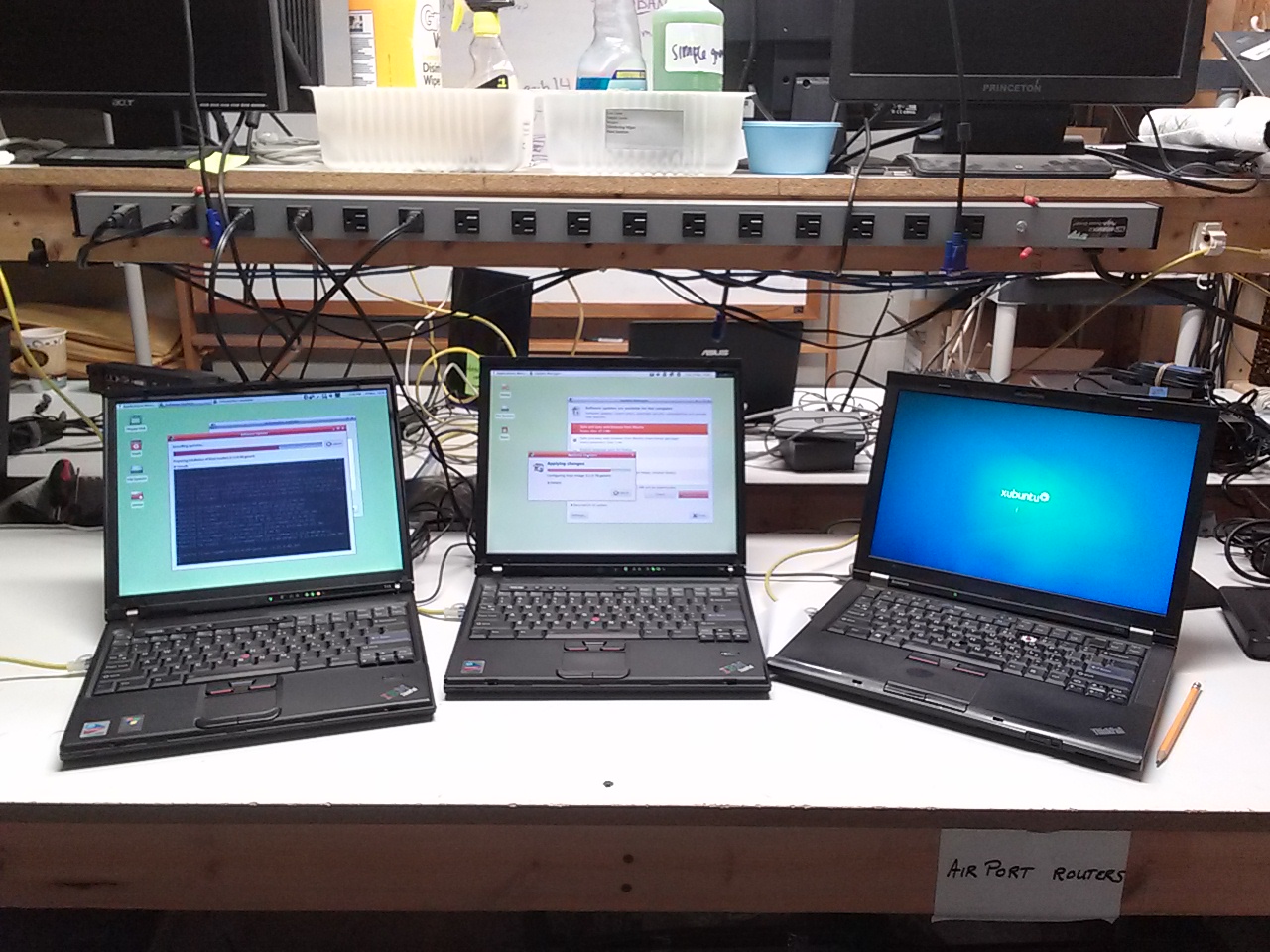
Can you tell us a bit about your Xubuntu setup?

We have three images which help us cover PC’s as old as 15 years. Most of our computers are 5-10 years old and run what we call “32x” (32-bit Xubuntu). Computers with 64-bit processors and more than 2GB RAM get “64x” (64-bit Xubuntu), while older computers get “32Lite.” Both 32x and 64x are based on Xubuntu 14.04 LTS so we can expect updates through early 2019. (Ed. Only packages shared with Ubuntu will receive updates, Xfce and other components are only supported until 2017.) “32Lite” is based on Ubuntu 12.04 LTS since it is the last version with clear support for non-PAE motherboards often present in older systems.

All of the systems use the Whisker Menu and a panel to launch common apps. LibreOffice and the Educational Desktop are on all systems as well. We put Wikipedia for Schools (offline) on the “x” versions so users without internet access can still used that offline version like an encyclopedia. (It is not on the “Lite” version so the system can run on machines with as small as 10GB hard drives).

We create a supervisory user account, a standard one, and enable the guest account so the organization that gets the computer can decide what level of control they want their users to have.

Thanks to the help of many past local volunteers, we have a system that lets us image Linux onto just about any PC made in the past 15 years. As mentioned before, we only have 3 images that we use. If you think about the tremendous variety of brands and models of computers made in that time frame, it is astounding how many combinations of equipment our (often non-technical) volunteers run into. Yet after a quick PXE-boot, Clonezilla automated script runs on those computers, it will reboot into a completely operational Linux environment is amazing! Xubuntu is so resillient to be able to run, without prompt for drivers, on so many different kinds of PC’s! Now we are trying it on some Macs as well. Who knows how for we can go with it?

There is lots more information on our website (including the News page) and social media sites – Twitter, Facebook and YouTube – with examples of where our computers are in use as well as our volunteers doing the work.

To learn more, download their Edubuntu-Xubuntu 14.04 Quickstart Guide (14M).