



惯性聚合 高效追踪和阅读你感兴趣的博客、新闻、科技资讯
阅读原文 在惯性聚合中打开

推荐订阅源

博客园 - Franky
W
WeLiveSecurity
cs.AI updates on arXiv.org
N
News and Events Feed by Topic
Recent Commits to openclaw:main
S
Security Affairs
SecWiki News
SecWiki News
T
Tenable Blog
C
CERT Recently Published Vulnerability Notes
Forbes - Security
Forbes - Security
Google Online Security Blog
C
Cybersecurity and Infrastructure Security Agency CISA
L
LINUX DO - 热门话题
T
Threat Research - Cisco Blogs
C
Cyber Attacks, Cyber Crime and Cyber Security
Cisco Talos Blog
Cisco Talos Blog
PCI Perspectives
PCI Perspectives
Engineering at Meta
Engineering at Meta
博客园 - 聂微东
Cyberwarzone
Cyberwarzone
Hugging Face - Blog
Hugging Face - Blog
Microsoft Azure Blog
V
Vulnerabilities – Threatpost
宝玉的分享
宝玉的分享
Cyber Security Advisories - MS-ISAC
Vercel News
Vercel News
V
Visual Studio Blog
T
Threatpost
Project Zero
Project Zero
Know Your Adversary
Know Your Adversary
I
InfoQ
G
Google Developers Blog
博客园 - 【当耐特】
Google DeepMind News
T
The Blog of Author Tim Ferriss
CTFtime.org: upcoming CTF events
TaoSecurity Blog
TaoSecurity Blog
O
OpenAI News
博客园_首页
钛媒体:引领未来商业与生活新知
钛媒体:引领未来商业与生活新知
T
Tor Project blog
Schneier on Security
OSCHINA 社区最新新闻
OSCHINA 社区最新新闻
Exploit-DB.com RSS Feed
博客园 - 三生石上(FineUI控件)
D
DataBreaches.Net
Security Latest
Security Latest
Attack and Defense Labs
aimingoo的专栏
aimingoo的专栏
H
Heimdal Security Blog

News on Xubuntu

Xubuntu – Xubuntu 26.04 Community Wallpaper Contest Winners Xubuntu – Xubuntu 26.04 Wallpaper Voting Open Xubuntu – Xubuntu Anniversary Wallpaper Contests Xubuntu – Public postmortem of the Xubuntu.org download compromise Xubuntu – Xubuntu 25.10 released! Xubuntu – Xubuntu 25.04 released! Xubuntu – Xubuntu 24.10 released! Xubuntu – Xubuntu 24.04 released! Xubuntu – Xubuntu 23.10 released! Xubuntu – Xubuntu 23.04 released! Xubuntu – Xubuntu 22.10 released! Xubuntu – Xubuntu 22.04 released! Xubuntu – Xubuntu 22.04 Community Wallpaper Contest Winners Xubuntu – Xubuntu 22.04 Community Wallpaper Contest Xubuntu – Xubuntu 21.04 released! Xubuntu – Xubuntu 21.04 Testing Week Xubuntu – Xubuntu 20.10 released! Xubuntu – Xubuntu is now on GitHub! Xubuntu – Xubuntu 20.04 released! Xubuntu – Xubuntu 20.04 Community Wallpaper Contest Winners Xubuntu – Xubuntu 20.04 Testing Week Xubuntu – Xubuntu 20.04 community wallpaper contest Xubuntu – Xubuntu 19.10 released! Xubuntu – Xubuntu 19.04 released! Xubuntu – Xubuntu 18.10 released! Xubuntu – Xubuntu 18.04.1 released! Xubuntu – Xubuntu 17.10 EOL Xubuntu – New Wiki pages for Testers Xubuntu – Xubuntu 18.04 released! Xubuntu – Xubuntu 18.04 Community Wallpaper Contest Winners! Xubuntu – Testing for Xubuntu Xubuntu – Xubuntu 18.04 community wallpaper contest Xubuntu – Xubuntu 17.10.1 Release Xubuntu – Xubuntu 17.04 End Of Life Xubuntu – Xubuntu 17.10 released! Xubuntu – Xubuntu Quality Assurance team is spreading out Xubuntu – Xubuntu 17.04 released! Xubuntu – Winners of the #lovexubuntu Competition! Xubuntu – Introducing the Xubuntu Council Xubuntu – Integrating releases to the website Xubuntu – Presenting the Xubuntu status tracker Xubuntu – Xubuntu 16.10 Released Intel cursor bug fix released Xubuntu – Xubuntu 16.04.1 Release Xubuntu – Looking for memorable and fun Xubuntu stories! Xubuntu – Xubuntu 16.04 released! Xubuntu – Xubuntu 16.04 Wallpaper Competition Winners! Xubuntu – The small details: Wallpapers Xubuntu – My media manager: Other alternatives Xubuntu – The small details: Panel layouts Xubuntu – My media manager: The cloud Xubuntu – The small details: Personal information integration Xubuntu – The small details: Shortcut keys Xubuntu – The small details: Menu editing Xubuntu – The small details: Theme configuration Xubuntu – The Small and the Noisy Xubuntu – Xubuntu 16.04 LTS Beta 2 Xubuntu – Introducing Xubuntu core Xubuntu – Xubuntu 12.04 End of Life Xubuntu – Xubuntu 15.04 released! Xubuntu – Xubuntu 15.04 Beta 2 Xubuntu – Xubuntu 15.04 Beta 1 Xubuntu – Xubuntu at Mexican collection agencies Xubuntu – Xubuntu 14.04.2 released Xubuntu – Help the Community with testing and win Xubuntu stickers Xubuntu – Xubuntu 14.10 released! Xubuntu – Xubuntu 14.10 Beta 2 is released! Xubuntu – Xubuntu 14.10 Beta 1 is released! Xubuntu – Using inxi to detect hardware information Fix available for the black screen on unlock bug Xubuntu – 5 Things to Do After Upgrading from 12.04 to 14.04 Xubuntu – Xubuntu 14.04.1 released Xubuntu – Screen locking in Xubuntu 14.04 Xubuntu – Xubuntu 14.04 QA Recap Xubuntu – Xubuntu 14.04 released! Xubuntu – Xubuntu 14.04 Final Beta Xubuntu – Xubuntu 14.04 Beta 1 Xubuntu – Xubuntu Marketing with StartUbuntu Flyer Xubuntu – Reporting is caring Xubuntu – Xubuntu 12.04.4 released Xubuntu – Xubuntu community wallpaper contest winners Xubuntu – Xubuntu 14.04 Alpha 2 Xubuntu – Xubuntu 14.04 Alpha 1 Xubuntu – Help us test Xubuntu 14.04 LTS Xubuntu – Xubuntu 14.04 Default Wallpapers Xubuntu – Xubuntu Natty Artwork Xubuntu – Xubuntu 11.04 alpha 2 released Xubuntu – Xubuntu 11.04 alpha 1 released Xubuntu – Xubuntu 10.10 released Xubuntu – Xubuntu 10.10 RC released Xubuntu – Xubuntu 10.10 alpha 3 released Xubuntu – Xubuntu 9.10 RC released Xubuntu – Xubuntu 9.10 beta released Xubuntu – Free Xubuntu CDs now available Xubuntu – Xubuntu 9.04 Released Xubuntu – Countdown to Xubuntu 9.04 Xubuntu – Xubuntu 9.04 beta released Xubuntu – Xubuntu 8.10 released Xubuntu – Xubuntu 8.10 Release Candidate now available Xubuntu – Countdown to Xubuntu 8.10
Xubuntu – Xubuntu at Colegio Hispano Americano
2015-07-15 · via News on Xubuntu

The Xubuntu team hears stories about how it is used in organizations all over the world. In this “Xubuntu at..” series of interviews, we seek to interview organizations who wish to share their stories. If your organization is using Xubuntu and you want to share what you’re doing with us please contact Elizabeth K. Joseph at lyz@ubuntu.com to discuss details about your organization.

As we’ve covered in other articles in this series, Xubuntu is being used world wide to serve a variety of communities with users of all ages. In this interview we spoke with Jose M. Torres Ortiz about how he uses Xubuntu where he teaches, at Colegio Hispano Americano in Puerto Rico.

Can you tell us a bit about your role at the Private School Colegio Hispano Americano and the students/community you serve?

My role at the Colegio Hispano Americano is a teacher but also I’m in charge of the computer lab. This private school has Pre-K to 12th grade students.
What influenced your decision to use Open Source Software at the school?

With Open Source Software I can freely use, and share to anyone. So it was big part of my decision. Now my students can have the same software without charging them. And they can practice at their home. Also there are a lots of great educational software for the learning process.

What made you select Xubuntu specifically for your lab?

I’ve been a Ubuntu user before. My brother has been an Ubuntu user for many years! He taught me the benefits of this OS. But now, I needed an OS to be lighter, faster and user friendly for the teachers and students. Something easier to adapt to, coming from Windows. Also, because Xubuntu is an Ubuntu flavor it has all the administration, education and office software that I need at this time, for example: LibreOffice, Tux Paint, GCompris, TuxMath, Epoptes, etc.

Can you tell us a bit about your Xubuntu setup – customizations made, how installs are done, etc.

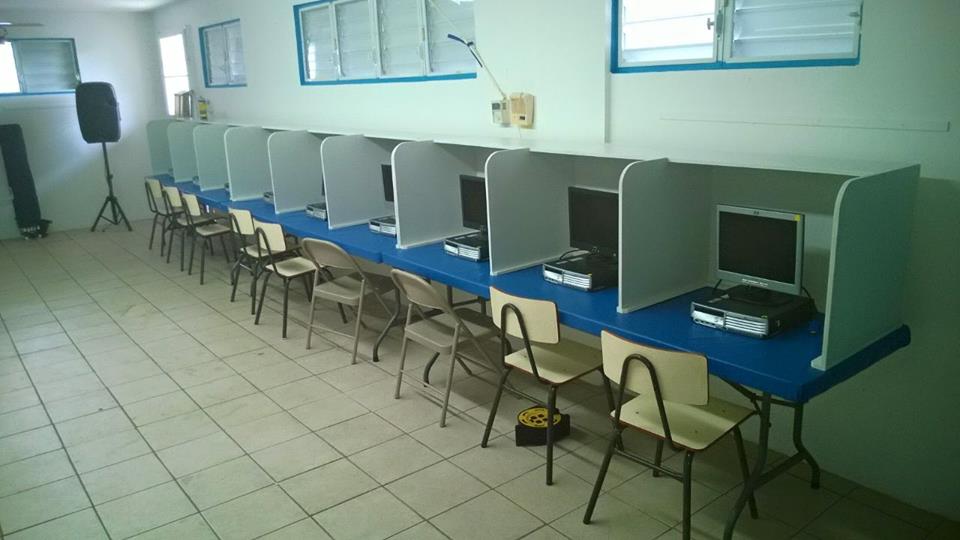
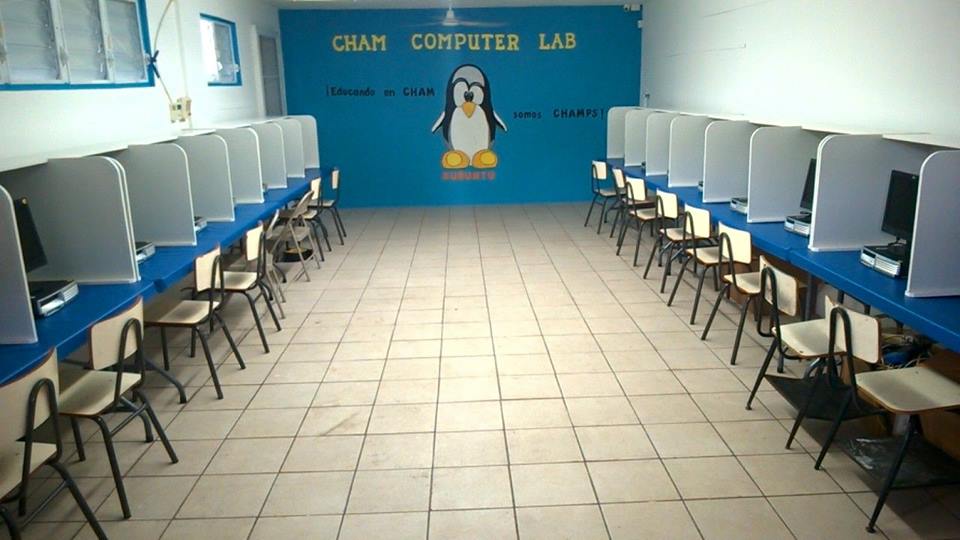
I installed Xubuntu to 20 used computers Intel Core 2 Duo with 2GB RAM. I used a router and 3 switches to connect them to the network and to my main computer which I monitor, see and administrate each one from my master PC using Epoptes administration software. With it I can see, control or command to open any application in each students computer. (Epoptes is in the Ubuntu Software Center) We painted or classroom with blue and white (for Xubuntu colors). We drew and painted a Linux Penguin Logo in the wall! We still need to draw the mouse from the Xubuntu logo. It’s a Xubuntu Lab!
Colegio Hispano Americano is a private school that uses the Cueto Method to teach children.

The school is scientifically arranged for the child to learn the basic skills of reading and writing in a reasoned manner, by composition. By using this method, lawyer Jose M. Cueto noticed that destroyed, sullen, self-conscious children suddenly began to respond spontaneously, smile, lost their shyness and wanted to show what they knew. When being actively involved in their own learning, children ultimately learn to reason and deduce in a reasoned manner.

Furthermore, we use the Python Whiteboard in the software repositories. We use it to connect a Nintendo Wiimote to the PC via Bluetooth. This has allowed us to create a Digital Whiteboard with out buying one.

Materials needed:

  • Xubuntu on a Bluetooth capable computer
  • Python Whiteboard software to setup the Wiimote via Bluetooth (package python-whiteboard)
  • Open Sankoré as the whiteboard software
  • Infrared Pen (buy for $20.00 or less or make one by yourself)
  • Nintendo Wiimote
  • Projector

Last year I used the above setup with Xubuntu in my class. It is excellent for learning process; on the whiteboard we can write, use pictures, games and more. The following is a video of it in use: https://www.youtube.com/watch?v=N1XzGk43njc (in Spanish).

If anyone from Puerto Rico wants to know more about Cueto Method or to how build a low cost Xubuntu Computer Lab, feel free to contact us by phone: 1-787-884-0276 (school phone number) or me 1-787-201-1750. I am also available via email at torres_jose10 at hotmail dot com.