
惯性聚合 高效追踪和阅读你感兴趣的博客、新闻、科技资讯
阅读原文 在惯性聚合中打开

推荐订阅源

Security Latest
Security Latest
Recorded Future
Recorded Future
人人都是产品经理
人人都是产品经理
S
SegmentFault 最新的问题
Hacker News - Newest:
Hacker News - Newest: "LLM"
C
CXSECURITY Database RSS Feed - CXSecurity.com
博客园 - 三生石上(FineUI控件)
博客园 - 聂微东
P
Privacy & Cybersecurity Law Blog
WordPress大学
WordPress大学
Know Your Adversary
Know Your Adversary
Spread Privacy
Spread Privacy
Threat Intelligence Blog | Flashpoint
量子位
L
LINUX DO - 热门话题
L
Lohrmann on Cybersecurity
博客园 - Franky
酷 壳 – CoolShell
酷 壳 – CoolShell
T
Tor Project blog
钛媒体:引领未来商业与生活新知
钛媒体:引领未来商业与生活新知
雷峰网
雷峰网
阮一峰的网络日志
阮一峰的网络日志
V
Visual Studio Blog
T
Threatpost
T
Tenable Blog
有赞技术团队
有赞技术团队
大猫的无限游戏
大猫的无限游戏
Engineering at Meta
Engineering at Meta
GbyAI
GbyAI
C
Cisco Blogs
H
Heimdal Security Blog
Attack and Defense Labs
A
About on SuperTechFans
Last Week in AI
Last Week in AI
N
News and Events Feed by Topic
T
Threat Research - Cisco Blogs
cs.AI updates on arXiv.org
I
Intezer
V
V2EX
Cyberwarzone
Cyberwarzone
cs.CL updates on arXiv.org
B
Blog RSS Feed
V
Vulnerabilities – Threatpost
N
Netflix TechBlog - Medium
T
The Blog of Author Tim Ferriss
CTFtime.org: upcoming CTF events
U
Unit 42
PCI Perspectives
PCI Perspectives
P
Privacy International News Feed
D
Docker

Derek Seaman's Tech Blog

SmartWings Blinds Review: Matter over Thread Zebra Shades Aqara Camera Hub G350: World’s First Matter v1.5 Camera ESPHome: Micro-Air EasyStart Integration ESPHome: Introducing the Seeed Studio Xiao ESP32-C5 Seeed Studio ESP32 Showdown: C3 vs. C6 vs. S3 (ESPHome Edition) Home Assistant: Updating Aqara FP300 Zigbee Firmware How-To: Using my ESPHome Bluetooth IRK Capture Package Vibe Coding: My ESPHome Bluetooth IRK Capture Tool Home Assistant: Track Who’s in Each Room with ESPHome + Bermuda BLE 3-2-1-1 Go: Implementing Foolproof Backups Proxmox Backup Server (PBS) 4.0 Blog Series How To: Proxmox Backup Server 4 as a Synology VM How To: Backblaze B2 as a Proxmox Backup Server 4 S3 Datastore How To: Synology NFS for Proxmox Backup Server Datastore (2025) How To: Proxmox Backup Server 4 (VM) Installation How MVNOs Like US Mobile Can Save You Money on Your Cell Phone Bill Data Brokers Exposed: How to Opt Out and Secure Your Personal Data Digital Privacy Decoded: Simple Ways to Secure Your Information Part 2: Ruckus Unleashed (200.18+) Best Practices Guide Part 1: Ruckus Unleashed (200.18+) Best Practices Guide 3-2-1 Go: A Step-by-Step Guide to Implementing Foolproof Backups Geek Chic Eyewear: My Optometrist Saga, Eyewear Collection & More Geek Chic Eyewear: Optometry Tools, Eye Health and Insurance Geek Chic Eyewear: Understanding Lens Materials and Designs Essential Tips for a Stable Matter over Thread Network Aqara U200 Thread/Matter/Homekey Smart Lock Impressions Home Assistant: The Ultimate Light Automation Blueprints Demystifying Ruckus Home Wi-Fi: Getting Started Guide Mastering Home Wi-Fi: A Guide to Predictive RF Planning Part 2: Ruckus Unleashed Best Practices Guide Part 2: Ruckus One Home Wi-Fi Best Practices Guide Part 1: Ruckus One Home Wi-Fi Best Practices Guide Smartwings Thread/Matter Blinds Review Ruckus One: Provisioning ICX Switches Goodbye NextDNS, Hello Control D : My New DNS Service Ruckus Unleashed to Ruckus One Migration Guide Unleashing the Power of 6 GHz Wi-Fi: Re-Think Everything Enterprise Grade Home Wi-Fi: Ruckus Unleashed vs. Ruckus One Home Assistant: Ecowitt Weather Station Setup Configuring Netgear M4300 IGMP & MLD Multicast Snooping Configuring TP-Link IGMP & MLD Multicast Snooping Part 3: Smart Home Matter and Thread Deep Dive Part 2: Smart Home Matter and Thread Deep Dive Part 1: Smart Home Matter and Thread Deep Dive Unraveling Apple Shortcuts: A Journey with the Apple Watch Ultra Top macOS App picks (mid-2023) Stecker: Trigger macOS Shortcuts with USB Devices (FREE) Home Assistant: Tracking Apple's Sleep Focus Mode How-to: Proxmox Backup Server 2.4 to 3.0 Upgrade Guide Proxmox VE 8: Windows 11 vGPU (VT-d) Passthrough with Intel Alder Lake Home Assistant: Auto-renewing Let’s Encrypt SSL Designing your own Custom Under Desk Mounting Bracket Home Assistant: Hands-on Adding a Matter Smart Plug (Eve Energy) Ubuntu Kernel Upgrades: The Easy Button Hands On: Beelink Mini-PCs for Proxmox, Home Assistant and Plex Migration Guide: Plex on Synology to Proxmox LXC Proxmox Let’s Encrypt SSL: The Easy Button InfluxDB + Chronograf: Configuring Let’s Encrypt SSL Getting your Cloudflare DNS Zone API Key and Account ID Home Assistant: Installing Grafana (LXC) with Let’s Encrypt SSL Home Assistant: InfluxDB Data Management (LXC) InfluxDB 1.x Automated Backups Home Assistant: Proxmox VE 7.4 Quick Start Guide Home Assistant: Getting Started Guide My Stream Deck Productivity Setup (2023 Edition) Home Network Upgrade (2023 Edition) My Dream Desk Setup (2023 Edition) NOTICE: RSS Feed URL Changing (Action Needed) Email aliases: How to easily protect your inbox from spam Top macOS App picks for 2023
6 GHz Wi-Fi: Are Your Devices ready for Standard Power?
2024-04-24 · via Derek Seaman's Tech Blog

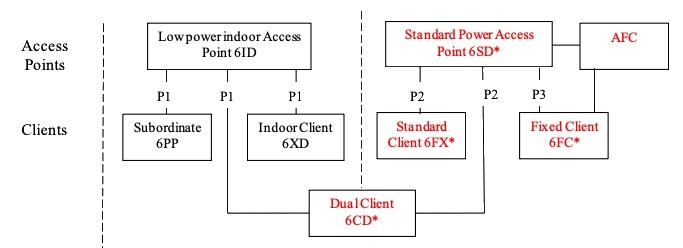
The 6 GHz Wi-Fi spectrum is complicated, and introduces the new concept of Lower Power Indoor (LPI) and Standard Power (SP) transmit modes for access points (APs). These are two different maximum power transmit modes for APs. SP is required outdoors, and can also be used indoors as well. SP mode requires the use of Automated Frequency Coordination (AFC). AFC’s go live date was spring 2024. The Ruckus R770 is one of the first APs to gain AFC (and thus SP) certification. 

Why is this important? Not all 6 GHz clients are certified for both LPI and SP access points. All clients can connect to LPI APs, but only clients which receive the 6CD FCC certification can connect to both LPI and SP APs. These are called “dual mode” clients. Now the million dollar question is, what clients are dual mode certified? All manufactures went for bust and did 6CD right? WRONG! 

Update December 13, 2024: Added a section covering which 6 GHz channels support standard power mode. In the US not all channels are permitted to transmit at standard power and must use low power indoor mode.
Update August 28, 2024: Updated the post regarding success with the iPhone 15 Pro using iOS 18 Beta 8 and Ruckus One firmware 7.0.0.200.6365.

Update May 9, 2024: Added new iPad Air/Pro models to the dual client list, and added how to find your FCC ID on your iPhone/iPad.

Finding Dual Mode Certified Clients

Finding out if a 6 GHz device supports SP is not easy. I have yet to see a manufacturer put it on their data sheet. However, you can use the FCC’s site to easily dump a full list of all 6CD certified devices. Here’s the process:
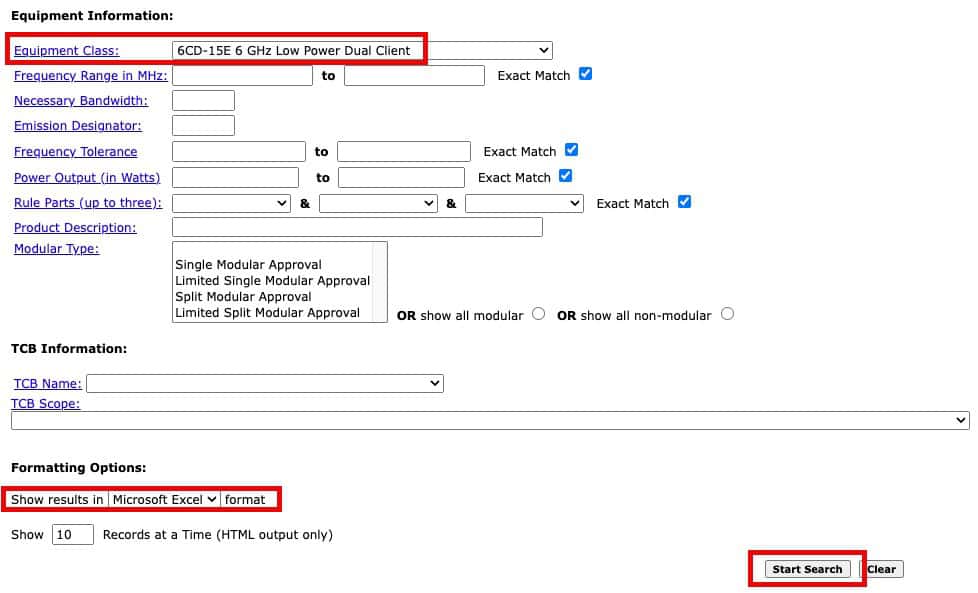
  1. Go to the FCC’s Generic Search form.
  2. In the lower half of the form change the Equipment Class to 6CD-15E.
  3. At the bottom of the form pick your results format. I used Excel.  
  4. Click Start Search and wait a little for the download to start. 

5. Open the Excel spreadsheet and search the data as needed. You can easily sort on any column you want, such as vendor. After you find the FCC ID that’s of interest, I used Google to ‘decode’ FCC ID into the corresponding product name and model. 

6CD (Dual Mode) FCC Database Dump

Dual Mode Apple Clients

As of the publication date of this post, the following list are all of the Apple devices that support 6 GHz dual mode (6CD FCC certification): 

11″ iPad Air (2024)
13″ iPad Air (2024)
11″ iPad Pro (2022/2024)
12.9″/13″ iPad Pro (2022/2024)
Mac Pro M2 (2023)
Mac Studio M2 (2023)
iPhone 15 Pro Max (2023)
iPhone 15 Pro (2023)
iMac M3 (2023)
MacBook Pro 16″ M3 (2023)
MacBook Pro 14″ M3 Pro/Max (2023)
MacBook Pro 14″ M3 (2023)

As you can see there are some notable missing products, like the whole MacBook Air lineup. The M3 MacBook Air supports 6 GHz, but isn’t certified as dual mode. In addition, non-pro iPads are also missing, as is the base model iPhone 15. It could be possible that firmware updates might add dual client mode, but I would not count on it. I would hope now that AFC is real and SP certified APs are coming on the market that manufacturers like Apple will do 6CD certifications for all 6 GHz capable devices.

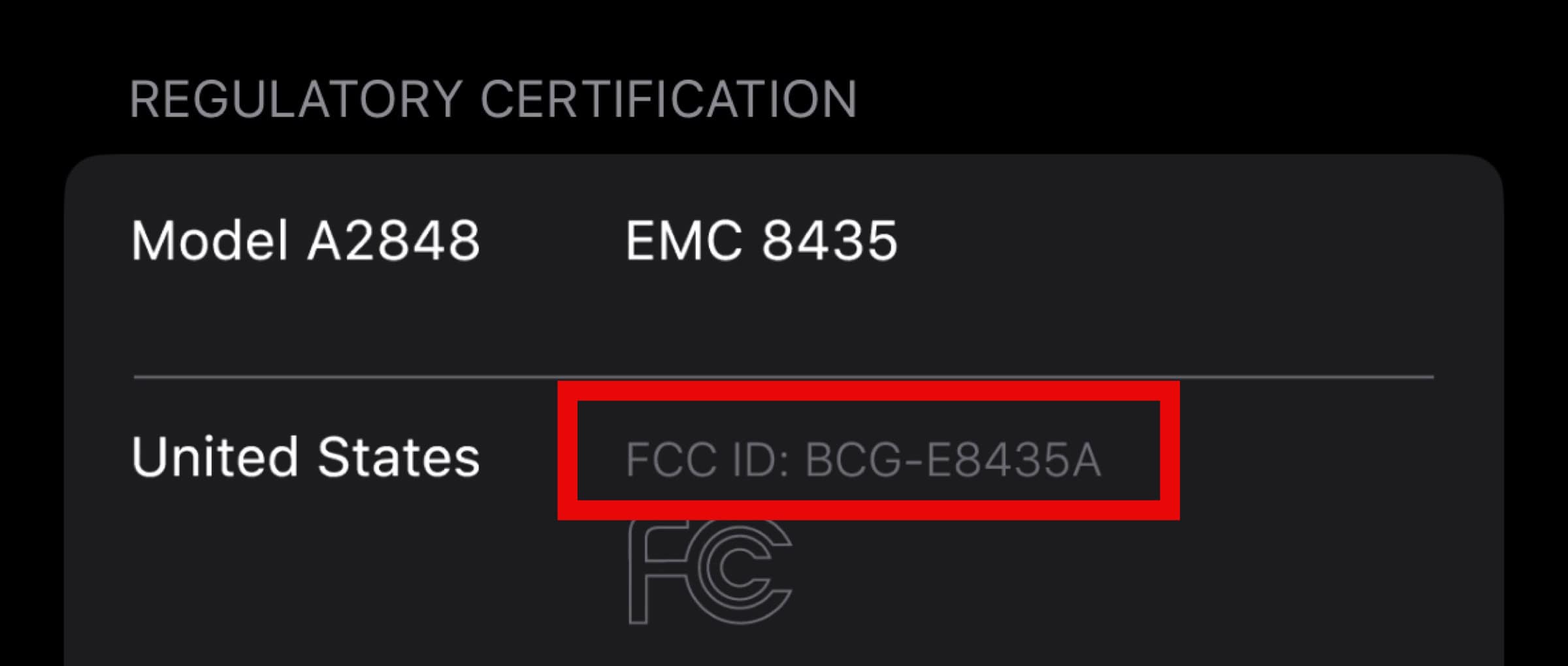
On iPhone/iPads you can go to Settings -> General -> Legal and Regulatory to find your model number and FCC ID. 
What if my device is NOT 6CD Certified?

If you want to use an SSID that is dedicated to 6 GHz and the AP is in SP mode, then your client device won’t even see the SSID. So in short, you are out of luck! If, however, the SSID is combined with another band, like 5 GHz, then your client device should automatically see the SSID (like always) and can connect using the non-6 GHz band. This is one reason why in my Ruckus Unleashed and Ruckus One Best practices guide that I recommend one SSID that combines both the 5 GHz and 6 GHz bands. 

What if my device IS 6CD Certified?

You would think that if a device is 6CD certified, and thus can use SP mode, that the client would increase its transmit power within FCC limits. This may not always be the case. Since AFC only recently went live, and the number of AFC certified APs is tiny, it’s not entirely surprising there may be firmware or OS kinks to work out in the ecosystem. So this is a nice way of saying, even if you enable SP mode on your AP, client devices may not increase their transmit power accordingly. 

In addition, in SP mode some 6 GHz clients might refuse to use the 6 GHz band or SSID.  My iPhone 15 Pro, even though it is 6CD certified, doesn’t “see” my 6 GHz band when SP is enabled. My iPhone 15 Pro with iOS 17.x did not “see” the standard power 6 GHz band. BUT, with iOS 18.0 beta 8 my phone now seamlessly connects to a standard power 6GHz band. I also updated my APs with Ruckus One firmware 7.0.0.200.6365 at the same time, which may or may not have also played a role. Either way, I’m now keeping my APs in standard power mode. 

I’ve heard second hand that the Pixel 8 may fully support SP mode. So your mileage may vary on device compatibility. Be sure to do testing! If you are using Apple devices, update to the very latest OS release to maximize the chances of success. 

Standard Power 6 GHz Channels

Not all indoor 6 GHz channels are approved by the FCC for standard power. If you want to operate your indoor APs at standard power it’s important to restrict the APs to only using U-NII-5 and U-NII-7 channels in the US. 

  • U-NII-5: 1 – 93 Standard/LPI
  • U-NII-6: 97-113 LPI Only
  • U-NII-7: 117-181 Standard/LPI
  • U-NII-8: 185-233 LPI Only

The figure below shows the standard power compatible channels when using Ruckus One and 160 MHz channels. Notice that for indoor APs I had to de-select channels 97-125, 161-221. This leaves 4 160 MHz channels available for standard power mode.
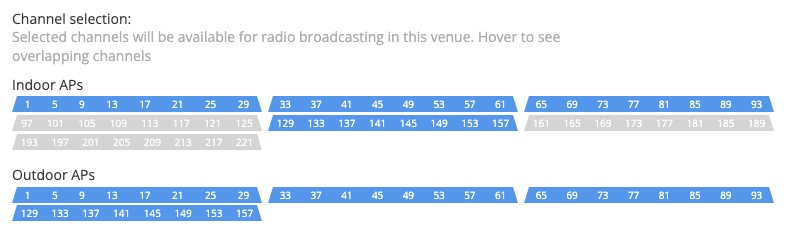
Ruckus One 160 MHz Channels for SP

Summary

The 6 GHz Wi-Fi spectrum is complicated, and introduces the new concept of Lower Power Indoor (LPI) and Standard Power (SP) modes. SP mode is required outdoors, and can also be used indoors as well. Finding out which mode a device is certified for is not straight forward. However, you can dump the FCC database contents for 6CD clients to find out what has been certified. Only dual mode clients can connect to SP APs, so it’s worthwhile knowing the capabilities of your clients. You may need to do an OS update for your device to enable standard power compatibility, like I did with my iPhone 15 Pro to iOS 18 Beta 8.