
We’ve all been victims of spam, and the problem seems to only be getting worse. With all the data breaches happening, or companies that sell your contact information to make money, it’s no wonder our inboxes are flooded with crap. But there is at least one solution that can help with your online privacy and makes blocking compromised email addresses virtually pain free: email aliases.
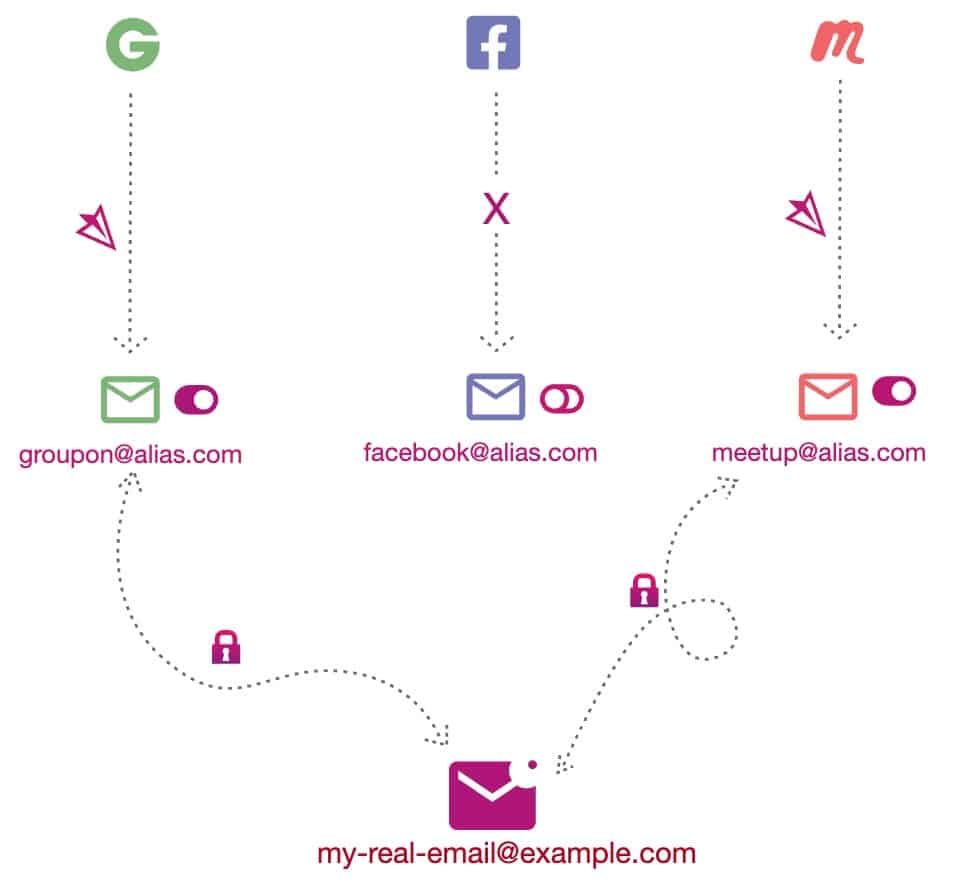
An email alias is a “fake” email address that you generate and use in place of your real email when you visit sites that require an email address. A service then takes all email that comes into that email address and forwards it to your real mailbox. This way the site never gets your real email address. This comes with advantages like being able to ‘turn off’ or delete an alias that gets spammy and not impact any other sites. The graphic below shows how an email alias works.
Which email alias service should you trust?
There are ton of disposable email services that don’t do forwarding aliases, and several email alias forwarding services as well. I was a Burnermail.io user, but recently found a much better solution for my email forwarding needs: SimpleLogin.
Some of the reasons I chose SimpleLogin over Burnermail:
- 100% Open Source
- Works with PGP (don’t currently use, but nice to know its there)
- Superior browser plugin for auto-generating aliases or using existing ones
- Full iOS app for managing aliases
- Supports iOS alternative keyboards so you can search/insert aliases in any iOS app with just a tap
- Full CSV import/export of your aliases (so you aren’t locked in)
- Create on-the-fly aliases without having to first create them in the app
- Robust reverse alias that lets you reply to aliased emails
- Supports SPF/DKIM/DMARC for spam protection on custom domains
- Supports Security keys like Yubikey
- Owned by the same people that run Proton email and Proton VPN
- One-click unsubscribe
- Catch-all option that auto-creates aliases as new emails come in to an unknown alias (can be disabled)
- Free with certain Proton email/VPN plans (otherwise $30/year)
- Active bug bounty program
- Passed a third party security audit in 2022
So, as you can see, SimpleLogin is way more feature rich and I have a significantly higher comfort level with their security. Given that all your aliased email will flow through them, security should be a top priority.
BTW, if you use Gmail (my condolences) then you might be thinking well I can do something vaguely similar with plus (+) or dots (.). Not really. Check out this link to understand the major differences.
Tips for Using an email alias service
One of the first choices you need to make is what domain you want to use for all of your aliased email. If you are nerdy enough to know how to register your own domain name, I STRONGLY urge you to go this route. Why? It makes all of your aliases portable to another service should you want to move, with just a simple MX record flip. If you are a nerd and can register your own domain I’d suggest following these guidelines:
- Get a dedicated domain for your aliases. You can use a sub-domain for a domain you already own, but dedicated domains are cheap so just do it.
- Try and not to get fancy with “odd” top-level domains, as there are a handful of backwards sites that reject valid, but uncommon top-level domains. For example, .guru and .news have caused me occasional headaches. Using .com, .org or other extremely well known domain is strongly recommended.
- Just for privacy I wouldn’t get a domain name that reveals your identity or name. For example, I’m NOT using derekseaman.com as my alias domain.
- Just for simplicity I’d use a registrar that also has a rock solid DNS service, like Cloudflare. This isn’t unique to email aliases, but just a general tip. I love Cloudflare and host all my domains there.
After you get a custom domain registered, the SimpleLogin site walks you through all the DNS records you need to configure. I would strongly urge you to do all the records they provide to provide maximum spam protection and ensure others receive your aliased emails.
If you are not nerdy enough to get a custom domain, don’t worry. SimpleLogin provides 7 existing domains you can use, with the ability to create a sub-domain on their domain so you can fully customize the email alias names you use. This solution locks you into SimpleLogin (or any alias service) as you can’t just flip a MX record to a new provider as you don’t own the domain. So I really don’t recommend this option, but it is there as a last resort.
Tips for an email alias name
Once you decide on the domain you are using (hopefully a custom domain that you own, and one that has a boring well known top-level domain), you now need to think about the username part of the alias. The SimpleLogin browser plugin is very slick and defaults to using the domain name of the site you are visiting. For example, if you click on the SimpleLogin plugin on the facebook page it will auto populate facebook@<your domain>.
For the majority of sites I would go with a unique username alias per site, so if your bank is Wells Fargo you would use wellsfargo@<your domain>. Over the years I ended up with nearly 300 aliases. If you want to consolidate a little, you could do something like orders@<your domain> if you do random website purchases and don’t want to bother with a unique alias. But as easy as aliases are to use and create with SimpleLogin, I’d just do a 1:1 unique alias for every site.
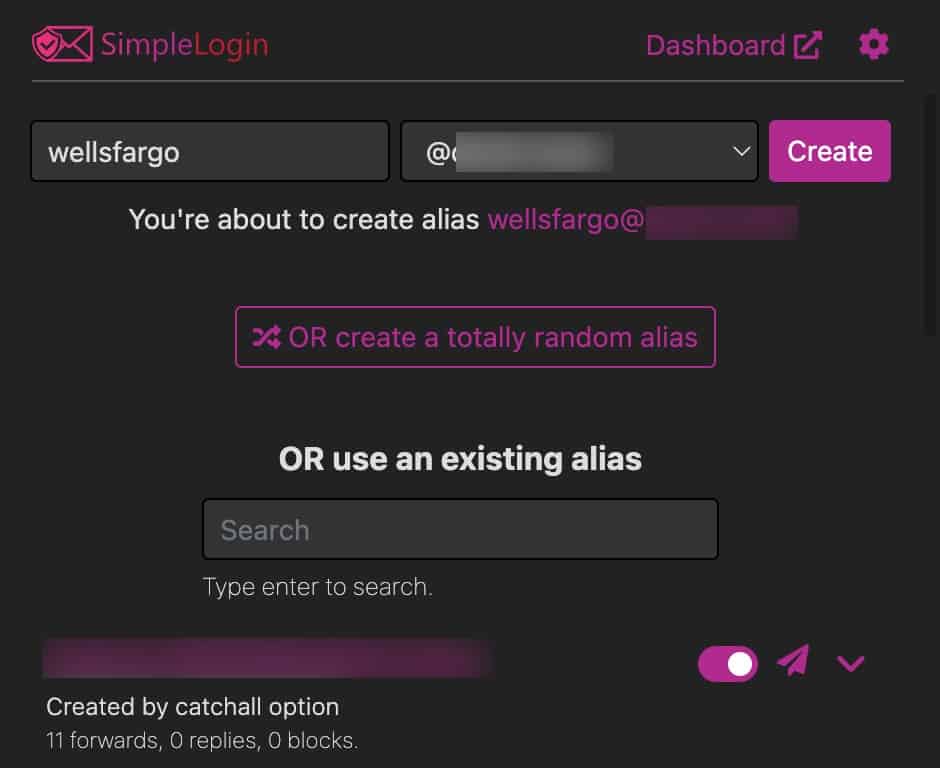
One of the great things about SimpleLogin is their ‘catch all’ option. Unfortunately Burnermail doesn’t have a CSV export option so I figured I was stuck with them since I didn’t want to change 300 email addresses. But their catch-all feature helps in two primary use cases:
- Just flip your MX record from another alias provider and SimpleLogin will auto-generate aliases based on received emails. This removed the need for me to pre-populate my 300 aliases. Whew!
- When you are on a website or giving out your email to someone or a service, on the fly you can just makeup an alias and it will auto-generate when an email comes in. No having to jump into an app or website to pre-create your alias (like you do with Burnermail).
Meet someone at a bar and they want your email but not sure they are legit? Just make up an alias on the spot with your domain. Or registering at an in-person event and they want your email? Just make something up. Very handy.
Pro tip for the ULTRA paranoid: If you think choosing something like wellsfargo@yourdomain is too obvious and an adversary might figure out your naming scheme, then you add a bit of randomness at the end. For example, facebook.5h9@<your domain>. That way a human would have a harder time figuring out what other aliases you might be using.
Pro tip for the ULTRA organized: Building on the random string in the alias, you can get very cleaver and group aliases together by type and then use an email client rule like “recipient address includes” in Outlook. Let me explain, for all of your finance accounts you do something like chase.g8w@<yourdomain>. Etrade could be etrade.g8w@<yourdomain>. Then just create an email client rule that looks for “g8w” in the recipient address and put that in a dedicated folder. And you could create others as well, for say travel sites, or whatever.
Closing Thoughts
Email aliases can be a great way to protect your privacy and help prevent spam. It can also make switching your primary (e.g. real) email provider super easy. How? Just tell SimpleLogin where what your new real email address is, and automatically all your dozens or hundreds of aliases will use that mailbox. No more having to change your email address on hundreds of sites or calling customer service at brain dead companies that don’t allow online email changes.
Now there are a few situations where you might not want to use an alias. First, trusted friends and family. Although you can reply to an alias, the relay process can be a little weird with how the headers look. So I’d use your real email for cases where you regularly have two-way email communications. And you might have an account that is highly sensitive and you don’t want emails relayed through a third party. But in general, go hog wild with an alias per login and it’s a seamless experience.
Once you have a trusted email alias service, then I would slowly start to transition nearly all of your online identities to use a unique alias for that site. It took me months of slowly pecking away at sites as I used them to get a majority of logins converted.
Finally, once you have your aliases all active, they lend themselves to email client filter rules. For example, you could have a rule that directs all your finance accounts to a folder. The sky is the limit.

Related Posts