


Note: This post is NOT sponsored and there are NO public affiliate links. If you would like a private code to use for $50 off some plans, use my contact form and I’ll email you a code.
Choosing a cell phone plan in the United States can be overwhelming, with dozens of providers and an ever-growing array of options. Mobile Virtual Network Operators (MVNOs) stand out by offering a wide variety of plans tailored to different needs and budgets, often at a fraction of the cost of traditional carriers.
By leasing network access from major providers such as Verizon, AT&T, and T-Mobile, MVNOs can deliver reliable coverage while passing significant savings onto customers. Whether you’re looking for a feature-rich unlimited plan, a minimalist option for a secondary number, or flexible coverage that adapts to your location, MVNOs provide value and choice that can help you get the most out of your wireless service without overpaying.
In this article I walk you through why I landed on US Mobile as my MVNO of choice, and why they have a near perfect feature set for me. I’ve been a US Mobile customer for over 18 months, and really delighted with the service.
A MVNO, or Mobile Virtual Network Operator, is a telecommunications company that provides wireless services without owning its own physical network infrastructure. Instead, MVNOs lease access to network capacity from major carriers like AT&T, Verizon, or T-Mobile and then resell this service to consumers under their own brand. MVNOs handle customer service, billing, and marketing, but rely on the host network for actual cellular connectivity.
MVNOs increase competition in the wireless market by offering alternative pricing, niche services, or specialized customer support that the major carriers may not provide. For carriers, leasing excess network capacity to MVNOs creates additional revenue streams without cannibalizing their own customer base.
In the US there are dozens of MVNOs, some with well known brands like Consumer Cellular, Boost Mobile, Google Fi, Cricket Wireless, Mint Mobile, Visible, and many others. Most MVNOs only offer a single carrier. For example, Visible only offers the Verizon network, while Tello operates only on T-Mobile. But more on this later, as there are exceptions to this rule which can very interesting.
For quite a number of years my cellular contract was with a major carrier, and it was fairly expensive. I only needed one line, so the carrier was making a fat profit off my monthly fee. A former employer of mine had a ‘perk’ program and one of the offers was a deeply discounted cellular plan with a MVNO using the T-Mobile network.
I was very happy with that provider, and my monthly bill was more than 40% cheaper for basically the same service. That MVNO was acquired by a major carrier, so over the past few years I’ve been bouncing between a handful of MVNOs. Thankfully in the US porting numbers is easy, so changing carriers is fairly painless and quick.
As part of enhancing my personal privacy, I also acquired a secondary number to use for ‘throw away’ use cases like online purchases, offers only available via SMS, or other use cases where I didn’t want to provide an entity my main phone number. However, it didn’t make any sense to get an expensive plan through a major carrier for a number that needed minimal data, a few SMS messages, and virtually no voice minutes.
This is where a MVNO can come in clutch. With a little research I was able to find a cheap plan (single digit dollars per month), that worked perfectly as a secondary ‘throw away’ number. I added it as an eSIM in just minutes after signup.
If you are interested in a plethora of personal privacy tips, check out my two latest articles:
QCI, or QoS Class Identifier, is a technical standard used by cellular networks to manage and prioritize different types of data traffic. Each QCI level represents a specific quality of service for data, such as voice calls, video streaming, or general web browsing. The network uses these levels to decide which traffic gets priority, especially when the network is congested.
In the US, major carriers assign higher QCI levels (lower numbers) to their own customers and premium plans, ensuring faster speeds and better reliability. MVNO customers or lower-tier plans often receive higher-numbered QCI levels, which means their data can be deprioritized during heavy network use. This system allows carriers to efficiently allocate resources while maintaining service quality for their highest-paying customers.
Various MVNOs buy data ‘buckets’ from the major carries at different QCI levels to offer a variety of price points (or pad profit margins). Each carrier has their own definition what QCI level maps to what type of data priority. Some major carriers, and even a few MVNOs, advertise add-ons that lower your QCI number, theoretically giving you faster or higher quality data connectivity. For example, ATT calls their add-on “Turbo” for QCI7.
About 18 months ago I was shopping for a new MVNO, and ran across US Mobile. Since I originally signed up they have added a number of features that allowed me to finally go all-in on one MVNO for my primary number, secondary number and Apple Watch cellular plan.
One of the most unique features about US Mobile is that they partner with all three major US carriers: Verizon, T-Mobile and ATT. In US Mobile lingo the carriers are:
This means that when you port in your number, you can select which carrier it will use. This multi-carrier approach allows them to offer two cool features: Network Transfers and Multi-network add-on.
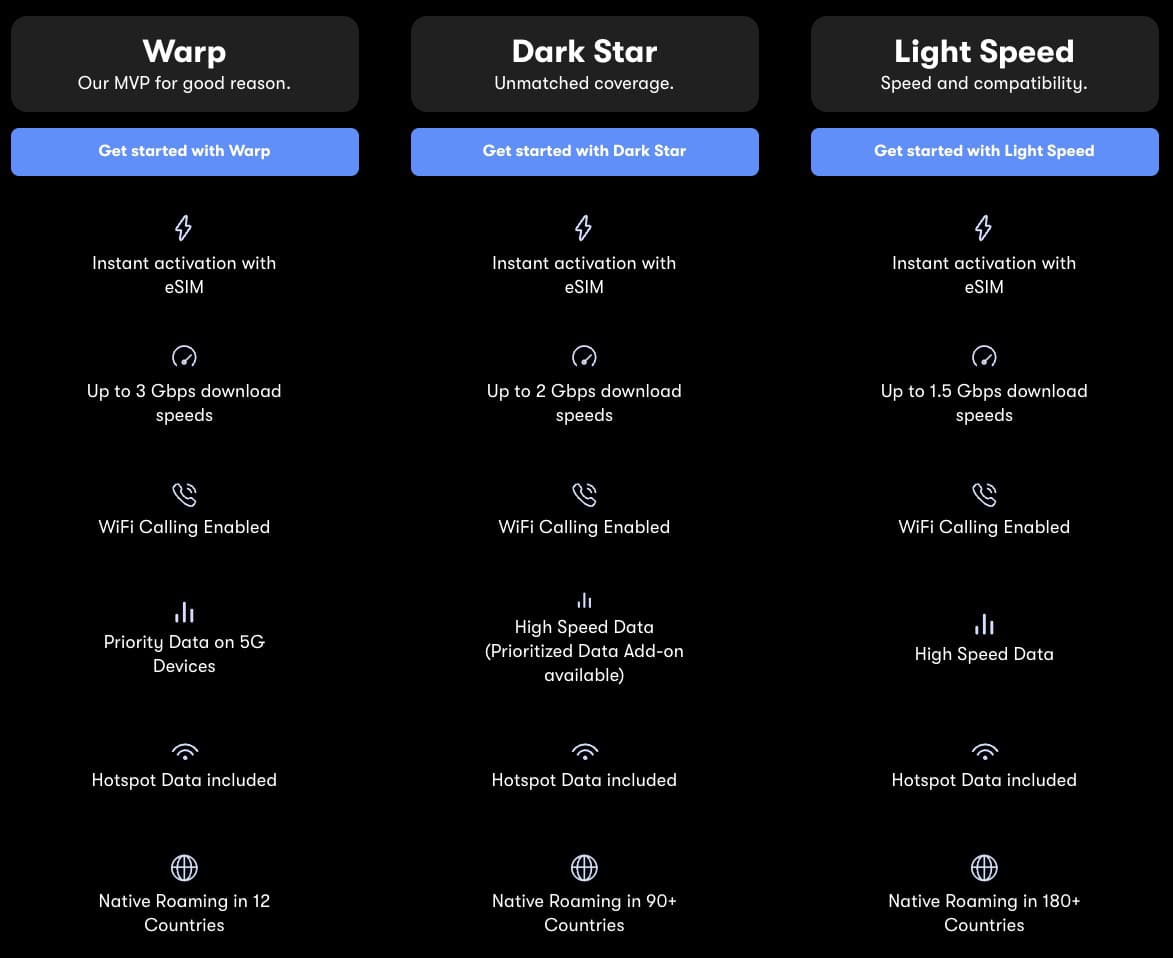
Note: In late July 2025 US Mobile announced additional country support for Warp for native roaming, expanding to 125 countries in August 2025.
US Mobile allows you to transfer your line between all three networks — Dark Star, Warp, and Light Speed — so that you can get the best coverage, wherever you are. With Free Network Transfer included, these network transfers are always free. Without ‘Free Network Transfer’, your first two transfers (ever, not per cycle) are free, then $2 per transfer.
This can be great if you are going on vacation, and find that the coverage from your primary carrier is terrible but know a different carrier is much better. Do a network transfer, and your eSIM is migrated pretty seamlessly to the new carrier of choice. Your phone number does not change. Basically US Mobile does a behind the scenes port.
With the multi-network add-on you can add a second line to your phone that shares your unlimited data plan but that is on a different network (for example if your primary line is on Dark Star, you could add a second line on Warp).
I personally use this feature, as my primary line is on Warp (Verizon) since that carrier supports the cellular Apple Watch. My secondary line is on Light Speed (T-Mobile). This is as low as $7.50/mo, which is about as cheap as a secondary line can get for my privacy-focused needs.
My iPhone supports automatic data switching, so if one carrier signal completely drops, the phone will try the second carrier. Unfortunately the iPhone seems to only switch if the cell signal completely drops, so 1 bar of poor service may need manual intervention to change carriers.
Thankfully US Mobile provides an iOS Shortcut that is easily installed which makes switching cell data a one tap operation. I have a Shortcut widget on my home screen that is just one tap away. Check out the US Mobile blog post here for the instructions and download link. This Shortcut is not US Mobile specific, so it would literally work with any two eSIMs from any carriers in the world.
Another potential use case is if you are routinely at two different locations, and one carrier’s coverage is trash at one location. For example, Verizon works great at home but ATT is best at work. You could setup an iOS shortcut that is geolocation aware which automatically swaps your cellular data to the right plan.
Note: As of July 2025 US Mobile is offering two free months of multi-network so you can try it out.
After having using a number of terrible account dashboards over the years (including T-Mobile which I think was the worst), I really love the US Mobile account dashboard. It has both Simple and Advanced views, and gives you a lot of metrics about data, voice and SMS usage. US Mobile also has a mobile app for account management, that has the same dashboard and features, just formatted for a mobile display.
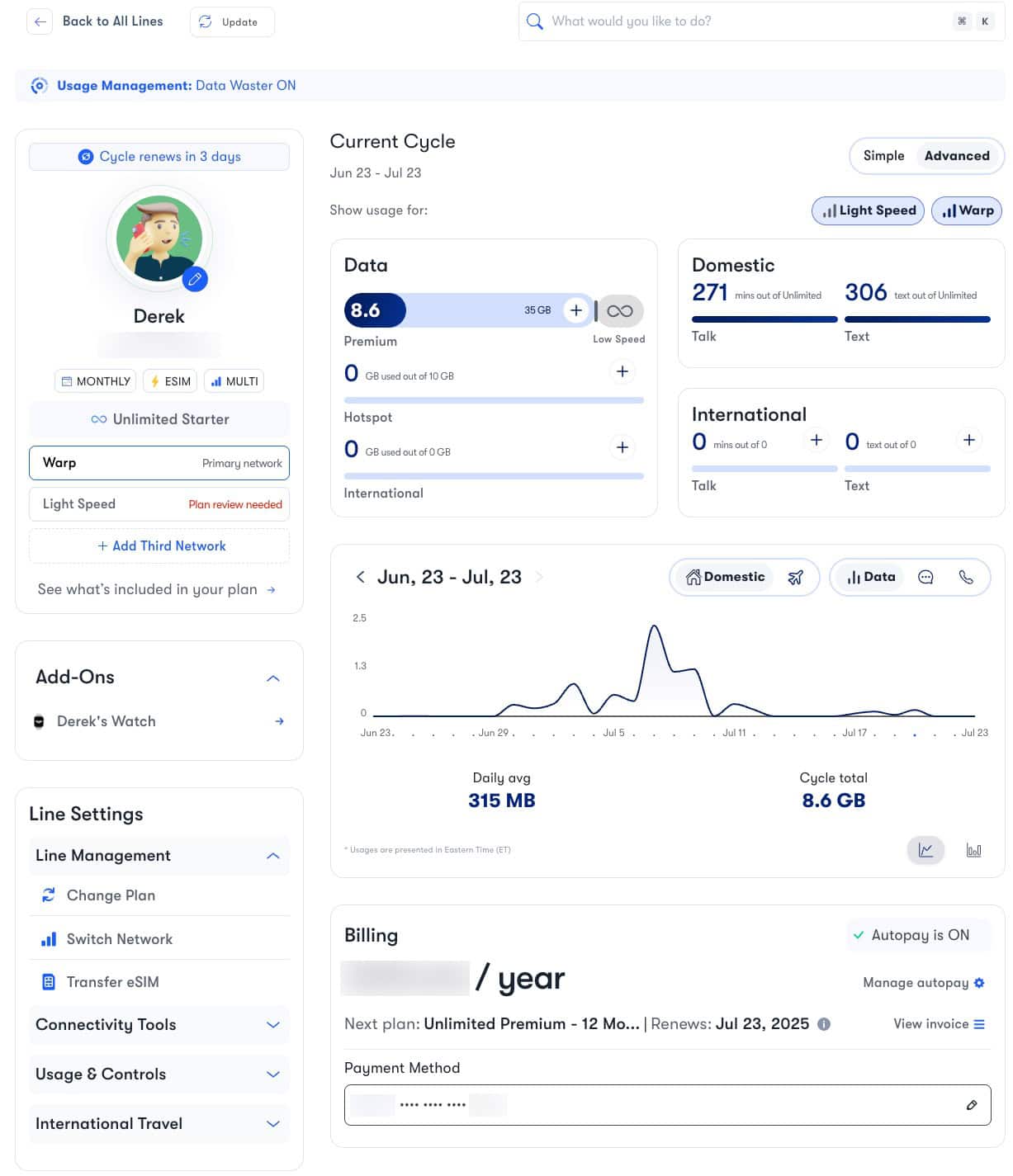
US Mobile has 24/7/365 online customer support via chat. I’ve always reached an human agent in a couple of minutes or less, and for the most part their service has been friendly and on target. They’ve helped me with port in requests, plan adjustments, international roaming issues, and more.
With my iPhone on iOS 18.5, RCS works on both Warp (Verizon) and Light Speed (T-Mobile). I haven’t used Dark Star (ATT), so can’t comment on that support. This feature is somewhat dependent on the iOS carrier bundles that Apple pushes out.
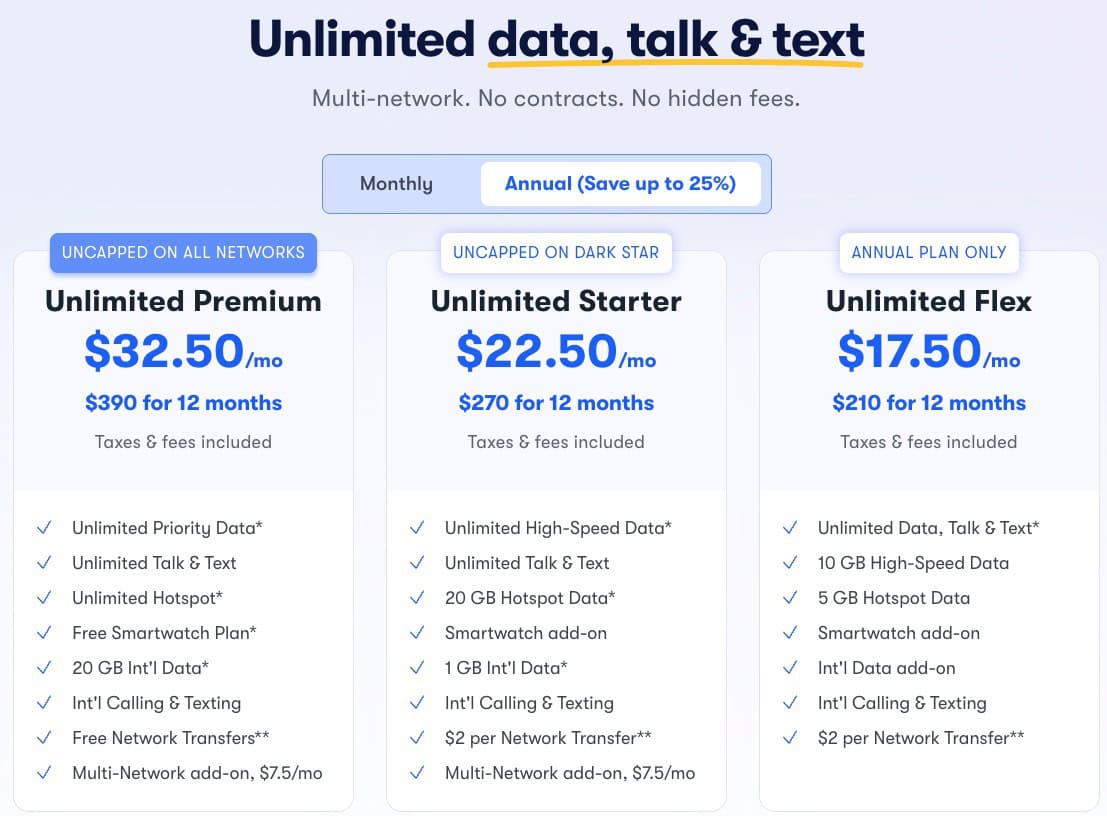
US Mobile has a number of more traditional plans (e.g. Unlimited Premium, Unlimited Starter, Unlimited Flex), pay for what you need by-the-gig pools, smartwatch plans, and digital minimalist plans. They often change (usually enhance) their plans, so check their website for the latest deals and features. They have a mixture of monthly and annual plans, so you can chose what best fits your needs.
US Mobile just recently enhanced their Unlimited Premium plan, so I’m switching to that plan in a few days. That gets me free Apple Watch connectivity, uncapped premium data, more international data, and free network transfers. For $32.50/mo (plus $7.50/mo for multi-network), I think that’s a great deal.
If you decide US Mobile has the right plan for you, you can message my from my contact form for a referral code that gives you $50 off qualified accounts and also helps support my blog. Thank you! They are also currently offering a free 30-day trial, so you can see if they are fit for you. To get the $50, the referral code must be used during the initial sign-up process so message me first.
They are also running a special, until 8/15/2025, that anyone that signs up with Warp on the Unlimited Starter will get permanent access to QCI8 (faster data), instead of needing to pay a $4/mo to upgrade from QCI9 (slower data).
Of course no carrier is perfect, and no single MVNO has the right plans for everyone. I’ve been super happy with all of the enhancements they’ve made over the last 18 months, but here are a few areas they could work on:
Over the years I’ve used a number of cellular carriers to get the best value for my money. To date US Mobile has virtually all of the features that I want, and at a very competitive price. Their account dashboard is awesome, has solid customer service, and frequently enhances their plans. While no single MVNO is right for everyone, US Mobile has a lot of bases covered with their array of plans. For $50 off and a free 30 day trial, use my contact form and ask for my referral code before you sign up. Plans start at just $8/mo.
此内容由惯性聚合(RSS阅读器)自动聚合整理,仅供阅读参考。 原文来自 — 版权归原作者所有。