


See what’s new on Android XR, where we’re rolling out new, immersive features for headsets.
General summary
Android XR users, a new update is rolling out today with five key features to enhance your experience. You can now transform 2D content into 3D, enjoy more immersive apps, pin apps to walls, see your real hands in home space mode, and resume sessions exactly where you left off. The update also includes improvements to hand tracking, eye tracking, accessibility, and Android Enterprise support.
Summaries were generated by Google AI. Generative AI is experimental.
Basic explainer
Android XR is getting some cool updates for the Samsung Galaxy XR headset. Now, people can turn regular 2D apps into 3D with a button. There are also more apps designed just for XR, like games and live sports. Plus, you can pin apps to walls in your room and see your real hands while using the headset.
Summaries were generated by Google AI. Generative AI is experimental.
Explore other styles:
Your browser does not support the audio element.
Listen to article
This content is generated by Google AI. Generative AI is experimental
[[duration]] minutes
Since the launch of the Samsung Galaxy XR late last year, people have been using Android XR to explore immersive apps and games with Gemini by their side. Starting today, we’re rolling out new experiences designed to deepen your immersion, make using the headset even more natural and bring you more ways to watch, create and explore. Check out what’s new.
1. Transform your favorite 2D apps and content into 3D experiences
Headsets have beautiful immersive displays, but making the most of them has been held back with so many apps still living in a 2D world. Auto-spatialization launches today as an experimental feature, allowing you to turn almost any app, game, website, image or video into a 3D experience with the push of a button. Try adding depth to your favorite YouTube videos, bringing a new dimension to your favorite 2D game or making websites more immersive on Chrome. To get started, activate the feature in the Labs tab found under Advanced features in Settings.
Transform 2D content into spatialized 3D content.
2. Try the growing library of immersive app experiences
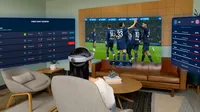
Beyond the millions of apps available from Google Play on XR, there are now over 100 apps made to take full advantage of XR’s immersiveness — more than doubling since Galaxy XR launched. Dive into new additions like Real VR Fishing, or get ready to blast some brass with the upcoming Trombone Champ: Unflattened! And some apps are adding new experiences, like the Paris St. Germain (PSG) Immersion app that now lets you catch live games as if you were there at Parc des Princes stadium in Paris. Watch the games in full immersive mode, or experience an overhead view of the action on your tabletop.

Unlock more immersive entertainment with new apps for Galaxy XR.

Unlock more immersive entertainment with new apps for Galaxy XR.

Unlock more immersive entertainment with new apps for Galaxy XR.
3. Turn any wall into a workspace or entertainment center
You can now pin your apps directly to walls in your room, and they will stay securely anchored exactly where you placed them. During your session, keep a calendar app pinned next to your office desk, or anchor your favorite streaming app to the space you always wished you had a big screen TV.
Pin apps to surfaces in your physical space.
4. See your real hands while you interact with virtual content
Now, you can see your physical hands interacting with virtual content in home space mode, rather than white outlines, keeping you visually grounded in your physical space. Every reach, pinch and swipe feels even more natural, bringing your physical and digital worlds closer. You can enable this feature in the Labs tab in settings too.
See your hands for more natural and precise interactions.
5. Find your apps right where you left them
It can take time to get your preferred app layout when you pick your headset back up. Now, when you resume, your previous session is automatically restored, reopening your apps so you can jump right back in. Grabbing popcorn mid-movie just got way easier.
Resume sessions in Galaxy XR right where you left off.
This Android XR update begins rolling out to Samsung Galaxy XR headsets today, and also includes new hand tracking, eye tracking and accessibility improvements to make your headset work perfectly for you.
Android Enterprise is now supported on XR, enabling organizations to deploy solutions for immersive training and collaboration at scale. We’re collaborating with leading EMM partners including ArborXR, ManageXR, Microsoft Intune, Omnissa Workspace ONE, Samsung Knox Manage, SOTI and more to make Android XR devices workplace-ready.
If you haven't yet experienced Android XR, you can try out these new features firsthand on Galaxy XR by visiting your local Samsung Experience Store.