


在开发的过程中,经常需要处理一些重复的工作,或者逻辑相当简单但耗时的功能,这时我们可能会考虑到用脚本来自动化完成这些工作。而 Bash 脚本是我们最容易接触到和上手的脚本语言。
这篇博客汇总一些常用的 Bash 语法,方便日后查阅学习。
不管写啥,上来先输出个hello world。
#!/bin/bash

echo "hello world"
创建一个文件hello.sh 包含以上内容,同时赋予执行权限,然后执行,一个hello world 就好了。
# 添加执行权限
$ chmod +x hello.sh

$ ./hello.sh
hello world
我们看到这个hello.sh 脚本,第一行有个 #!/bin/bash 。 这个是用来指定该脚本在 UNIX/Linux 下执行时用到的解释器。
执行cat /etc/shells 我们可以看到自己的系统中都有哪些解释器。如我的:
$ cat /etc/shells
# /etc/shells: valid login shells
/bin/sh
/bin/bash
/usr/bin/bash
/bin/rbash
/usr/bin/rbash
/bin/dash
/usr/bin/dash
/bin/zsh
/usr/bin/zsh
/usr/bin/tmux
用 # 来注释。
#!/bin/bash
# 这是注释
echo "hello world"
Bash 中变量命名是大小写敏感的,很多喜欢全大写。当然你也可以使用 小写英文字母,数字和下划线,但不能以数字开头。 给变量赋值的时候 = 号前后不能有空格。
# 有效的
FIRSTLETTERS="ABC"
FIRST_THREE_LETTERS="ABC"
firstThreeLetters="ABC"
MY_SHELL="bash"
my_another_shell="my another shell"
My_Shell="My shell"
_myshell="My shell"

# 无效的
3LETTERS="ABC"
first-three-letters="ABC"
first@Thtree@Letters="ABC"
ABC = "ABC "
MY_SHELL = "bash"
My-SHELL="bash"
1MY_SHELL="My shell"
当你要使用变量的时候,用 $ 来引用, 如果后面要接一些其他字符,可以用{} 括起来。
#!/bin/bash
WORLD="world world"
echo "hello $WORLD"  # hello world world
echo "hello ${WORLD}2" # hello world world2
在 Bash 中要注意 单引号 ' , 双引号 " ,反引号 ` 的区别。
单引号,双引号都能用来保留引号内的为文字值,其差别在于,双引号在遇到 $(参数替换) , 反引号 `(命令替换) 的时候有例外,单引号则剥夺其中所有字符的特殊含义。
而反引号的作用 和 $() 是差不多的。 在执行一条命令的时候,会先执行其中的命令,再把结果放到原命令中。
#!/bin/bash
var="music"
sports='sports'
echo "I like $var"   # I like music
echo "I like ${var}" # I like music
echo I like $var     # I like music
echo 'I like $var'   # I like $var
echo "I like \$var"  # I like $var
echo 'I like \$var'  # I like \$var
echo `bash -version` # GNU bash, version 5.0.17(1)-release (x86_64-pc-linux-gnu)...
echo 'bash -version' # bash -version
Linux 的环境变量包含了存储在系统中的信息。我们可以在终端中找到一些环境变量。
你可以在脚本中引用这些环境变量。
#!/bin/bash
echo $SHELL, $USER, $HOME

# /usr/bin/zsh, razeen, /home/razeen
这里 还有更多。
Bash 的内部变量也不少,有时我们可能会用到,如 $BASHPID $IFS $PWD 等,更多看这里 。
可以使用 $(command) 将命令输出存储在变量中。例如这是一个info.sh脚本内容:
#!/bin/bash

LIST=$(ls -l)
echo "File information: $LIST"
执行(别忘了给执行权限)
$ ./info.sh
File information: total 8
-rwxrwxr-x 1 razeen razeen 85 2月   5 07:35 hello.sh
-rwxrwxr-x 1 razeen razeen 58 2月   5 07:36 info.sh
下面的脚本会将时间和日期,用户名以及系统正常运行时间保存到日志文件中。
其中 > 是重定向之一,它将覆盖文件。使用 >> 可以将输出追加到文件。
#!/bin/bash
DATE=$(date -u) # UTC 时间#!/bin/bash
DATE=$(date -u) # UTC 时间
WHO=$(whoami) # 用户名
UPTIME=$(uptime) # 系统运行时间
echo "Today is $DATE. You are $WHO. Uptime info: $UPTIME" > logfile
WHO=$(whoami) # 用户名
UPTIME=$(uptime) # 系统运行时间
echo "Today is $DATE. You are $WHO. Uptime info: $UPTIME" > logfile

Shell 内建命令是可以直接在Shell中运行的命令。可以这么查看内建命令:
$ compgen -b | sort
-
.
:
[
alias
autoload
bg
bindkey
break
builtin
bye
cd
也可以用 type 查看命令的类型。
$ type cd
cd is a shell builtin
可以用 which 命令查看可执行文件的文件路径:
# which sort
/usr/bin/sort
可通过 man builtins 查看内建命令的详细描述。
if 后面需要接者then:
if [ condition-for-test ]
then
  command
  ...
fi
或者,
if [ condition-for-test ]; then
  command
  ...
fi
如:
#!/bin/bash

VAR=myvar
if [ $VAR = myvar ]; then
    echo "1: \$VAR is $VAR"   # 1: $VAR is myvar
fi
if [ "$VAR" = myvar ]; then
    echo "2: \$VAR is $VAR"   # 2: $VAR is myvar
fi
if [ $VAR = "myvar" ]; then
    echo "3: \$VAR is $VAR"   # 3: $VAR is myvar
fi
if [ "$VAR" = "myvar" ]; then
    echo "4: \$VAR is $VAR"   # 4: $VAR is myvar
fi
上面,我们在比较时,可以用双引号把变量引用起来。
但要注意单引号的使用。
#!/bin/bash
VAR=myvar
if [ '$VAR' = 'myvar' ]; then
    echo '5a: $VAR is $VAR'
else
    echo "5b: Not equal."
fibas
# Output:
# 5b: Not equal.
上面这个就把 ‘$VAR’ 当一个字符串了。
但如果变量是多个单词,我们就必须用到双引号了,如
#!/bin/bash

# 这样写就有问题
VAR1="my var"
if [ $VAR1 = "my var" ]; then
    echo "\$VAR1 is $VAR1"
fi
# Output
# error [: too many arguments

# 用双引号
if [ "$VAR1" = "my var" ]; then
    echo "\$VAR1 is $VAR1"
fi
总的来说,双引号可以一直加上。
比较表达式中,如果=前后没有空格,那么整个表法式会被认为是一个单词,其判断结果为True.
#!/bin/bash

VAR2=2
#  由于被识别成一个单词, [] 里面为 true
if [ "$VAR2"=1 ]; then
    echo "$VAR2 is 1."
else
    echo "$VAR2 is not 1."
fi
# Output
# 2 is 1.


# 前后加上空格就好了
if [ "$VAR2" = 1 ]; then
    echo "$VAR2 is 1."
else
    echo "$VAR2 is not 1."
fi
# Output
# 2 is not 1.
另外需要注意的是, 在判断中,中括号 [ 和变量之间一定要有一个空格,= 或者 ==。 如果缺少了空格,你可能会到这类似这样的错误:unary operator expected’ or missing ]` 。
# 正确, 符号前后有空格
if [ $VAR2 = 1 ]; then
    echo "\$VAR2 is 1."
else
    echo "It's not 1."
fi
# Output
# 2 is 1.


# 错误, 符号前后无空格
if [$VAR2=1]; then
    echo "$VAR2 is 1."
else
    echo "It's not 1."
fi
# Output
# line 3: =1: command not found
# line 5: [=1]: command not found
# It's not 1.
对文件进行相关测试,判断的表达式如下:
| 表达式 | True |
|---|---|
| file1 -nt file2 | file1 比 file2 新。 |
| file1 -ot file2 | file1 比 file2 老。 |
| -d file | 文件file存在,且是一个文件夹。 |
| -e file | 文件 file 存在。 |
| -f file | 文件file存在,且为普通文件。 |
| -L file | 文件file存在,且为符号连接。 |
| -O file | 文件 flle 存在, 且由有效用户ID拥有。 |
| -r file | 文件 flle 存在, 且是一个可读文件。 |
| -s file | 文件 flle 存在, 且长度大于0。 |
| -w file | 文件 flle 可写入。 |
| -x file | 文件 flle 可写执行。 |
可以使用man test查看那详细的说明。
当表达式为True时,测试命令返回退出状态 0,而表达式为False时返回退出状态1。
#!/bin/bash
FILE="/etc/resolv.conf"
if [ -e "$FILE" ]; then
  if [ -f "$FILE" ]; then
      echo "$FILE is a file."
  fi
  if [ -d "$FILE" ]; then
      echo "$FILE is a directory."
  fi
  if [ -r "$FILE" ]; then
      echo "$FILE is readable."
  fi
fi
| 表达式 | True |
|---|---|
| string1 = string2 或 string1 == string2 | 两字符相等 |
| string1 != string2 | 两个字符串不相等 |
| string1 > string2 | string1 大于 string2. |
| string1 < string2 | string1 小于string2. |
| -n string | 字符串长度大于0 |
| -z string | 字符串长度等于0 |
#!/bin/bash
STRING=""
if [ -z "$STRING" ]; then
  echo "There is no string." >&2
  exit 1
fi

# Output
# There is no string.
其中>&2将错误信息定位到标准错误输出。
下面这些是用来比较数字的一些表达式。
| […] | ((…)) | True |
|---|---|---|
| [ “int1” -eq “int2” ] | (( “int1” == “int2” )) | 相等. |
| [ “int1” -nq “int2” ] | (( “int1” != “int2” )) | 不等. |
| [ “int1” -lt “int2” ] | (( “int1” < “int2” )) | int2 大于 int1. |
| [ “int1” -le “int2” ] | (( “int1” <= “int2” )) | int2 大于等于 int1. |
| [ “int1” -gt “int2” ] | (( “int1 > “int2” )) | int1 大于 int2 |
| [ “int1” -ge “int2” ] | (( “int1 >= “int2” )) | int1 大于等于 int2 |
(())数值的比较或者计算可以用((... ))。
#!/bin/bash
a=3
b=4
c=3
if (("$a" < "$b")); then
    echo "$a is less than $b."
else
    echo "$a is not less than $b."
fi
if (("$a" != "$c")); then
    echo "$a is not equal to $c."
else
    echo "$a is equal to $c."
fi


# 计算
echo "$a + $b = $(($a + $b))"


# Output
# 3 is less than 4.
# 3 is equal to 3.
# 3 + 4 = 7
其实上面已经展示了不少了,这里总结下if...else 和 if...elif...else 语句。
if/else 语句格式如下:
if [ condition-is-true ]
then
  command A
else
  command B
fi

# 或
if [ condition-is-true ]; then
  command A
else
  command B
fi
例如:
#!/bin/bash
MY_SHELL="csh"
if [ "$MY_SHELL" = "bash" ]
then
  echo "You are using the bash shell."
else
  echo "You are not using the bash shell."
fi
if/elif/else 语句格式如下:
if [ condition-is-true ]
then
  command A
elif [ condition-is-true ]
then
  command B
else
  command C
fi
# or
if [ condition-is-true ]; then
  command A
elif [ condition-is-true ]; then
  command B
else
  command C
fi
如:
#!/bin/bash
MY_SHELL="csh"
if [ "$MY_SHELL" = "bash" ]; then
  echo "You are using the bash shell."
elif [ "$MY_SHELL" = "csh" ]; then
  echo "You are using csh."
else
  echo "You are not using the bash shell."
fi
[[]]如用用于比较的变量不是单个单词,就需要[[]] , 或者用单中括号(这时需要加双引号)。 在平常的使用中,最好都使用[[]]。
与单中括号相比,双中括号具有其他功能。 如,可以对其中正则使用逻辑&&和||和=〜。
#!/bin/bash

VAR1="variable"
VAR2="variable 2"
if [[ (VAR1 == "variable")  ]]; then
    echo "They are the same."
else
    echo "Not the same."
fi

# 使用 &&
[[ ($VAR1 == variable) && (
$VAR2 == "variable 2") ]] && echo "They are the same again."
#!/bin/bash

digit=4
if [[ $digit =~ [0-9] ]]; then
    echo "$digit is a digit"
else
    echo "$digit isn't a digit"
fi
letter="abc"
if [[ $letter =~ [0-9] ]]; then
    echo "$letter is a digit"
else
    echo "$letter isn't a digit"
fi

# Output
# 4 is a digit
# abc isn't a digit
for循环的使用如下:
for VARIABLE_NAME in ITEM_1 ITEM_N
do
  command A
done
例如:
#!/bin/bash
for COLOR in red green blue
do
  echo "COLOR: $COLOR"
done

# Output
# COLOR: red
# COLOR: green
# COLOR: blue
可以在其中使用变量,如下:
#!/bin/bash
COLORS="red green blue"
for COLOR in $COLORS
do
  echo "COLOR: $COLOR"
done
for 循环重命名文件我们举个简单的例子,用for循环重命名当前目录下的jpg图片。
#!/bin/bash
IMGS=$(ls *jpg)
DATE=$(date +%F)
for IMG in $IMGS
do
  echo "Renaming ${IMG} to ${DATE}-${IMG}"
  mv ${IMG} ${DATE}-${IMG}
done
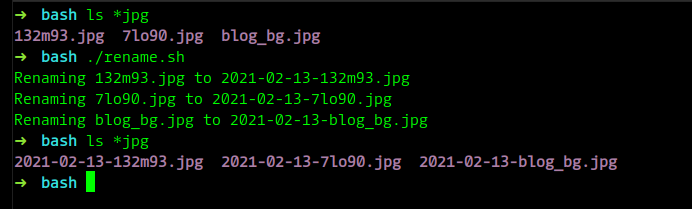
执行脚本的时候,后面可以跟着很多参数,如:
$ scriptname param1 param2 param3
param1 到 param3 称为可选参数, 可以在脚本中用 $0, $1, $2等,来引用这些参赛。例如:
#!/bin/bash
echo "'\$0' is $0"
echo "'\$1' is $1"
echo "'\$2' is $2"
echo "'\$3' is $3"
输出:
$ ./param.sh
'$0' is ./param.sh
'$1' is
'$2' is
'$3' is
$0 参数0返回的是当前执行文件的名字,包括路径。
可以用 $@ 接受所以的参数。
#!/bin/bash
for PARAM in $@
do
  echo "Param is: $PARAM"
done
Using this script:
$ ./params.sh a b c d e f
Param is: a
Param is: b
Param is: c
Param is: d
Param is: e
Param is: f
用户输入称为STDIN。可以将read命令与-p(提示)选项一起使用来读取用户输入,它将输出提示字符串。 -r 选项不允许反斜杠转义任何字符。
read -rp "PROMPT" VARIABLE
例如:
#!/bin/bash
read -rp "Enter your programming languages: " PROGRAMMES
echo "Your programming languages are: "
for PROGRAMME in $PROGRAMMES; do
    echo "$PROGRAMME "
done
运行:
$ ./read.sh
Enter your programming languages: go py
Your programming languages are:
go
py
{}如下所示,我们可以用大括号来表所一个数字或字母的范围。
$ echo {0..3}
$ echo {a..d}

# output:
# 0 1 2 3
# a b c d
你也可以在 for 循环中这么使用:
#!/bin/bash
for i in {0..9};
do
  touch file_"$i".txt;
done
This will create different file names with different modification times.
$ ls -al file_*
-rw-rw-r-- 1 razeen razeen 0 2月  14 09:54 file_0.txt
-rw-rw-r-- 1 razeen razeen 0 2月  14 09:54 file_1.txt
-rw-rw-r-- 1 razeen razeen 0 2月  14 09:54 file_2.txt
...
当 While 后的表达式结果为 true时,执行循环内语句。
#!/bin/bash
i=1
while [ $i -le 5 ]; do
  echo $i
  ((i++))
done
Output:
每个命令都返回退出状态,范围为0-255。 0代表成功,非0代表错误。 可以用来进行错误检查。
| 数值 | 含义 |
|---|---|
| 0 | 成功 |
| 2 | 返回内置命令,从而提示错误 |
| 126 | 命令找到了,但不是可执行的 |
| 127 | 没有找到命令 |
| 128+N | 由于接收到信号N,命令退出 |
$? 包含了上一条命令执行的返回码。
$ ls ./no/exist
ls: cannot access './no/exist': No such file or directory
$ echo "$?"
2
如,在if表达式中检查返回码:
#!/bin/bash

HOST="razeen.me"
ping -c 1 $HOST
RETURN_CODE=$?
if [ "$RETURN_CODE" -eq "0" ]; then
    echo "$HOST reachable."
else
    echo "$HOST unreachable."
fi
-c 1 参数表示发送一个可达包就停止发送。 然后我们检查一下ping执行的返回码。
输出:
$ ./ex.sh
PING razeen.me (47.108.161.7) 56(84) bytes of data.
64 bytes from 47.108.161.7 (47.108.161.7): icmp_seq=1 ttl=50 time=38.5 ms

--- razeen.me ping statistics ---
1 packets transmitted, 1 received, 0% packet loss, time 0ms
rtt min/avg/max/mdev = 38.541/38.541/38.541/0.000 ms
razeen.me reachable.
执行命令后都有退出状态,我们可以使用 && 和 ||去决定下一步。
你可以使用 exit 来决定退出码:
exit 0
exit 1
exit 2
etc.
例如:
#!/bin/bash
HOST="razeen.me"
ping -c 1 $HOST
if [ "$?" -ne "0" ]
then
  echo "$HOST unreachable."
  exit 1
fi
exit 0
我们可以将该脚本通过&&与其他脚本/命令连接。
$ ./ex2.sh && ls
....
2021-02-13-132m93.jpg   ex2.sh      file_1.txt  file_4.txt
如果./ex2.sh返回状态码非0,后面的就不会执行。
当&&前面的语句返回的状态码为0时,执行后面的语句。
mkdir /tmp/bak && cp test.txt /tmp/bak
当||前面的语句返回的状态码非0时(也就是执行失败),执行后面的语句。
cp test.txt /tmp/bak/ || cp test.test.txt /tmp
例如:
如果ping通了,就执行后面的输出。
#!/bin/bash
host="razeen.me"
ping -c 1 $host && echo "You can reach ${host}."
如果ping失败了,就执行后面的输出。
#!/bin/bash
host="google.com"
ping -c 1 $host || echo "You can't reach ${host}."
分号不是一个逻辑运算符,但你可以用它来分割语句。
cp text.txt /tmp/bak/ ; cp test.txt /tmp
# 等同于
cp text.txt /tmp/bak/
cp test.txt /tmp
管道|两侧的命令在各自的子shell中运行,并且两者同时启动。
如下:
第一个命令将目录更改为主目录,并列出文件和目录。
第二个命令仅显示执行该命令的文件和目录。
$ echo "$(cd ~ && ls)"
$ echo "$(cd ~ | ls)"
在Bash中,你可以使用function或者直接定义一个函数。
function function-name(){}
# 或
function-name(){}
当你调用函数的时候,只需要函数名,不用带()。
#!/bin/bash
function hello(){
  echo "Hello!"
}
# 正确
hello

# 错误
# hello()
在函数中,可以调用其他函数。
#!/bin/bash
function hello(){
  echo "Hello!"
  now
  bye
}
function now(){
  echo "It's $(date +%r)"
}
function bye(){
  echo "Bye bye."
}
hello

# Output
# Hello!
# It's 09:29:44 PM
# Bye bye.
但,需要注意函数的定义顺序。如果你在函数声明的前就去调用函数,函数就不会执行。如下, 在hello中执行now函数,但now是定义hello执行下面的,结果就会出错。
#!/bin/bash
# this won't work
function hello(){
  echo "Hello!"
  now
}
hello
function now(){
  echo "It's $(date +%r)"
}
输出:
$ ./hello2.sh
Hello!
./hello2.sh: line 5: now: command not found
和脚本执行的时候传参一样,函数的参数也用$1…,$@ 来输出。
注意$0这里并不是函数的名字,而是当前脚本的名字。
$N是第N个参数,$@表示所有的参数。
#!/bin/bash
function fullname(){
  echo "$0"
  echo "My name is $1 $2"
}

fullname Razeen Cheng


# Output
# ./func.sh
# My name is Razeen Cheng
#!/bin/bash
function greeting(){
  for NAME in $@
  do
    echo "Hi $NAME."
  done
}

greeting Tom Jerry
默认变量的作用域是全局的,必须先声明,后使用。 当然,最好在最上面就把需要的变量声明好。
#!/bin/bash
my_func() {
  GLOBAL_VAR=1
}
# 这时,变量还是空的
echo "Calling GLONAL_VAR before calling function my_func"
# echo $GLOBAL_VAR

# 声明后,就可以输出了
my_func
echo "Calling GLONAL_VAR after calling function my_func"
echo $GLOBAL_VAR
可以用local来定义局部变量,且只能在函数中使用。
#!/bin/bash
MY_VAR=1
my_func () {
  local MY_VAR=2
  echo "my_func: MY_VAR=$MY_VAR"
}
echo "global: MY_VAR=$MY_VAR"
my_func
你可以在函数中,指定返回码:
函数中最后执行的命令的退出状态将隐式返回。 有效代码范围为0-255。0代表成功,$?可以显示退出码。
$ my_function
$ echo $?
0
可以在if 判断中用$? :
#!/bin/bash

# 该函数用来创建一个备份文件
function backup_file () {
    local BACK # 声明局部变量
    if [[ -f $1 ]];then # 检查参数(是否是文件)
        BACK="/tmp/$(basename "$1").$(date +%F).$$"
        echo "Backing up $1 to $BACK"
        cp "$1" "$BACK"
    else
        # 文件不存在.
        return 1
    fi
}

# 调用函数
if [[ "$1" ]]; then
    backup_file "$1"
    # if [[ $? -eq 0 ]]; then
    if [[ $(backup_file "$1") -eq 0 ]]; then
        echo "Backup succeeded."
        exit 0
    else
        echo "Backup failed."
        # 备份失败,中断,并返回非0状态.
        exit 1
    fi
else
    backup_file /etc/hosts
    echo "/etc/hosts Backup succeeded."
    exit 0
fi
上面这个脚本默认备份/etc/hosts文件,除非你制定一个文件外。如果你指定一个文件参数,他会先检查文件,然后备份到/tmp目录。
$$ 返回 当前脚本执行的PID. 每次运行PID都会发生变化。当你需要多次运行脚本时,或许对你有帮助。
basename ${1} 可以从你输入的路径中提取文件的名字. 如 basename /etc/hosts 是 hosts.
$ ls /tmp
$ ex1
Backing up /etc/hosts to /tmp/hosts.2020-10-04.77124
Backup succeeded.
$ ls /tmp
hosts.2020-10-04.77124
return 会跳出当前函数, exit会结束当前脚本。
这篇博客总结了常用的,我们需要了解的一些脚本语法与知识。如果向更好的使用bash, 我们还需要进一步学习更多的命令等。希望这篇博客能对你有所帮助。
此内容由惯性聚合(RSS阅读器)自动聚合整理,仅供阅读参考。 原文来自 — 版权归原作者所有。