惯性聚合 高效追踪和阅读你感兴趣的博客、新闻、科技资讯
阅读原文 在惯性聚合中打开

推荐订阅源

C
Cybersecurity and Infrastructure Security Agency CISA
D
Darknet – Hacking Tools, Hacker News & Cyber Security
cs.CL updates on arXiv.org
S
Schneier on Security
L
Lohrmann on Cybersecurity
S
Securelist
P
Palo Alto Networks Blog
SecWiki News
SecWiki News
T
Troy Hunt's Blog
H
Hacker News: Front Page
AWS News Blog
AWS News Blog
Latest news
Latest news
Hacker News - Newest:
Hacker News - Newest: "LLM"
NISL@THU
NISL@THU
The Hacker News
The Hacker News
F
Full Disclosure
让小产品的独立变现更简单 - ezindie.com
大猫的无限游戏
大猫的无限游戏
O
OpenAI News
P
Proofpoint News Feed
Know Your Adversary
Know Your Adversary
G
GRAHAM CLULEY
博客园_首页
Attack and Defense Labs
cs.CV updates on arXiv.org
Security Latest
Security Latest
云风的 BLOG
云风的 BLOG
K
Kaspersky official blog
WordPress大学
WordPress大学
www.infosecurity-magazine.com
宝玉的分享
宝玉的分享
L
LINUX DO - 热门话题
博客园 - 叶小钗
L
LINUX DO - 最新话题
Martin Fowler
Martin Fowler
N
News | PayPal Newsroom
Project Zero
Project Zero
OSCHINA 社区最新新闻
OSCHINA 社区最新新闻
PCI Perspectives
PCI Perspectives
月光博客
月光博客
IT之家
IT之家
Recent Announcements
T
The Exploit Database - CXSecurity.com
D
DataBreaches.Net
J
Java Code Geeks
酷 壳 – CoolShell
酷 壳 – CoolShell
Last Week in AI
Last Week in AI
Google Online Security Blog
C
CXSECURITY Database RSS Feed - CXSecurity.com
钛媒体:引领未来商业与生活新知
钛媒体:引领未来商业与生活新知

Engadget is a web magazine with obsessive daily coverage of everything new in gadgets and consumer electronics

Teenage Engineering Just Released A Stereo Mixer That Physically Connects To Its EP-Series Samplers Spotify Now Lets AI Agents Like OpenClaw Generate Personal Podcasts Qualcomm reveals two new affordable phone chips with Smooth Motion UI tech - Engadget Angry Birds And FIFA International Soccer Join The World Video Game Hall Of Fame Spotify's AI-Powered Personal DJ Expands To More Languages And Countries Google Is Turning The Fitbit App Into A Unified Portal For Your Health And Fitness Data The Survival Horror Game Hollowbody Launches For PS5 And Xbox Series X/S On June 5 The Google Fitbit Air Is An AI-Infused Take On Whoop Wearables DJI's Osmo Mobile 8P Gimbal Has A Detachable Screen Remote HP EliteBoard G1a Review: It's A Desktop In A Keyboard! But It's Not For You Chrome Downloads A 4GB AI File Without User Consent, Researcher Alleges Remakes Of Myst And Riven Are Coming To PlayStation, Xbox And The Microsoft Store The Steam Controller Sold Out Super Quickly And Valve Is Working On A Restock ChatGPT's New Default Model Is More Factual And Better At Personalization Book Publishers Accuse Meta And Mark Zuckerberg Of Copyright Infringement Alexa+ Is Now Available On A Bunch Of Bose Speakers Chrome On Android Will Now Let You Share Your Approximate Location Google Will Livestream The Android Show: I/O Edition On May 12 Game Pass Additions For May Include Subnautica 2 And Forza Horizon 6 The Creator Of Citizen Sleeper 2 Is Making Two New Games Horizon Hunters Gathering Is Holding Another Playtest On May 22 Meta Is Using AI Bone Structure Analysis To Detect And Remove Underaged Users Samsung Galaxy A37 Review: A Solid Deal Even In This Economy Bose's New Lifestyle Home Audio Lineup Includes A Speaker, Soundbar And Subwoofer Google's Pentagon AI Deal Reportedly Drove The DeepMind Team To Unionize Apple Said To Be Talking To Intel And Samsung About Building Key Device Processors Mini Motorways Is Letting Players Vote For Its Next City Map How To Watch Xbox's Stranger Than Heaven Showcase Sony Will Soon Settle A PlayStation Store Class Action Lawsuit For $7.8 Million Oura Adds More Detailed Hormonal Health Insights To Its Series 3 And 4 Rings Engadget Podcast: Is The Valve Steam Controller Worth $100? Meta Says It May Withdraw Its Apps From New Mexico If Judge Agrees To The State's Demands The ROG Xbox Ally X Is Getting Some Updates, Including Automatic Super Resolution ChatGPT Developed A Goblin Obsession After OpenAI Tried To Make It Nerdy The Upcoming Resident Evil Movie Looks Legit Scary In Its First Trailer Spotify's New Verification Badge Shows That Music Is Not AI-Generated Vine Reboot App Divine Arrives With A Ban On AI Slop Motorola's Latest Family Of Razrs Includes Its First Book-Style Foldable YouTube TV Gets A Fully Customizable Multiview Feature, With Availability For All Channels It Runs Doom: AI Chatbot Edition You Can Now Book A Hotel Via The Uber App Apple reportedly testing out four different styles for its smart glasses that will rival Meta Ray-Bans The US government wants Reddit to snitch on one of its users through a grand jury OpenAI says Elon Musk is orchestrating a last-minute 'legal ambush' before trial Rockstar Games has confirmed it was hit by third-party data breach The first European country to get Tesla’s Full Self-Driving Supervised will be the Netherlands IBM settles its DEI lawsuit with the DOJ for $17 million Engadget review recap: ASUS ZenBook A16, AirPods Max 2, Sonos Play and LG Sound Suite X's messaging app, XChat, may be available soon Marauding minotaurs, more CloverPit and other new indie games worth checking out The Artemis II astronauts are back after a 10-day journey around the moon The FAA is encouraging gamers to get jobs in air traffic control Epic is reportedly building an extraction shooter for Disney A man allegedly threw a Molotov cocktail at Sam Altman's house Estonia is the rare EU country opposing child social media bans Garmin may be working on a Whoop competitor Amazon Luna ends support for third-party subscriptions and game purchases French government says au revoir Windows, bienvenue Linux Google adds E2E encryption to Gmail for iOS and Android enterprise users Google has reportedly started to add Polymarket data to News results How to watch the Artemis II landing Sony Bravia Theater Bar 5 review: A basic TV sound booster YouTube Premium’s US pricing is going up Microsoft starts removing unnecessary Copilot buttons in Windows 11 The Morning After: Amazon pledges its satellite internet starts this year Google removes Doki Doki Literature Club! from the Play Store OpenAI has a new $100 ChatGPT Pro plan to better match up with Claude Apple is closing three US stores, including the first to unionize The Metal Gear Solid movie is back on, with Final Destination: Bloodlines directors in charge A maverick hacker got Mac OS X running on a Wii Instagram comments can now be edited (within 15 minutes) Jazzy stealth-action game Thick as Thieves hits PC on May 20 Netflix adds three Jackbox games to its TV app Another Don't Starve game is on the way Mountain climbing sim Cairn is getting free DLC this summer Co-op pirate survival game Windrose hits PC in early access on April 14 Tesla may be working on a smaller and cheaper electric SUV Razer just released some new gaming earbuds with low latency and fast switching between devices Indie game Neverway will launch this October, just in time for spooky season 1000xResist devs reveal their wild-looking second game about convincing an AI it's not human Amazon's satellite internet service is scheduled for mid-2026 availability Rhythm Heaven Groove comes to Switch on July 2 Roku will stream Savannah Bananas games, along with the entire Banana Ball Championship League Google introduces AI-generated avatars to YouTube Shorts OpenAI 'pauses' its Stargate UK data center plan Google bakes NotebookLM, its research tool, into Gemini Spotify now lets you turn off all video JBL Live 780NC and 680NC review: Great leaps, greater missteps Dyson just announced its first-ever handheld fan, with a motor that spins up to 65,000 RPM You'll have one more chance to buy Samsung's pricey Galaxy Z TriFold this Friday DoorDash and Wing are expanding their drone delivery partnership to Atlanta You'll soon be able to hide games from your Xbox achievements list How to watch the Triple-i Initiative showcase on April 9 Meta's Muse Spark model brings reasoning capabilities to the Meta AI app Greece will ban all kids under 15 from using social media The Nintendo Switch 2 version of 007 First Light is delayed until later this summer No Man’s Sky now has Pokémon-style creature battles GoPro to lay off over 20 percent of staff by the end of 2026 Forza Horizon 6 gives would-be racers another gorgeous open world to explore Fender Elie review: Handsome speaker/amp hybrids with excellent clarity
How to personalize the screensaver on your Kindle - Engadget
Mariella Moon · 2026-06-20 · via Engadget is a web magazine with obsessive daily coverage of everything new in gadgets and consumer electronics

With some care, you can customize what appears on your ereader’s sleep screen.

Hands holding Kindle ereaders.

Amazon

We may receive a commission on purchases made from links.

So, you're tired of seeing rotating ads or Amazon's preloaded graphics on your Kindle every time you put it to sleep. That's understandable, especially if you're voracious reader who's been spending a lot of time on your ereader. In this piece, we're going to walk you through how to change your Kindle sleep screen and even how to personalize it if you want. 

How to remove Kindle Special Offers

Kindles with Special Offers or lockscreen ads typically cost $20 less than the versions without them. These devices will show you a rotation of advertisements for books, for more Kindle devices or for Kindle Unlimited whenever you put your Kindle to sleep. As long as your device is ad-supported, you cannot customize your screensaver, so your first step is removing Special Offers from your ereader, which will understandably cost you some money. If your Kindle doesn't have lockscreen ads, you can skip this step. But if it does, you can follow these instructions:

1. On desktop, go to the Amazon website, log in and click the hamburger menu on the left side of the screen. 

  • Under Digital Content & Devices, go to Kindle E-readers & Books. 
  • On the next screen, click on Manage Content and Devices under Apps & Resources. 
  • On the new page that loads, click on Devices near the top of screen. If you have more than one Kindle attached to your account, click the box marked Kindle under Amazon Devices and then choose the ereader you want. 
  • In the Special Offers box at the bottom, you'll find a button to remove offers for $20. Again, you'll have to pay for it, because Amazon says the original $20 discount you got was in exchange for getting ads.
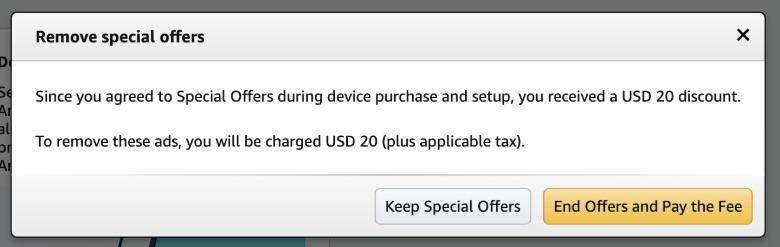
Screenshot of ending special offersScreenshot by Mariella Moon (Amazon)

2. On mobile, fire up the Amazon app. 

  • Go to the "Alexa for Shopping" tab on the bottom right corner of your screen. 
  • Type in "I want to end Special Offers on my Kindle." Alexa will link you to the Manage Devices page. 
  • From there, choose a Kindle and scroll down to end Special Offers for $20.

NOTE: If you're not in the US but somehow have a US-version Kindle, you might have issues removing lockscreen ads. Amazon will ask you to add a US address and a card with US billing to be able to pay $20 for their removal. Without both, it won't be possible to proceed to the next step. You can try talking to customer service and asking kindly if they can disable special offers for you at no cost, but there's no guarantee that that will work. 

How to display book covers as your Kindle screensaver

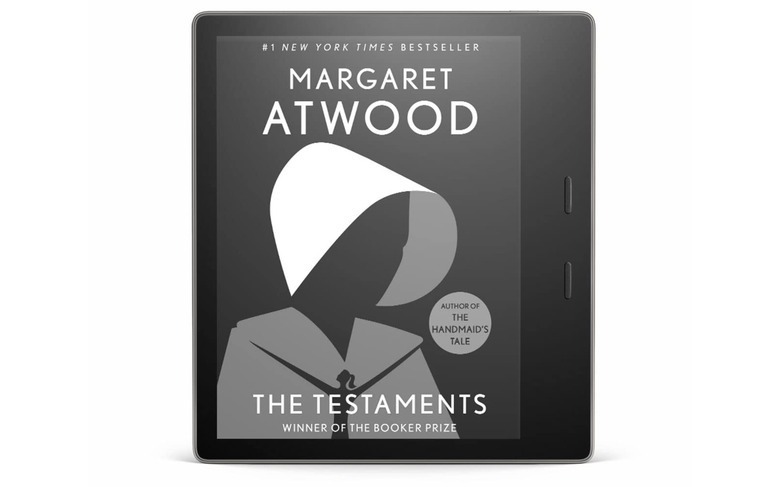
Once you're done getting lockscreen ads removed, or if you never had them in the first place, you'll get a rotation of Amazon-provided illustrations as your screensaver. Those who own newer Kindles have the option of using the cover of the book you're currently reading instead (see below for a full list of supported models). To make sure this feature is turned on, follow these steps: 

  • Tap the three-dot menu on the upper right-hand corner of your Kindle. 
  • Go to Device Options. Find Display Cover and toggle it to On. 
  • On newer or updated devices, you'll find the "Show covers on lock screen" option in the "Screen and brightness" section. Simply toggle it on. 

NOTE: The option to use book covers as screensavers is only available on the following models: 

Kindle with a book cover screensaverAmazon

How to use custom images as your Kindle screensaver

Unfortunately, there's no way to use custom images as your permanent Kindle screensaver without jailbreaking your device. There is, however, a trick you can consider: Replacing the cover of a book  with the illustration you want to see, then opening it before locking your device. Before you proceed with the instructions below, make sure you've already completed the steps above to toggle on the option to display book covers as your lockscreen. 

  • The first step is to create custom wallpapers on programs like Canva or to look for an illustration you want to use. Just make sure it fits the device you have by searching for the dimensions of your ereader's screen. The latest Kindle Paperwhite, for instance, has a 7-by-5-inch display. Some people recommend creating a wallpaper measuring 2,560 x 1,600 pixels, which will work for most Kindle models. 
  • After you're done designing your custom illustration, download it as a PNG image.
  • Use a program like Calibre to convert any file it supports (like PDF) into an EPUB file. You'll find the option to set a cover for your ebook on the conversation screen, so choose the PNG image you made. 
  • You can also look for an "epub cover change" website online. Upload the book you're reading or any EPUB you have and then choose the PNG image you saved earlier for your new cover.
  • Use the "Send-to-Kindle" feature to upload the finished file to your ereader.

NOTE: You will have to switch to the book that uses your custom cover before you put your device to sleep every time you want to see it on your lockscreen. Alternatively, you can change the cover of every book you read, though that sounds pretty time-consuming, especially if you blaze through books quickly. While this solution isn't very straightforward, it's an effective way to personalize your device.