



惯性聚合 高效追踪和阅读你感兴趣的博客、新闻、科技资讯
阅读原文 在惯性聚合中打开

推荐订阅源

有赞技术团队
有赞技术团队
Apple Machine Learning Research
IT之家
IT之家
奇客Solidot–传递最新科技情报
奇客Solidot–传递最新科技情报
B
Blog RSS Feed
酷 壳 – CoolShell
酷 壳 – CoolShell
人人都是产品经理
人人都是产品经理
Hugging Face - Blog
Hugging Face - Blog
博客园_首页
V
V2EX
aimingoo的专栏
aimingoo的专栏
爱范儿
爱范儿
博客园 - 聂微东
Cyber Security Advisories - MS-ISAC
钛媒体:引领未来商业与生活新知
钛媒体:引领未来商业与生活新知
H
Hackread – Cybersecurity News, Data Breaches, AI and More
Stack Overflow Blog
Stack Overflow Blog
罗磊的独立博客
freeCodeCamp Programming Tutorials: Python, JavaScript, Git & More
MongoDB | Blog
MongoDB | Blog
Jina AI
Jina AI
T
The Blog of Author Tim Ferriss
月光博客
月光博客
云风的 BLOG
云风的 BLOG

Engadget is a web magazine with obsessive daily coverage of everything new in gadgets and consumer electronics

Teenage Engineering Just Released A Stereo Mixer That Physically Connects To Its EP-Series Samplers Spotify Now Lets AI Agents Like OpenClaw Generate Personal Podcasts Qualcomm reveals two new affordable phone chips with Smooth Motion UI tech - Engadget Angry Birds And FIFA International Soccer Join The World Video Game Hall Of Fame Spotify's AI-Powered Personal DJ Expands To More Languages And Countries Google Is Turning The Fitbit App Into A Unified Portal For Your Health And Fitness Data The Survival Horror Game Hollowbody Launches For PS5 And Xbox Series X/S On June 5 The Google Fitbit Air Is An AI-Infused Take On Whoop Wearables DJI's Osmo Mobile 8P Gimbal Has A Detachable Screen Remote HP EliteBoard G1a Review: It's A Desktop In A Keyboard! But It's Not For You Chrome Downloads A 4GB AI File Without User Consent, Researcher Alleges Remakes Of Myst And Riven Are Coming To PlayStation, Xbox And The Microsoft Store The Steam Controller Sold Out Super Quickly And Valve Is Working On A Restock ChatGPT's New Default Model Is More Factual And Better At Personalization Book Publishers Accuse Meta And Mark Zuckerberg Of Copyright Infringement Alexa+ Is Now Available On A Bunch Of Bose Speakers Chrome On Android Will Now Let You Share Your Approximate Location Google Will Livestream The Android Show: I/O Edition On May 12 Game Pass Additions For May Include Subnautica 2 And Forza Horizon 6 The Creator Of Citizen Sleeper 2 Is Making Two New Games Horizon Hunters Gathering Is Holding Another Playtest On May 22 Meta Is Using AI Bone Structure Analysis To Detect And Remove Underaged Users Samsung Galaxy A37 Review: A Solid Deal Even In This Economy Bose's New Lifestyle Home Audio Lineup Includes A Speaker, Soundbar And Subwoofer Google's Pentagon AI Deal Reportedly Drove The DeepMind Team To Unionize Apple Said To Be Talking To Intel And Samsung About Building Key Device Processors Mini Motorways Is Letting Players Vote For Its Next City Map How To Watch Xbox's Stranger Than Heaven Showcase Sony Will Soon Settle A PlayStation Store Class Action Lawsuit For $7.8 Million Oura Adds More Detailed Hormonal Health Insights To Its Series 3 And 4 Rings
What That Tiny Green Dot On Your Samsung Phone Is Telling...
Mariella Moon · 2026-06-10 · via Engadget is a web magazine with obsessive daily coverage of everything new in gadgets and consumer electronics

It’s actually a security feature.

A phone

Samsung

If you have a Samsung phone, you might have wondered at one time or another why a green dot periodically shows up at the top right corner of your screen. I know I had. Don't worry, it's not a bug or in any way connected to the green line issue that sometimes affects Samsung and Apple devices. In fact, it's a security feature that lets you know if you've opened an app that's accessing your camera or your microphone. If you didn't fire up an application that's supposed to use your camera and mic, that's when the green dot appearing becomes a cause for worry.

The feature was one of the transparency and security indicators Google had rolled out with Android 12, which was released in 2021. As long as the green dot is there, there's an app accessing your camera or mic. It only disappears around five seconds after you close the app. The indicator initially appears as a green tab displaying a camera or a mic icon, or both if they're in use at the same time, before it collapses into a green dot next to your phone's battery, Wi-Fi and mobile internet icons. 

To see which apps are currently accessing your phone and camera, simply swipe down from the top to open your notification bar and then tap on the green dot. It will show you which app has current access, such as your camera or Instagram if you're posting a Story. 
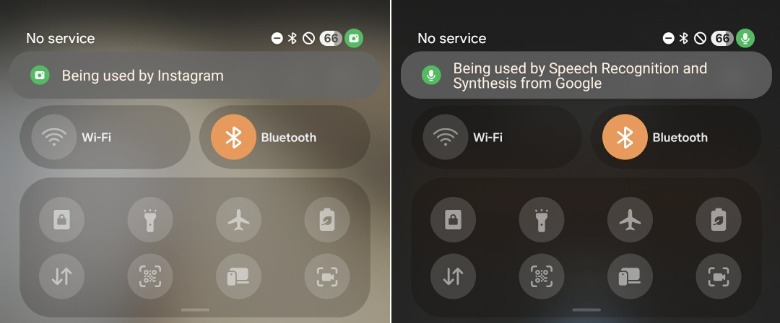
Screenshots of Samsung's notification tabMariella Moon for Engadget

In case the green dot is showing up when there's no app open that's supposed to be able to access your camera or mic, restart your phone first before running an anti-malware scan if it continues to persist. On Samsung devices, you can do a search for "App security" and then choose the "Google Play Protect" option. From there, you'll be able to scan your phone to find any harmful apps that may be installed on your device. You can also check out Google's instructions on how to check your phone for viruses or malware to give it a more thorough inspection.

If you just want to revoke an app's access to your camera or mic, then swipe down, tap on the green dot and then tap on the "Being used by [app]" tab that shows up. That will bring up permissions for that particular application, where you can set its access from allowed to "don't allow" or "ask every time."