


暂无文章
Scand Ltd offers flexible solutions and extensions based on Adobe Creative Suite, beginning from CS and ending with CS6. We have wide experience in plug-in development for Adobe InDesign, Adobe Photoshop, Adobe Illustrator and other Adobe products, both for Windows and MacOS X.
In practice, Adobe supports SVG file format, but only in Adobe Illustrator. So, you can't use SVG file as image for InDesign without converting it to EPS (raster graphics is not an option of course).
We present new solution - direct support of SVG format for Adobe InDesign, Adobe InDesign Server, Adobe InCopy, Adobe Photoshop, Adobe Photoshop Elements, and Adobe Bridge.
Export of InDesign/InCopy books and documents to SVG format directly from Adobe InDesign, Adobe InDesign Server, and Adobe InCopy is available.
Scand Ltd. provides complete support of SVG format for Adobe Creative Suite, including InDesign and Photoshop, both Windows and Mac, both 32 and 64bit. Our vector graphics tool will broaden your opportunities in SVG image usage.
Scalable Vector Graphics is easy, flexible and open. As opposed to Flex/Flash it has much more sense in desktop publishing and prepress.
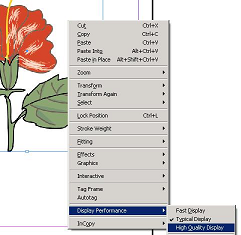
Now you don't need to to convert SVG image into EPS every time after changing it; instead of this use SVG natively in InDesign, by placing SVG image on the page. All the changes of SVG image are reflected in InDesign file as well. Of course all commands and effects are applicable to SVG images as for any other image types. Instead of applying effects to image bounding box, all effects (like figures and text) are applied to image contents.
Scripting is supported too, like this:
set pageToPlace = document.Pages.Add
set margins = pageToPlace.MarginPreferences
pageToPlace.Place "gradients.svg", Array(margins.left, margins.top)
Adobe InDesign Server is also supported (Windows and MacOS X), so you can use SVG images in your automated printing process in the same manner as EPS and others.
We provide support of SVG and SVGZ images (both 1.0, 1.1 and 1.2 SVG versions), with Inkscape and Adobe Illustrator SVG extensions.
Moreover, you can also export SVG images to ePub documents, to use them in e-books.
Our solution offers correct support of PDF flattening, RGB and CMYK color spaces, and SVG export to EPS as a vector image. SVG Kit isn't SVG editor itself, so it doesn't add any menu items - everything is integrated into existing commands, like 'Place' and 'Export'.
We provide support of export InDesign/InCopy documents and books into SVG format, including page-by-page conversions in set of vector images. Linearized export mode converts fonts into set of shapes; filtered mode keeps text intact with adding glyph definitions. Right now, such effects and gradients are not supported, and we're using all time RGB color space for SVG output.
Screenshots, Examples, Quick Guide, Buy now, Download trial
Photoshop layers for svg? Just import and work - we will do the rest.
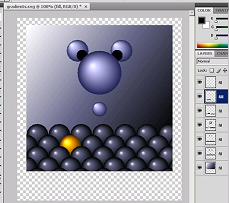
SVG format support for Photoshop can be really usefull, if you need to apply certain effects, available in Photoshop. Of course you should first transform svg file into raster image, but sometimes it is reasonable (when embeding svg into html code, making collages and so on). Unfortunately, once you have converted SVG into raster, you loose all layers, figures etc. That's why the first thing you usually do after that, is splitting raster image into layers, managing colors and so on.
Now we offer advanced conversion from SVG to PSD on the fly, directly in Photoshop. Just open SVG file with the help of Photoshop, and we'll do the rest. Image will be shrinked into layers automatically, depending on SVG figures, opacity and effects. All intercepted polygons will be moved to different layers, to provide you more opportunities for image operating.
Of course, every layer becomes raster, but all of the original SVG figures (text, curves, triangles, filters, transparency effects, etc.) are located on different layers, to let you operate with every figure or effect separately.
Transparency effect is realized in specific way: if possible, it is applied not to the raster object itself, but to the whole layer, so you can manage opacity easily.
此内容由惯性聚合(RSS阅读器)自动聚合整理,仅供阅读参考。 原文来自 — 版权归原作者所有。