


Lotus Notes, in 1989, had encryption two years before Pretty Good Privacy brought it to normal email, had rich text formatting and attachments before MIME, had read receipts, notifications, a directory of users, and wiki-style cross-message links. It, rightly, felt like the future.
Or like déjà vu, if you’d used email on a timesharing computer at your university.
Lotus Notes was the future of communications, a decade before laptops had WiFi. Yet of all things, it wasn’t even an email app. It was a notes app, a collaboration tool, an all-things-to-all-people software that let you build apps in the way Access and Airtable later would. That, and the notes could be used for email.
Love it or hate it (and there were plenty on both sides of the fence), what you couldn’t do was ignore it. This email-and-everything-else platform showed what the future of digital communications would become — and provoked, as email itself was always doomed to provoke, equal measures of awe and exasperation.
When the future’s staring you in the face
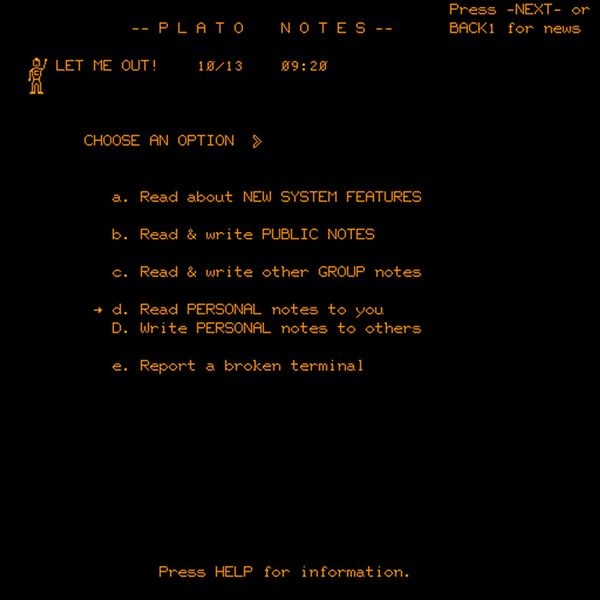
The future started out as a plain text file. In 1973, the University of Illinois’ claim to fame was a state-of-the-art timesharing computer, PLATO, built for education—the computer where the first language learning software was built, among others.
Each lesson in PLATO came paired with a plain text Notes file, as a place to leave pointers or log issues or, less helpfully, note that Kilroy was here or delete the entire note. A bit too flexible for an educational environment.
Somehow it fell to the 17-year-old developer David Woolley in 1973 to fix this mess with something better. “I went off and used my imagination and wrote it the way it seemed natural to me,” Woolley recalled to author Brian Dear. And in the end, his PLATO Notes would be one of the earliest online forums, Reddit before its time. You could start new discussions, respond to existing ones, and read through the comments in reverse chronological order. And you could send email-style personal notes, privately, to anyone else. All stored on the same computer, accessed through individual terminals, in something that offered “a peek at what the Internet would ultimately become,” alum Ray Ozzie told the New York Times after having worked on PLATO as a student.
For Ozzie, PLATO Notes enabled early remote work, with him and a coding partner collaborating across different shifts. A reply could drop into a forum with no one there to read it, and it would still be waiting when they came back. Upon entering the workforce after having seen a different future for work, “I started going through ... withdrawal,” recalled Ozzie, when in the real world there was “no online community.”
“After graduation, I said to myself, ‘By hook or crook, I am going to build software to recreate the interactive environment I’d used with Plato,’” Ozzie would later recall.
With hooks into the Lotus team that’d built the Lotus 1-2-3 spreadsheet, and enough time in development hell that the company had to tongue-in-cheek acknowledge the delays (“Notes is coming off the vaporware list,” said a spokesperson when it finally launched in 1989, five years after entering development), Ozzie kept his promise with Lotus Notes.
Notes, that is. Not email, per se.
The everything email app
What you have discovered is a recipe not for memory, but for reminder. ~ Plato
The lessons of PLATO Notes weren’t about email as much as they were about the power of community, of a shared brain, of the power of having everyone’s ideas together in one place. And that was what the Lotus Notes team set out to replicate.
“It was eccentric to think about group communications software in 1984, when most people had never touched an email system,” noted Tom Diaz, former VP of Engineering at Iris.
PLATO Notes worked because everyone was accessing the same database on the same mainframe through terminals. But now with PCs on every desk, you’d need networking to recreate the same experience. So Lotus Notes was built as a database, one that synced everything with every other computer. “Servers exchanged information through replicated data; there were potentially many copies of the same database resident on different servers, and the Notes server software continuously synchronized them,” IBM explained years later (spoiler alert: Big Blue would acquire Lotus mostly for Notes, in 1995). That means, in the age when checking your email often meant pulling messages one time over POP3, Lotus Notes was keeping messages in sync, for the same experience IMAP and Microsoft Exchange would later provide.
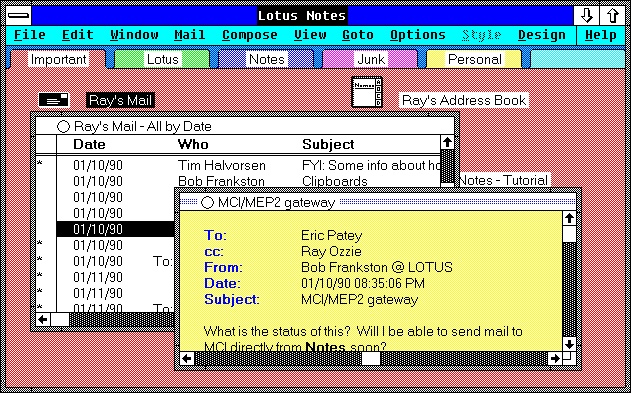
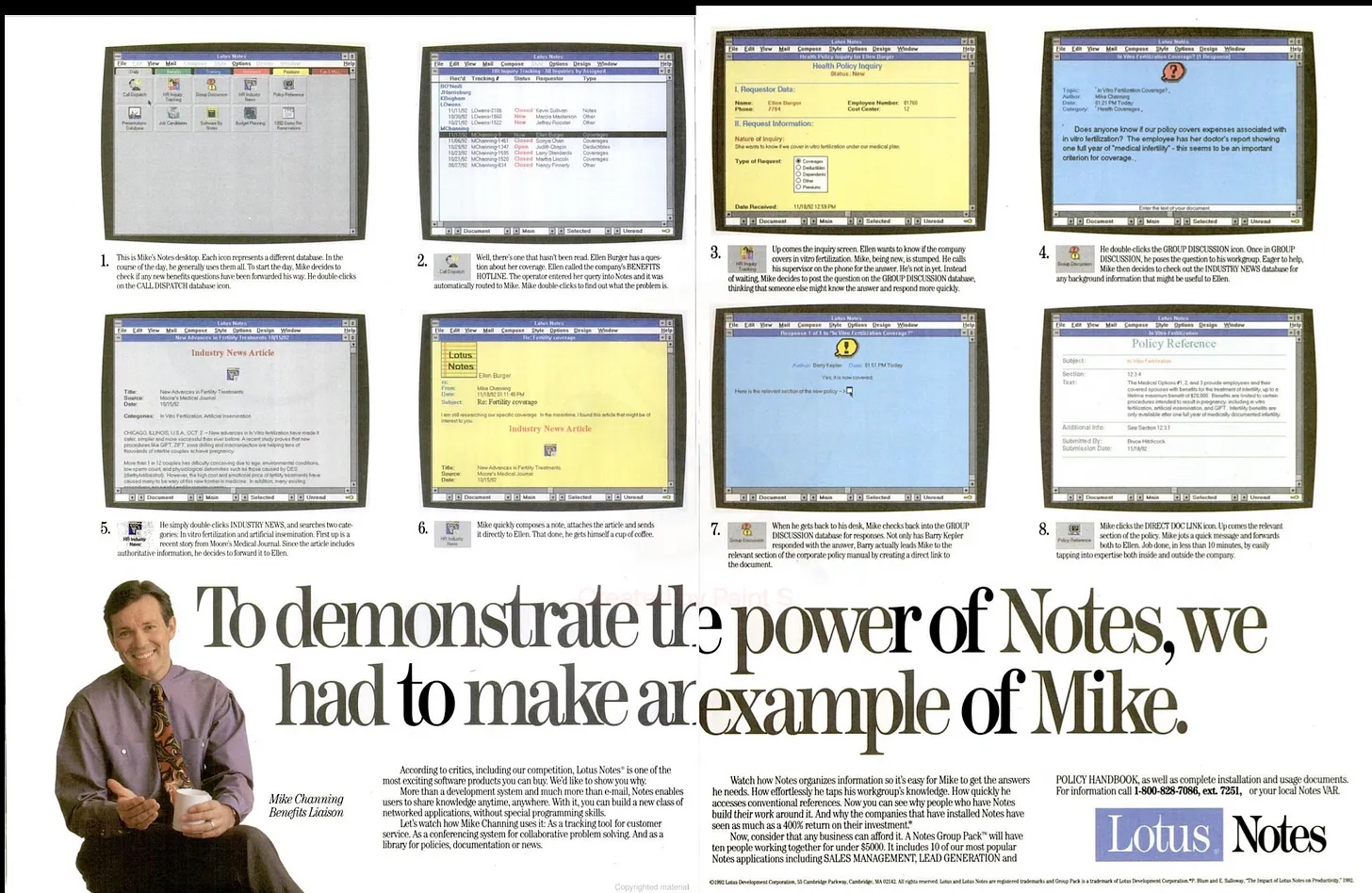
But it wasn’t just email. For email is private messages sent in standards-compliant ways, and Lotus Notes was designed to “pick the brains of everyone in your organization as if they all sat at the next desk,” as Fortune’s David Kirkpatrick described it. “With Notes, everyone puts his contributions onto databases, and you tell the system what kinds of information you want to see.” And so you could have a private message, email-style, or more commonly you could write something publicly that synced across everyone in your company’s database, a corporate version of PLATO Notes’ freewheeling, ad hoc community.
You had something you couldn’t replicate anywhere else, something it’d take Teams and Slack plus email to approximate today. And as a database, you could build anything. Calendars, forums, address books, custom internal software—everything was possible in the app that just happened to also support its own variant of email as almost an afterthought, a showcase of what else you could build in Notes (it wouldn’t support SMTP email until 1996, and by then email had caught up to many of Notes’ advances).
Encryption was baked into Lotus Notes from the start, as part of the database. As was rich text formatting and file attachments, both things normal email wouldn’t get until MIME’s launch in ‘92. You could link to other messages, like a wiki, something email still doesn’t have since each message is a stand-alone text file instead of a shared database. It had a categorized inbox, of sorts, and threaded messages, long before other email apps would. If you didn’t like something, you could fix it and code your own email app from the same database core. And you could take all of your mail with you, syncing whenever you were back on the network, hardly a selling point at first but increasingly a key use case as laptops started entering the workforce.
Those computers might not be running the same operating system, either. So Lotus Notes was cross-platform from day one, originally on DOS and OS/2, later on Windows, Unix, and the Macintosh, complete with its own custom graphical user interface to work consistently across every platform.
And that, the unique interface that looked and worked the same everywhere, was its Achilles’ heel.
Love it or hate it
To the fans, Lotus Notes was like nothing else. Powerful, expandable, feature-rich at a time when email was plain English text. Plus, it wasn’t just email. “Email is about 5% of the actual use of Notes,” one countered on a post about Lotus Notes’ flaws; “Email is just one of the things it does (albeit poorly),” said another.
“Using Notes you could suddenly create applications that shared data across your office locations,” reminisced @andrewstuart on Hacker News. “You ran a server locally and Notes dialed up the other servers and did replication of just the changed/different data. It was gob smacking [sic] because nothing else could do this.”
But it did all of that, while working differently from almost any other application on your computer. Lotus Notes was built for every operating system, in a time when conventions were yet to be set in stone. It forged its own path—and if you were used to it, perhaps that was fine, but for anyone switching between Lotus Notes and other popular software, the differences, the things that’d break your muscle memory, became infuriating over time.
“If I want to ‘refresh’ the inbox shouldn’t I press F5? Nope, that will lock the app and require your password to unlock it,” went one of the many complaints collected on Stack Overflow co-founder Jeff Atwood’s blog. “How do I send an email? CTRL+ENTER? Of course not! ALT+1, naturally.”
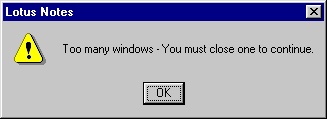
The anti-conventions were so bad, there was an entire Lotus Notes Interface Hall of Shame noting, among other things, that you could not have more than eight Lotus Notes windows open at once, that some buttons required a double-click when others required a more conventional single-click, that the spellcheck would check email addresses in the To: field and inevitably suggest that you change them. Lotus Notes, far ahead of its time, would notify you when new mail arrived, a foreshadowing of push notifications. But, the notification had both “OK” and “Open Mail...” buttons—the former would not actually load the new mail, while the latter would but only if the Drafts folder wasn’t open.
Then there was the Lotus Notes Sucks site, detailing over 80 ways the program had driven the author to near-madness. The best? A warning that “You must change your password” that then asked “Do you want to change your password now?” followed by both yes and no buttons. “I give up,” sighed the author.
Its best features were beguiling. You were locked into sharing notes and emailing only inside of your company, at first, but you were sending rich text messages with attachments that notified the recipient upon arrival with colleagues on practically any computer, years before BlackBerries and Slack. It was enough for some to put up with its eccentricities, and once your company ran on Notes, the stream of notifications and shared knowledge in synced databases became difficult to live without. It was hard enough to migrate all of your data away that you might as well stick with it (as some still do, in its latest incarnation as HCL Notes).
A powerful tool, yes. A great email application, no. For all of Ozzie’s fond memories of PLATO Notes’ forums and collaboration, it was mail that would stick with us for the long haul — and shape how Notes was judged. “The first implementation most people saw of it was the email side, and it could be a truly clunky and unpleasant email client,” noted @dspillett. “This soured opinions before people delved into the document management and programmability features that email handling were just one use of.”
And while it was advanced at launch, it was slow to adapt to the rapidly changing world. Its email was an island unto itself until 1996, long after most of the world had moved on to SMTP. “The engineers could never manage to get out of their programming mindsets and build the thing to do what users want,” noted Aaron Lawrence, “and as a result technology has passed them by.”
Therein was opportunity for competitors. “The need for email was so acute that customers essentially were betting on a ‘point solution’ for email that might be marginally easier to deploy and manage rather than the complexity of landing what amounts to a development tool on each and every desktop,” recalled Microsoft’s Steven Sinofsky. “We were able to turn the need for email into a need to ride the wave of general-purpose client-server computing, rather than a new category of groupware.” Microsoft would attack the app building side with Microsoft Access, but that was far from the priority. The real fight was over mail — and it was Microsoft Outlook, paired with Exchange Server and its X.500-inspired directory, that won. Standards-compliant email and a rapid embrace of every new feature put universal email at the center of most businesses.
Email would eventually catch up to most of the features Lotus Notes pioneered, rebuilding those features one RFC at a time. It was a glimpse of the future, like Xerox Alto before it. Anyone who used it knew that this was how we’d work in the future. Yet it was too much, when all people really needed was an easier way to communicate.
“The web won because it could evolve faster than Lotus Notes could,” surmised former Iris Associates developer @GMoromisato. “The web won because it was open.” As did email, on the open web—even if it took decades to recreate the future that Lotus Notes showcased in 1989.
| Image | Credit |
|---|---|
| Header photo | PLATO, via the University of Illinois |
| PLATO Notes screenshot | Computer History Museum |
| Lotus Notes screenshot | IBM |
| Lotus Notes features ad | Hardcore Software by Steven Sinofsky |
| Lotus Notes error | Interface Hall of Shame |