


Phone numbers leak more info than you might expect. They tell, based on country and area code, where the caller’s located—or at least where their phone number was registered. The caller’s name is likely to pop up on caller ID, and their carrier may be discoverable with a quick lookup. One could infer that the caller is awake and available at the time of the call. And if the callee answers, one can also infer that they are available—that they heard the call, saw the info, and decided to still take the time to talk.
When Caller ID was first introduced, the idea that you could know who was calling you was controversial.
“Caller ID poses invasion of privacy,” shouted the Chicago Tribune’s headline in 1990. “Ever since Alexander Graham Bell invented the telephone in 1876, there has been an expectation of privacy,” the piece argued (forgetting, apparently, the original human operators who originally connected phone calls, and the party lines that made eavesdropping all-too easy). “The contrivance of new technology cannot change that expectation. And a person should not be forced to give it up.”
Then came email.
I sent an email, and all I got was this referer data
Email itself is innocuous enough. An email address shares no more data than a phone number; at most you could guess the email address owner’s name and learn their workplace, educational institution, personal site, or preferred tech company from the domain.
Plain text is all that email requires. “The body of a message is simply lines of US-ASCII characters,” reads the RFC that defines email. Stick to that, and when you send an email you’ll only know if the message didn’t bounce. You’ll know nothing else about the person you emailed and if they ever read your message.
But something in us wants to know, wonders if an email still makes a “You’ve got mail!” sound if it falls in the digital forest and no one is there to hear it. “We just want people to get back to us,” as Stephanie Dubick wrote after digging into email tracking. “We want to be connected.” It feels nice to know someone opened your email, better still that they opened it repeatedly.
And that urge brings out the worse angels of our nature.
Email tracking centers around the simplest of things: Images. With first web mail apps like Hotmail (neé HoTMaiL, for HTML), HTML started creeping into messages, first as a way to add formatting and images, soon enough as a way to turn emails into tiny websites (something Google would later try to advance with AMP).
Emails were meant to be small, needed to be small on the era’s dial-up connections. With HTML, you didn’t need to send the whole image in an email. You could just link to the image, and load it from the server. Who wouldn’t want to make your emails more beautiful?
And then someone—a marketer, surely—realized that downloading the image gave insights into what happened to that email you’d sent. Whenever someone opened your email, they’d ping your server to download the image. Boom: Now you know that your email was received and read.
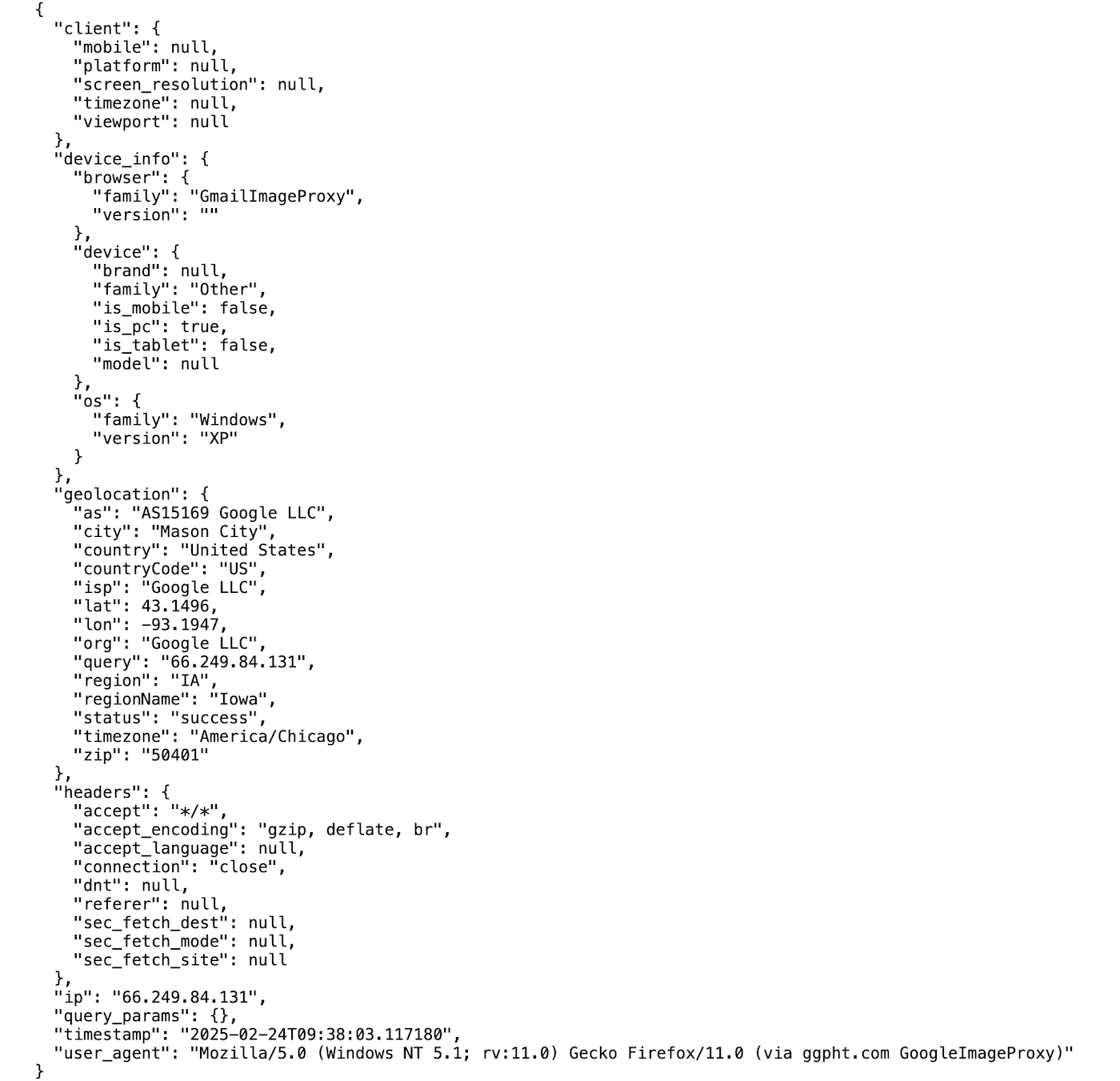
A tracking pixel can learn a lot about recipients—or not much at all, if the data’s proxied or faked, as Gmail does to protect privacy
Along with that ping, the email sender would get HTTP referer data (fun fact: a misspelling that became tech jargon), the same data servers get whenever someone clicks a link on a webpage. The time and date, the IP address with its general location data, even the recipient’s internet company. Their operating system, web browser, and even default language. With CSS to load different images for light or dark mode, senders can divine which mode the recipient uses. A similar bit of CSS could load yet another image if the email was printed, or if the image was in a quoted portion of a message (suggesting it was forwarded). With lazy loading (supported, today, in Apple Mail, Thunderbird, Samsung Email, and Hey), they’d even know how far down the email a reader scrolled (and, with timestamps, how long they spent reading).
Every time the email’s opened, the image gets loaded again—suggesting that a reader was interested enough in the message to check it multiple times. Or if it was opened from a new location, especially in a quoted portion of an email, it just might have been sent to another person.
The same data was sent, regardless of image size. So you could include a nice photo to illustrate your email, and gain the benefits of extra data about readers at the same time. Or you could be a bit more sneaky, embed a tiny, 1x1 pixel transparent image, and gain the same data without readers ever suspecting anything.
Web bugs, they were called at first. Tracking bugs. Spy pixels. Tracking pixels. The idea was the same. And by 1999, they’d sparked the same privacy concerns that caller ID had raised a decade prior.
To bug or not to bug
“Are the use of Web Bugs unethical?” asked an FAQ published by the EFF on November 11, 1999.
It’s a question that’s been debated ever since. Superhuman reopened the debate in 2019, with what it called “read statuses” turned on by default. Only these weren’t the traditional opt-in read receipts, but instead were tracking pixels that told you if a recipient opened your email, and where they were when they did so.
It didn’t feel fair, to recipients. As Fred argued in his Surveilled newsletter, “it’s the recipient’s privacy that gets violated, and they don’t derive a whole lot of convenience from the surveillance Superhuman subjects them to, nor did they even agree to trade away their privacy in the first place.” Or as Mike Davidson put it: “You, the sender, do not get to decide how I, the receiver, respond to you.”
The EFF’s Richard Smith agreed. “Clearly Web Bugs are controversial. Because they allow people to be monitored, when they don't expect it, they certainly can be very upsetting. For example, most people will likely be troubled to learn that an outsider is tracking when they read Email.”
Brett Glass in PC Mag had landed on a similar take, two decades earlier, for tracking pixels in both websites and emails. “A Web bug contributes nothing to your web browsing experience; the only reason it’s there is so that a server can follow your browsing activities. But a Web bug can’t do any snooping that can’t be done via visible images. It’s just sneakier and therefore more suspicious.”
It’s not so much that people are never ok with sharing their data, otherwise they wouldn’t sign up for newsletters or use the web in the first place. It’s the sneakiness that stings.
Worse, tracking sneakily is illegal, in a growing number of jurisdictions. GDPR, for example, requires that EU recipients are informed of and consent to receiving tracking pixels. Recipients can always opt out, by disabling HTML messages or disabling remote images in their email app—technically adapt recipients, at any rate—but the EU wants tracking pixels, instead, to be opt-in.
Learning to let go of the email data
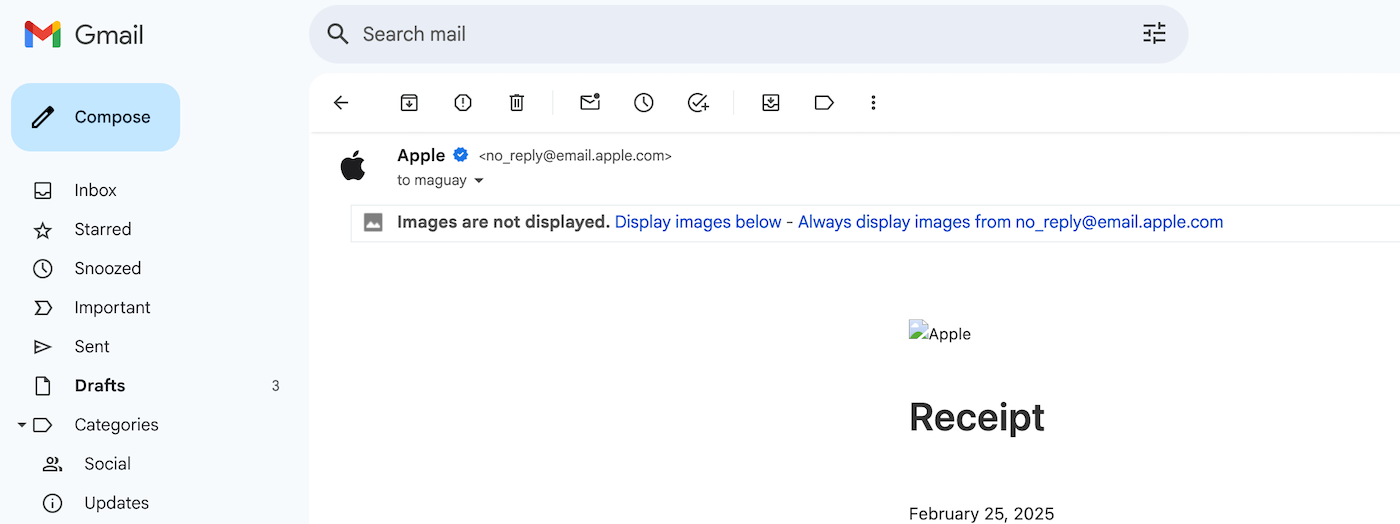
Most email services today either load images by proxy or block them—your choice
And, increasingly, the data’s just not worth collecting. First, there’s the risk that by tracking data, your email could get put in Gmail’s promotions tab or, worse, marked as spam. A well-written plain-text email is most likely to land in your recipient’s inbox. A more salesy message with HTML formatting and, worse, an obvious tracking pixel has much worse odds.
“If other users using the same or similar tracking pixel are spamming, you are inheriting their bad inbox placement,” suggested one sales person in a forum, who found their deliverability rate improved drastically after removing a tracking pixel. Obviously not a guarantee; plenty of tracked emails get through just fine. But when you’re starting out, every little bit in your favor counts.
And even if you decide the risk is worth it, the data you receive may be more than useless. Plenty of apps like Outlook refrain from loading images by default; someone could read your email, without ever opening the tracking image. Others, including Gmail and Apple Mail, pre-load images—making emails load instantly for readers, but also making the image data useless to senders as every email appears to have been opened.
Gmail goes to the next level. Send a tracking pixel to a Gmail or Google Workspace address, and Google will load the image from a random server with a fake configuration. I tested it out while writing. The first tracking pixel I sent was loaded instantly in Mountain View by a Google LLC, running ... Edge on Windows 10. The next tracking pixel got picked up by another Google Server in Mason City, Iowa that claimed to be running Windows XP. All the while, I sat at home in neither location, opening the email on my phone.
Sure, tracking pixels will still get some data. You could filter out Gmail recipients and learn a bit from the others. But the value of that data is rapidly depreciating—making it even less worth annoying your readers.
That, among other reasons, is why Buttondown keeps tracking off by default. And why, if you do enable tracking, Buttondown lets your recipients opt out of tracking on their own.
The best email analytics is a reply, anyhow, and when you learn to let go of the open data, you might have to try harder to write in a way that’ll strike up conversation. That’s a worthwhile pursuit. Every reply will feel so much better than the tiny dopamine (or cortisol, if the numbers are bad) spike you get from seeing your email open stats.
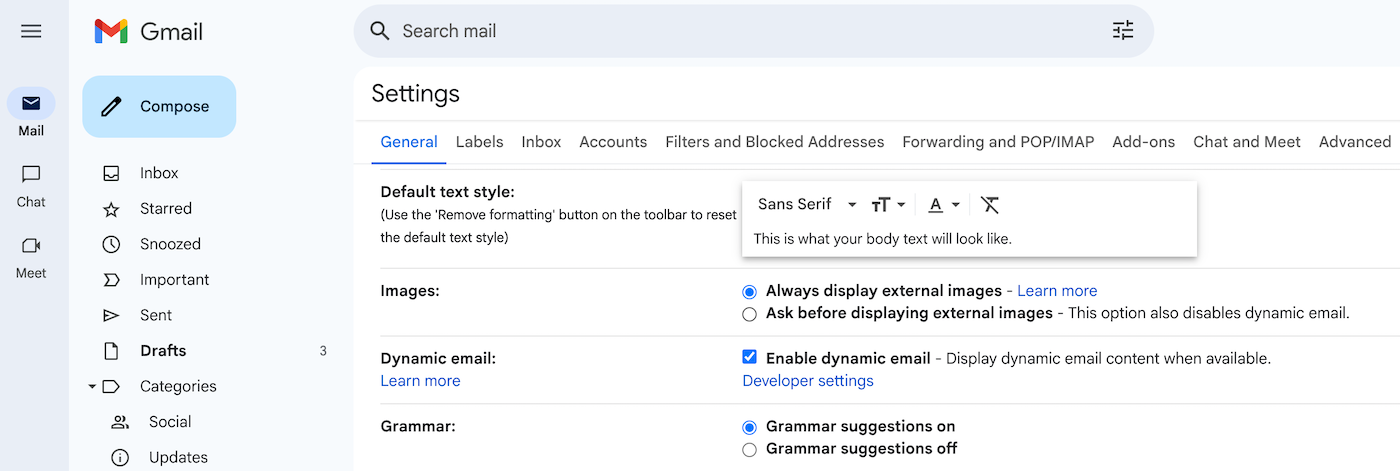
Choose what you want to do with remote images
Speaking of, if you want to keep others from learning when you open their emails, you can block others’ tracking pixels (and other images) in your email app:
- Gmail’s preloading obfuscate tracking data, but you can also have Gmail ask you before displaying external images
- Apple Mail has Mail Privacy Protection turned on by default; check your Mail setting’s Privacy tab to ensure it’s checked, or to block all external images instead.
- Outlook.com (neé Hotmail) by default uses an Outlook service to load images; you’ll need to check your mail in a 3rd party app to prevent loading entirely.
- Outlook’s desktop apps by default won’t open images, and will only load them when you click on a privacy banner. You can customize your Outlook settings to whitelist domains, if you want to receive images from colleagues but not others, say. The same goes for Thunderbird, too.
It’s your inbox, your mail to read in private. No reason to let a bug watch over your shoulder, if you don’t want to.