








It started as automated fill-in-the-blanks, on a typewriter that cost half as much as a median American house.
IBM had a hit on its hand, and was looking for the next big thing. Its Selectric typewriter had changed how businesses typed—and soon accounted for one out of every three typewriters in American offices. Gone were the typebars that’d lift up and tap the typewriter ribbon with every keypress. In their place was a golfball-sized orb of letters. It’d spin and glide its way across your page as you typed. Keypresses no longer directly put letters on paper. Keys were now just buttons, intermediated by wires and electricity and motors.
Which means that in lieu of keys, a bit of code could instead instruct the typeball where to turn next.
That’s what IBM built. They put a Selectric in a desk, wired it to magnetic tapes, and added a pane of buttons to run the contraption. Voilà: The IBM MT/ST (for Magnetic Tape Selectric Typewriter). Here, for $10,000 in 1964 was the first tool marketed as a word processor.
Its first job? Mail merge.
Filling in the blanks
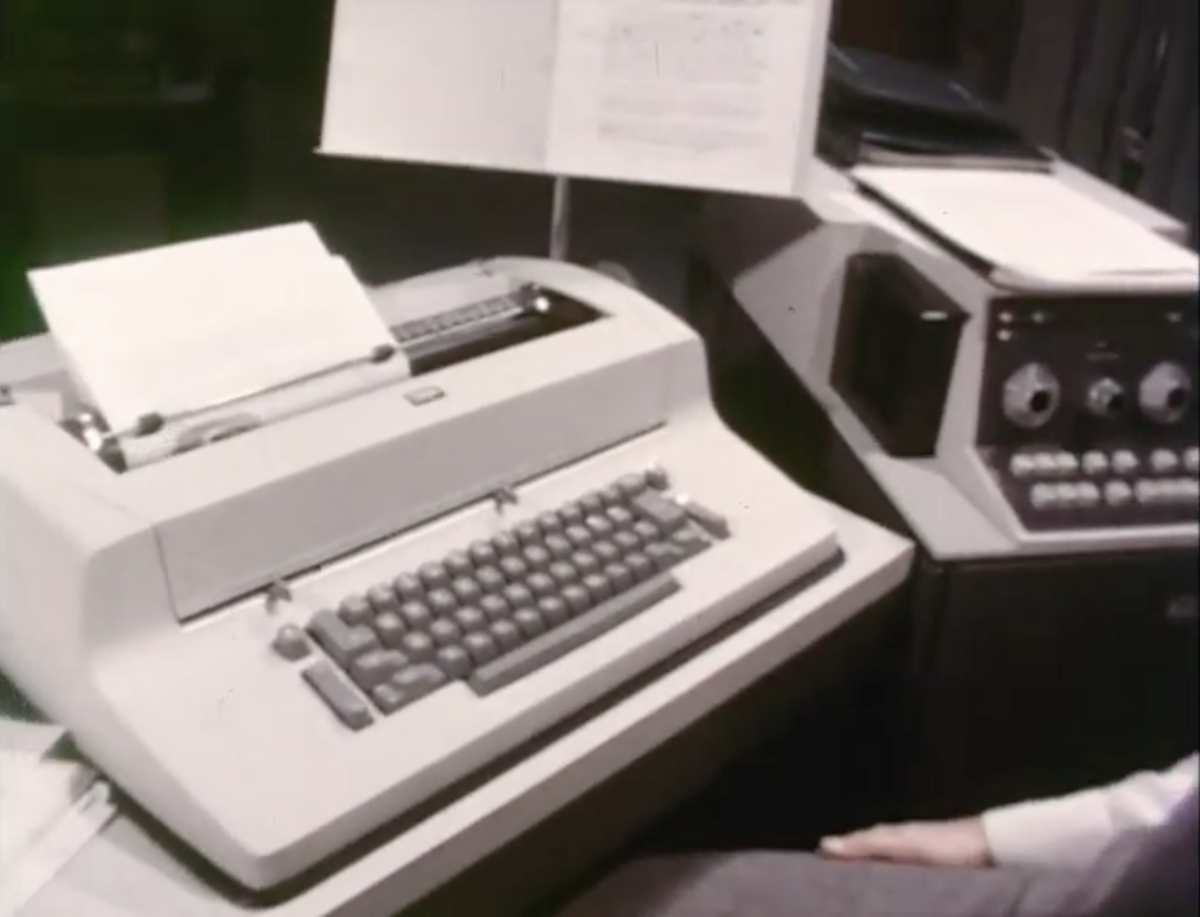
The desk-sized IBM MT/ST, from its Jim Henson-directed ad
The MT/ST feels impossibly limited, today. Its magnetic tapes could store at most 15 pages of typed copy. It didn’t even have a screen to show what you’d typed. And yet, it was popular enough that, as IBM Selectric engineer Leon Cooper told Shift Happens author Marcin Wichary, “I was told they sold the first year’s production in a month.”
Type up your document, and the MT/ST would faithfully record each letter to tape. Then turn a dial to Play, press start, and the typewriter would put letters on paper at 150 words a minute. You could print as many copies as you like. Or if you saw a typo, you could pause, backspace over the erroneous word, and overwrite those characters in memory.
Mail merge worked similarly. You’d press a Stop code button to add a special character to the tape. When you played back your recording, the typewriter would type every character you’d entered up to the stop code then pause, waiting for your input. You could then type in names, addresses, personalized greetings, or any other text you wanted to merge—then restart the playback and the typewriter would pick up where it left off.
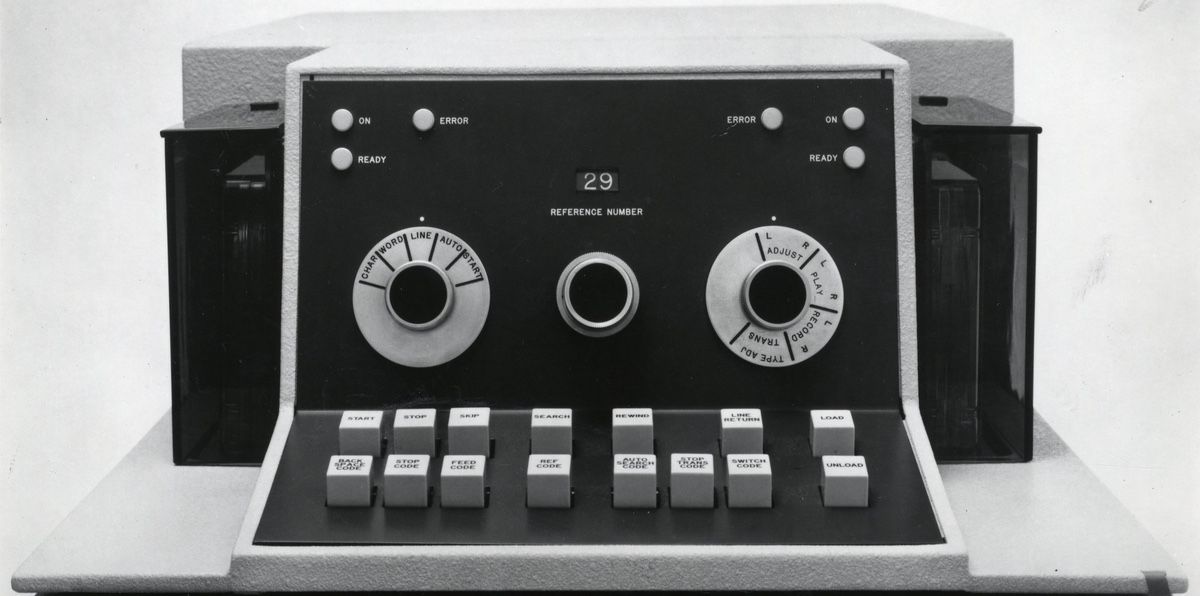
The MT/ST’s dials and buttons that electromechanically automated mail merge (via Wikipedia)
It was automated fill-in-the-blanks. The word processor typed the bulk of the characters, time and again, with the typist adding the personalized details as needed. Or, with the fancier two-tape machine, one could automate the whole process. One tape held the letter, the other held the list of names and other merge data as in the header photo, and the stop code would switch between tapes for automatic, personalized letters.
“At IBM, our work is related to the paperwork explosion,” said a Jim Henson (yup, of Muppets fame) directed ad for the MT/ST, unironically, never stopping to consider that IBM’s automated typewriters might have something to do with that.
“Machines should work,” IBM concluded. “People should think.”
Mail merge on every desk and in every home
Fast forward twenty years, and word processors were no longer dedicated machines. All that time to think had given developers enough time to miniaturize computing into a machine that’d fit on your desk, and subsume one device after another by software.
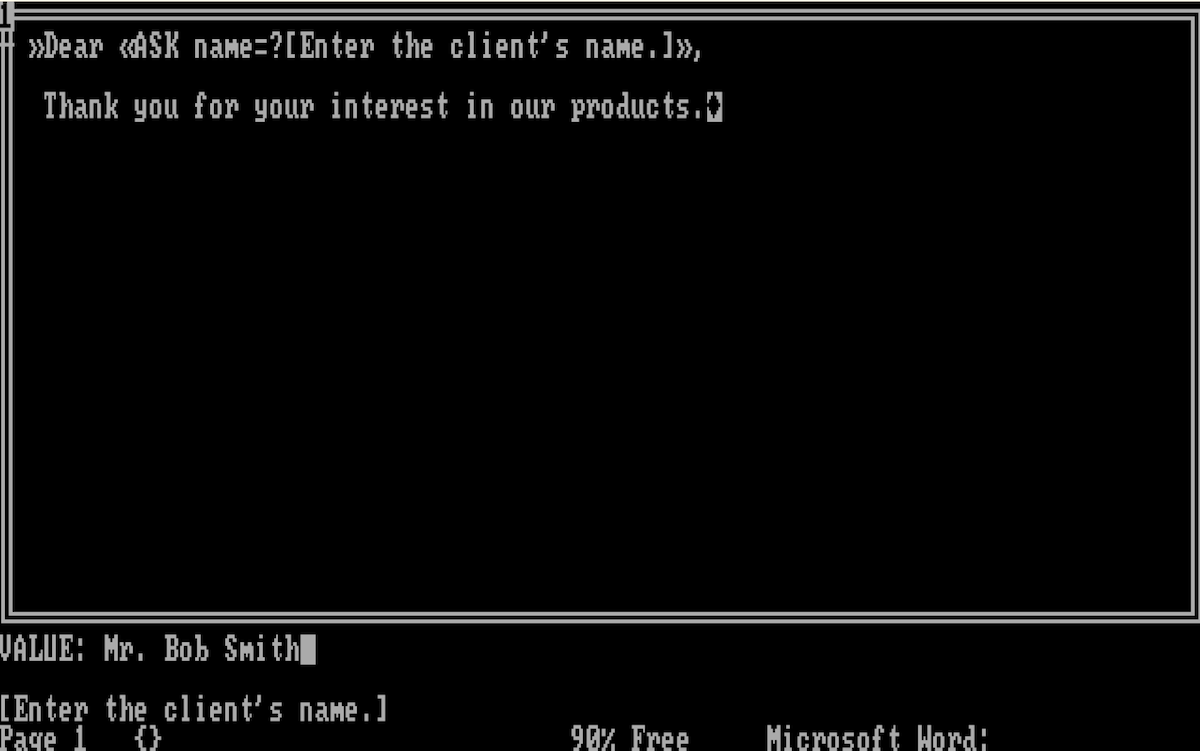
Word’s original mail merge would prompt you to enter names and other merge data
The first version of Word, the word processing software most of us would end up using over the coming decades, replicated a standard typewriter’s features—with the bonus that you could write and rewrite to your heart’s content. Word 1.1, though, added a feature that took the fight to the MT/ST: Mail Merge.
It worked much the same way as that original Stop code. Only this time, you could both see what you’d typed, and tell the word processor what data to ask for.
You’d type your letter as normal. Then when you hit a spot that required customization, you’d press CTRL+[ to add a << symbol, then could type the name of a merge field followed by a closing CTRL+] to finish the variable with a >>. You could add more detail, if you wanted, for a merge field like <<ASK name=?[Enter the client’s name.]>>.
You’d then select Print in Word’s menu, choose the Merge option, then you’d type each client’s name, one after another, when Word asked—just like on an automated Selectric.
Or, this being a computer, you could pair Word with a database (“Any ASCII file, or the ASCII output of a database program, such as dBaseII,” with the data separated by commas or tabs, recommended Microsoft’s manual), and automate the whole process. No more monitoring your mass-production of letters.
Mail merging electronic mail
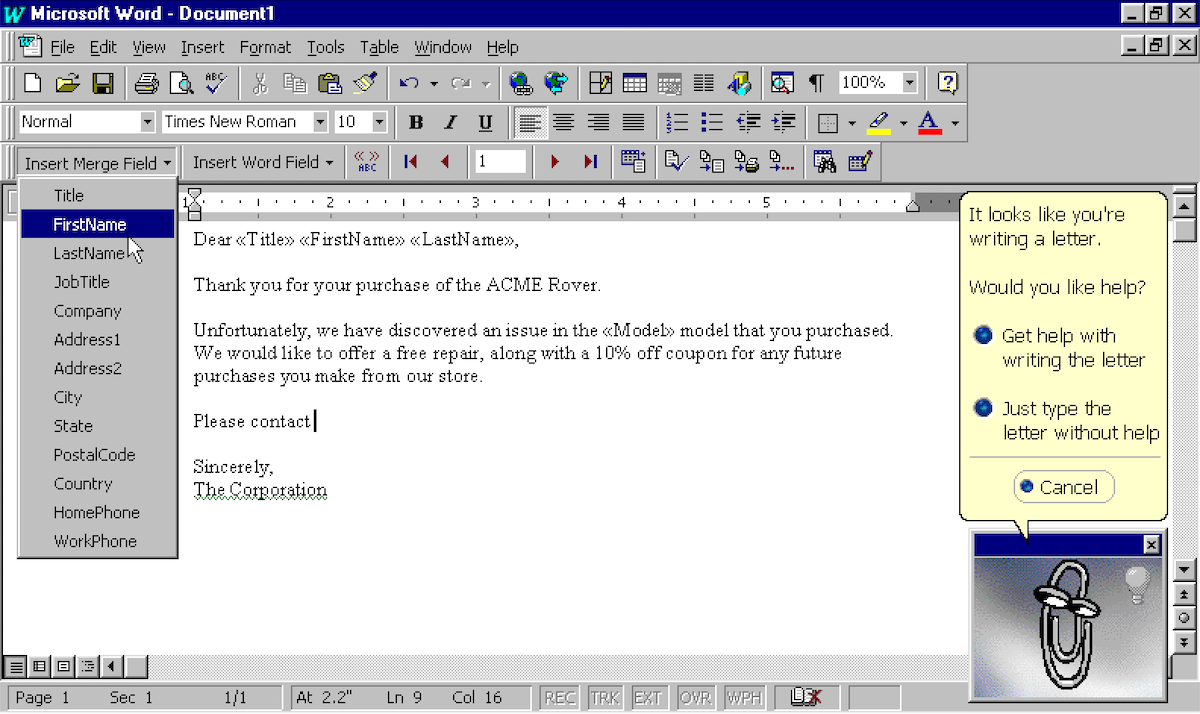
The original Word mail merge features, in a shiny Windows 95 UI.
And soon enough, no more letters at all. While the MT/ST was still pounding out automated letters, the first electronic mail was sent in 1971 on ARPANET, and the $16,500 Xerox Star computer already had “computer mail” by the time the first versions of Microsoft Word were landing on much more affordably-priced desktops.
It took a while, but by the time you were running Word 97 on your Windows 95 PC, odds are you had an email address. The internet had taken the world by storm, and the dot com bubble was just about to start. What better time to start sending out personalized electronic mail?
That’s when Mail Merge started morphing into something a bit closer to what we now call email newsletters through a Word and Outlook integration—with Clippy offering to help.
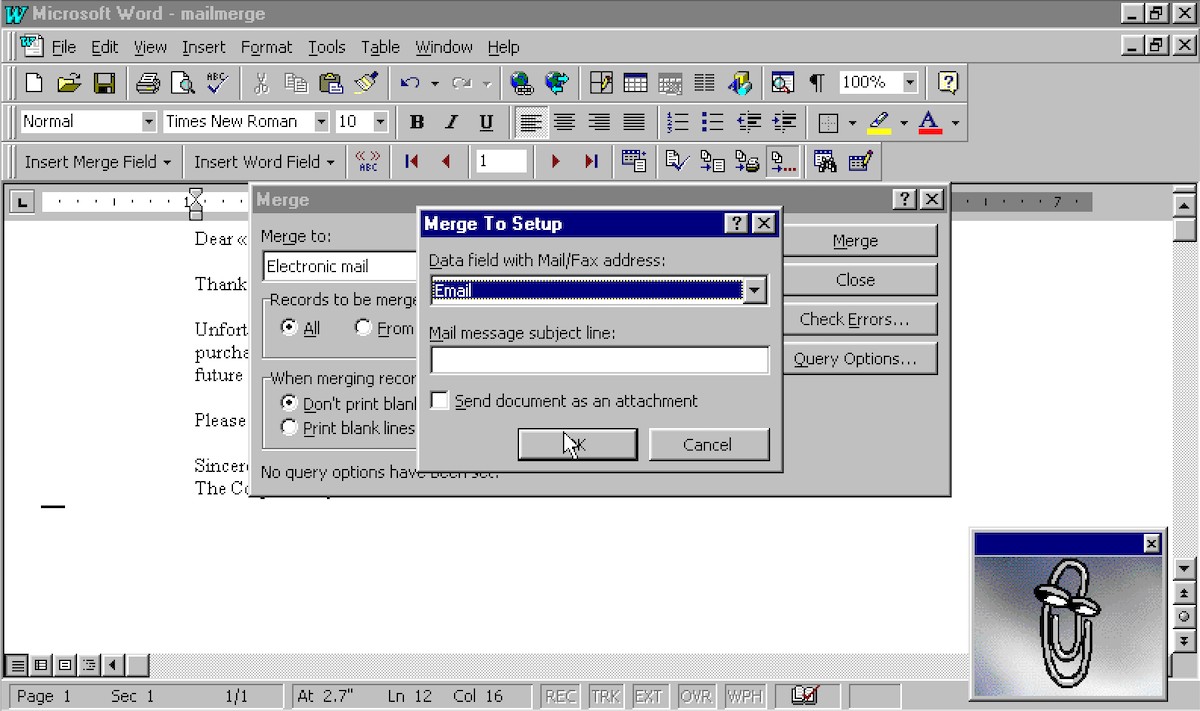
Word 97 was the first version of Word with mail merge to email
You’d still type out variables wrapped in parenthesis, like <<FirstName>>, or could choose variables from the Merge Field menu. Then, you’d either choose a database with “Mail/Fax” addresses, as Microsoft called it at the time, and send out one personalized message at a time over the wires.
Mail merging in the cloud
Word’s Mail Merge feature lives on today, in paid versions of Word in Office 365. You can still insert merge fields into documents, link them to an Excel spreadsheet or database, and send your contact list personalized Outlook emails or print documents.
Yet rare is the email newsletter sent, today, via Mail Merge. You could, if you wanted, email ten of your closest friends that way. It’d likely be fine. Gmail even lets you send up to 500 emails a day; I wouldn’t recommend it, but it might work.
The more bulk emails you send, though, the more you have to be worried about being canned as spam. As spam email rates rose, email providers like Hotmail and Gmail became selective about letting email through. Each successive verification measure—SPF to verify which IP addresses could send messages, DKIM to add public keys to your domain’s DNS records—paired with server reputation systems made sending your own emails increasingly difficult.
It started making more sense to outsource sending email. Today, the majority of bulk emails are actually sent via ESPs—email service providers like Sendgrid and Amazon SES that handle the nitty gritty of getting your messages delivered to your subscribers’ inboxes. And email newsletter apps, including tools like Buttondown (waves), built tools on top of them to format emails, merge them with your contact list, and send them out on a schedule.
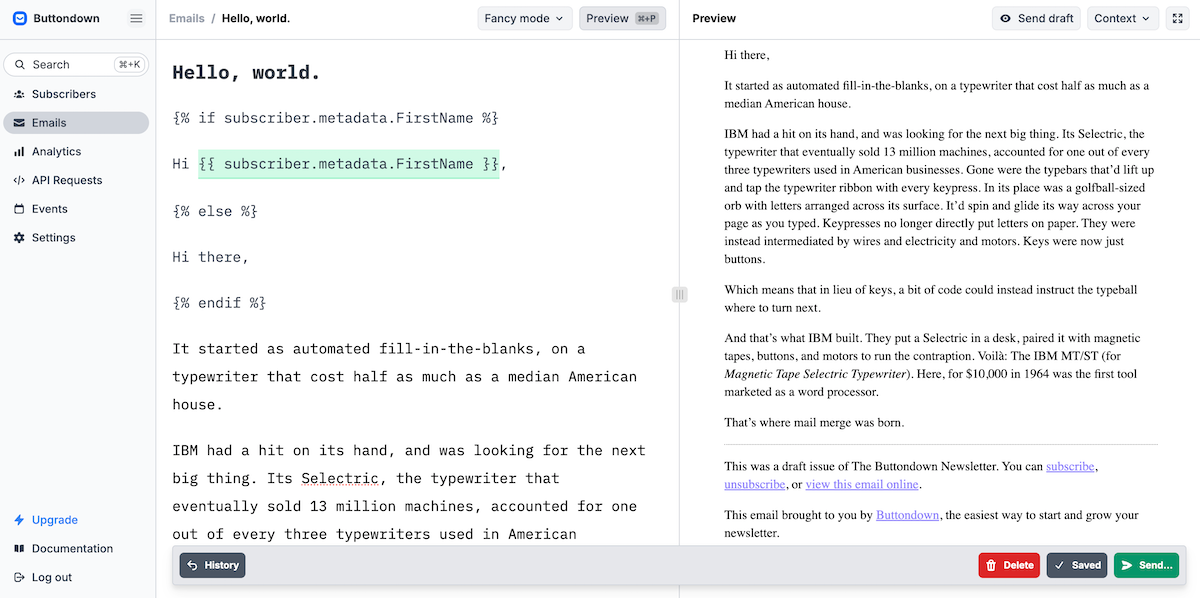
Buttondown’s template variables, a modern descendant of the earliest mail merge
Mail merge—or, what we call template variables—work much the same as Word 97’s iteration on IBM’s innovation. You store data about your subscribers in Buttondown. You then write your emails, and include variables with curly brackets like {{ Name }}, a style borrowed from early programming languages like Lisp and C that most apps today use for variables. And when you hit send, Buttondown replaces every {{ variable }} with the correct data from your subscriber list.
It’s mail merge, for an infinitesimal fraction of what an MT/ST cost.
IBM said we needed it, for there were neither enough people nor time to do all the paperwork. “I don’t do much work anymore,” said the ad’s lead protagonist. “I’m too busy thinking.”
Perhaps, today, he’d be putting those thoughts down on a newsletter, before sending them out to hundreds of his closest friends, as one does.
Image Credits: Header Photo via IBM’s Magnetic Tape Selectric Typewriter, Mode II Operating Instructions from the Internet Archive